How data synchronization works in OpenSearch
When you add or update records in your data source, those changes must reach the OpenSearch engine before users can find them in search results. OpenSearch synchronizes real-time incremental data through a three-stage pipeline: from the data source to an offline application, from the offline application to a wide table, and from the offline application to the search engine. Rate limits at each stage protect the engine and keep primary table latency low.
Choose an ingestion path
Incremental data enters the pipeline through one of two paths:
| Path | How it works | When to use it |
|---|---|---|
| Subscribe to binary logs via DTS | Data Transmission Service (DTS) subscribes to the binary logs of your data source and streams changes to the OpenSearch offline application. | Your data source is a relational database, and you want automatic, low-latency change capture without modifying your application code. |
| Push data using the API | Your application sends data directly to the OpenSearch offline application via API calls. | You generate data outside a database, process data before indexing, or need fine-grained control over which records are indexed. |
Both paths feed into the same three-stage pipeline.
How the pipeline works
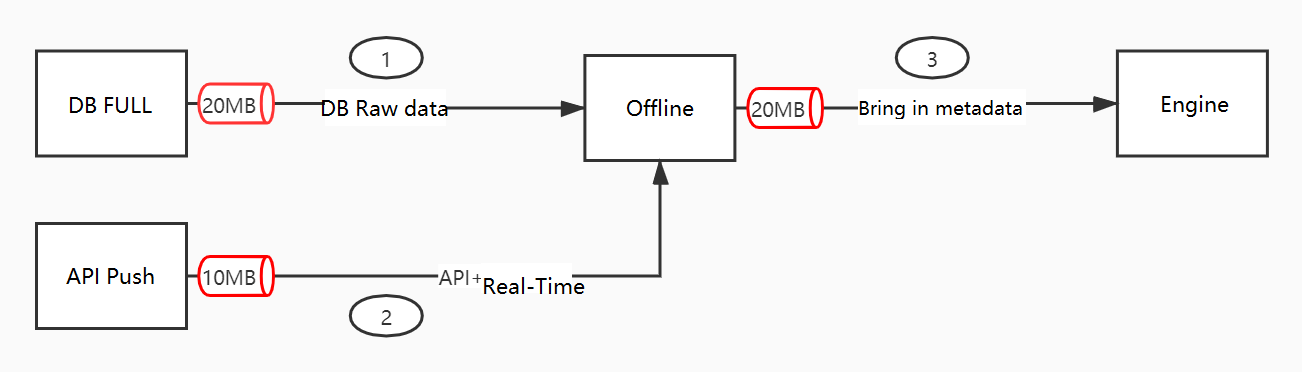
Stage 1: Data source to offline application
DTS subscribes to the binary logs of your data source and streams changes to the offline application. If you use the API path, your application pushes data directly to the offline application. In either case, the combined transactions per second (TPS) across your primary table and all secondary tables must not exceed 1,500 TPS.
Stage 2: Offline application to wide table
The offline application merges incoming changes into an existing wide table. When a secondary table update triggers updates in the primary table and those triggered updates reach or exceed 1,000 TPS, the system throttles secondary table updates. This keeps primary table synchronization latency low.
For details on how multi-table joins affect latency, see Data synchronization latency caused by multi-table joins.
Stage 3: Offline application to engine
The offline application writes the merged data to the OpenSearch engine. Because metadata is added during this stage, the data volume reaching the engine can be two to three times that of the original source data. To protect the engine, write speed is capped at 10 MB/s.
Limits
| Metric | Limit | Why this limit exists |
|---|---|---|
| Total TPS from data source to offline application (primary and secondary tables combined, no trigger relationship configured) | 1,500 TPS | Upstream ingestion capacity of the offline application |
| Write speed from offline application to engine | 10 MB/s | Metadata addition expands data to 2–3x its original size; the cap protects the engine from overload |
| Primary table updates triggered by secondary table updates | 1,000 TPS | Above this threshold, secondary table update speed is reduced to keep primary table latency low |
If you expect your workload to approach these limits, monitor TPS and data volume before going live. Contact Alibaba Cloud support to discuss options if your requirements exceed the defaults.
Troubleshoot synchronization failures
If your data source fails to synchronize with OpenSearch, follow these steps to identify the cause and restore synchronization:
Console checks
Check synchronization latency: In the Cloud Monitor console, go to the metrics and Event Center. Find the Application Real-time Processing Latency (
app_realtime_write_latency) metric for OpenSearch (opensearch), measured in milliseconds, and use it to assess the synchronization delay of the primary table.Check the DTS task status: In the DTS console, view the data synchronization task list to confirm the running status and the current stage (schema synchronization, full synchronization, or incremental synchronization).
Check storage usage: On the Instance Management page in the OpenSearch console, check the Storage Used (GB) column. When storage is full, automatic synchronization stops.
Data validation
Compare primary key data: Query the same primary key value in both the database and OpenSearch, and compare the results for consistency.
Confirm configuration consistency: On the Step 3: Data Source page of the instance configuration wizard, confirm that the RDS instance ID, database, and table name match the DTS subscription configuration.
Check the character set: DTS does not support the utf8mb3 character set. Use utf8mb4 instead.
Recovery
Rebuild the index: If storage is full, rebuild the index and run a full data import. For more information, see the DTS real-time synchronization documentation and the data source configuration documentation.