Query analysis
Understanding the intent behind search terms is essential to returning relevant results. Query analysis in OpenSearch uses a series of intelligent analysis operations to understand search intent and rewrite a query before the engine retrieves and ranks results. This topic describes the basic features of query analysis.
Stop words
Filters out words that carry little meaning in a query. These are typically frequently used words that do not affect search results, such as punctuation and modal particles.
Spelling correction
Queries entered by users may contain errors that produce unexpected results or no results. Spelling correction detects and corrects errors in search terms and determines whether to use the corrected terms based on the confidence of the correction.
Term weight
Term weight analysis evaluates the importance of each term in a query and assigns it a numeric weight. Terms with low weights may be excluded from retrieval. This prevents less important terms from unnecessarily restricting retrieval and producing too few results.
Synonyms
Search queries often contain terms with synonyms. For example, when a user searches for Apple mobile phones, content that contains iPhone can also be retrieved. The synonyms feature expands search terms with synonyms to retrieve additional documents that use equivalent expressions.
Entity recognition
Named entity recognition (NER) identifies semantic entities after a query is tokenized and assigns a type label to each entity. Entities whose type labels have low importance may be omitted from the query. For example, the query "Nike slim-fit dress" is identified as "Nike/brand/medium", "slim-fit/style element/low", and "dress/category/high".
Category prediction
Category prediction estimates the relevance of business categories to the intent of search terms. You can use this information in ranking expressions to adjust document rankings. For example, a search for mobile phones may return both phones and phone cases. Category prediction can determine that digital products are more relevant than digital accessories and rank results in the digital products category first.
Text vectorization
Text vectorization works differently in the following two cases:
The index scope is a text type: Specify a vector index in the text vectorization processing item. A vector model converts the query text into a vector, and multi-path search returns both text and vector search results. For example, the search term "OpenSearch" is converted into [0.1,0.3,0.5] by the vector model in the selected index analyzer. The vector is then used to retrieve results from the vector index. You can configure the corresponding query policy in the multi-path search module.
The index scope is a text vector type: Only the Vectorization (Built-in) processing item is currently supported. It converts the query text into a vector and performs vector search, returning only vector search results.
Multimodal vectorization
When the index scope of a query analysis rule is a multimodal vector index, two processing items are supported: Subject Recognition (optional) and Multimodal Vectorization (Built-in). Multimodal vectorization uses the multimodal vector model associated with the index to convert the query content into a vector and then performs vector search.
Subject recognition identifies the main subject in a query image. It applies only to image queries and has no effect on text queries.
For descriptions of multimodal analyzers and their supported scenarios, see Vector analyzers.
For index configuration instructions, see Index management: Multimodal vector analysis.
Index Scope
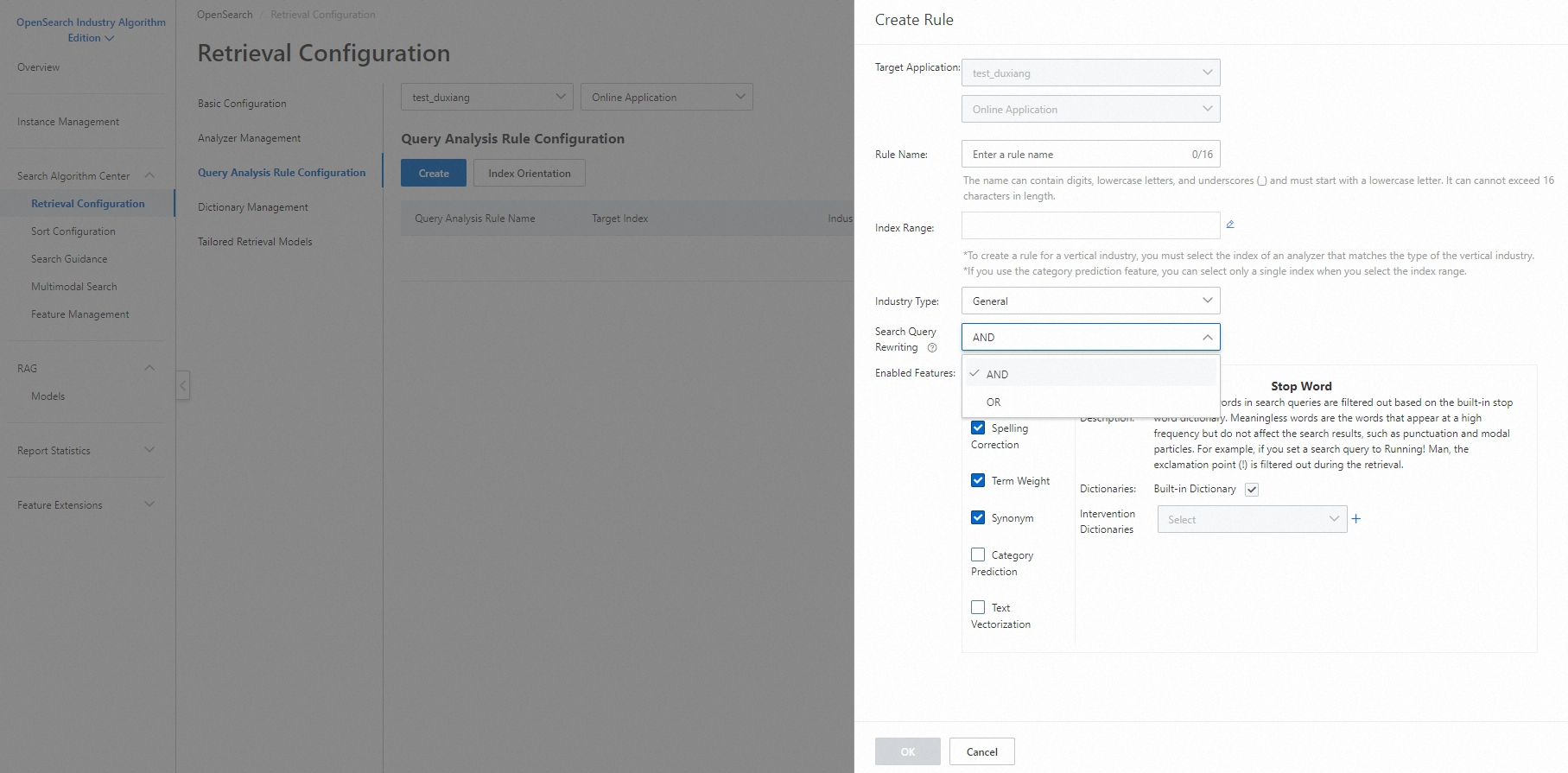
On the Retrieval Configuration page, click the Query Analysis Configuration tab and then Add Rule. In the dialog box that appears, configure the following parameters.
Rule Name: Enter a custom rule name, such as
default.Index Scope: Select the index scope.
Industry Type: Select an industry type, such as General.
Query Rewrite Policy: Select AND or OR.
Feature Selection: You can select Spelling Correction, Equal Weight, Synonyms (for which you can configure an intervention dictionary), and Category Prediction (for which you can select a category prediction model).
Dictionary Usage: You can select Built-in System Dictionary.
After you complete the configuration, click OK.
Supported analyzer types for the index scope: general Chinese analysis, Chinese e-commerce analysis, IT content analysis, gaming industry analysis, education industry analysis, vector analyzers, and multimodal vector analyzers.
You can change the index analyzer in the application schema by configuring the application or requesting an offline change.
Query rewrite policy
The query rewrite policy determines whether terms used for retrieval are combined with AND or OR. Note: Term weight analysis or entity recognition can affect which terms participate in retrieval. For example, the query "Nike athletic shoes" is tokenized into "Nike/athletic/shoes".
When the operator is AND, the query is rewritten as follows:
(default:'Nike' AND default:'athletic' AND default:'shoes')When the operator is OR, the query is rewritten as follows:
(default:'Nike' OR default:'athletic' OR default:'shoes')
Enable a query rewrite policy: When you create or edit a query analysis rule, select AND or OR in the Query Rewrite Policy field.
For a complex query, query analysis may rewrite the query twice.
If the first rewritten query returns results, the second rewrite is not triggered.
If the first rewritten query returns no results, a second rewrite is triggered to broaden the search.
Query analysis re-search policy
After query analysis is configured, if the first query retrieves 0 results, the query is rewritten to trigger a re-search. You can use the disable parameter to control whether to perform a re-search and the re_search parameter to configure the re-search policy. For more information, see Search processing.
Example:
disable=re_search # Disable re-search

re_search=strategy:threshold,params:total_hits#6    # Perform a re-search when total hits is less than 6
After you configure re-search, add fetch=qp:profile to determine whether the results of the current request were returned by a re-search:
Check qp-->re_search_times. A value of re_search_times=0 indicates that no re-search was triggered. For example:
"qp": [
  {
   "app_name": "130180448",
   "query_correction_info": [
    {
     "index": "index",
     "original_query": "Bobi Brown powder",
     "corrected_query": "Bobbi Brown powder",
     "correction_level": 1,
     "processor_name": "spell_check"
    }
   ],
   "re_search_times": 0
  }
 ],
The request string with the re_search and fetch parameters is as follows:
query=query=index:'search test'&&config=start:0,hit:10,format:fulljson&fetch_fields=title;subtitle&fetch=qp:profile&re_search=re_search=strategy:threshold,params:total_hits#6Multiple query analysis rules in one query
You can specify multiple query analysis rules in one query request. The qp parameter uses the following format: qp=qpName1,qpName2. The following restrictions apply. Assume that you have two indexes, index_1 and index_2, and two query analyzers, qp_1 and qp_2:
Case 1: index_1 is bound to qp_1, and index_2 is bound to qp_2.
# Query
index_1:'xxx' AND index_2:'xxx'  & qp=qp_1,qp_2   # Valid
index_1:'xxx'  & qp=qp_1,qp_2   # Valid
index_2:'xxx'  & qp=qp_1,qp_2   # Valid
Case 2: index_1 is bound to both qp_1 and qp_2.
# Query
index_1:'xxx'  & qp=qp_1,qp_2    # Error: 6601:Rewrite index used in multi qp chains
index_1:'xxx'  & qp=qp_1            # Valid
index_2:'xxx'  & qp=qp_2            # Error: 6606:No index need to process by QP
Comparison of query analysis across industry types
Query analysis feature | General | E-commerce | Enhanced e-commerce | IT content | Education | Intervention dictionary support |
Stop words | √ | √ | √ | √ | √ | √ |
Spelling Correction | √ | √ | √ | √ | √ | √ |
Term weight | √ | √ | √ | √ | √ | √ |
Synonyms | √ | √ | √ | √ | √ | √ |
Category Prediction | √ | √ | √ | √ | √ | √ |
Entity recognition | × | √ | √ | × | × | √ |
Text vectorization | √ | √ | √ | √ | √ | × |
Multimodal vectorization | √ | √ | √ | √ | √ | × |
Note: √ indicates supported, and × indicates not supported. | ||||||