Text analyzers
N-gram analyzer
Description: Splits text into sequences of N consecutive characters. 2-gram and 3-gram are supported. This analyzer is suitable for non-semantic search scenarios.
This analyzer is available only for exclusive applications, and the field must be of the SHORT_TEXT type.
Examples:
-
2-gram
If the document field content is "Open Search", the tokenization result is 'op','pe','en','n ',' s','se','ea','ar','rc','ch' -
3-gram
If the document field content is "Open Search", the tokenization result is 'ope','pen','en ','n s',' se','sea','ear','arc','rch'
Keyword analyzer
Description: Does not tokenize text. This analyzer is suitable for scenarios that require exact matches, such as tags, keywords, and other strings or numeric values that must not be tokenized.
Note: This analyzer applies to the LITERAL, INT, LITERAL_ARRAY, and INT_ARRAY field types.
Example:
Example: If the document field content is "chrysanthemum tea", the document can be retrieved only when you search for "chrysanthemum tea".Configuration procedure:
-
In the Application Schema step of an offline change, set the field type of the target field to LITERAL.
-
In the Index Schema step, create an index for the field. The analysis method of the field is automatically set to keyword analysis.
-
Submit the offline change and wait for the service switchover to complete.
-
Use
query=field_name:"search_term"to run an exact-match query. Only documents whose field values are identical to the content within the double quotation marks are retrieved. Example:query=id:"cloud search".
For TEXT fields, you can use double quotation marks to run a phrase query. The content within the double quotation marks is matched as a whole and is not tokenized. Example: query=default:"open search". For more information, see Fuzzy search.
Chinese - general analyzer
Description: Tokenizes text by retrieval unit based on Chinese semantics. This analyzer is suitable for general-purpose industries across the Internet and belongs to the industry analysis type.
Note: This analyzer applies to the TEXT and SHORT_TEXT field types.
Example:
In the examples in this topic, Chinese characters are represented as ASCII Unicode escapes (\uXXXX). Decode them into the actual Chinese characters before you enter them in a document or query.
Example: If the document field content is "\u83ca\u82b1\u8336" (Chinese for "chrysanthemum tea"), the document can be retrieved when you search for "\u83ca\u82b1\u8336", "\u83ca\u82b1", "\u8336", or "\u82b1\u8336".
Chinese - e-commerce analyzer
Description: An analyzer suitable for the e-commerce industry.
Note: This analyzer applies to the TEXT and SHORT_TEXT field types.
Example:
Example (Chinese characters are shown as Unicode escapes; decode them before use): If the document field content is "\u5927\u5b9dSOD\u871c" (a Chinese skin care product name), the document can be retrieved when you search for "\u5927\u5b9d", "sod", "sod\u871c", "SOD\u871c", or "\u871c".Chinese - single-character analyzer
Description: Tokenizes text by single character or single word. This analyzer is suitable for non-semantic Chinese search scenarios, such as searches for novel author names and store names.
Note: This analyzer applies to the TEXT and SHORT_TEXT field types.
Example:
Example (Chinese characters are shown as Unicode escapes; decode them before use): If the document field content is "\u83ca\u82b1\u8336" (Chinese for "chrysanthemum tea"), the document can be retrieved when you search for "\u83ca\u82b1\u8336", "\u83ca\u82b1", "\u8336", "\u82b1\u8336", "\u83ca", "\u82b1", or "\u83ca\u8336".Fuzzy analyzer
Description: Supports pinyin search, prefix and suffix search for numbers (prefix and suffix matching is not supported for Chinese characters, but is supported for letters, digits, and pinyin), and single-character or single-letter search. A field can be up to 100 bytes in length. For more information and usage notes, see Fuzzy search.
Note: This analyzer applies only to the SHORT_TEXT type.
Example:
Example (Chinese characters are shown as Unicode escapes; decode them before use): If the document field content is "\u83ca\u82b1\u8336" (Chinese for "chrysanthemum tea", pinyin: ju hua cha), the document can be retrieved when you search for "\u83ca\u82b1\u8336", "\u83ca\u82b1", "\u8336", "\u82b1\u8336", "\u83ca", "\u82b1", "\u83ca\u8336", "ju", "juhua", "juhuacha", "j", "jh", or "jhc".
Example: If the document field content is the mobile phone number "138****5678", you can search for "^138" to find mobile phone numbers that start with "138", and search for "5678$" to find mobile phone numbers that end with "5678".
Example: If the document field content is "OpenSearch", the document can be retrieved by a single letter or a combination of letters.
English - stemming analyzer
Description: Suitable for English semantic search scenarios. By default, stemming and singular/plural conversion are performed on each English word after tokenization.
Note: This analyzer applies to the TEXT and SHORT_TEXT field types. This analyzer does not support query analysis configurations.
Example:
Example (Chinese characters are shown as Unicode escapes; decode them before use): If the document field content is "\u82f1\u6587\u5206\u8bcd\u5668 english analyzer" (the Chinese part means "English analyzer"), the document can be retrieved when you search for "\u82f1\u6587\u5206\u8bcd\u5668", "english", "analyz", "analyzer", "analyzers", "analyze", "analyzed", or "analyzing".
(Note: In the English analyzer, consecutive Chinese characters are treated as a single term.)
English - non-stemming analyzer
Description: Used in scenarios such as searches for English book titles and person names. Text is tokenized by spaces and punctuation marks.
Note: This analyzer applies to the TEXT and SHORT_TEXT field types. This analyzer does not support query analysis configurations.
Example:
Example (Chinese characters are shown as Unicode escapes; decode them before use): If the document field content is "\u82f1\u6587\u5206\u8bcd\u5668 english analyzer" (the Chinese part means "English analyzer"), the document can be retrieved when you search for "\u82f1\u6587\u5206\u8bcd\u5668", "english", or "analyzer".
(Note: In the English analyzer, consecutive Chinese characters are treated as a single term.)
English - fine-grained analysis
Description: Tokenizes text by English retrieval unit based on English semantics. This analyzer is suitable for general-purpose English industries.
Note: This analyzer applies only to the TEXT and SHORT_TEXT field types.
It is available only for applications of the exclusive specification.
Example:
If the document field content is "dataprocess", the tokenization result is "data process", and the document can be retrieved when you search for "dataprocess", "data process", "data", or "process".Full pinyin analyzer
Description: Allows you to search Chinese characters in short text by pinyin initials and full pinyin. This analyzer is suitable for scenarios that require abbreviated pinyin and full pinyin search, such as person names and movie titles. For full pinyin search, you must enter the complete pinyin of a Chinese character, not just part of it.
Note: This analyzer applies only to the SHORT_TEXT type.
Example:
Example (Chinese characters are shown as Unicode escapes; decode them before use): If the document field content is "\u5927\u5185\u5bc6\u63a2007" (a Chinese movie title, pinyin: da nei mi tan), the document can be retrieved when you search for "d", "dn", "dnm", "dnmt", "dnmt007", "da", "danei", "daneimi", or "daneimitan". The document cannot be retrieved when you search for "an" or "anei".Abbreviated pinyin analyzer
Description: Allows you to search Chinese characters in short text by pinyin initials. This analyzer is suitable for scenarios that require abbreviated pinyin search, such as person names and movie titles.
Note: This analyzer applies only to the SHORT_TEXT type.
Example:
Example (Chinese characters are shown as Unicode escapes; decode them before use): If the document field content is "\u5927\u5185\u5bc6\u63a2007" (a Chinese movie title, pinyin: da nei mi tan), the document can be retrieved when you search for "d", "dn", "dnm", "dnmt", "dnmt0", "dnmt007", "m", "mt", "mt007", or "007".Simple analyzer
Description: Suitable for special search scenarios that the built-in analyzers cannot handle, giving users complete control over tokenization. When you push documents and perform searches, use the tab character "\t" to separate the field content (or query terms). Make sure that the tokenization of documents and queries is consistent. Otherwise, documents may fail to be retrieved.
Note: This analyzer applies to the TEXT and SHORT_TEXT field types. This analyzer does not support query analysis configurations.
Example:
Example (Chinese characters are shown as Unicode escapes; decode them before use; "\t" is the tab character): If the field content is "\u83ca\t\u82b1\u8336\thao", the document can be retrieved only by the query terms "\u83ca", "\u82b1\u8336", "\u83ca\t\u82b1\u8336", "\u82b1\u8336\thao", "\u83ca\thao", and "\u83ca\t\u82b1\u8336\thao".Numeric analyzer
Description: Suitable for search scenarios that require time range queries and numeric range queries.
Note: This analyzer applies to the INT and timestamp field types.
Example:
Example: query=default:'open search' AND index:[number1,number2]
//Here, index is the name of the index for which numeric analysis is configured.
Geographical location analyzer
Description: Suitable for scenarios that require geographical location range queries.
Note: This analyzer applies only to the geo_point field type.
Example:
Example: query=spatial_index:'circle(116.5806 39.99624, 1000)'
//Queries points within a circle. This can be used to query points within a certain number of kilometers nearby.
IT content analyzer
Description: An analyzer for technical content in the IT industry. It belongs to industry tokenization. Compared with the general analyzer, it produces different tokenization results for some IT technology terms.
Note: This analyzer applies only to the TEXT and SHORT_TEXT field types.
Example:
Example (Chinese characters are shown as Unicode escapes; decode them before use; the Chinese text means "precautions for using C++ arrays"):
Original content: c++\u6570\u7ec4\u4f7f\u7528\u6ce8\u610f\u4e8b\u9879
General analysis: c ++\u6570\u7ec4\u4f7f\u7528\u6ce8\u610f\u4e8b\u9879
IT content analysis: c++\u6570\u7ec4\u4f7f\u7528\u6ce8\u610f\u4e8b\u9879
Industry - general e-commerce analysis
Description: An analyzer for e-commerce industry scenarios. It belongs to industry tokenization. Based on years of industry experience and the intelligent language processing technology of DAMO Academy, OpenSearch provides query analysis capabilities dedicated to e-commerce that address the pain points and requirements of the industry.
Note:
This analyzer applies only to the TEXT field type.
It is available only for exclusive applications of the e-commerce industry-enhanced specification.
Example:
Example (Chinese characters are shown as Unicode escapes; decode them before use; the Chinese text is the name of a concealer product):
Original content: \u5c0f\u91d1\u7ba1\u906e\u7455\u818f
General analysis: \u5c0f\u91d1\u7ba1 \u906e\u7455 \u818f
Industry - e-commerce analysis: \u5c0f\u91d1\u7ba1 \u906e\u7455 \u818f
Thai - general analysis
Description: Tokenizes text by Thai retrieval unit. This analyzer is suitable for general-purpose Thai industries.
Note: This analyzer applies only to the TEXT and SHORT_TEXT field types.
It is available only for applications of the exclusive specification.
Example:
If the document field content is "แหล่งดึงดูดนักท่องเที่ยว", the tokenization result is "แหล่ง ดึง ดูด นักท่องเที่ยว", and the document can be retrieved when you search for "นักท่องเที่ยว" or "แหล่งดึงดูดนักท่องเที่ยว".Thai - e-commerce analysis
Description: An analyzer suitable for the Thai e-commerce industry.
Note: This analyzer applies only to the TEXT and SHORT_TEXT field types.
It is available only for applications of the exclusive specification.
Example:
If the document field content is "หน้าจอโทรศัพท์", the tokenization result is "หน้าจอ โทรศัพท์", and the document can be retrieved when you search for "หน้าจอโทรศัพท์", "หน้าจอ", or "โทรศัพท์".Vietnamese - general analysis
Description: An analyzer suitable for general-purpose Vietnamese industries.
Note: This analyzer applies only to the TEXT and SHORT_TEXT field types.
It is available only for applications of the exclusive specification.
Indonesian - general analysis
Description: An analyzer suitable for general-purpose Indonesian industries.
Note: This analyzer applies only to the TEXT and SHORT_TEXT field types.
It is available only for applications of the exclusive specification.
Industry - general gaming analysis
Description: An analyzer suitable for the gaming industry.
Note: This analyzer applies only to the TEXT and SHORT_TEXT field types.
It is available only for exclusive applications of the gaming industry-enhanced specification.
Example:
Example (Chinese characters are shown as Unicode escapes; decode them before use): If the document field content is "\u539f\u795e\u88c5\u5907" (Chinese for "Genshin Impact equipment"), the tokenization result is "\u539f\u795e \u88c5\u5907", and the document can be retrieved when you search for "\u539f\u795e\u88c5\u5907", "\u539f\u795e", or "\u88c5\u5907".Industry - general English e-commerce analysis
Description: An analyzer suitable for the e-commerce industry in English scenarios.
Note: This analyzer applies only to the TEXT field type.
It is available only for exclusive applications of the e-commerce industry-enhanced specification.
Chinese - character analysis
Description: Tokenizes text into individual Chinese characters, digits, English letters, and punctuation marks. This analyzer is suitable for non-semantic search scenarios.
Note: This analyzer applies only to the TEXT and SHORT_TEXT field types.
It is available only for applications of the exclusive specification.
Example:
Example (Chinese characters are shown as Unicode escapes; decode them before use): If the document field content is "\u5f00\u653e\u641c\u7d22OpenSearch123." (the Chinese part is the Chinese name of OpenSearch), the document can be retrieved when you search for "\u5f00", "\u653e", "\u641c", "\u7d22", "O", "p", "e", "n", "S", "e", "a", "r", "c", "h", or ".".Korean - general analysis
Description: An analyzer suitable for general-purpose Korean industries.
Note: This analyzer applies only to the TEXT and SHORT_TEXT field types.
It is available only for applications of the exclusive specification.
Example:
If the document field content is "인제군의교육", the tokenization result is "인제군 의 교육", and the document can be retrieved when you search for "인제군의교육", "의", or "교육".Korean - e-commerce analysis
Description: An analyzer suitable for the Korean e-commerce industry.
Note: This analyzer applies only to the TEXT and SHORT_TEXT field types.
It is available only for applications of the exclusive specification.
Example:
If the document field content is "스포츠캐주얼신발", the tokenization result is "스포츠 캐주얼 신발", and the document can be retrieved when you search for "스포츠", "캐주얼", or "신발".Japanese - general analysis
Description: An analyzer suitable for general-purpose Japanese industries.
Note: This analyzer applies only to the TEXT and SHORT_TEXT field types.
It is available only for applications of the exclusive specification.
Example:
If the document field content is "メキシコアグーチ", the tokenization result is "メキシコ アグーチ", and the document can be retrieved when you search for "メキシコ" or "アグーチ".Japanese - e-commerce analysis
Description: An analyzer suitable for the Japanese e-commerce industry.
Note: This analyzer applies only to the TEXT and SHORT_TEXT field types.
It is available only for applications of the exclusive specification.
Example:
If the document field content is "ラウンドネックスーツ", the tokenization result is "ラウンド ネック スーツ", and the document can be retrieved when you search for "ラウンド", "ネック", or "スーツ".Text - custom analyzer
Description: An industry analyzer (general analysis, e-commerce analysis, or person name analysis) combined with custom intervention entries. For more information about how to use it, see Text - custom analyzer.
Note: This analyzer applies only to the TEXT and SHORT_TEXT field types.
Analysis test
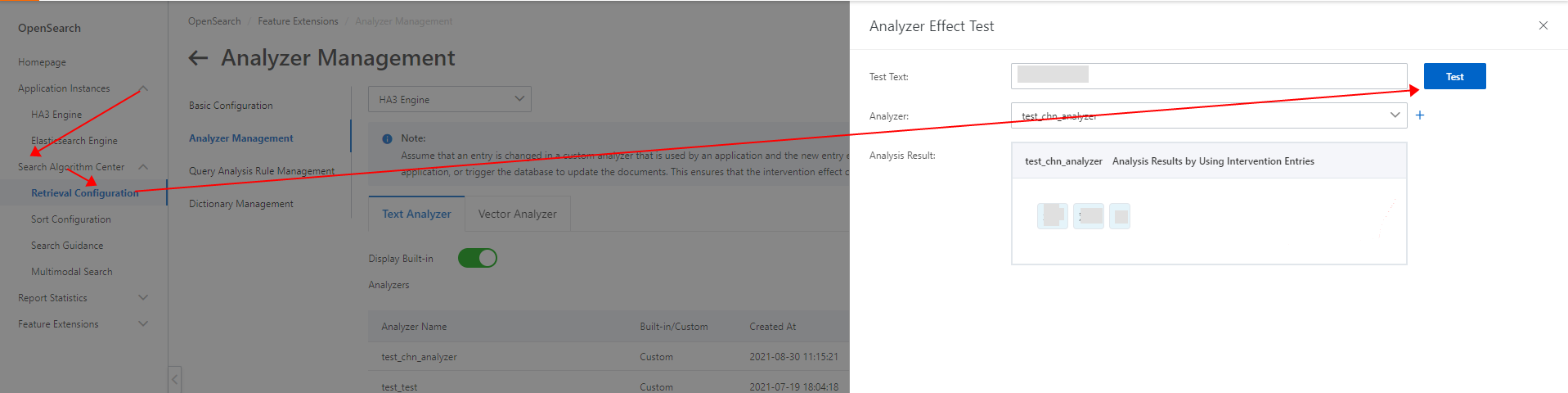
You can use the analysis test feature to test the analysis results of industry analyzers and custom analyzers. Go to the application list page of the application console and choose Search Algorithm Center -> Retrieval Configuration -> Analyzer Management -> Tokenization Test to test the analysis results of an analyzer, as shown in the following figure.
Extended retrieval units
In terms of retrieval granularity, an analyzer produces two types of retrieval terms: basic retrieval units and extended retrieval units. Basic retrieval units are the regular tokenization results. Extended retrieval units are additional retrieval terms derived beyond the basic retrieval units, that is, "other reasonable ways to segment" the same text. For example, for the text "\u7bee\u7403\u978b" (Chinese for "basketball shoes"; Chinese characters in this section are shown as Unicode escapes, which you must decode before entering the actual characters), the basic retrieval units are "\u7bee\u7403" (basketball) and "\u978b" (shoes), and the extended retrieval unit is "\u7403\u978b" (sneakers). Whether extended retrieval units are produced depends on the configuration of the internal dictionary of the analyzer.
In the Analyzer Effect Test dialog box, turn on the Extended Retrieval Unit switch and click Test. The analysis results then show both basic retrieval units and extended retrieval units. When the switch is turned off, only basic retrieval units are shown. You can use this switch to check whether a tokenization triggers extended retrieval units, which helps you troubleshoot unexpected tokenization results. The switch affects only how test results are displayed and does not affect actual retrieval.
-
Switch turned off: The analysis result of the test text "\u7bee\u7403\u978b" is
\u7bee\u7403, \u978b. -
Switch turned on: The analysis result of the test text "\u7bee\u7403\u978b" is
\u7bee\u7403, \u7403\u978b, \u978b, in which "\u7403\u978b" is an extended retrieval unit.
Extended retrieval units and basic retrieval units are displayed together in the same style in the analysis results, and the console does not visually distinguish them. The switch status affects only how test results are displayed. After you close the dialog box, the switch is restored to its default state, which is off.
Extended retrieval units may produce unexpected tokenization results. For example, a complete brand name may be split into single characters. In this case, you can use Text - custom analyzer to add intervention entries that keep the relevant words intact as a whole.
Scenarios
-
For Chinese search in a semantic context, we recommend that you use the Chinese semantic analyzer.
-
For Chinese search on short text or in a non-semantic context (with few requirements for sorting), we recommend that you use the Chinese single-character analyzer to expand retrieval.
-
For pinyin search, use the fuzzy analyzer.
-
For English scenarios, use the English stemming analyzer.
-
In some scenarios, using the Chinese semantic analyzer together with the single-character analyzer achieves excellent search results. For example, use the query query=title_index:'\u83ca\u82b1\u8336' OR sws_title_index:'\u83ca\u82b1\u8336' (Chinese characters are shown as Unicode escapes; decode them before use; the term means "chrysanthemum tea") with the fine sort expression text_relevance(title)*5+field_proximity(sws_title). This retrieves documents that contain "xx\u83caxx\u82b1xx\u8336xx", and documents that contain "\u83ca\u82b1\u8336" are ranked higher.
Usage notes
-
Field types that can be used to create index fields
INT, INT_ARRAY, TEXT, SHORT_TEXT, LITERAL, LITERAL_ARRAY, TIMESTAMP, GEO_POINT
Field types that cannot be used to create index fields
FLOAT, FLOAT_ARRAY, DOUBLE, DOUBLE_ARRAY
-
If search result summaries are configured for a TEXT field, highlighting tags are not added to some phrases that are extended retrieval units (see Extended retrieval units), such as "\u82b1\u8336" (decode the Unicode escapes before use) in the preceding "\u83ca\u82b1\u8336" example.
-
The Chinese single-character analyzer treats a number or an English word as a single term. For example, for "hello word", searching for "hello" retrieves the document, but searching for "he" does not. If you need to retrieve documents by part of a word, use the fuzzy analyzer.
-
The primary key of the primary table in the application schema is set as an index field by default, and the index field name is "id" by default. This configuration cannot be modified.