Parsing document content
AI Search Open Platform provides a document parsing service via API. You can integrate this service into your business processing workflow to parse unstructured data into structured data for use in your business applications.
|
Service name |
Service ID |
Description |
API QPS limit |
|
Document Analysis Service |
ops-document-analyze-001 |
Extracts logical hierarchical structures (such as titles and paragraphs), text, tables, and images from unstructured documents and returns the output in a structured format. Supported document types: TXT, PDF, HTML, DOC, DOCX, PPT, and PPTX. |
10 Note
To request a higher API QPS limit, submit a ticket to technical support. |
|
ops-document-analyze-002 |
Analyzes multiple unstructured document formats, such as PDFs and images. It excels at identifying complex elements, such as tables, formulas, and charts, and offers high inference speed. Usage limits: PDF files are limited to 400 pages. The request body cannot exceed 8 MB. |
Prerequisites
-
Get authentication credentials
The AI Search open platform requires an API key for authentication. For instructions, see Get an API key.
-
Get the service endpoint
You can call the service via the public network or a VPC. For details, see Get the service endpoint.
Overview
-
The request body must not exceed 8 MB.
Overview
Document content parsing offers both synchronous and asynchronous interfaces. The synchronous interface is not recommended for production environments due to the risk of HTTP timeouts, but it can be used for debugging. For production environments, we recommend the asynchronous interface. This is a two-step process: first, create an asynchronous extraction task to obtain a task_id, and then poll for the task's status via the asynchronous interface until the task is complete.
Asynchronous extraction task
Request method
POST
URL
{host}/v3/openapi/workspaces/{workspace_name}/document-analyze/{service_id}/async-
host: The service endpoint. You can call the API service over the public network or through a VPC. For more information, see Get a service endpoint.In the left-side navigation pane of the console, click API Keys, select the target workspace (for example, default), and view the Public API Endpoint and Private API Endpoint in the Access Endpoints section.
-
workspace_name: The name of the workspace. For example,default. -
service_id: The ID of the built-in service. For example,ops-document-analyze-001.
Request parameters
Header parameter
API key authentication
|
Parameter |
Type |
Required |
Description |
Example value |
|
Content-Type |
String |
Yes |
The media type of the request body. |
application/json |
|
Authorization |
String |
Yes |
The API key for authentication. |
Bearer OS-d1**2a |
Body parameters
|
Parameter |
Type |
Required |
Description |
Example |
|
service_id |
String |
Yes |
The built-in service ID. |
ops-document-analyze-001 |
|
document.url |
String |
No |
The URL of the document. The file must be publicly downloadable via HTTP or HTTPS without authentication. You must specify either |
http://opensearch-shanghai.oss-cn-shanghai.aliyuncs.com/chatos/***/file-parser/samples/GB10767.pdf |
|
document.content |
String |
No |
The Base64-encoded content of the document. You must specify either |
"aGVsbG8gd29ybGQ=" |
|
document.file_name |
String |
No |
The file name. If this parameter is not specified, the system infers it from the URL. This parameter is required if you provide the document's content directly using |
test.pdf |
|
document.file_type |
String |
No |
The file type. If this parameter is not specified, the system infers it from the extension of the Supported file types: TXT, PDF, HTML, DOC, DOCX, PPT, and PPTX. When using the |
|
|
output.image_storage |
String |
No |
Specifies how to store images extracted from the document.
|
url |
|
strategy.enable_semantic |
Boolean |
No |
Enables semantic-based extraction of hierarchical structures from TXT and other unstructured documents.
|
false |
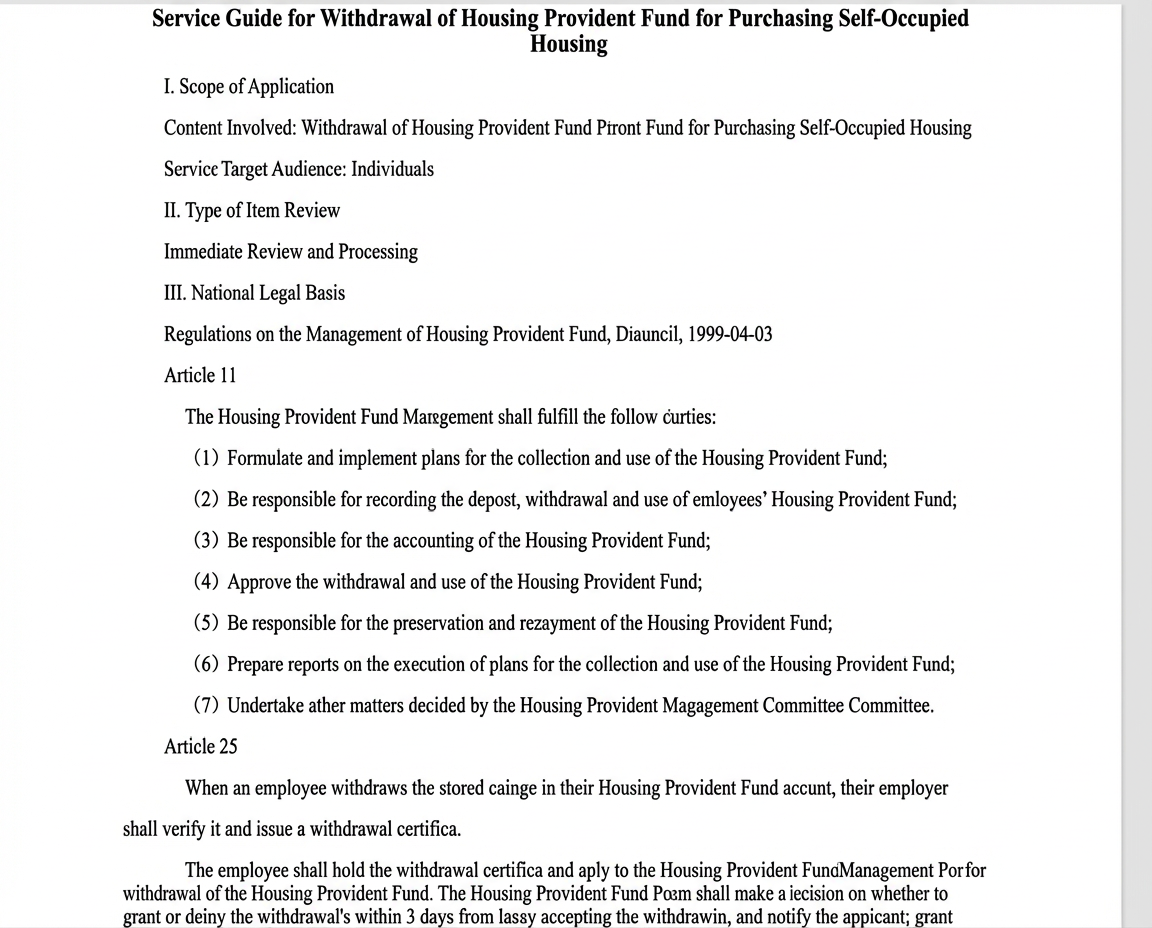
For documents where the table of contents and the body are not clearly distinguished, as in the figure below, this feature produces a more accurate hierarchical structure.
-
With semantic structure extraction disabled:
curl -XGET -H"Content-Type: application/json" "http://xxx.opensearch.aliyuncs.com/v3/openapi/workspaces/default/document-analyze/ops-document-analyze-001/async/task-status?task_id=f6122788-30e2-4/t8-8d18-33217f6a5e7c" -H "Authorization: Bearer OS xxx" {"request_id":"63877CEA-BB65-43E3-806B-DE4710DEDA98","latency":"3.0","http_code":200,"result":{"status":"SUCCESS","data":"{xxx","事项前置\n10024910010024251717233000000\n\n购买自住住房提取住房公积金 事项前置\n\n购买自住住房提取住房公积金\n金 基金 指南\n\n一、适用范围\n\n及的内容。购买自住住房提取住房公积金\n\n服务对象:\n个人\n二、事项前置类型\n\n即配即办\n\n三、国家/省/市依据\n\n住房公积金相关条例\n\n1999-04-03\n\n第十一条 \n\n住房公积金管理中心履行下列职责:\n\n...(后续为住房公积金管理条例详细内容)\n\n购买1 购买自住住房提取住房公积金流程福利\n\n[IMO]:data:image/jpeg;base64,/9j/4AAQSkZJRgABAQAYABeAAD..."}} -
When semantic structure extraction is enabled, the response example is as follows. The
##and###Markdown markers in thecontentfield indicate the recognized hierarchical directory structure, and\nrepresents a line break.{"request_id":"9F7B4F1A-4EE0-4430-A537-2C21B01E3676","latency":3.0,"http_code":200,"result":{"status":"SUCCESS","data":{"content":"... 事项编码:1\n## 适用范围\n及的内容:购买自住住房提取住房公积金\n(含购买自住住房提取住房公积金和购服务指南)的制定和发布 事项名称:购买自住住房提取住房公积金 适用范围\n及的内容:购买自住住房提取住房公积金\n\n### 二 事项审查类型\n即时即办\n### 三 国家法律依据\n住房公积金管理条例(国务院 1999-04-03...\n(二)购买自住住房的提取...住房公积金的保值和归集...\n使用等情况...在住房公积金的核算...使用...住房公积金的保值和归集...\n...管理中心应当...提取住房公积金...自3日内作出准予提取或者不准提取的决定,并通知申请人;准予提取的,由受委托银行办理支付手续...\n...建设住房公积金...储存余额的存储方式...建设住房公积金...\n...住房公积金流程...相关申请材料文件\n...\n附录3 帮助购趣群答..."}}}NoteIf
usage.semantic_token_countreturns a value, the semantic structure extraction was successful, and the token fee for this billing item is charged. If no value is returned, the extraction was unsuccessful, and no fee is charged.
The table below shows the estimated duration and semantic token count after enabling semantic result extraction.
|
PDF pages |
Tokens |
Without semantic hierarchy |
With semantic hierarchy |
|
|
Time (s) |
Time (s) |
Semantic tokens |
||
|
7 |
11504 |
2 |
49 |
36243 |
|
25 |
10375 |
1 |
33 |
59332 |
|
42 |
41435 |
5 |
68 |
130717 |
Response parameters
|
Parameter |
Type |
Description |
Example |
|
result.task_id |
String |
The ID of the asynchronous task for document parsing. |
d5a4019e-853a-****-b5b6-8053d9f5a9fc |
cURL example
curl --location 'http://****shanghai.opensearch.aliyuncs.com/v3/openapi/workspaces/default/document-analyze/ops-document-analyze-001/async/' \
--header 'Authorization: Bearer your API key' \
--header 'Content-Type: application/json' \
--data '{
  "document":{
      "url": "https://help-static-aliyun-doc.aliyuncs.com/file-manage-files/zh-CN/20241018/jahnyn/%E8%A7%A3%E6%9E%90%E6%B5%8B%E8%AF%95.doc"
    },
    "output" :{
      "image_storage":"base64"
    },
    "strategy": {
      "enable_semantic":true
    }
}'
Response examples
Successful response
{
    "request_id": "D5A4019E-853A-4E20-****-8053D9F5A9FC",
    "latency": 5.0,
    "http_code": 200,
    "result": {
        "task_id": "d5a4019e-853a-****-b5b6-8053d9f5a9fc"
    }
}
Error response
If a request fails, the response describes the error in the code and message fields.
{
    "request_id": "590A7EB8-AA84-****-AF31-8C35DC965972",
    "latency": 0.0,
    "code": "InvalidParameter",
    "http_code": 400,
    "message": "document.file_name required"
}
Asynchronous task retrieval
Request method
GET
URL
{host}/v3/openapi/workspaces/{workspace_name}/document-analyze/{service_id}/async/task-status?task_id=${task_id}-
host: The service endpoint. You can call the API service over the public network or through a VPC. For more information, see Get a service endpoint. -
workspace_name: The name of the workspace. For example,default. -
service_id: The ID of the built-in service. For example,ops-document-analyze-001. -
task_id: The asynchronous task ID returned by the task creation request. For example,d5a4019e-853a-****-b5b6-8053d9f5a9fc.
Request parameters
Header Parameters
API key authentication
|
Parameter |
Type |
Required |
Description |
Example |
|
Content-Type |
String |
Yes |
The media type of the request. The value must be application/json. |
application/json |
|
Authorization |
String |
Yes |
The API key for authentication, prefixed with Bearer . |
Bearer OS-d1**2a |
Response parameters
|
Parameter |
Type |
Description |
Value |
|
result.task_id |
String |
The ID of the asynchronous document parsing task. |
24c3ad59-****-40cf-974b-b63d63e0571 |
|
result.status |
String |
The task status. Possible values are:
|
PENDING |
|
result.error |
String |
The error message for a failed task. This parameter is empty otherwise. |
Failed to decrypt the document. |
|
result.data |
Object |
The document parsing result. |
markdown |
|
result.data.content |
String |
The parsed content of the document.
|
"XXX" |
|
result.data.content_type |
String |
The format of the parsed content.
|
markdown |
|
result.data.page_num |
Int |
The number of pages in the document. |
15 |
|
request_id |
String |
The unique identifier for this API call. |
B4AB89C8-B135-****-A6F8-2BAB8018688 |
|
latency |
Float/Int |
The request latency in milliseconds (ms). |
10 |
|
usage |
Object |
The metering information for this API call. |
"usage": { "token_count": 123, "table_count": 5, "image_count": 6, "semantic_token_count":3068 } |
|
usage.token_count |
Int |
The character count in the document. |
1234 |
|
usage.table_count |
Int |
The table count in the document. |
5 |
|
usage.image_count |
Int |
The image count in the document. |
6 |
|
usage.semantic_token_count |
Int |
The character count in the input to the semantic extraction model. |
3068 |
cURL request
curl -XGET -H"Content-Type: application/json" \
"http://****-hangzhou.opensearch.aliyuncs.com/v3/openapi/workspaces/default/document-analyze/ops-document-analyze-001/async/task-status?task_id=110d6349-2e51-****-8bfb-25e5de434686" \
-H "Authorization: Bearer Your API key"
Response examples
Successful response
{
    "request_id": "27F9CEC3-9052-****-83FF-E7957B680492",
    "latency": 13.0,
    "http_code": 200,
    "result": {
        "status": "SUCCESS",
        "data": {
            "content": "Provided proper attribution is provided, Alibaba hereby grants permission to reproduce the tables and figures in this paper solely for use in journalistic or scholarly works....",
            "content_type": "markdown",
            "page_num": 15
        },
        "task_id": "24c3ad59-b196-****-974b-b63d63e05895"
    },
    "usage": {
        "token_count": 31867,
        "table_count": 4,
        "image_count": 8,
        "semantic_token_count":3068
    }
}
Error response
If an access request fails, the code and message fields in the response explain the error.
Create a synchronous parsing task
Avoid using the synchronous interface in a production environment due to the risk of HTTP timeouts. You can use it for debugging instead.
Request method
POST
URL
{host}/v3/openapi/workspaces/{workspace_name}/document-analyze/{service_id}/syncParameters
-
host: The service endpoint. You can call the API service over the public network or a VPC. For more information, see Get a service endpoint. -
workspace_name: The workspace name. For example,default. -
service_id: The built-in service ID. For example,ops-document-analyze-001.
Request parameters
Header parameter
API key authentication
|
Parameter |
Type |
Required |
Description |
Value |
|
Content-Type |
String |
Yes |
The request type. |
application/json |
|
Authorization |
String |
Yes |
Your API key. |
Bearer OS-d1**2a |
Body parameter
|
Parameter |
Type |
Required |
Description |
Example value |
|
document.url |
String |
No |
The public URL of the document. It must be accessible via HTTP or HTTPS without authentication. You must specify either |
http://opensearch-shanghai.oss-cn-shanghai.aliyuncs.com/chatos/***/file-parser/samples/GB10767.pdf |
|
document.content |
String |
No |
The document content, Base64-encoded. You must specify either |
"aGVsbG8gd29ybGQ=" |
|
document.file_name |
String |
No |
The file name. If this parameter is omitted, the system infers the name from the document.url. This parameter is required when document.content is specified. |
test.pdf |
|
document.file_type |
String |
No |
The file type. If this parameter is omitted, the system infers the file type from the extension of the Supported file types: TXT, PDF, HTML, DOC, DOCX, PPT, and PPTX. |
|
|
output.image_storage |
String |
No |
The image storage method.
|
url |
|
strategy.enable_semantic |
Boolean |
No |
Specifies whether to enable semantic structure extraction. The default is |
false |
Response parameters
|
Parameter |
Type |
Description |
Example |
|
result.status |
String |
The task status. Valid values include:
|
PENDING |
|
result.error |
String |
The error message returned when the status is |
Document decryption failed |
|
result.data |
Object |
The document parsing result. |
markdown |
|
result.data.content |
String |
The parsed content of the document.
|
"XXX" |
|
result.data.content_type |
String |
The content type of the parsed document. Valid values include:
|
markdown |
|
result.data.page_num |
Int |
The page count of the document. |
15 |
|
request_id |
String |
A unique identifier for the request. |
B4AB89C8-B135-****-A6F8-2BAB801A2CE4 |
|
latency |
Float/Int |
The request latency in milliseconds (ms). |
10 |
|
usage |
Object |
Usage details for the request. |
"usage": { "token_count": 123, "table_count": 5, "image_count": 6, "semantic_token_count":3068 } |
|
usage.token_count |
Int |
The total number of tokens in the document. |
1234 |
|
usage.table_count |
Int |
The total number of tables in the document. |
5 |
|
usage.image_count |
Int |
The total number of images in the document. |
6 |
|
usage.semantic_token_count |
Int |
The total number of semantic tokens used as input for the semantic extraction model. |
3068 |
cURL
curl --location 'http://****shanghai.opensearch.aliyuncs.com/v3/openapi/workspaces/default/document-analyze/ops-document-analyze-001/sync/' \
--header 'Authorization: Bearer your API key' \
--header 'Content-Type: application/json' \
--data '{
  "document":{
      "url": "https://help-static-aliyun-doc.aliyuncs.com/file-manage-files/zh-CN/20241018/jahnyn/%E8%A7%A3%E6%9E%90%E6%B5%8B%E8%AF%95.doc"
    },
    "output" :{
      "image_storage":"base64"
    },
    "strategy": {
      "enable_semantic":true
    }
}'
Response examples
Successful response example
{
    "request_id": "27F9CEC3-9052-****-83FF-E7957B689D04",
    "latency": 13.0,
    "http_code": 200,
    "result": {
        "status": "SUCCESS",
        "data": {
            "content": "Provided proper attribution is given, Alibaba hereby grants permission to reproduce the tables and figures in this paper solely for use in journalistic or scholarly works....",
            "content_type": "markdown",
            "page_num": 15
        }
    },
    "usage": {
        "token_count": 31867,
        "table_count": 4,
        "image_count": 8,
        "semantic_token_count":3068
    }
}
Error response example
If an access request fails, the response indicates the error in the code and message fields.
{
    "request_id": "6F33AFB6-A35C-****-AFD2-9EA16CCF4383",
    "latency": 2.0,
    "code": "InvalidParameter",
    "http_code": 400,
    "message": "JSON parse error: Cannot deserialize value of type `ImageStorage` from String \\"xxx\\"
}
Status codes
|
Http status code |
Error code |
Description |
|
200 |
- |
The request succeeded. This status is returned even if the task failed. Check the |
|
404 |
BadRequest.TaskNotExist |
The task does not exist. |
|
400 |
InvalidParameter |
The request was invalid. |
|
500 |
InternalServerError |
An internal error occurred. |
For more information about status codes, see status codes.