Service deployment
You can independently deploy models from AI Search Open Platform, ModelScope, and model customization to provide inference services with higher concurrency and lower latency.
Model list
Model category | Model name | Model source |
Text embedding |
For information about how to call the models, see Text embedding. | AI Search Open Platform |
GTE multilingual general-purpose text embedding model: supports a maximum context length of 8,192 tokens and more than 70 languages. | ModelScope | |
Text embedding models that you train in Model customization. | Model customization | |
Ranking service |
For information about how to call the models, see Ranking service. | AI Search Open Platform |
Multimodal embedding |
| ModelScope |
Billing rules
Billing formula: CU unit price × Number of CUs consumed by the instance type × Number of purchased machines
The following table describes the billing rules.
Instance type | Unit price per machine (CNY/hour) |
gpu.v100.16g.x1 | 32.25 |
gpu.t4.16g.x1 | 17.195 |
gpu.a10.24g.x1 | 11.781 |
qwen3-vl-embedding custom model deployment | 25.2 |
Deploy a service
In AI Search Open Platform, choose Model Services > Service Deployment, and then click Deploy Service.
If you use a RAM user to create or modify services or view service details, you must first grant the RAM user the operation permissions related to Model Services - Service Deployment.
On the Deploy Service page, configure information such as the service name and deployment region.
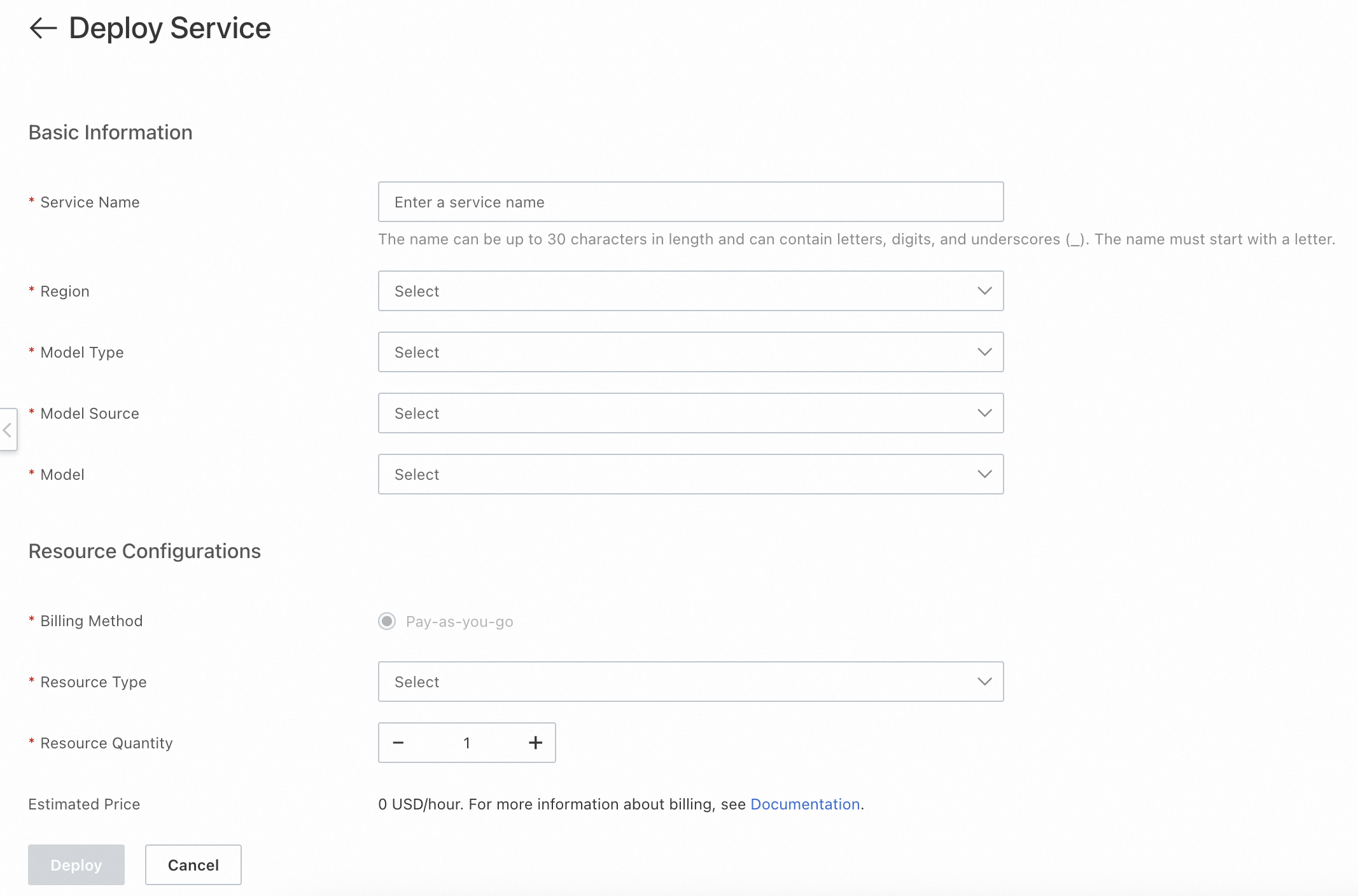
The following deployment regions are supported: China (Hangzhou), China (Shanghai), China (Shenzhen), China (Beijing), and China (Zhangjiakou).
Resource specifications: the instance type used for model deployment.
Estimated cost: the fees incurred by model deployment.
Click Deploy. The system starts to deploy the service. Service statuses:
Deploying: The system is deploying the service, and the service is temporarily unavailable. In the service list, click Manage to view service details, or click Delete to delete the deployment task.
Normal: The deployment is successful. In the service list, click Manage to view service details. On the service details page, use Change Configuration to change the resource configuration of the service. In the service list, click Delete to delete the service.
Deployment Failed: You can view deployment details, redeploy the service, or delete the deployment task.
View service call information
Log on to AI Search Open Platform, choose Model Services > Service Deployment, and click Manage in the service list:

Service ID: This parameter is required when you call the service by using an SDK.
Public and private API endpoints: You can call the model service by using a public or private endpoint.
Token: the credential used to call the service. Tokens are classified into public tokens and private tokens. When you call the service by using a public or private endpoint, you must specify the corresponding token.
API-KEY: used for identity authentication when the service is called.

Test the service
When you test the model service by running a curl command, you must specify the API-KEY and token.
Run the following code to call the text embedding model to vectorize the input content "Science and technology are the primary productive force" and "OpenSearch product documentation":
curl -X POST \
     -H "Content-Type: application/json" \
     -H "Authorization: Bearer Your-API-KEY" \
     -H "Token: NjU0ZDkzYjUwZTQ1NDI1OGRiN2ExMmFmNjQxMDYyN2M5*******==" \
     "http://default-0fm.platform-cn-hangzhou.opensearch.aliyuncs.com/v3/openapi/deployments/******_1zj19x_1yc/predict" \
     -d '{
           "input": [
             "Science and technology are the primary productive force",
             "OpenSearch product documentation"
           ],
           "input_type": "query",
           "dimension" : 567 # Takes effect only when the deployed model is a custom model with vector dimensionality reduction enabled. The dimension cannot exceed that of the base model.
         }'
Sample success response:
{
  "embeddings": [
    {
      "index": 0,
      "embedding": [
        -0.028656005859375,
        0.0218963623046875,
        -0.04168701171875,
        -0.0440673828125,
        0.02142333984375,
        0.012345678901234568,
        ...
        0.0009876543210987654
      ]
    }
  ]
}
Call the service by using an SDK
After the test is successful, you can refer to the following Python SDK sample code to integrate the SDK into your business system and call the service.
import json

from alibabacloud_tea_openapi.models import Config
from alibabacloud_searchplat20240529.client import Client
from alibabacloud_searchplat20240529.models import GetPredictionRequest
from alibabacloud_searchplat20240529.models import GetPredictionHeaders
from alibabacloud_tea_util import models as util_models

if __name__ == '__main__':
    config = Config(bearer_token="API-KEY",
                    # endpoint: the unified request endpoint. Remove http:// or https://.
                    endpoint="default-xxx.platform-cn-shanghai.opensearch.aliyuncs.com",
                    # protocol: HTTPS and HTTP are supported.
                    protocol="http")
    client = Client(config=config)

    # --------------- Request body parameters ---------------
    request = GetPredictionRequest().from_map({"body":{"input_type": "document", "input": ["search", "test"]}})

    headers = GetPredictionHeaders(token="xxxxxxxxYjIyNjNjMjc2MTU1MTQ3MmI0ZmQ3OGQ0ZjJlMjxxxxxxxx==")

    runtime = util_models.RuntimeOptions()

    # deploymentId: the deployment ID
    response = client.get_prediction_with_options("Service ID of the deployed service" ,request, headers, runtime)
    print(response)