Multi-object detection best practices
Background
Introduction to multi-object detection:
In image search, multi-object detection identifies and interprets multiple subjects in an image, such as objects, people, and scenes. It enables a search engine to find not only images containing a single object but also complex images containing multiple related objects.
When a user searches with an image, the search engine analyzes its visual content, identifies prominent elements, and uses them to match results. For example, the following image contains a helmet, cycling clothes, a bicycle, and cycling gloves. With multi-object detection enabled, OpenSearch Vector Search Edition can identify these elements and return relevant results for the user’s query.
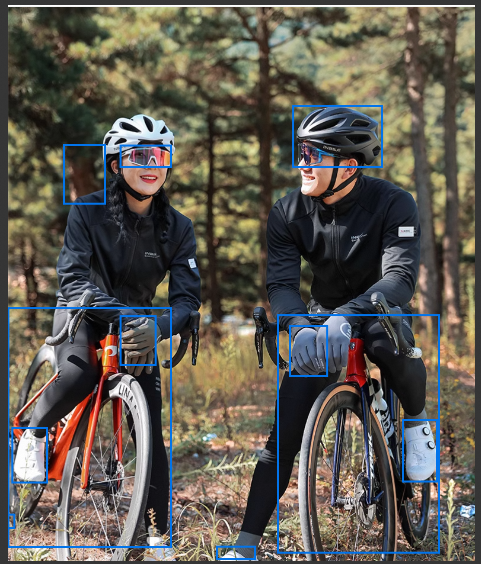
Multi-object detection improves the accuracy and relevance of image search, especially when users need to find images based on several features in a complex scene. By identifying multiple subjects, the search engine can better understand the search intent and return more precise results.
Multi-object detection in Vector Search Edition:
Two parameters control multi-object detection in Vector Search Edition:
-
crop: Specifies whether to detect objects in an uploaded image during image search.
-
Object detection method (range): The range parameter specifies a subject region in the image. Its four values represent the x and y coordinates of the upper-left corner, the width, and the height of the region.
-
The system can automatically detect objects and search based on a detected object. Detection results are available in the response.
-
Custom subject region: You can specify a detection region in the format x1,y1,x2,y2. The four values represent the x and y coordinates of the upper-left corner, the width, and the height of the region. If you do not specify a region, the search uses the largest detected object.
-
Use cases
Multi-object detection is suitable for image searches in which one image contains multiple subjects and users need to search for a specific subject.
-
E-commerce and retail
Street-style fashion search: A user uploads a street photo. The model detects subjects such as a top, pants, shoes, and a shoulder bag. The user selects a subject to search the merchant’s product catalog for similar items. The application returns a product list and purchase links.
-
Content safety
Review of user-generated images: A user uploads an image. The model detects subjects such as people, objects, text watermarks, and QR codes. A reviewer selects a suspicious subject and compares it against a database of prohibited features to determine whether it matches a prohibited item or a sensitive person.
-
Food and health
Dish identification and search: A user photographs a table of food. The model detects each dish. The user selects a dish to search a recipe or nutrition database and receives its calories, nutritional information, and preparation instructions.
Prerequisites and parameter requirements
Engine version: Starting from engine version 1.5.13, you can select an image object detection model when you create a table.
Table configuration: When you create a table, select Image Object Detection + Image Vectorization in the data processing template. The system automatically generates an image object detection service and an image vectorization service. For configuration instructions, see Configure fused vectors. You can select one of the following AI Search Open Platform models for object detection:
|
Model |
Description |
Use case |
|
General object detection (ops-object-detect-001) |
A multi-object detection model developed by the Alibaba Cloud OpenSearch AI team. It detects multiple independent objects in an image and returns bounding boxes and confidence scores. |
General multi-object image search |
|
Face detection (ops-object-detect-face-001) |
Detects face regions in an image. |
Portrait and face search |
|
Fashion object detection (ops-object-detect-fashion-001) |
Detects clothing and fashion items in an image. |
Fashion e-commerce image search |
The object detection model calls an AI Search Open Platform service. During configuration, you must enter an API key and acknowledge the billing notice. For billing details, see Billing methods and billable items of AI Search Open Platform.
Query parameters:
-
crop: Specifies whether to detect objects in the uploaded image. If crop=true and range is not specified, the system first detects objects and then searches based on the detection result.
-
range: Specifies a custom subject region in the format x,y,width,height. If multiple subjects are detected, the first subject region is used as the crop region for the search by default. The response returns metadata for all detected subjects, including bounding boxes and confidence scores. You can use this metadata to draw boxes or select another subject and run a new query.
-
Image input: Public HTTP/HTTPS URLs, Base64 encoding, and data URIs are supported. Only JPEG (.jpg or .jpeg) and PNG (.png) images are supported.
The actual image format is determined from the file signature and decoding result, regardless of the URL suffix or HTTP Content-Type. BMP, WebP, GIF, TIFF, HEIF/HEIC, SVG, and other formats are not supported.
Behavior: A single query generates only one query vector and performs one vector search. The response includes the detection results, including bounding boxes and confidence scores. On the console’s Query Test page, you can view subjects as numbered bounding boxes and switch between them.
Configure an instance
For detailed setup instructions, see the Preparations, Purchase an instance, and Configure an instance sections of Build an end-to-end image search solution.
Test the results
On the console’s Query Test page, select a Table Name, set Query Type to Image, set Method for Providing Images to Upload Image File, and enable Multi-object Detection.
Select multi_images_tb as the Table Name and source_image_vector as the Index Name. Set TopK to 10 and Result Sort Order to ASC. Upload an image and click Search.
View the detection results in the search results:
The uploaded image displays detected subjects in blue, numbered bounding boxes. For example, box 1 may mark a face and box 2 a handheld item. Click a box number to switch the subject used for the search. The table on the right shows results for the selected subject, including Distance Score, Primary Key, Vector Value, Attributes, and Namespace.
Query syntax
Use multi-object detection with an SDK
-
Query data (detect objects and query by primary key with an SDK)
-
Update data (add and delete records with an SDK)