Access OSS by using STS temporary credentials
Security Token Service (STS) generates temporary credentials that grant users time-limited access to specific OSS resources as defined by a policy. These credentials automatically expire, ensuring flexible and time-bound access control.
Video tutorial
Watch the following video to learn how to quickly access OSS by using STS temporary credentials.
Use cases
An e-commerce company, Company A, stores a large amount of product data in Alibaba Cloud OSS. A supplier, Company B, needs to regularly upload data to Company A's OSS and integrate its own system with Company A's Alibaba Cloud resources.
Company A has the following security requirements:
Data security: Company A does not want to expose its long-term AccessKey pair to Company B to prevent unauthorized access to or misuse of its core data.
Permission control: Company A wants to grant only upload permissions to Company B initially and adjust them later as needed. This provides precise control over access rights.
Permission management: For Company B and future partners, Company A wants to generate credentials for each partner or temporary need, eliminating the constant management of long-term AccessKey pairs.
Time-limited access control: Company A wants to limit the duration of Company B's data access. When the credentials expire, Company B automatically loses access, ensuring strict control over access duration.
How it works
Company A uses temporary credentials to authorize Company B to securely upload files to OSS.

First, Company A creates a RAM user and a RAM role with the required permissions. When Company B requests access, Company A calls the AssumeRole operation to obtain STS temporary credentials and passes them to Company B. Using these credentials, Company B can upload data to Company A's OSS.
Prerequisites
Company A has created a bucket. For more information, see Create buckets.
Step 1: Company A issues temporary credentials
1. Create a RAM user
Use an Alibaba Cloud account or a RAM user with RAM administrative permissions to create a RAM user.
Log on to the RAM console.
In the left-side navigation pane, choose Identities > Users.
Click Create User.
Enter a Logon Name and a Display Name.
In the Access Mode section, select OpenAPI Access and click OK.
Complete the security verification as prompted.
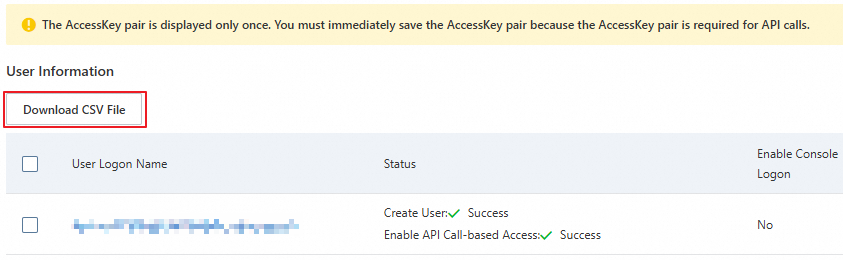
Copy the AccessKey ID and AccessKey secret.
ImportantA RAM user's AccessKey secret is displayed only during creation and cannot be retrieved later. Download the CSV file that contains the AccessKey pair and store it securely.
2. Grant the RAM user AssumeRole permissions
After you create the RAM user, use an Alibaba Cloud account or a RAM user with RAM administrative permissions to grant the RAM user the permissions to call the STS service by assuming a role.
Log on to the RAM console.
In the left-side navigation pane, choose Identities > Users. In the user list, find the RAM user and click Add Permissions in the Actions column.
On the Grant Permission page, select the AliyunSTSAssumeRoleAccess system policy.
NoteThe AliyunSTSAssumeRoleAccess policy grants a RAM user permission to call the STS
AssumeRoleoperation. This is distinct from the permissions granted by the role itself, which the temporary credentials will inherit.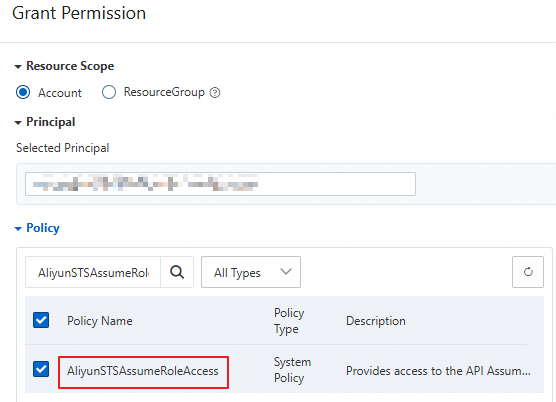
Click OK.
3. Create a RAM role
Use an Alibaba Cloud account or a RAM user with RAM administrative permissions to create a RAM role. This role defines the OSS access permissions that are granted when it is assumed.
Log on to the RAM console.
In the left-side navigation pane, choose Identities > Roles.
On the Roles page, click Create Role.
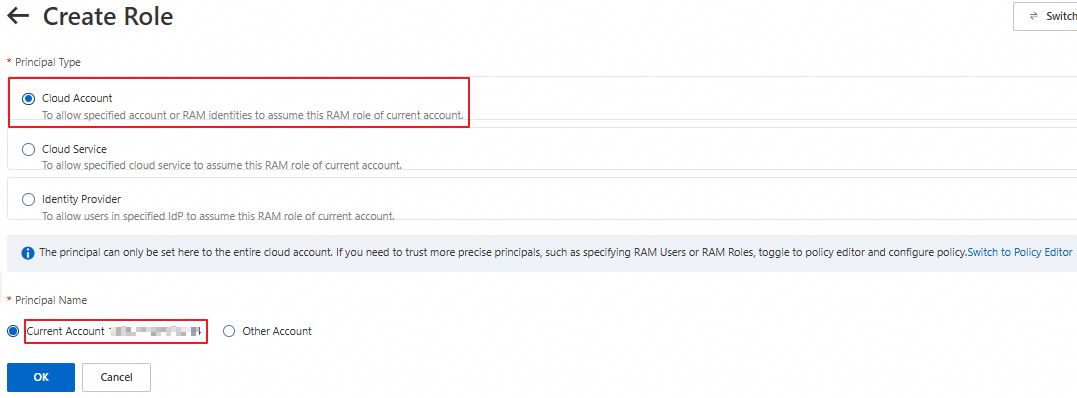
On the Create Role page, set Principal Type to Alibaba Cloud Account and Principal Name to Current Alibaba Cloud Account. Then, click OK.
In the Create Role dialog box, enter a role name and click OK.
Click Copy next to the ARN and save the role ARN.

4. Grant file upload permissions to the RAM role
After creating the RAM role, use an Alibaba Cloud account or a RAM user with RAM administrative permissions to attach policies to it. These policies define the OSS access permissions granted by the role.
Create a custom policy for file uploads.
Log on to the RAM console.
In the left-side navigation pane, choose Permissions > Policies.
On the Policies page, click Create Policy.
On the Create Policy page, click the JSON Editor tab. In the policy editor, grant the role the permission to upload files to examplebucket. The following code provides an example:
WarningThe following example is for reference only. For optimal security, we recommend that you configure more fine-grained authorization policies to avoid the risks associated with excessive permissions. For more information about how to configure fine-grained authorization policies, see Grant permissions to other users by using RAM or STS.
{ "Version": "1", "Statement": [ { "Effect": "Allow", "Action": [ "oss:PutObject" ], "Resource": [ "acs:oss:*:*:examplebucket/*" ] } ] }NoteA RAM role's OSS permissions are determined by the
Actionconfiguration. For example, if you grant theoss:PutObjectpermission, a RAM user who assumes the RAM role can perform simple upload, form upload, append upload, multipart upload, and resumable upload operations on the specified bucket. For more information, see OSS actions.After you configure the policy, click OK. On the Edit Basic Information page, enter a policy name, such as RamTestPolicy, and then click OK.
Grant the custom policy to the RamOssTest RAM role.
Log on to the RAM console.
In the left-side navigation pane, choose Identities > Roles.
On the Roles page, find the target RAM role RamOssTest.
Click Add Permissions in the Actions column for the RAM role RamOssTest.
On the Grant Permission page, select Custom Policy in the Select Policy section. Then, click the created custom policy RamTestPolicy in the policy list.
Click OK.
5. Assume a RAM role and obtain temporary credentials
Do not use an Alibaba Cloud account's AccessKey pair to call STS API operations for temporary credentials; this will cause an error. The following examples use a RAM user's AccessKey pair.
After you grant the file upload permission to the role, the RAM user needs to assume the role to obtain temporary credentials. Temporary credentials consist of a security token, a temporary AccessKey pair (AccessKey ID and AccessKey secret), and an expiration time. You can use an STS SDK to obtain temporary credentials that have the simple upload (
oss:PutObject) permission. For more STS SDK examples in other programming languages, see STS SDK overview.The endpoint in the sample code is the address of the STS endpoint. For faster STS responses, select an STS endpoint in the same region as your server, or a nearby one. For more information about STS endpoints, see Endpoints.
Java
import com.aliyuncs.DefaultAcsClient;
import com.aliyuncs.exceptions.ClientException;
import com.aliyuncs.http.MethodType;
import com.aliyuncs.profile.DefaultProfile;
import com.aliyuncs.profile.IClientProfile;
import com.aliyuncs.auth.sts.AssumeRoleRequest;
import com.aliyuncs.auth.sts.AssumeRoleResponse;
public class StsServiceSample {
    public static void main(String[] args) {
        // The endpoint of the STS service. Example: sts.cn-hangzhou.aliyuncs.com. You can access the STS service over the internet or through a VPC.
        String endpoint = "sts.cn-hangzhou.aliyuncs.com";
        // Obtain the AccessKey ID and AccessKey secret of the RAM user that you created in Substep 1 from environment variables.
        String accessKeyId = System.getenv("ACCESS_KEY_ID");
        String accessKeySecret = System.getenv("ACCESS_KEY_SECRET");
        // Obtain the ARN of the RAM role that you created in Substep 3 from environment variables.
        String roleArn = System.getenv("RAM_ROLE_ARN");
        // Specify a custom role session name to distinguish different tokens. Example: SessionTest.
        String roleSessionName = "yourRoleSessionName";
        // By default, the temporary credentials have all the permissions of the assumed role.
        String policy = null;
        // The validity period of the temporary credentials in seconds. Minimum value: 900. Maximum value: the value of the Maximum Session Duration parameter of the role. The value of this parameter can be 3,600 to 43,200 seconds. Default value: 3,600 seconds.
        // When you upload large files or perform other time-consuming operations, we recommend that you specify a sufficient validity period to avoid having to repeatedly call the STS service to obtain new temporary credentials.
        Long durationSeconds = 3600L;
        try {
            // The region where the STS request is initiated. We recommend that you retain the default value, which is an empty string ("").
            String regionId = "";
            // Add an endpoint. This is applicable to STS SDK for Java 3.12.0 and later.
            DefaultProfile.addEndpoint(regionId, "Sts", endpoint);
            // Add an endpoint. This is applicable to STS SDK for Java versions earlier than 3.12.0.
            // DefaultProfile.addEndpoint("",regionId, "Sts", endpoint);
            // Construct a default profile.
            IClientProfile profile = DefaultProfile.getProfile(regionId, accessKeyId, accessKeySecret);
            // Construct a client.
            DefaultAcsClient client = new DefaultAcsClient(profile);
            final AssumeRoleRequest request = new AssumeRoleRequest();
            // This is applicable to STS SDK for Java 3.12.0 and later.
            request.setSysMethod(MethodType.POST);
            // This is applicable to STS SDK for Java versions earlier than 3.12.0.
            // request.setMethod(MethodType.POST);
            request.setRoleArn(roleArn);
            request.setRoleSessionName(roleSessionName);
            request.setPolicy(policy);
            request.setDurationSeconds(durationSeconds);
            final AssumeRoleResponse response = client.getAcsResponse(request);
            System.out.println("Expiration: " + response.getCredentials().getExpiration());
            System.out.println("Access Key Id: " + response.getCredentials().getAccessKeyId());
            System.out.println("Access Key Secret: " + response.getCredentials().getAccessKeySecret());
            System.out.println("Security Token: " + response.getCredentials().getSecurityToken());
            System.out.println("RequestId: " + response.getRequestId());
        } catch (ClientException e) {
            System.out.println("Failed:");
            System.out.println("Error code: " + e.getErrCode());
            System.out.println("Error message: " + e.getErrMsg());
            System.out.println("RequestId: " + e.getRequestId());
        }
    }
}
Python
# -*- coding: utf-8 -*-

from aliyunsdkcore import client
from aliyunsdkcore.request import CommonRequest
import json
import oss2
import os

# Obtain the AccessKey ID and AccessKey secret of the RAM user that you created in Substep 1 from environment variables.
access_key_id = os.getenv("ACCESS_KEY_ID")
access_key_secret = os.getenv("ACCESS_KEY_SECRET")
# Obtain the ARN of the RAM role that you created in Substep 3 from environment variables.
role_arn = os.getenv("RAM_ROLE_ARN")

# Create a policy.
clt = client.AcsClient(access_key_id, access_key_secret, 'cn-hangzhou')
request = CommonRequest(product="Sts", version='2015-04-01', action_name='AssumeRole')
request.set_method('POST')
request.set_protocol_type('https')
request.add_query_param('RoleArn', role_arn)
# Specify a custom role session name to distinguish different tokens. Example: sessiontest.
request.add_query_param('RoleSessionName', 'sessiontest')
# Specify that the STS temporary credentials expire in 3,600 seconds.
request.add_query_param('DurationSeconds', '3600')
request.set_accept_format('JSON')

body = clt.do_action_with_exception(request)

# Use the AccessKey ID and AccessKey secret of the RAM user to request temporary credentials from STS.
token = json.loads(oss2.to_unicode(body))
# Print the temporary AccessKey pair (AccessKey ID and AccessKey secret), security token, and expiration time returned by STS.
print('AccessKeyId: ' + token['Credentials']['AccessKeyId'])
print('AccessKeySecret: ' + token['Credentials']['AccessKeySecret'])
print('SecurityToken: ' + token['Credentials']['SecurityToken'])
print('Expiration: ' + token['Credentials']['Expiration'])
Node.js
const { STS } = require('ali-oss');
const express = require("express");
const app = express();

app.get('/sts', (req, res) => {
 let sts = new STS({
  // Obtain the AccessKey ID and AccessKey secret of the RAM user that you created in Substep 1 from environment variables.
   accessKeyId : process.env.ACCESS_KEY_ID,
   accessKeySecret : process.env.ACCESS_KEY_SECRET
});
  // process.env.RAM_ROLE_ARN is used to obtain the ARN of the RAM role that you created in Substep 3 from environment variables.
  // Specify a custom policy to further limit the permissions of the STS temporary credentials. If you do not specify a policy, the returned STS temporary credentials have all permissions of the specified role.
  // The final permissions of the temporary credentials are the intersection of the role permissions that you set in Step 4 and the permissions that you set in this policy.
  // The expiration parameter specifies the validity period of the temporary credentials in seconds. Minimum value: 900. Maximum value: the value of the Maximum Session Duration parameter of the role. In this example, the validity period is set to 3,600 seconds.
  // The sessionName parameter specifies a custom role session name to distinguish different tokens. Example: sessiontest.
  sts.assumeRole('process.env.RAM_ROLE_ARN', ``, '3600', 'sessiontest').then((result) => {
    console.log(result);
    res.set('Access-Control-Allow-Origin', '*');
    res.set('Access-Control-Allow-METHOD', 'GET');
    res.json({
      AccessKeyId: result.credentials.AccessKeyId,
      AccessKeySecret: result.credentials.AccessKeySecret,
      SecurityToken: result.credentials.SecurityToken,
      Expiration: result.credentials.Expiration
    });
  }).catch((err) => {
    console.log(err);
    res.status(400).json(err.message);
  });
});
app.listen(8000,()=>{
   console.log("server listen on:8000")
})
Go
package main

import (
    "fmt"
    "os"

    openapi "github.com/alibabacloud-go/darabonba-openapi/v2/client"
    sts20150401 "github.com/alibabacloud-go/sts-20150401/v2/client"
    util "github.com/alibabacloud-go/tea-utils/v2/service"
    "github.com/alibabacloud-go/tea/tea"
)

func main() {
    // Obtain the AccessKey ID and AccessKey secret of the RAM user that you created in Substep 1 from environment variables.
    accessKeyId := os.Getenv("ACCESS_KEY_ID")
    accessKeySecret := os.Getenv("ACCESS_KEY_SECRET")
    // Obtain the ARN of the RAM role that you created in Substep 3 from environment variables.
    roleArn := os.Getenv("RAM_ROLE_ARN")

    // Create a policy client.
    config := &openapi.Config{
        // Required. The AccessKey ID that you obtained in Substep 1.
        AccessKeyId: tea.String(accessKeyId),
        // Required. The AccessKey secret that you obtained in Substep 1.
        AccessKeySecret: tea.String(accessKeySecret),
    }
    // For more information about endpoints, see https://api.aliyun.com/product/Sts
    config.Endpoint = tea.String("sts.cn-hangzhou.aliyuncs.com")
    client, err := sts20150401.NewClient(config)
    if err != nil {
        fmt.Printf("Failed to create client: %v\n", err)
        return
    }

    // Use the AccessKey ID and AccessKey secret of the RAM user to request temporary credentials from STS.
    request := &sts20150401.AssumeRoleRequest{
        // Specify that the STS temporary credentials expire in 3,600 seconds.
        DurationSeconds: tea.Int64(3600),
        // Obtain the ARN of the RAM role that you created in Substep 3 from environment variables.
        RoleArn: tea.String(roleArn),
        // Specify a custom role session name. In this example, use examplename.
        RoleSessionName: tea.String("examplename"),
    }
    response, err := client.AssumeRoleWithOptions(request, &util.RuntimeOptions{})
    if err != nil {
        fmt.Printf("Failed to assume role: %v\n", err)
        return
    }

    // Print the temporary AccessKey pair (AccessKey ID and AccessKey secret), security token, and expiration time returned by STS.
    credentials := response.Body.Credentials
    fmt.Println("AccessKeyId: " + tea.StringValue(credentials.AccessKeyId))
    fmt.Println("AccessKeySecret: " + tea.StringValue(credentials.AccessKeySecret))
    fmt.Println("SecurityToken: " + tea.StringValue(credentials.SecurityToken))
    fmt.Println("Expiration: " + tea.StringValue(credentials.Expiration))
}
PHP
<?php
require __DIR__ . '/vendor/autoload.php';

use AlibabaCloud\Client\AlibabaCloud;
use AlibabaCloud\Client\Exception\ClientException;
use AlibabaCloud\Client\Exception\ServerException;
use AlibabaCloud\Sts\Sts;

// Obtain the AccessKey ID and AccessKey secret of the RAM user that you created in Substep 1 from environment variables.
$accessKeyId = getenv("ACCESS_KEY_ID");
$accessKeySecret = getenv("ACCESS_KEY_SECRET");
// Obtain the ARN of the RAM role that you created in Substep 3 from environment variables.
$roleArn = getenv("RAM_ROLE_ARN");

// Initialize an Alibaba Cloud client.
AlibabaCloud::accessKeyClient($accessKeyId, $accessKeySecret)
    ->regionId('cn-hangzhou')
    ->asDefaultClient();

try {
    // Create an STS request.
    $result = Sts::v20150401()
        ->assumeRole()
        // Set the role ARN.
        ->withRoleArn($roleArn)
        // Specify a custom role session name to distinguish different tokens.
        ->withRoleSessionName('sessiontest')
        // Specify that the STS temporary credentials expire in 3,600 seconds.
        ->withDurationSeconds(3600)
        ->request();

    // Obtain the credential information from the response.
    $credentials = $result['Credentials'];

    // Print the temporary AccessKey pair (AccessKey ID and AccessKey secret), security token, and expiration time returned by STS.
    echo 'AccessKeyId: ' . $credentials['AccessKeyId'] . PHP_EOL;
    echo 'AccessKeySecret: ' . $credentials['AccessKeySecret'] . PHP_EOL;
    echo 'SecurityToken: ' . $credentials['SecurityToken'] . PHP_EOL;
    echo 'Expiration: ' . $credentials['Expiration'] . PHP_EOL;
} catch (ClientException $e) {
    // Handle client exceptions.
    echo $e->getErrorMessage() . PHP_EOL;
} catch (ServerException $e) {
    // Handle server exceptions.
    echo $e->getErrorMessage() . PHP_EOL;
}
Ruby
require 'sinatra'
require 'base64'
require 'open-uri'
require 'cgi'
require 'openssl'
require 'json'
require 'sinatra/reloader'
require 'sinatra/content_for'
require 'aliyunsdkcore'

# Set the path of the public folder to the templates subfolder in the current folder.
set :public_folder, File.dirname(__FILE__) + '/templates'

def get_sts_token_for_oss_upload()
  client = RPCClient.new(
    # Obtain the AccessKey ID and AccessKey secret of the RAM user that you created in Substep 1 from environment variables.
    access_key_id: ENV['ACCESS_KEY_ID'],
    access_key_secret: ENV['ACCESS_KEY_SECRET'],
    endpoint: 'https://sts.cn-hangzhou.aliyuncs.com',
    api_version: '2015-04-01'
  )
  response = client.request(
    action: 'AssumeRole',
    params: {
      # Obtain the ARN of the RAM role that you created in Substep 3 from environment variables.
      "RoleArn": ENV['RAM_ROLE_ARN'],
      # Specify that the STS temporary credentials expire in 3,600 seconds.
      "DurationSeconds": 3600,
      # The sessionName parameter specifies a custom role session name to distinguish different tokens. Example: sessiontest.
      "RoleSessionName": "sessiontest"
    },
    opts: {
      method: 'POST',
      format_params: true
    }
  )
end

if ARGV.length == 1
  $server_port = ARGV[0]
elsif ARGV.length == 2
  $server_ip = ARGV[0]
  $server_port = ARGV[1]
end

$server_ip = "127.0.0.1"  # To listen on other addresses such as 0.0.0.0, you must add an authentication mechanism on the server.
$server_port = 8000

puts "App server is running on: http://#{$server_ip}:#{$server_port}"

set :bind, $server_ip
set :port, $server_port

get '/get_sts_token_for_oss_upload' do
  token = get_sts_token_for_oss_upload()
  response = {
    "AccessKeyId" => token["Credentials"]["AccessKeyId"],
    "AccessKeySecret" => token["Credentials"]["AccessKeySecret"],
    "SecurityToken" => token["Credentials"]["SecurityToken"],
    "Expiration" => token["Credentials"]["Expiration"]
  }
  response.to_json
end

get '/*' do
  puts "********************* GET "
  send_file File.join(settings.public_folder, 'index.html')
end
The STS temporary credentials are as follows:
NoteAn Alibaba Cloud account and the RAM users and RAM roles under this account can call the STS service to obtain temporary credentials up to 100 times per second. In high-concurrency scenarios, we recommend that you reuse the temporary credentials within their validity period.
The expiration time of STS temporary credentials is in UTC. UTC is 8 hours behind China Standard Time (CST). For example, if the expiration time of temporary credentials is 2024-04-18T11:33:40Z, the temporary credentials expire at 19:33:40 on April 18, 2024 (UTC+8).
{
  "AccessKeyId": "STS.****************",
  "AccessKeySecret": "3dZn*******************************************",
  "SecurityToken": "CAIS*****************************************************************************************************************************************",
  "Expiration": "2024-**-*****:**:50Z"
}
To configure temporary access permissions with finer granularity, see the following content.
To further restrict the permissions inherited from the role, you can specify an additional policy when requesting the temporary credentials. For example, if the role is granted the permission to upload files to examplebucket, you can restrict the temporary credentials to upload files only to a specific directory in this bucket.
// The following policy restricts the temporary credentials to allow uploading files only to the src directory in examplebucket.
// The final permissions of the temporary credentials are the intersection of the role permissions set in Step 4 and the permissions set in this policy, which means that files can be uploaded only to the src directory in examplebucket.
String policy = "{\n" +
                "    \"Version\": \"1\", \n" +
                "    \"Statement\": [\n" +
                "        {\n" +
                "            \"Action\": [\n" +
                "                \"oss:PutObject\"\n" +
                "            ], \n" +
                "            \"Resource\": [\n" +
                "                \"acs:oss:*:*:examplebucket/src/*\" \n" +
                "            ], \n" +
                "            \"Effect\": \"Allow\"\n" +
                "        }\n" +
                "    ]\n" +
                "}";
Step 2: Upload a file with temporary credentials
The following examples show how to use temporary credentials to upload a file to OSS. For SDK installation and more code examples for various operations, such as file uploads and downloads, by using temporary credentials, see SDK reference.
Java
import com.aliyun.oss.*;
import com.aliyun.oss.common.auth.CredentialsProvider;
import com.aliyun.oss.common.auth.DefaultCredentialProvider;
import com.aliyun.oss.common.comm.SignVersion;
import com.aliyun.oss.model.PutObjectRequest;
import com.aliyun.oss.model.PutObjectResult;

import java.io.File;

public class Demo {

    public static void main(String[] args) throws Exception {
        // Specify the temporary AccessKey ID, AccessKey secret, and security token that you obtained in Substep 5 of Step 1. Do not use the identity credentials of the RAM user.
        // Note that the AccessKey ID obtained from the STS service starts with "STS".
        String accessKeyId = "yourSTSAccessKeyID";
        String accessKeySecret = "yourSTSAccessKeySecret";
        // Specify the security token that you obtained from STS.
        String stsToken= "yourSecurityToken";

        // Use the DefaultCredentialProvider method to directly set the AccessKey ID and AccessKey secret.
        CredentialsProvider credentialsProvider = new DefaultCredentialProvider(accessKeyId, accessKeySecret, stsToken);
        // Initialize the client by using credentialsProvider.
        ClientBuilderConfiguration clientBuilderConfiguration = new ClientBuilderConfiguration();
        // Explicitly declare that the V4 signature algorithm is used.
        clientBuilderConfiguration.setSignatureVersion(SignVersion.V4);
        // Create an OSSClient instance.
        // When the OSSClient instance is no longer used, call the shutdown method to release resources.
        OSS ossClient = OSSClientBuilder.create()
                 // Set the OSS access domain name. Example for the China (Hangzhou) region: https://oss-cn-hangzhou.aliyuncs.com
                .endpoint("endpoint")
                .credentialsProvider(credentialsProvider)
                .clientConfiguration(clientBuilderConfiguration)
                // Set the region of the destination bucket. Example for the China (Hangzhou) region: cn-hangzhou
                .region("region")
                .build();

        try {

            // Create a PutObjectRequest object to upload the local file exampletest.txt to examplebucket.
            PutObjectRequest putObjectRequest = new PutObjectRequest("examplebucket", "exampletest.txt", new File("D:\\localpath\\exampletest.txt"));

            // If you need to set the storage class and access permissions during the upload, see the following sample code.
            // ObjectMetadata metadata = new ObjectMetadata();
            // metadata.setHeader(OSSHeaders.OSS_STORAGE_CLASS, StorageClass.Standard.toString());
            // metadata.setObjectAcl(CannedAccessControlList.Private);
            // putObjectRequest.setMetadata(metadata);

            // Upload the file.
            PutObjectResult result = ossClient.putObject(putObjectRequest);
        } catch (OSSException oe) {
            System.out.println("Caught an OSSException, which means your request made it to OSS, "
                    + "but was rejected with an error response for some reason.");
            System.out.println("Error Message:" + oe.getErrorMessage());
            System.out.println("Error Code:" + oe.getErrorCode());
            System.out.println("Request ID:" + oe.getRequestId());
            System.out.println("Host ID:" + oe.getHostId());
        } catch (ClientException ce) {
            System.out.println("Caught a ClientException, which means the client encountered "
                    + "a serious internal problem while trying to communicate with OSS, "
                    + "such as not being able to access the network.");
            System.out.println("Error Message:" + ce.getMessage());
        } finally {
            if (ossClient != null) {
                ossClient.shutdown();
            }
        }
    }
}
Python
OSS SDK for Python is available in V2 and V1. V2 is a comprehensive refactoring of V1 that simplifies underlying operations such as identity verification, request retries, and error handling. It also provides more flexible parameter configurations and new advanced interfaces. See the following examples based on your requirements.
V2 example
import alibabacloud_oss_v2 as oss

def main():
    # Specify the temporary AccessKey ID, AccessKey secret, and security token that you obtained in Substep 5 of Step 1. Do not use the identity credentials of the RAM user.
    # Note that the AccessKey ID obtained from the STS service starts with "STS".
    sts_access_key_id = 'yourSTSAccessKeyID'
    sts_access_key_secret = 'yourSTSAccessKeySecret'
    # Specify the security token that you obtained from STS.
    sts_security_token = 'yourSecurityToken'

    # Create a static credential provider and explicitly set the temporary AccessKey ID, AccessKey secret, and security token.
    credentials_provider = oss.credentials.StaticCredentialsProvider(
        access_key_id=sts_access_key_id,
        access_key_secret=sts_access_key_secret,
        security_token=sts_security_token,
    )

    # Load the default configuration of the SDK and set the credential provider.
    cfg = oss.config.load_default()
    cfg.credentials_provider = credentials_provider

    # Specify the region of the bucket. Example for China (Hangzhou): cn-hangzhou.
    cfg.region = 'cn-hangzhou'

    # Create an OSS client by using the configured information.
    client = oss.Client(cfg)

    # The path of the local file to upload. Example: D:\\localpath\\exampletest.txt.
    local_file_path = 'D:\\localpath\\exampletest.txt'
    with open(local_file_path, 'rb') as file:
        data = file.read()

    # Execute the object upload request to upload the local file exampletest.txt to examplebucket. Specify the bucket name, object name, and file to upload.
    result = client.put_object(oss.PutObjectRequest(
        # Bucket name
        bucket='examplebucket',
        # Name of the object to upload to the bucket
        key='exampletest.txt',
        body=data,
    ))

     # Output the request status code, request ID, content MD5, ETag, CRC-64 checksum, and version ID to check whether the request was successful.
    print(f'status code: {result.status_code},'
          f' request id: {result.request_id},'
          f' content md5: {result.content_md5},'
          f' etag: {result.etag},'
          f' hash crc64: {result.hash_crc64},'
          f' version id: {result.version_id},'
    )


# When this script is run directly, call the main function.
if __name__ == "__main__":
    main()  # The entry point of the script. When the file is run directly, the main function is called.
V1 example
# -*- coding: utf-8 -*-
import oss2

# yourEndpoint specifies the endpoint of the bucket's region. Example for China (Hangzhou): https://oss-cn-hangzhou.aliyuncs.com.
endpoint = 'https://oss-cn-hangzhou.aliyuncs.com'
# Specify the temporary AccessKey ID and AccessKey secret that you obtained in Substep 5 of Step 1. Do not use the AccessKey ID and AccessKey secret of an Alibaba Cloud account.
sts_access_key_id = 'yourAccessKeyId'
sts_access_key_secret = 'yourAccessKeySecret'
# Specify the bucket name.
bucket_name = 'examplebucket'
# Specify the full path of the object. The full path of the object cannot contain the bucket name.
object_name = 'examplebt.txt'
# Specify the security token that you obtained in Substep 5 of Step 1.
security_token = 'yourSecurityToken'
# Initialize the StsAuth instance by using the authentication information from the temporary credentials.
auth = oss2.StsAuth(sts_access_key_id,
                    sts_access_key_secret,
                    security_token)
# Initialize the bucket by using the StsAuth instance.
bucket = oss2.Bucket(auth, endpoint, bucket_name)
# Upload the object.
result = bucket.put_object(object_name, "hello world")
print(result.status)
Go
OSS SDK for Go is available in V2 and V1. V2 is a comprehensive refactoring of V1 that simplifies underlying operations such as identity verification, request retries, and error handling. It also provides more flexible parameter configurations and new advanced interfaces. See the following examples based on your requirements.
V2 example
package main

import (
	"context"
	"log"

	"github.com/aliyun/alibabacloud-oss-go-sdk-v2/oss"
	"github.com/aliyun/alibabacloud-oss-go-sdk-v2/oss/credentials"
)

func main() {
	// Specify the region of the bucket. Example for China (Hangzhou): cn-hangzhou.
	region := "cn-hangzhou"

	// Specify the temporary AccessKey ID, AccessKey secret, and security token that you obtained in Substep 5 of Step 1. Do not use the identity credentials of the RAM user.
    // Note that the AccessKey ID obtained from the STS service starts with "STS".
	accessKeyID := "yourSTSAccessKeyID"
	accessKeySecret := "yourSTSAccessKeySecret"
	// Specify the security token that you obtained from STS.
	stsToken := "yourSecurityToken"

	// Use the NewStaticCredentialsProvider method to directly set the AccessKey ID, AccessKey secret, and STS token.
	provider := credentials.NewStaticCredentialsProvider(accessKeyID, accessKeySecret, stsToken)

	// Load the default configuration and set the credential provider and region.
	cfg := oss.LoadDefaultConfig().
		WithCredentialsProvider(provider).
		WithRegion(region)

	// Create an OSS client.
	client := oss.NewClient(cfg)

	// Specify the path and name of the local file to upload. Example: D:\\localpath\\exampletest.txt.
	localFile := "D:\\localpath\\exampletest.txt"

	// Create a request to upload an object.
	putRequest := &oss.PutObjectRequest{
		Bucket:       oss.Ptr("examplebucket"),      // Bucket name
		Key:          oss.Ptr("exampletest.txt"),    // Name of the object to upload to the bucket
		StorageClass: oss.StorageClassStandard, // Set the storage class of the object to Standard.
		Acl:          oss.ObjectACLPrivate,     // Set the access control list (ACL) of the object to private.
		Metadata: map[string]string{
			"yourMetadataKey1": "yourMetadataValue1", // Set the metadata of the object.
		},
	}

	// Execute the object upload request to upload the local file exampletest.txt to examplebucket.
	result, err := client.PutObjectFromFile(context.TODO(), putRequest, localFile)
	if err != nil {
		log.Fatalf("failed to put object from file %v", err)
	}

	// Print the result of the object upload.
	log.Printf("put object from file result:%#v\n", result)

}
V1 example
package main

import (
    "fmt"
    "github.com/aliyun/aliyun-oss-go-sdk/oss"
    "os"
)

func main() {
    // Obtain the temporary credentials from environment variables that you obtained in Substep 5 of Step 1. Before you run this sample code, make sure that the OSS_ACCESS_KEY_ID, OSS_ACCESS_KEY_SECRET, and OSS_SESSION_TOKEN environment variables are set.
    provider, err := oss.NewEnvironmentVariableCredentialsProvider()
    if err != nil {
        fmt.Println("Error:", err)
        os.Exit(-1)
    }
    // Create an OSSClient instance.
    // yourEndpoint specifies the endpoint of the bucket. Example for China (Hangzhou): https://oss-cn-hangzhou.aliyuncs.com. Specify the endpoint based on your region.
    client, err := oss.New("yourEndpoint", "", "", oss.SetCredentialsProvider(&provider))
    if err != nil {
        fmt.Println("Error:", err)
        os.Exit(-1)
    }
    // Specify the bucket name. Example: examplebucket.
    bucketName := "examplebucket"
    // Specify the full path of the object. The full path cannot contain the bucket name. Example: exampledir/exampleobject.txt.
    objectName := "exampledir/exampleobject.txt"
    // Specify the full path of the local file. Example: D:\\localpath\\examplefile.txt.
    filepath := "D:\\localpath\\examplefile.txt"
    bucket, err := client.Bucket(bucketName)
    if err != nil {
        fmt.Println("Error:", err)
        os.Exit(-1)
    }
    // Authorize a third party to upload a file by using STS.
    err = bucket.PutObjectFromFile(objectName, filepath)
    if err != nil {
        fmt.Println("Error:", err)
        os.Exit(-1)
    }
    fmt.Println("upload success")
}
Node.js
The example in this step depends on axios. Install it before running the code.
const axios = require("axios");
const OSS = require("ali-oss");

// Use the temporary credentials to initialize the OSS client on the client side for temporary authorized access to OSS resources.
const getToken = async () => {
  // Set the address for the client to request access credentials.
  await axios.get("http://localhost:8000/sts").then((token) => {
    const client = new OSS({
       // yourRegion specifies the region of the bucket. Example for China (Hangzhou): oss-cn-hangzhou.
      region: 'oss-cn-hangzhou',
      // Specify the temporary AccessKey ID and AccessKey secret that you obtained in Substep 5 of Step 1. Do not use the AccessKey ID and AccessKey secret of an Alibaba Cloud account.
      accessKeyId: token.data.AccessKeyId,
      accessKeySecret: token.data.AccessKeySecret,
      // Specify the security token that you obtained in Substep 5 of Step 1.
      stsToken: token.data.SecurityToken,
      authorizationV4: true,
      // Specify the bucket name.
      bucket: "examplebucket",
      // Refresh the temporary credentials.
      refreshSTSToken: async () => {
        const refreshToken = await axios.get("http://localhost:8000/sts");
        return {
          accessKeyId: refreshToken.data.AccessKeyId,
          accessKeySecret: refreshToken.data.AccessKeySecret,
          stsToken: refreshToken.data.SecurityToken,
        };
      },
    });
    // Use the temporary credentials to upload a file.
    // Specify the full path of the object, excluding the bucket name. Example: exampleobject.jpg.
    // Specify the full path of the local file. Example: D:\\example.jpg.
    client.put('exampleobject.jpg', 'D:\\example.jpg').then((res)=>{console.log(res)}).catch(e=>console.log(e))
  });
};
getToken()
PHP
<?php
if (is_file(__DIR__ . 'autoload.php')) {
    require_once __DIR__ . 'autoload.php';
}
if (is_file(__DIR__ . '/vendor/autoload.php')) {
    require_once __DIR__ . '/vendor/autoload.php';
}

use OSS\Credentials\StaticCredentialsProvider;
use OSS\OssClient;
use OSS\Core\OssException;

try {
    // Specify the temporary AccessKey ID, AccessKey secret, and security token that you obtained in Substep 5 of Step 1. Do not use the identity credentials of the RAM user.
    // Note that the AccessKey ID obtained from the STS service starts with "STS".
    $accessKeyId = 'yourSTSAccessKeyID';
    $accessKeySecret = 'yourSTSAccessKeySecret';
    // Specify the security token that you obtained from STS.
    $securityToken = 'yourSecurityToken';

    // Create a credential provider by using the StaticCredentialsProvider class.
    $provider = new StaticCredentialsProvider($accessKeyId, $accessKeySecret, $securityToken);

    // Specify the endpoint of the bucket's region. Example for China (Hangzhou): https://oss-cn-hangzhou.aliyuncs.com.
    $endpoint = "https://oss-cn-hangzhou.aliyuncs.com";

    // Specify the bucket name. Example: examplebucket.
    $bucket= "examplebucket";
    // Specify the name of the object to upload to the bucket.
    $object = "exampletest.txt";
    // Specify the path of the local file to upload. Example: D:\\localpath\\exampletest.txt.
    $localFilePath = "D:\\localpath\\exampletest.txt";

    // You can set relevant headers during the upload, such as setting the access permission to private and specifying custom metadata.
    $options = array(
        OssClient::OSS_HEADERS => array(
            'x-oss-object-acl' => 'private',
            'x-oss-meta-info' => 'yourinfo'
        ),
    );

    $config = array(
        "provider" => $provider,
        "endpoint" => $endpoint,
        "signatureVersion" => OssClient::OSS_SIGNATURE_VERSION_V4,
        // Specify the region of the bucket. Example for China (Hangzhou): cn-hangzhou.
        "region" => "cn-hangzhou"
    );

    // Create an OSS client by using the configured information.
    $ossClient = new OssClient($config);

     // Send the request to upload the local file exampletest.txt to examplebucket.
    $ossClient->putObject($bucket, $object, $localFilePath, $options);
} catch (OssException $e) {
    printf($e->getMessage() . "\n");
    return;
}
Ruby
require 'aliyun/sts'
require 'aliyun/oss'

client = Aliyun::OSS::Client.new(
  # The endpoint of the China (Hangzhou) region is used in this example. Specify the endpoint based on your region.
  endpoint: 'https://oss-cn-hangzhou.aliyuncs.com',
  # Specify the temporary AccessKey ID and AccessKey secret that you obtained in Substep 5 of Step 1. Do not use the AccessKey ID and AccessKey secret of an Alibaba Cloud account.
  access_key_id: 'token.access_key_id',
  access_key_secret: 'token.access_key_secret',
  # Specify the security token that you obtained in Substep 5 of Step 1.
  sts_token: 'token.security_token'
  )
# Specify the bucket name. Example: examplebucket.
bucket = client.get_bucket('examplebucket')
# Upload the file.
bucket.put_object('exampleobject.txt', :file => 'D:\test.txt')
FAQ
Authorization error
Invalid DurationSeconds value
Invalid security token
Non-existent AccessKeyId
Anonymous access forbidden
NoSuchBucket error
Bucket ACL error
Authorizer policy error
This error usually occurs because you do not have the permissions to perform the related operations. Before you request temporary credentials, you must create a RAM role and grant permissions to the role (Substep 4 of Step 1). When you send a request to the STS server to assume this role and obtain temporary credentials, you can use the policy parameter to further restrict the permissions of the temporary credentials (Substep 5 of Step 1).
If you provide this policy parameter, the temporary credentials' final permissions are the intersection of the RAM role's policy and the parameter's policy.
Example 1
In the following figure, A represents the permissions of the RAM role, B represents the permissions set by the policy parameter, and C represents the final permissions of the temporary credentials.

Example 2
In the following figure, A represents the RAM role permissions, and B represents the permissions set by the policy parameter. The permissions set by the policy parameter are a subset of the RAM role permissions. Therefore, B represents the final permissions of the temporary credentials.
If you omit the policy parameter, the temporary credentials inherit all permissions of the RAM role.


Incorrect endpoint error
Obtaining multiple credentials
Incorrect time format error
Handling error code 0003-0000301
References
To learn how to limit file size, file type, or upload path when using server-issued STS credentials for client-side uploads, see Overview.
After authorizing file uploads to OSS with STS temporary credentials, you can use presigned URLs to share files with third parties for preview or download. For more information, see Use a presigned URL to download or preview a file.