Auto-rotate
You can set whether to automatically rotate photos that contain rotation parameters. By default, auto-rotation is enabled. Some photos, such as those taken by mobile phones, may contain rotation parameters stored in their Exchangeable Image File Format (EXIF) data.
Parameters
## Parameters| Name | Description | Value Range || --- | --- | --- || o | Auto-rotation option. `0`: Keep the original orientation. `1`: Auto-rotate. The image is resized first and then rotated. `2`: Auto-rotate. The image is rotated first and then resized. | \[0, 2] |
Name | Description | Value range |
o | Auto-rotate options:
| [0, 1, 2] |
Notes
If you set the option to 1, the final image width and height might not match the specified parameters.
The width and height of the original image must both be less than 4096 pixels for auto-rotation to be applied.
If the source image does not have a rotation parameter, adding the auto-orient parameter does not rotate the image.
Examples
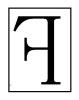
Resize the image to a width of 100 without auto-rotation.
http://image-demo.img-cn-hangzhou.aliyuncs.com/f.jpg@100w.jpg
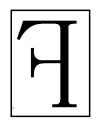
Resize the image to a width of 100 and set the auto-rotation option to 1.
The resulting image has a width of 79 and a height of 100.
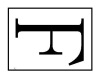
Resize the image to a width of 100 and set the auto-rotation option to 2.
The resulting image has a width of 100 and a height of 127.