Reduce storage costs with lifecycle rules and versioning
When you enable versioning for a bucket, Object Storage Service (OSS) saves overwritten or deleted objects as previous versions. If a bucket accumulates many previous versions or delete markers, you can use a lifecycle rule to automatically remove them, which reduces storage costs and improves the performance of listing objects.
Prerequisites
Versioning is enabled for the target bucket. For more information, see Enable versioning.
Use cases
Consider a scenario where versioning is enabled for a bucket named examplebucket. A user uploads an object named example.txt on February 8. Later, the user overwrites the object or deletes it multiple times without specifying a version ID. For each operation, Object Storage Service (OSS) generates a unique version ID and saves the object as a previous version. The version IDs in the following figure are simplified for demonstration purposes and do not represent actual version IDs.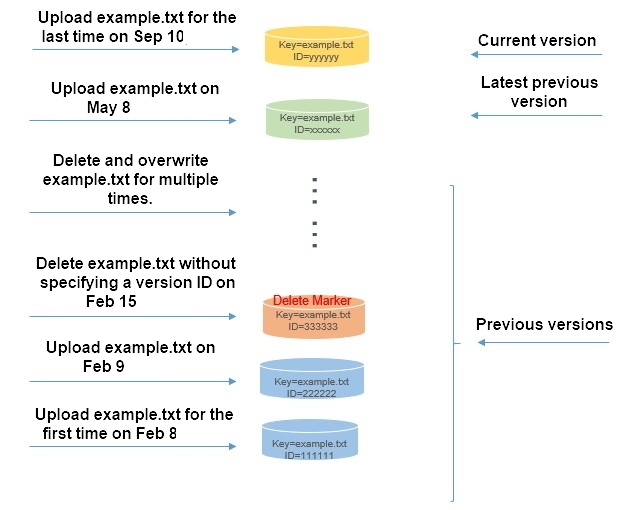
After these operations, the user wants to:
-
Retain only the object versions from May 8 and September 10.
-
Restore the previous version from May 8 to the current version.
Procedure
-
Retain specific object versions
Assume that the current date is September 10. To retain only the object versions from May 8 and September 10, configure a lifecycle rule with the following settings.
Log on to the OSS console.
-
In the navigation pane on the left, click Buckets. On the Buckets page, click examplebucket.
-
In the navigation pane on the left, choose .
-
Click Create Rule. Configure the lifecycle rule with the settings in the following table, and leave other settings at their default values.
Section
Parameter
Description
Basic Settings
Status
Select Enabled.
Applied To
Select Whole Bucket.
Policy for Current Versions
Object Lifecycle
Select Removal of Delete Marker.
Policy for Previous Versions
Object Lifecycle
Select Validity Period (Days).
Lifecycle-based Rules
Set Modified Time to 90 days. An object expires 90 days after becoming a previous version and is deleted the next day.
NoteIn this example, the object uploaded on May 8 transitions to a previous version on September 10. Because it has been a previous version for less than 90 days, it is retained and not deleted.
Policy for Parts
Part Lifecycle
Select Validity Period (Days).
Rules for Parts
Set the value to 90. Parts from incomplete multipart upload tasks expire 90 days after creation and are deleted the next day.
-
Click OK.
-
Restore a specific object version
To restore the previous version from May 8 to the current version, do the following:
-
On the examplebucket management page, choose Object Management > Objects.
-
Click Show next to Previous Versions.
-
Find the version of the example.txt object that was last modified on May 8.
-
In the Actions column for the target previous version, click Restore.
-
Usage notes
When you use lifecycle rules to manage object versions, note the following:
-
Expiration of current versions
-
For a bucket with versioning enabled, if a lifecycle rule expires the current version of an object, OSS does not delete the object. Instead, it adds a delete marker as the new current version, and the expired current version becomes a previous version.
-
In a versioning-suspended bucket, if a lifecycle rule expires the current version of an object, OSS adds a delete marker with a null version ID as the new current version. Because an object can have only one version with a null version ID, this new delete marker overwrites any existing version that has a null version ID.
-
-
Expiration of previous versions
In a bucket where versioning is enabled or suspended, when a lifecycle rule expires a previous version of an object, OSS permanently deletes that version. You cannot restore permanently deleted previous versions.
For more information, see Lifecycle rules based on the last modified time.
Related resources
You can also restore objects using API operations. To restore a previous version of an object as the current version, copy the previous version to the same bucket. The copy becomes the new current version. For more information, see CopyObject.