Distributed vector processing on OSS with Lance and Ray
Build a distributed vector data pipeline on OSS with Lance and Ray, covering data ingestion, embedding, index creation, hybrid search, and maintenance for RAG, multimodal search, and recommendation workloads at million-vector scale.
Solution overview
This guide walks through an enterprise RAG vectorization workflow. After reviewing the architecture and preparing ECS, OSS, and a Ray cluster, you configure OSS as the Lance storage backend and build the pipeline:
-
Prepare a unified configuration module: Centralize storage and compute parameters in
config.pyfor sharing in subsequent steps. -
Prepare the raw dataset: Write the original text data to OSS in the Lance format.
-
Generate embeddings in a distributed manner: Use a Ray cluster to generate vectors in parallel with a model and write them back to OSS.
-
Build a distributed vector index and perform an ANN search: Create an IVF_PQ vector index on OSS and verify its retrieval performance.
-
Build a full-text index and perform a hybrid search: Fuse vector and keyword search results using Reciprocal Rank Fusion (RRF).
-
Maintain data: Perform incremental appends, distributed compaction, and time travel.
Typical use cases:
-
Retrieval-Augmented Generation (RAG): Vectorize chunked enterprise knowledge bases to support real-time retrieval for LLMs.
-
Multimodal search: Generate embeddings for images, videos, and audio to enable similarity search.
-
Recommendation systems: Vectorize user behavior and item features for real-time matching.
Solution benefits
OSS
|
Dimension |
Capabilities |
|
Native protocol access |
You can directly access data by using the OSS native protocol ( |
|
High performance |
A single bucket provides ultra-high QPS and bandwidth, ideal for Lance's random-read access patterns. |
|
Low cost |
Pay-as-you-go standard storage. Lance MVCC lets versions share data files with near-zero extra storage cost. |
|
Elastic scaling |
Capacity scales from GB to TB. ECS compute scales on demand. |
|
Data lake ecosystem |
Integrates with the Alibaba Cloud data lake ecosystem, including MaxCompute, EMR, and PAI. |
|
Data security |
Combines Lance MVCC version control with OSS server-side encryption and access control. |
Datasets reside on OSS, so compute nodes need no data disks — true storage-compute separation. Scale ECS on demand while data stays in OSS.
Lance format
Lance is a columnar format optimized for ML/AI. Compared to Parquet:
-
High-performance random access: O(1) row-level random access, much faster than row-group-based formats.
-
Native vector support: Built-in high-dimensional vector columns and ANN indexes (IVF_PQ, IVF_HNSW).
-
Full-text search support: Built-in inverted index, combinable with vector search for hybrid retrieval.
-
Zero-copy version control: Automatic version snapshots on each write for time travel. Versions share unchanged data files.
-
Cloud-native: Natively supports object storage like OSS — no local disks required.
Ray
At millions of records, single-node embedding and indexing becomes a bottleneck. Ray is a distributed computing framework for data-intensive AI:
-
Pipeline parallelism: Ray Data streams "read → compute → write" stages in parallel.
-
Persistent Actor Pool: Embedding models persist as Ray Actors, avoiding per-batch model reloads.
-
Distributed index building:
lance-raysplits vector and full-text indexes into fragments and builds them in parallel. -
Resource elasticity: Ray manages Worker lifecycles and resource allocation. Scale the cluster based on workload.
The lance-ray integration library provides distributed reads/writes, index building, and compaction for Lance datasets.
Configure OSS for Lance
Lance accesses OSS through the OSS native protocol, built on Apache OpenDAL. These configurations apply to all Lance + OSS scenarios, not just Ray.
The OSS native protocol works only with buckets that have never had the Versioning feature enabled.
Key configuration constraints:
-
Endpoint format:
https://oss-<region>-internal.aliyuncs.com(does not include the bucket name). -
Dataset URI format:
oss://<bucket>/path/to/dataset.lance.
Configuration example:
storage_options = {
    "oss_endpoint": "https://oss-cn-hangzhou-internal.aliyuncs.com",
    "oss_access_key_id": "...",
    "oss_secret_access_key": "...",
    "oss_region": "cn-hangzhou",
}
Architecture overview
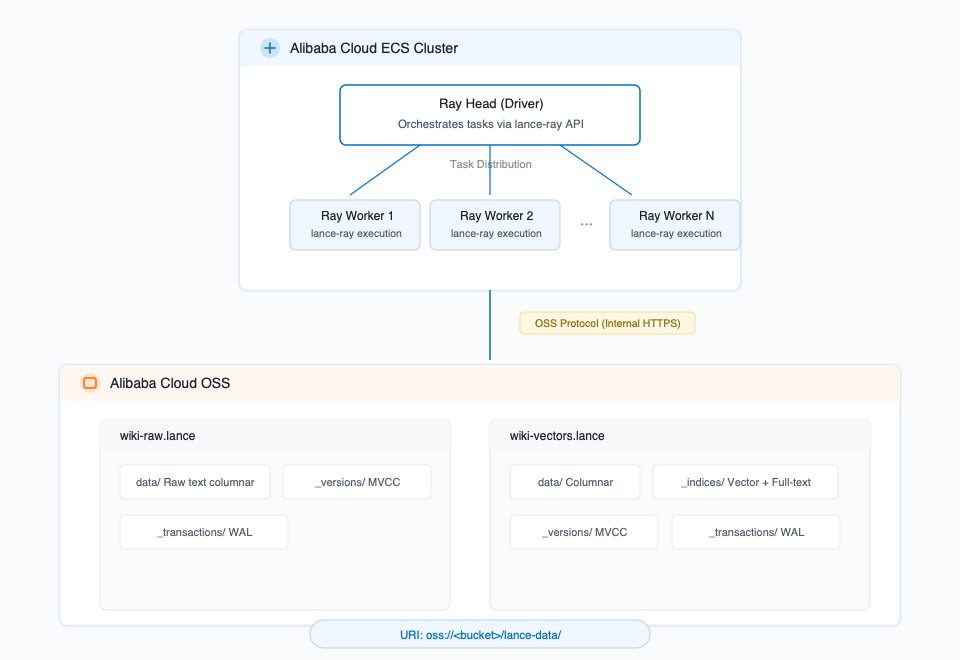
Data flow: Raw text → Write to OSS in Lance format → Distributed embedding on a Ray cluster → Write vector data back to OSS → Distributed index creation → Vector, full-text, or hybrid search.
Prerequisites
-
ECS: At least three instances (1 Head + N Workers) in the same availability zone. Recommended: 8+ vCPU, 32+ GB memory, Ubuntu 24.04 LTS.
-
OSS: A bucket in the same region as ECS, accessed via an internal endpoint. Configure OSS for Lance.
-
A Python 3.12 virtual environment with core dependencies:
pip install "pylance>=6.0.0" "lance-ray>=0.4.2" "ray[data]>=2.41.0" pip install torch --index-url https://download.pytorch.org/whl/cpu pip install sentence-transformers "modelscope[framework]" datasets pandas pyarrow -
A running Ray cluster:
# Head node ray start --head --port=6379 --dashboard-host=0.0.0.0 --dashboard-port=8265 # Worker node (pass the internal IP of the Head node) ray start --address=<HEAD_INTERNAL_IP>:6379 -
OSS access credentials: configured as environment variables on the Head node. Ray automatically distributes them to Workers.
export BUCKET_NAME="<your-bucket-name>"

# OSS native protocol
export OSS_ACCESS_KEY_ID="<your-access-key-id>"
export OSS_ACCESS_KEY_SECRET="<your-access-key-secret>"
export OSS_ENDPOINT="https://oss-cn-hangzhou-internal.aliyuncs.com"
Step 1: Prepare the configuration module
Configurations are centralized in config.py: storage and compute.
Storage configuration
This guide uses the OSS native protocol. For configuration, see Configure OSS for Lance.
"""config.py - Storage configuration"""

import os
from datetime import datetime

RUN_ID = os.environ.get("RUN_ID", datetime.now().strftime("%Y%m%d_%H%M%S"))

# Data scale (write tuning parameters depend on this value, so define it first)
NUM_SAMPLES = int(os.environ.get("NUM_SAMPLES", 100_000))

# OSS / Storage configuration (OSS native protocol)
BUCKET_NAME = os.environ["BUCKET_NAME"]
OSS_REGION = os.environ.get("OSS_REGION", "cn-hangzhou")

STORAGE_OPTIONS = {
    "oss_endpoint": os.environ.get(
        "OSS_ENDPOINT",
        f"https://oss-{OSS_REGION}-internal.aliyuncs.com",
    ),
    "oss_access_key_id": os.environ["OSS_ACCESS_KEY_ID"],
    "oss_secret_access_key": os.environ["OSS_ACCESS_KEY_SECRET"],
    "oss_region": OSS_REGION,
}

# Dataset URIs
RAW_DATASET_URI = f"oss://{BUCKET_NAME}/lance-data/{RUN_ID}/wiki-raw.lance"
VECTOR_DATASET_URI = f"oss://{BUCKET_NAME}/lance-data/{RUN_ID}/wiki-vectors.lance"

# Write tuning
RAW_MAX_ROWS_PER_FILE = min(NUM_SAMPLES, 100_000)
RAW_MIN_ROWS_PER_FILE = min(NUM_SAMPLES // 2, 50_000)
VECTOR_MAX_ROWS_PER_FILE = min(NUM_SAMPLES, 200_000)
VECTOR_MIN_ROWS_PER_FILE = min(NUM_SAMPLES // 2, 50_000)
Compute configuration
Covers the embedding model, Ray scheduling, and index/search parameters. Ray parameters are auto-derived from cluster topology by init_ray_config() after ray.init().
"""config.py — Compute configuration"""

import math

# Embedding model
EMBEDDING_MODEL = "sentence-transformers/all-MiniLM-L6-v2"
EMBEDDING_DIM = 384
TEXT_TRUNCATE_LENGTH = 512

# Ray parameters — auto-populated by init_ray_config()
RAY_CPUS_PER_WORKER = 2
RAY_NUM_WORKERS = None
RAY_MEMORY_PER_WORKER = None
ACTOR_MIN_SIZE = None
ACTOR_MAX_SIZE = None
RAY_REMOTE_ARGS = None

ENCODE_BATCH_SIZE = 256
MAP_BATCH_SIZE = 1024


def init_ray_config():
    """Call after ray.init() to automatically derive Ray scheduling parameters."""
    import ray

    global RAY_NUM_WORKERS, RAY_MEMORY_PER_WORKER
    global ACTOR_MIN_SIZE, ACTOR_MAX_SIZE, RAY_REMOTE_ARGS

    nodes = ray.nodes()
    alive_nodes = [n for n in nodes if n["Alive"]]
    num_nodes = len(alive_nodes)
    total_cpus = sum(n["Resources"].get("CPU", 0) for n in alive_nodes)
    total_memory_bytes = sum(n["Resources"].get("memory", 0) for n in alive_nodes)
    total_memory_gb = total_memory_bytes / 1024**3

    print(f"[config] Cluster: {num_nodes} nodes, "
          f"{total_cpus:.0f} CPUs, {total_memory_gb:.1f} GB schedulable memory")

    min_node_memory_gb = min(
        n["Resources"].get("memory", 0) for n in alive_nodes
    ) / 1024**3
    max_workers_per_node = max(1, int(min_node_memory_gb) // 10)
    RAY_MEMORY_PER_WORKER = int(
        min_node_memory_gb / max_workers_per_node * 0.8 * 1024**3
    )

    max_workers_by_cpu = int(total_cpus) // RAY_CPUS_PER_WORKER
    max_workers_by_mem = num_nodes * max_workers_per_node
    RAY_NUM_WORKERS = max(1, min(max_workers_by_cpu, max_workers_by_mem))

    ACTOR_MIN_SIZE = 2
    ACTOR_MAX_SIZE = min(6, max_workers_by_cpu)

    RAY_REMOTE_ARGS = {
        "num_cpus": RAY_CPUS_PER_WORKER,
        "memory": RAY_MEMORY_PER_WORKER,
    }

    print(f"[config] Auto-tuned: num_workers={RAY_NUM_WORKERS}, "
          f"memory/worker={RAY_MEMORY_PER_WORKER / 1024**3:.1f} GB, "
          f"actor_pool=[{ACTOR_MIN_SIZE}, {ACTOR_MAX_SIZE}]")


# Vector index
VECTOR_INDEX_NAME = "vector_idx"
VECTOR_INDEX_METRIC = "cosine"
IVF_NUM_PARTITIONS = max(16, min(4096, int(math.sqrt(NUM_SAMPLES))))
PQ_NUM_SUB_VECTORS = 48

# Full-text index
TITLE_FTS_INDEX_NAME = "title_fts_idx"
TEXT_FTS_INDEX_NAME = "text_fts_idx"
FTS_WITH_POSITION = True

# Search parameters
VECTOR_SEARCH_K = 10
KEYWORD_SEARCH_LIMIT = 20
HYBRID_VECTOR_K = 20
RRF_K = 60

# Data management
APPEND_BATCH_SIZE = min(10_000, NUM_SAMPLES // 10)
Step 2: Prepare the raw dataset
Download the Wikipedia dataset from ModelScope and write it to OSS in Lance format.
"""Step 2: Prepare the test dataset and write it to OSS in Lance format"""

import lance
import pyarrow as pa
from modelscope.msdatasets import MsDataset

from config import NUM_SAMPLES, RAW_DATASET_URI, RAW_MAX_ROWS_PER_FILE, STORAGE_OPTIONS


def main():
    print("Loading Wikipedia dataset from ModelScope...")
    ds = MsDataset.load(
        "wikimedia/wikipedia",
        subset_name="20231101.en",
        split=f"train[:{NUM_SAMPLES}]",
        trust_remote_code=True,
    )

    print(f"Loaded {len(ds)} articles")
    print(f"Sample: {ds[0]['title']}")

    table = pa.table(
        {
            "doc_id": pa.array(range(len(ds)), type=pa.int64()),
            "title": pa.array(ds["title"], type=pa.utf8()),
            "text": pa.array(ds["text"], type=pa.utf8()),
        }
    )

    print(f"Writing {table.num_rows} rows to OSS: {RAW_DATASET_URI}")

    lance.write_dataset(
        table,
        RAW_DATASET_URI,
        storage_options=STORAGE_OPTIONS,
        max_rows_per_file=RAW_MAX_ROWS_PER_FILE,
    )

    ds_lance = lance.dataset(RAW_DATASET_URI, storage_options=STORAGE_OPTIONS)
    print("Dataset written successfully!")
    print(f"  Rows: {ds_lance.count_rows()}")
    print(f"  Fragments: {len(ds_lance.get_fragments())}")
    print(f"  Schema: {ds_lance.schema}")
    print(f"  Version: {ds_lance.version}")


if __name__ == "__main__":
    main()
Step 3: Distributed embedding generation
Use a Ray Actor Pool to distribute embedding across cluster nodes. Each Actor loads the model once and reuses it across batches. The pipeline streams data through read → compute → write stages without loading the full dataset.
"""Step 3: Use Ray to generate embeddings in a distributed manner and write them back to OSS in Lance format"""

import time

import lance
import lance_ray as lr
import ray

import config
from config import (
    EMBEDDING_MODEL,
    ENCODE_BATCH_SIZE,
    MAP_BATCH_SIZE,
    RAW_DATASET_URI,
    RAY_CPUS_PER_WORKER,
    STORAGE_OPTIONS,
    TEXT_TRUNCATE_LENGTH,
    VECTOR_DATASET_URI,
    VECTOR_MAX_ROWS_PER_FILE,
    VECTOR_MIN_ROWS_PER_FILE,
    init_ray_config,
)


class EmbeddingGenerator:
    """Ray Actor: Loads the model once per Worker to process multiple batches"""

    def __init__(self):
        from modelscope import snapshot_download
        from sentence_transformers import SentenceTransformer

        local_path = snapshot_download(EMBEDDING_MODEL)
        self.model = SentenceTransformer(local_path)
        print(f"Model loaded on worker: {EMBEDDING_MODEL}")

    def __call__(self, batch: dict) -> dict:
        texts = [
            f"{title}: {text[:TEXT_TRUNCATE_LENGTH]}"
            for title, text in zip(batch["title"], batch["text"])
        ]

        embeddings = self.model.encode(
            texts,
            batch_size=ENCODE_BATCH_SIZE,
            show_progress_bar=False,
            normalize_embeddings=True,
        )

        import numpy as np
        import pyarrow as pa

        flat = embeddings.astype(np.float32).ravel()
        batch["vector"] = pa.FixedSizeListArray.from_arrays(
            pa.array(flat, type=pa.float32()),
            list_size=embeddings.shape[1],
        )
        return batch


def main():
    ray.init(address="auto")
    init_ray_config()

    print("\n=== Phase 1: Reading raw data from OSS ===")
    t0 = time.time()

    ds = lr.read_lance(
        RAW_DATASET_URI,
        columns=["doc_id", "title", "text"],
        storage_options=STORAGE_OPTIONS,
    )

    print(f"Read dataset: {ds.count()} rows, took {time.time()-t0:.1f}s")
    print(f"Schema: {ds.schema()}")

    print("\n=== Phase 2: Distributed Embedding Generation ===")
    t1 = time.time()

    ds_with_vectors = ds.map_batches(
        EmbeddingGenerator,
        batch_size=MAP_BATCH_SIZE,
        compute=ray.data.ActorPoolStrategy(
            min_size=config.ACTOR_MIN_SIZE,
            max_size=config.ACTOR_MAX_SIZE,
        ),
        num_gpus=0,
        num_cpus=RAY_CPUS_PER_WORKER,
    )

    print(f"Embedding generation configured, took {time.time()-t1:.1f}s to plan")

    print("\n=== Phase 3: Writing vectors to OSS in Lance format ===")
    t2 = time.time()

    lr.write_lance(
        ds_with_vectors,
        VECTOR_DATASET_URI,
        storage_options=STORAGE_OPTIONS,
        mode="create",
        max_rows_per_file=VECTOR_MAX_ROWS_PER_FILE,
        min_rows_per_file=VECTOR_MIN_ROWS_PER_FILE,
    )

    write_time = time.time() - t2
    print(f"Write completed in {write_time:.1f}s")

    print("\n=== Verification ===")
    result_ds = lance.dataset(VECTOR_DATASET_URI, storage_options=STORAGE_OPTIONS)
    print(f"Total rows: {result_ds.count_rows()}")
    print(f"Fragments: {len(result_ds.get_fragments())}")
    print(f"Schema: {result_ds.schema}")
    print(f"Dataset version: {result_ds.version}")

    sample = result_ds.take(indices=[0])
    print(f"Sample doc_id: {sample['doc_id'][0].as_py()}")
    print(f"Sample title: {sample['title'][0].as_py()}")
    print(f"Sample vector dim: {len(sample['vector'][0].as_py())}")
    print(f"Sample vector[:5]: {sample['vector'][0].as_py()[:5]}")

    total_time = time.time() - t0
    print(f"\nTotal pipeline time: {total_time:.1f}s")

    ray.shutdown()


if __name__ == "__main__":
    main()
Step 4: Build distributed vector index and search
Build a distributed IVF_PQ vector index with lance-ray. Index data writes directly to OSS without local disk.
"""Step 4: Use Ray to build a distributed IVF_PQ vector index"""

import time

import lance
import lance_ray as lr
import ray

import config
from config import (
    IVF_NUM_PARTITIONS,
    PQ_NUM_SUB_VECTORS,
    STORAGE_OPTIONS,
    VECTOR_DATASET_URI,
    VECTOR_INDEX_METRIC,
    VECTOR_INDEX_NAME,
    VECTOR_SEARCH_K,
    init_ray_config,
)


def main():
    ray.init(address="auto")
    init_ray_config()

    ds = lance.dataset(VECTOR_DATASET_URI, storage_options=STORAGE_OPTIONS)
    num_rows = ds.count_rows()
    num_fragments = len(ds.get_fragments())
    print(f"Dataset: {num_rows} rows, {num_fragments} fragments")

    print("\n=== Building IVF_PQ Vector Index ===")
    print(f"  num_partitions={IVF_NUM_PARTITIONS}, num_sub_vectors={PQ_NUM_SUB_VECTORS}")
    t0 = time.time()

    updated_ds = lr.create_index(
        VECTOR_DATASET_URI,
        column="vector",
        index_type="IVF_PQ",
        name=VECTOR_INDEX_NAME,
        metric=VECTOR_INDEX_METRIC,
        num_partitions=IVF_NUM_PARTITIONS,
        num_sub_vectors=PQ_NUM_SUB_VECTORS,
        num_workers=config.RAY_NUM_WORKERS,
        storage_options=STORAGE_OPTIONS,
        ray_remote_args=config.RAY_REMOTE_ARGS,
    )

    index_time = time.time() - t0
    print(f"Vector index built in {index_time:.1f}s")

    indices = updated_ds.list_indices()
    print(f"Indices: {indices}")
    print(f"Dataset version after indexing: {updated_ds.version}")

    print("\n=== Testing ANN Search ===")

    sample = updated_ds.take(indices=[42])
    query_vector = sample["vector"][0].as_py()
    query_title = sample["title"][0].as_py()
    print(f"Query document: '{query_title}'")

    t1 = time.time()
    results = updated_ds.to_table(
        nearest={"column": "vector", "q": query_vector, "k": VECTOR_SEARCH_K},
        columns=["doc_id", "title"],
    )
    search_time = time.time() - t1
    print(
        f"ANN search completed in {search_time*1000:.1f}ms, "
        f"found {results.num_rows} results:"
    )

    for i in range(results.num_rows):
        doc_id = results.column("doc_id")[i].as_py()
        title = results.column("title")[i].as_py()
        print(f"  [{i+1}] doc_id={doc_id}, title='{title}'")

    ray.shutdown()


if __name__ == "__main__":
    main()
Step 5: Build full-text index and perform hybrid search
Build a distributed inverted index (INVERTED) and combine it with vector search for hybrid retrieval. Reciprocal Rank Fusion (RRF) merges results from both methods, balancing semantic and keyword relevance.
"""Step 5: Build a full-text index and perform a hybrid search (vector + keyword)"""

import time

import lance
import lance_ray as lr
import ray

import config
from config import (
    EMBEDDING_MODEL,
    FTS_WITH_POSITION,
    HYBRID_VECTOR_K,
    KEYWORD_SEARCH_LIMIT,
    RRF_K,
    STORAGE_OPTIONS,
    TEXT_FTS_INDEX_NAME,
    TITLE_FTS_INDEX_NAME,
    VECTOR_DATASET_URI,
    VECTOR_SEARCH_K,
    init_ray_config,
)


def main():
    ray.init(address="auto")
    init_ray_config()

    # Build a distributed inverted index
    print("=== Building Full-Text Index ===")
    t0 = time.time()

    lr.create_scalar_index(
        VECTOR_DATASET_URI,
        column="title",
        index_type="INVERTED",
        name=TITLE_FTS_INDEX_NAME,
        num_workers=config.RAY_NUM_WORKERS,
        storage_options=STORAGE_OPTIONS,
        ray_remote_args=config.RAY_REMOTE_ARGS,
        with_position=FTS_WITH_POSITION,
    )

    fts_time = time.time() - t0
    print(f"Full-text index on 'title' built in {fts_time:.1f}s")

    print("\nBuilding FTS index on 'text' column...")
    t1 = time.time()

    lr.create_scalar_index(
        VECTOR_DATASET_URI,
        column="text",
        index_type="INVERTED",
        name=TEXT_FTS_INDEX_NAME,
        num_workers=config.RAY_NUM_WORKERS,
        storage_options=STORAGE_OPTIONS,
        ray_remote_args=config.RAY_REMOTE_ARGS,
        with_position=FTS_WITH_POSITION,
    )

    print(f"Text FTS index built in {time.time()-t1:.1f}s")

    ds = lance.dataset(VECTOR_DATASET_URI, storage_options=STORAGE_OPTIONS)
    print(f"\nAll indices: {ds.list_indices()}")

    # Full-text search
    print("\n=== Full-Text Search ===")

    query_text = "machine learning neural network"
    t2 = time.time()

    fts_results = ds.to_table(
        full_text_query=query_text,
        columns=["doc_id", "title"],
        limit=VECTOR_SEARCH_K,
    )

    fts_search_time = time.time() - t2
    print(f"FTS query '{query_text}' completed in {fts_search_time*1000:.1f}ms")
    print(f"Found {fts_results.num_rows} results:")
    for i in range(min(5, fts_results.num_rows)):
        print(f"  [{i+1}] {fts_results.column('title')[i].as_py()}")

    # Hybrid search (Vector + Full-text)
    print("\n=== Hybrid Search (Vector + Full-Text) ===")

    user_question = "What are the applications of deep learning in healthcare?"

    from modelscope import snapshot_download
    from sentence_transformers import SentenceTransformer

    local_path = snapshot_download(EMBEDDING_MODEL)
    model = SentenceTransformer(local_path)
    query_vector = model.encode(user_question, normalize_embeddings=True).tolist()

    t3 = time.time()
    vector_results = ds.to_table(
        nearest={"column": "vector", "q": query_vector, "k": HYBRID_VECTOR_K},
        columns=["doc_id", "title", "text"],
    )
    vector_time = time.time() - t3

    t4 = time.time()
    keyword_results = ds.to_table(
        full_text_query="deep learning healthcare",
        columns=["doc_id", "title", "text"],
        limit=KEYWORD_SEARCH_LIMIT,
    )
    keyword_time = time.time() - t4

    print(f"\nUser question: '{user_question}'")
    print(
        f"Vector search: {vector_results.num_rows} results in {vector_time*1000:.1f}ms"
    )
    print(
        f"Keyword search: {keyword_results.num_rows} results in {keyword_time*1000:.1f}ms"
    )

    # Reciprocal Rank Fusion
    doc_scores = {}
    doc_titles = {}

    for i in range(vector_results.num_rows):
        doc_id = vector_results.column("doc_id")[i].as_py()
        doc_scores[doc_id] = doc_scores.get(doc_id, 0) + 1.0 / (RRF_K + i)
        doc_titles[doc_id] = vector_results.column("title")[i].as_py()

    for i in range(keyword_results.num_rows):
        doc_id = keyword_results.column("doc_id")[i].as_py()
        doc_scores[doc_id] = doc_scores.get(doc_id, 0) + 1.0 / (RRF_K + i)
        doc_titles[doc_id] = keyword_results.column("title")[i].as_py()

    ranked_docs = sorted(doc_scores.items(), key=lambda x: x[1], reverse=True)[:10]

    print("\nHybrid search top results (RRF fusion):")
    for rank, (doc_id, score) in enumerate(ranked_docs, 1):
        title = doc_titles.get(doc_id, "Unknown")
        print(f"  [{rank}] score={score:.4f} | {title}")

    ray.shutdown()


if __name__ == "__main__":
    main()
Step 6: Data maintenance: Incremental appends, compaction, and time travel
Common production maintenance operations: incremental appends, distributed compaction, and time travel.
"""Step 6: Data management - Incremental append, distributed compaction, and version management"""

import time

import lance
import lance_ray as lr
import numpy as np
import pyarrow as pa
import ray
from lance_ray.compaction import CompactionOptions

import config
from config import (
    APPEND_BATCH_SIZE,
    EMBEDDING_DIM,
    STORAGE_OPTIONS,
    VECTOR_DATASET_URI,
    init_ray_config,
)


def main():
    ray.init(address="auto")
    init_ray_config()

    ds = lance.dataset(VECTOR_DATASET_URI, storage_options=STORAGE_OPTIONS)
    print(f"Current state: {ds.count_rows()} rows, {len(ds.get_fragments())} fragments")
    print(f"Current version: {ds.version}")

    # 1. Incremental append (This example uses random vectors for demonstration.
    #    In a production environment, you should generate real vectors using an embedding model.)
    print("\n=== Incremental Append ===")

    num_new = APPEND_BATCH_SIZE
    start_id = ds.count_rows()
    new_docs = pa.table(
        {
            "doc_id": pa.array(
                range(start_id, start_id + num_new), type=pa.int64()
            ),
            "title": pa.array(
                [f"New Document {i}" for i in range(num_new)], type=pa.utf8()
            ),
            "text": pa.array(
                [
                    f"This is new content for document {i}. Updated knowledge base entry."
                    for i in range(num_new)
                ],
                type=pa.utf8(),
            ),
            "vector": pa.FixedSizeListArray.from_arrays(
                pa.array(
                    (lambda v: (v / np.linalg.norm(v, axis=1, keepdims=True)).ravel())(
                        np.random.randn(num_new, EMBEDDING_DIM).astype(np.float32)
                    )
                ),
                list_size=EMBEDDING_DIM,
            ),
        }
    )

    ray_ds = ray.data.from_arrow(new_docs)
    lr.write_lance(
        ray_ds,
        VECTOR_DATASET_URI,
        storage_options=STORAGE_OPTIONS,
        mode="append",
    )

    ds_after_append = lance.dataset(VECTOR_DATASET_URI, storage_options=STORAGE_OPTIONS)
    print(
        f"After append: {ds_after_append.count_rows()} rows, "
        f"{len(ds_after_append.get_fragments())} fragments"
    )
    print(f"New version: {ds_after_append.version}")

    # 2. Distributed compaction
    print("\n=== Distributed Compaction ===")

    t0 = time.time()
    metrics = lr.compact_files(
        VECTOR_DATASET_URI,
        compaction_options=CompactionOptions(),
        num_workers=config.RAY_NUM_WORKERS,
        storage_options=STORAGE_OPTIONS,
        ray_remote_args=config.RAY_REMOTE_ARGS,
    )
    compact_time = time.time() - t0

    if metrics:
        print(f"Compaction completed in {compact_time:.1f}s")
        print(f"Metrics: {metrics}")
    else:
        print("No compaction needed")

    ds_after_compact = lance.dataset(
        VECTOR_DATASET_URI, storage_options=STORAGE_OPTIONS
    )
    print(
        f"After compaction: {ds_after_compact.count_rows()} rows, "
        f"{len(ds_after_compact.get_fragments())} fragments"
    )

    # 3. Version management (time travel)
    print("\n=== Version Management (Time Travel) ===")

    versions = ds_after_compact.versions()
    print(f"Total versions: {len(versions)}")
    for v in versions[-3:]:
        print(f"  Version {v['version']}: {v['timestamp']}")

    old_version = versions[0]["version"]
    ds_old = lance.dataset(
        VECTOR_DATASET_URI,
        version=old_version,
        storage_options=STORAGE_OPTIONS,
    )
    print(f"\nOld version ({old_version}): {ds_old.count_rows()} rows")
    print(
        f"Current version ({ds_after_compact.version}): "
        f"{ds_after_compact.count_rows()} rows"
    )

    ray.shutdown()


if __name__ == "__main__":
main()After an incremental append, existing indexes do not cover new rows automatically. Rebuild indexes to include new data. For small increments, Lance falls back to brute-force search on un-indexed rows.
Results
Results from a 3-node Ray cluster (3 × 8 vCPU, 32 GB ECS) processing 100,000 Wikipedia documents.
Phase performance
|
Phase |
Time |
Description |
|
Writing data to OSS |
~38s |
100,000 documents written to OSS in Lance format |
|
Distributed embedding |
~490s |
Processing with 6 parallel Actors, with all I/O on OSS |
|
Vector index creation |
~101s |
Distributed creation of an IVF_PQ index, written directly to OSS |
|
Full-text index creation |
~61s |
Inverted indexes on |
|
Compaction |
~65s |
Merge small data fragments |
Search results
ANN vector search — Use a vector from "Crouching Tiger, Hidden Dragon" as a query to find semantically similar documents directly on OSS:
Query: 'Crouching Tiger, Hidden Dragon'

  [1] Crouching Tiger, Hidden Dragon
  [2] Cheng Pei-pei
  [3] Dragon Lord
  [4] Dragon Fist (manga)
  [5] The White Dragon (film)
  [6] Tiger Child
  [7] Wu Yonggang
  [8] Sam Lee (actor)
  [9] Action of the Tiger
  [10] New Fist of Fury
Hybrid search — For the user question "What are the applications of deep learning in healthcare?", perform a vector semantic search and a keyword full-text search simultaneously, then re-rank the results with RRF:
User question: 'What are the applications of deep learning in healthcare?'

Vector search:  20 results in ~1265ms
Keyword search: 20 results in ~347ms

Hybrid top results (RRF fusion):
  [1] List of artificial intelligence projects
  [2] Predictive analytics
  [3] Artificial intelligence
  [4] Clinical engineering
  [5] NeuroSolutions
Version management and time travel
Lance uses MVCC to implement zero-copy snapshots on OSS. Each write (append, index creation, compaction) creates a new version. Versions share unchanged data files with near-zero extra storage cost:
Total versions: 7

Version 1: 100,000 rows  ← Initial write
Version 4: 100,000 rows  ← After index creation
Version 5: 110,000 rows  ← After appending 10,000 rows
Version 7: 110,000 rows  ← After compaction

# Time travel: Revert to any historical version at any time
ds_old = lance.dataset(uri, version=1)  → 100,000 rows
ds_new = lance.dataset(uri, version=7)  → 110,000 rows
Advanced: Improve RAG retrieval with OSS Accelerator
After the pipeline is built, retrieval latency directly impacts UX and throughput in production RAG systems. This section benchmarks OSS Accelerator for Lance online retrieval.
Lance retrieval involves high-frequency random reads of index and data files on OSS. A single vector search reads multiple IVF partitions, and PQ refinement adds original-vector reads for re-ranking — I/O latency directly limits performance. OSS Accelerator provides a low-latency data path that cuts per-I/O latency. Lance's read-after-write pattern pairs naturally with the accelerator's synchronous warm-up: data is cached during writes, eliminating separate warm-up.
Test scenario
Using the Wikipedia vector knowledge base from this guide, the test simulates end-to-end RAG retrieval: text query → embedding → OSS retrieval → results. A 6-node Ray cluster with 100,000 documents (316-partition IVF_PQ + full-text inverted index), 36 concurrent Workers, and 5,000 requests per scenario, measured under steady-state conditions.
Accelerator configuration
Enable OSS Accelerator in the Alibaba Cloud console:
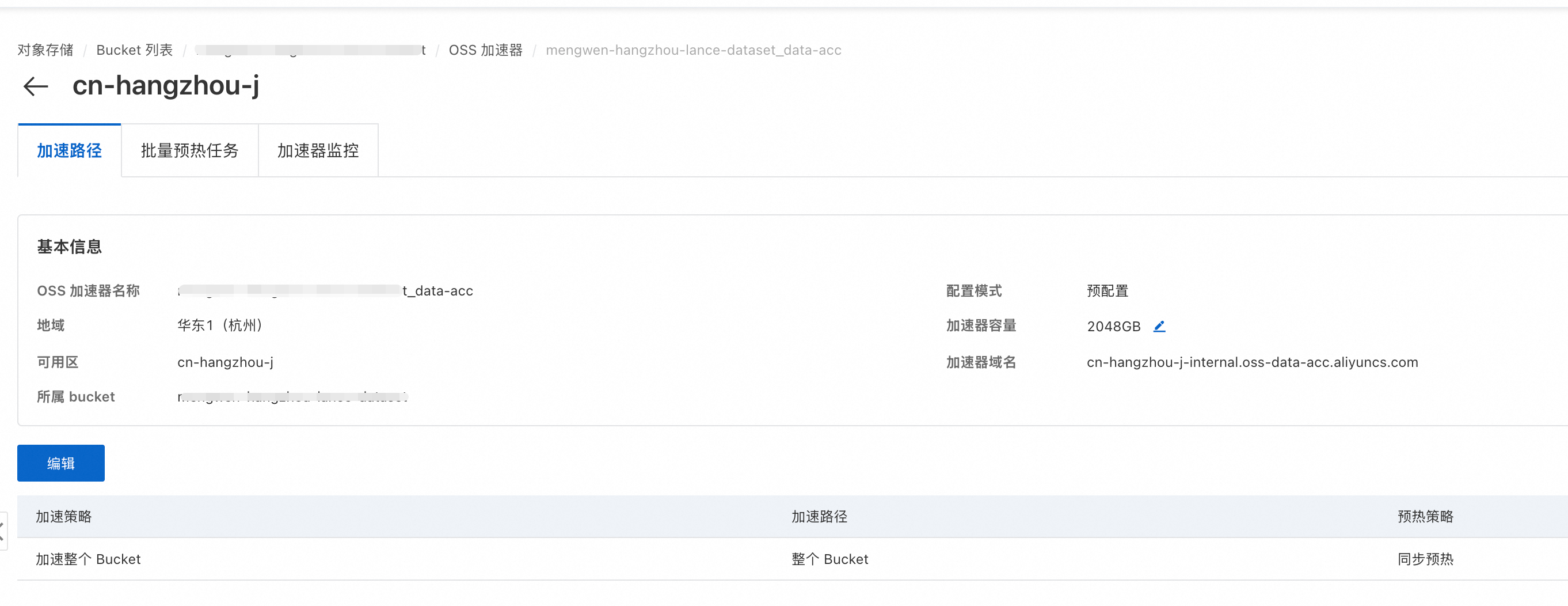
Replace the endpoint in storage_options with the accelerator address. No application code changes required.
Test parameters
|
Parameter |
Value |
Description |
|
Concurrent Workers |
36 |
Number of Ray Actors performing retrievals in parallel |
|
nprobes |
10 |
Number of IVF partitions to probe during search |
|
refine_factor |
5 |
Multiplier for the number of candidates for PQ refinement |
|
vector_k |
10 |
Number of top-k results to return |
|
Requests per scenario |
5000 |
A fixed number of requests to ensure statistical stability |
Test results
Performance comparison between standard OSS and OSS Accelerator in end-to-end RAG:
Total task time comparison (5,000 requests, 36 concurrent Workers, steady-state phase):
|
Scenario |
Standard OSS |
OSS Accelerator |
Acceleration ratio |
|
Vector search |
15.4s |
7.8s |
2.0x |
|
Hybrid search |
26.2s |
13.0s |
2.0x |
Retrieval latency comparison (p50 median):
|
Scenario |
Standard OSS |
OSS Accelerator |
Acceleration ratio |
Description |
|
Vector search (incl. embedding) |
97.4ms |
43.8ms |
2.2x |
Embedding inference + Lance vector retrieval |
|
Vector search (retrieval only) |
85.5ms |
30.2ms |
2.8x |
Lance vector retrieval only |
|
Hybrid search (incl. embedding) |
173.5ms |
73.5ms |
2.4x |
Embedding inference + vector retrieval + full-text retrieval + RRF fusion |
|
Hybrid search (retrieval only) |
161.5ms |
60.2ms |
2.7x |
Vector retrieval + full-text retrieval + RRF fusion only |
Key takeaways
-
Total retrieval task time is halved: For 5,000 requests, vector search time decreased from 15.4s to 7.8s (2.0x improvement), and hybrid search time decreased from 26.2s to 13.0s (2.0x improvement).
-
P50 retrieval-only latency is reduced by 2.7x to 2.8x: Vector search latency dropped from 85.5ms to 30.2ms (2.8x improvement), and hybrid search latency dropped from 161.5ms to 60.2ms (2.7x improvement).
Optimal nprobes and refine_factor values depend on dataset size, partition count, and recall requirements. This test used 100,000 entries (316 IVF partitions). Adjust these parameters based on your production recall targets.
Production guidelines
Storage access configuration
-
Use the OSS native protocol: Direct access with simple configuration. The OSS native protocol only works for buckets that have never had Versioning enabled. Configure OSS for Lance.
-
Use an internal endpoint: When ECS and OSS are in the same region, use an internal endpoint for higher bandwidth and no internet traffic charges.
Accelerate online retrieval
-
Enable OSS Accelerator: For high-frequency random-read scenarios like Lance retrieval, OSS Accelerator reduces retrieval-only latency by 2.7–2.8x and improves throughput by 2.0x. Switch the endpoint to the accelerator address — no code changes required.
-
Use read-after-write for automatic warm-up: Data is cached by the accelerator during write and index creation. Subsequent retrievals hit the cache without a separate warm-up step.
Cost optimization
-
Separate storage and compute: Store data in OSS and use diskless compute nodes. Scale compute elastically and pay only for what you use.
-
Use zero-copy versions and version cleanup: Lance MVCC lets versions share data files with near-zero extra storage cost. Clean up old versions through the Lance API. Do not use external storage lifecycle policies, as they can delete shared files still referenced by the current version.
# Clean up versions older than 7 days and their unreferenced data files
from datetime import timedelta
ds = lance.dataset(uri, storage_options=storage_options)
ds.cleanup_old_versions(older_than=timedelta(days=7))
Ray distributed tuning
-
Automatic Resource Discovery: After
ray.init(), callinit_ray_config()to auto-derive Worker count, memory allocation, and Actor Pool size from cluster topology. -
A fragment represents the degree of parallelism:
lance-rayassigns index tasks by fragment. During writes,max_rows_per_filecontrols fragment count, setting the parallelism ceiling for index building. -
Actor Pool elasticity and pipeline backpressure: The embedding stage uses
ActorPoolStrategy(min_size, max_size), letting Ray auto-scale model instances based on load. Ray Data's built-in backpressure coordinates read, compute, and write rates. Monitor per-operator throughput on the Ray Data panel in the Ray Dashboard.