How to migrate image label detection in Intelligent Media Management (IMM) to the new version
Image label detection is a feature of Intelligent Media Management (IMM) that uses AI algorithms to analyze image content. You can upload and store images in Object Storage Service (OSS) and analyze them at any time, from any location, on any internet-connected device. Multiple versions of the image label detection API are available. This guide walks you through migrating from the OSS data processing module to the Image Intelligence module.
Background
New features and optimizations for Intelligent Media Management (IMM) will be released only in the new version, and the legacy version will be phased out. All IMM data processing APIs that use the x-oss-process method — including media processing, document processing, Image Intelligence, and file processing — now use the new version of IMM.
Prerequisites
-
The Intelligent Media Management (IMM) service is activated. For more information, see Activate IMM.
-
An IMM project is attached. To attach a project in the OSS console, see Quick Start. To attach a project by using an API, see Attach an OSS bucket.
-
The IMM project and the bucket must be in the same region.
Usage notes
-
Image label detection supports only JPG, PNG, and JPEG formats.
-
The following size limits apply to images for label detection:
-
Maximum file size: 20 MB.
-
Maximum height or width: 30,000 pixels (px).
-
Maximum total pixel count: 250 million.
-
-
Only synchronous processing through the
x-oss-processmethod is supported. -
Anonymous access is not supported.
Use cases
|
Use case |
Description |
|
Content recognition |
Detect items, scenes, and other information in captured or uploaded images to power object recognition features or educational applications. |
|
Smart album |
Automatically classify images by content to organize photo albums and galleries. |
|
Scene analysis |
Detect objects and scenes in images, and then apply content labels to reduce manual annotation costs. |
|
Content operations |
Retrieve image labels for content recommendation on social media, news, and e-commerce platforms. |
Migration procedure
To migrate, complete the following steps:
-
Attach the new version in the console.
-
Detach the old version in the console.
-
Use image label detection.
Step 1: Attach the new version
-
Log on to the OSS console.
-
In the left-side navigation pane, click Buckets, and then click the name of the target bucket.

-
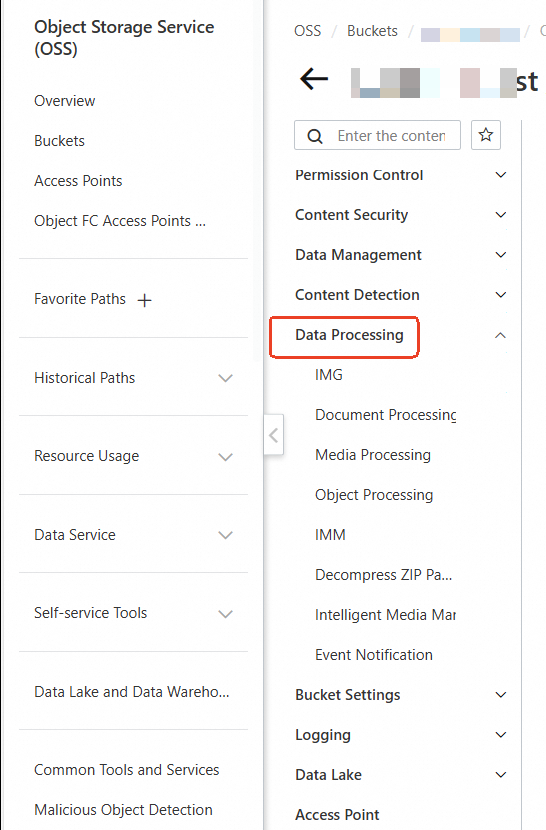
In the left-side navigation pane, choose Data Processing.
-
Click IMM. On the page that appears, click Attach IMM project to bucket.
-
In the Attach Intelligent Media Management project dialog box, select an attachment method in the IMM Settings section:
-
Create new project: Enter a project name. The system automatically creates an IMM project in the same region as the bucket and attaches the project to the bucket.

-
Attach existing project: Select an existing IMM project to attach to the bucket from the drop-down list.

-
-
In the Image Understanding module, click Create Style, enter a Style Name, and then click OK. For more information about styles, see styles.


Step 2: Detach the old version
-
The new and old versions are incompatible. After you detach the old version, image label detection in the old IMM project becomes unavailable, affecting both OSS console operations and SDK-based API calls. Proceed with caution.
-
When you detach a bucket from an old IMM project, verify that you select the correct bucket to avoid unintended impact on your IMM and OSS services.
-
Log on to the OSS console.
-
In the left-side navigation pane, click Buckets, and then click the name of the target bucket.
-
In the left-side navigation pane, choose Data Processing > Intelligent Media Management (IMM).
-
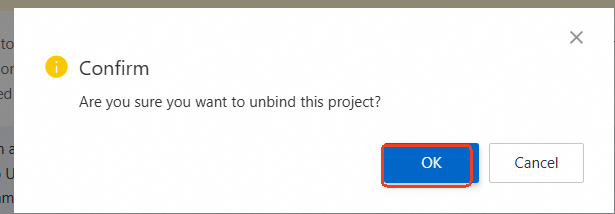
On the Intelligent Media page, find the old IMM project that is attached to the current bucket. Click the
icon, select Unbind, and then click OK.


 icon, select Unbind, and then click OK.

Step 3: Use image label detection
Parameters
Operation: image/labels
Request parameters
|
Parameter |
Type |
Required |
Description |
Example |
|
thr |
float |
No |
The minimum confidence score for returned labels. Labels below this threshold are excluded. Valid values: [0, 1]. Default value: 0.7. |
0.5 |
Response parameters
For information about the response parameters, see Detect labels in an image.
Examples
SDK
The following code examples demonstrate image label detection with common SDKs. You can adapt them for other SDKs.
Java
You must use Java SDK 3.17.4 or later.
import com.aliyun.oss.ClientBuilderConfiguration;
import com.aliyun.oss.OSS;
import com.aliyun.oss.OSSClientBuilder;
import com.aliyun.oss.common.auth.CredentialsProviderFactory;
import com.aliyun.oss.common.auth.EnvironmentVariableCredentialsProvider;
import com.aliyun.oss.common.comm.SignVersion;
import com.aliyun.oss.model.OSSObject;
import com.aliyun.oss.model.GetObjectRequest;
import com.aliyuncs.exceptions.ClientException;

import java.io.ByteArrayOutputStream;
import java.io.IOException;

public class Demo {
    public static void main(String[] args) throws ClientException, ClientException {
        // Set yourEndpoint to the endpoint for the region where the bucket is located.
        String endpoint = "https://oss-cn-hangzhou.aliyuncs.com";
        // Specify the region that corresponds to the endpoint, for example, cn-hangzhou.
        String region = "cn-hangzhou";
        // Obtain access credentials from environment variables. Before you run this sample code, make sure that the OSS_ACCESS_KEY_ID and OSS_ACCESS_KEY_SECRET environment variables are set.
        EnvironmentVariableCredentialsProvider credentialsProvider = CredentialsProviderFactory.newEnvironmentVariableCredentialsProvider();
        // Specify the bucket name.
        String bucketName = "examplebucket";
        // If the image is in the root directory of the bucket, specify the image name. If the image is not in the root directory, specify the full path, for example, exampledir/example.jpg.
        String key = "example.jpg";

        // Create an OSSClient instance.
        // When you have finished using the OSSClient instance, call the shutdown method to release its resources.
        ClientBuilderConfiguration clientBuilderConfiguration = new ClientBuilderConfiguration();
        clientBuilderConfiguration.setSignatureVersion(SignVersion.V4);
        OSS ossClient = OSSClientBuilder.create()
                .endpoint(endpoint)
                .credentialsProvider(credentialsProvider)
                .clientConfiguration(clientBuilderConfiguration)
                .region(region)
                .build();

        try {
            // Construct the processing instruction for image label detection.
            GetObjectRequest getObjectRequest = new GetObjectRequest(bucketName, key);
            getObjectRequest.setProcess("image/labels");

            // Use the getObject method and pass the processing instruction in the process parameter.
            OSSObject ossObject = ossClient.getObject(getObjectRequest);

            // Read and print the response data.
            ByteArrayOutputStream baos = new ByteArrayOutputStream();
            byte[] buffer = new byte[1024];
            int bytesRead;
            while ((bytesRead = ossObject.getObjectContent().read(buffer)) != -1) {
                baos.write(buffer, 0, bytesRead);
            }
            String imageLabels = baos.toString("UTF-8");
            System.out.println("Image Labels:");
            System.out.println(imageLabels);
        } catch (IOException e) {
            System.out.println("Error: " + e.getMessage());
        } finally {
            // Shut down the OSSClient instance.
            ossClient.shutdown();
        }
    }
}
Python
You must use Python SDK 2.18.4 or later.
# -*- coding: utf-8 -*-
import oss2
from oss2.credentials import EnvironmentVariableCredentialsProvider

# Obtain access credentials from environment variables. Before you run this sample code, make sure that the OSS_ACCESS_KEY_ID and OSS_ACCESS_KEY_SECRET environment variables are set.
auth = oss2.ProviderAuthV4(EnvironmentVariableCredentialsProvider())

# Specify the endpoint for the region where the bucket is located. For example, for China (Hangzhou), set the endpoint to https://oss-cn-hangzhou.aliyuncs.com.
endpoint = 'https://oss-cn-hangzhou.aliyuncs.com'
# Specify the general-purpose Alibaba Cloud region ID.
region = 'cn-hangzhou'
bucket = oss2.Bucket(auth, endpoint, 'examplebucket', region=region)

# If the image is in the root directory of the bucket, specify the image name. If the image is not in the root directory, specify the full path, for example, exampledir/example.jpg.
key = 'example.jpg'

# Construct the processing instruction for image label detection.
process = 'image/labels'

try:
    # Use the get_object method and pass the processing instruction in the process parameter.
    result = bucket.get_object(key, process=process)

    # Read and print the response data.
    image_labels = result.read().decode('utf-8')
    print("Image Labels:")
    print(image_labels)
except oss2.exceptions.OssError as e:
    print("Error:", e)
Go
You must use Go SDK 3.0.2 or later.
package main

import (
	"fmt"
	"io"
	"os"

	"github.com/aliyun/aliyun-oss-go-sdk/oss"
)

func main() {
	// Obtain access credentials from environment variables. Before you run this sample code, make sure that the OSS_ACCESS_KEY_ID and OSS_ACCESS_KEY_SECRET environment variables are set.
	provider, err := oss.NewEnvironmentVariableCredentialsProvider()
	if err != nil {
		fmt.Println("Error:", err)
		os.Exit(-1)
	}
	// Create an OSSClient instance.
	// Set yourEndpoint to the endpoint for the region where the bucket is located. For example, for China (Hangzhou), set it to https://oss-cn-hangzhou.aliyuncs.com. For other regions, specify the actual endpoint.
	// Set yourRegion to the general-purpose Alibaba Cloud region ID, for example, cn-hangzhou.
	client, err := oss.New("https://oss-cn-hangzhou.aliyuncs.com", "", "", oss.SetCredentialsProvider(&provider), oss.AuthVersion(oss.AuthV4), oss.Region("cn-hangzhou"))
	if err != nil {
		fmt.Println("Error:", err)
		os.Exit(-1)
	}
	// Specify the bucket name, for example, examplebucket.
	bucketName := "examplebucket"

	bucket, err := client.Bucket(bucketName)
	if err != nil {
		fmt.Println("Error:", err)
		os.Exit(-1)
	}
	// If the image is in the root directory of the bucket, specify the image name. If the image is not in the root directory, specify the full path, for example, exampledir/example.jpg.
	// Use the oss.Process method to construct the processing instruction for image label detection.
	body, err := bucket.GetObject("example.jpg", oss.Process("image/labels"))
	if err != nil {
		fmt.Println("Error:", err)
		os.Exit(-1)
	}

	defer body.Close()

	data, err := io.ReadAll(body)
	if err != nil {
		fmt.Println("Error:", err)
		os.Exit(-1)
	}
	fmt.Println("data:", string(data))
}
PHP
You must use PHP SDK 2.7.0 or later.
<?php
if (is_file(__DIR__ . '/../autoload.php')) {
    require_once __DIR__ . '/../autoload.php';
}
if (is_file(__DIR__ . '/../vendor/autoload.php')) {
    require_once __DIR__ . '/../vendor/autoload.php';
}
use OSS\Credentials\EnvironmentVariableCredentialsProvider;
use OSS\OssClient;

try {
    // Obtain access credentials from environment variables. Before you run this sample code, make sure that the OSS_ACCESS_KEY_ID and OSS_ACCESS_KEY_SECRET environment variables are set.
    $provider = new EnvironmentVariableCredentialsProvider();
    // Specify the endpoint for the region where the bucket is located. For example, for China (Hangzhou), set the endpoint to https://oss-cn-hangzhou.aliyuncs.com.
    $endpoint = 'https://oss-cn-hangzhou.aliyuncs.com';
    // Specify the bucket name, for example, examplebucket.
    $bucket = 'examplebucket';
    // If the image is in the root directory of the bucket, specify the image name. If the image is not in the root directory, specify the full path, for example, exampledir/example.jpg.
    $key = 'example.jpg';

    $config = array(
        "provider" => $provider,
        "endpoint" => $endpoint,
        "signatureVersion" => OssClient::OSS_SIGNATURE_VERSION_V4,
        // Specify the general-purpose Alibaba Cloud region ID.
        "region" => "cn-hangzhou"
    );
    $ossClient = new OssClient($config);
  // Construct the processing instruction for image label detection.
  $options[$ossClient::OSS_PROCESS] = "image/labels";
  $result = $ossClient->getObject($bucket,$key,$options);
  var_dump($result);
} catch (OssException $e) {
  printf($e->getMessage() . "\n");
  return;
REST API
For advanced customization, you can call the REST API directly. This requires writing your own code to calculate the request signature. For more information about calculating the Authorization request header, see (Recommended) Include a V4 signature.
You can process images by adding the x-oss-process parameter to the GetObject operation. For more information, see GetObject.
Labels without filter threshold
Threshold setting
-
Not set.
Sample request
GET /example.jpg?x-oss-process=image/labels HTTP/1.1
Host: image-demo.oss-cn-hangzhou.aliyuncs.com
Date: Fri, 21 Jul 2023 08:30:25 GMT
Authorization: SignatureValue
Sample response
HTTP/1.1 200 OK
Server: AliyunOSS
Date: Fri, 21 Jul 2023 08:30:26 GMT
Content-Type: application/json;charset=utf-8
Transfer-Encoding: chunked
Connection: keep-alive
Vary: Accept-Encoding
x-oss-request-id: 64BA42225DFDD13437ECD00E
Last-Modified: Mon, 10 Jul 2023 13:07:30 GMT
x-oss-object-type: Normal
x-oss-hash-crc64ecma: 13420962247653419692
x-oss-storage-class: Standard
x-oss-ec: 0048-00000104
Content-Disposition: attachment
x-oss-force-download: true
x-oss-server-time: 489
Content-Encoding: gzip

{
    "Labels":[
        {
            "CentricScore": 0.823,
            "LabelConfidence": 1.0,
            "LabelLevel": 2,
            "LabelName": "Outerwear",
            "Language": "zh-Hans",
            "ParentLabelName": "Clothing"
        },
        {
            "CentricScore": 0.721,
            "LabelConfidence": 0.735,
            "LabelLevel": 2,
            "LabelName": "Apparel",
            "Language": "zh-Hans",
            "ParentLabelName": "Clothing"
        },
    		......,
    ],
    "RequestId": "0EC0B6EC-EB16-5EF4-812B-EF3A60C7D20D"
}
Labels with filter threshold
Threshold setting
-
thr: 0.85
Sample request
GET /example.jpg?x-oss-process=image/labels,thr_0.85 HTTP/1.1
Host: image-demo.oss-cn-hangzhou.aliyuncs.com
Date: Fri, 21 Jul 2023 08:44:58 GMT
Authorization: SignatureValue
Sample response
HTTP/1.1 200 OK
Server: AliyunOSS
Date: Fri, 21 Jul 2023 08:45:00 GMT
Content-Type: application/json;charset=utf-8
Transfer-Encoding: chunked
Connection: keep-alive
Vary: Accept-Encoding
x-oss-request-id: 64BA458C7FFDC2383651DF09
Last-Modified: Mon, 10 Jul 2023 13:07:30 GMT
x-oss-object-type: Normal
x-oss-hash-crc64ecma: 13420962247653419692
x-oss-storage-class: Standard
x-oss-ec: 0048-00000104
Content-Disposition: attachment
x-oss-force-download: true
x-oss-server-time: 421
Content-Encoding: gzip

{
  "RequestId": "B7BDAFD5-C0AF-5042-A749-88BF6E4F2712",
  "Labels": [
     {
      	"CentricScore": 0.797,
      	"Language": "zh-Hans",
      	"LabelConfidence": 0.927,
      	"LabelName": "Apparel",
      	"LabelLevel": 2,
      	"ParentLabelName": "Clothing"
      },
        ......,
   ]
}
Permissions
An Alibaba Cloud account has all permissions by default, whereas a RAM user or RAM role requires explicit authorization. Grant permissions to the RAM user or RAM role by using a RAM policy or a bucket policy.
-
System policies:
AliyunOSSReadOnlyAccessandAliyunIMMFullAccessFor more information about granting permissions to a RAM user, see Manage the permissions of a RAM user.
-
Custom permissions:
oss:ProcessImmandram:GetRoleTo grant custom permissions to a RAM user, you must first create a custom policy and then grant the permissions to the RAM user. For more information, see Grant custom permissions to a RAM user.
Billing
Image label detection calls the IMM service, which incurs charges from both OSS and IMM:
-
OSS: The following billable items apply. For more information about pricing, see OSS Pricing.
API
Billable item
Description
GetObject
GET requests
Charged based on the number of successful requests.
Outbound traffic over the internet
If you call the GetObject operation by using an internet endpoint (for example, oss-cn-hangzhou.aliyuncs.com) or a transfer acceleration endpoint (for example, oss-accelerate.aliyuncs.com), outbound traffic fees are charged based on the data transfer size.
Data retrieval from Infrequent Access
If you retrieve data from the Infrequent Access storage class, fees are charged based on the amount of data retrieved.
Data retrieval from Archive Direct Read
If you read an Archive object with the direct read feature enabled for the bucket, fees are charged based on the amount of data retrieved.
Transfer acceleration
If transfer acceleration is enabled and you access your bucket through a transfer acceleration domain name, fees are charged based on the data transfer size.
-
IMM: The following billable items apply. For more information about pricing, see IMM billable items:
API
Billable item
Description
DetectImageLabels
image label detection
Charged per image label detection request.