OSS image processing can convert images to AVIF on the fly using the x-oss-process=image/format,avif parameter. Because not all browsers support AVIF, you need a fallback strategy to serve AVIF to compatible browsers while delivering a supported format to others.
AVIF overview
AVIF (AV1 Image File Format) is based on AV1 video encoding. Compared to JPEG and WebP, it achieves significantly higher compression ratios while preserving image detail — an AVIF file is approximately 35% the size of an equivalent-quality JPEG.
AVIF supports:
High Dynamic Range (HDR) and Standard Dynamic Range (SDR) content
Color spaces: sRGB and BT.2020
Color depths: 8-bit, 10-bit, and 12-bit
Film grain preservation, transparency (like PNG), and animations (like GIF)
Browser compatibility
AVIF is widely supported in modern browsers. For the full list of supported browsers and versions, see AVIF compatibility.
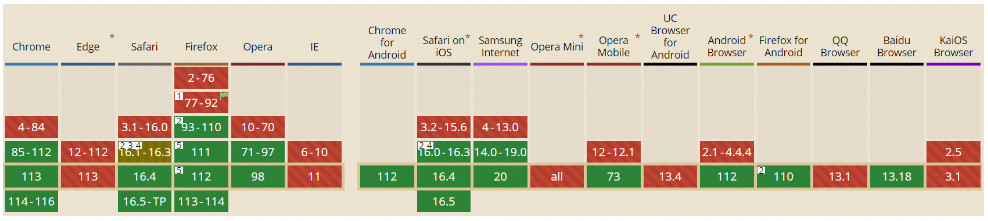
Display AVIF images in compatible browsers
In browsers that support AVIF, use the <img> element directly with the x-oss-process=image/format,avif parameter:
<img
  src="https://image-compress-demo.oss-cn-zhangjiakou.aliyuncs.com/demo.jpg?x-oss-process=image/format,avif"
/>
Serve AVIF with a fallback for older browsers
Some browsers don't support AVIF. To handle this, implement a fallback so those browsers receive the image in a supported format.
Two client-side approaches are available:
| Solution | Best for | Advantage | Disadvantage |
|---|---|---|---|
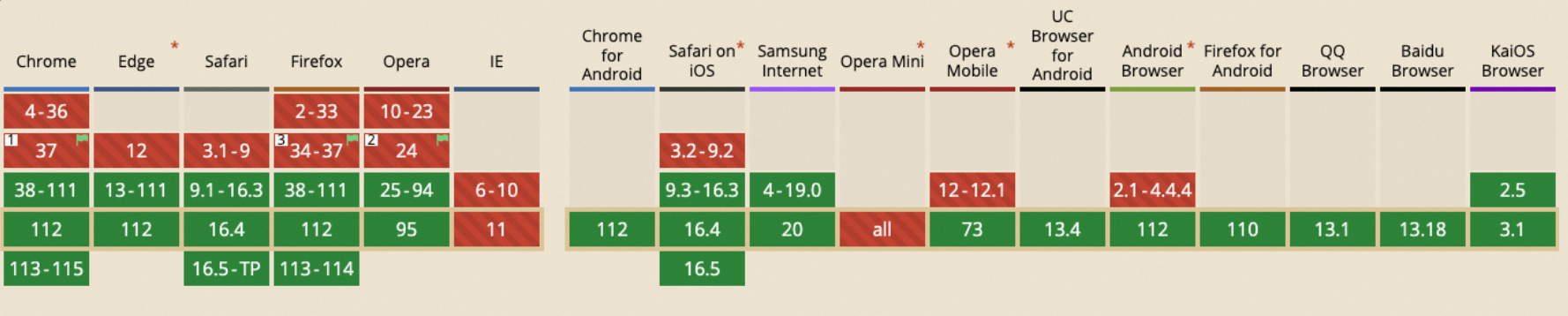
Solution 1: <picture> element | Most use cases | Simple to implement, minimal code | Falls back to the original format on unsupported browsers, consuming extra traffic. Not supported in Internet Explorer and Opera Mini. |
| Solution 2: CSS and JavaScript | Background images; avoiding fallback traffic | JavaScript checks support without fetching the image | More code required; images must be rendered as CSS background images |
Solution 1: Use the <picture> element
Add a <source> element with type="image/avif" inside a <picture> element. The browser loads the AVIF image if supported; otherwise, it falls back to the <img> element.
<picture>
  <source
    srcset="https://image-compress-demo.oss-cn-zhangjiakou.aliyuncs.com/demo.jpg?x-oss-process=image/format,avif"
    type="image/avif"
  />
  <img
    src="https://image-compress-demo.oss-cn-zhangjiakou.aliyuncs.com/demo.jpg"
  />
</picture>
Note: The<picture>element is not supported in Internet Explorer and Opera Mini. The following figure shows<picture>element browser compatibility.
Solution 2: Use CSS and JavaScript
Use JavaScript to check whether the browser supports AVIF, then apply the appropriate CSS class to serve the correct background image. This approach avoids the extra network request that occurs in Solution 1 when AVIF is unsupported.
JavaScript
The supportsAvif() function checks AVIF support using createImageBitmap. It adds the class avif to document.body if supported, or no-avif if not.
async function supportsAvif() {
  if (!this.createImageBitmap) return false

  const avifData =
    'data:image/avif;base64,AAAAIGZ0eXBhdmlmAAAAAGF2aWZtaWYxbWlhZk1BMUIAAADybWV0YQAAAAAAAAAoaGRscgAAAAAAAAAAcGljdAAAAAAAAAAAAAAAAGxpYmF2aWYAAAAADnBpdG0AAAAAAAEAAAAeaWxvYwAAAABEAAABAAEAAAABAAABGgAAAB0AAAAoaWluZgAAAAAAAQAAABppbmZlAgAAAAABAABhdjAxQ29sb3IAAAAAamlwcnAAAABLaXBjbwAAABRpc3BlAAAAAAAAAAIAAAACAAAAEHBpeGkAAAAAAwgICAAAAAxhdjFDgQ0MAAAAABNjb2xybmNseAACAAIAAYAAAAAXaXBtYQAAAAAAAAABAAEEAQKDBAAAACVtZGF0EgAKCBgANogQEAwgMg8f8D///8WfhwB8+ErK42A='
  const blob = await fetch(avifData).then((r) => r.blob())
  return createImageBitmap(blob).then(
    () => true,
    () => false
  )
}

;(async () => {
  const classAvif = (await supportsAvif()) ? 'avif' : 'no-avif'
  document.body.classList.add(classAvif)
})()
CSS
Use the .avif and .no-avif classes to serve the appropriate background image:
div {
  background-repeat: no-repeat;
  background-size: 500px 200px;
  width: 500px;
  height: 200px;
}
.avif div {
  background-image: url(https://image-compress-demo.oss-cn-zhangjiakou.aliyuncs.com/demo.jpg?x-oss-process=image/format,avif);
}
.no-avif div {
  background-image: url(https://image-compress-demo.oss-cn-zhangjiakou.aliyuncs.com/demo.jpg);
}
FAQ
Can I implement web support for HEIC images?
No. Web browsers don't natively render High Efficiency Image Container (HEIC) images — they require a codec to be installed. HEIC web fallback integration is not supported.