Use OSS Vector Bucket's multi-index architecture to isolate tenant data and scale vector retrieval across tens of millions of vectors.
Vector retrieval systems face two common challenges as RAG and semantic search workloads scale:
-
Multi-tenant isolation: SaaS providers and large organizations with per-tenant or per-department knowledge bases need strict data isolation.
-
Ultra-large-scale data: When a single index grows beyond tens of millions of vectors, query latency rises sharply and real-time retrieval becomes impractical.
OSS Vector Bucket lets you create many vector indexes within a single account and region. With a multi-index architecture, you partition data by tenant or business dimension to achieve both isolation and performance.
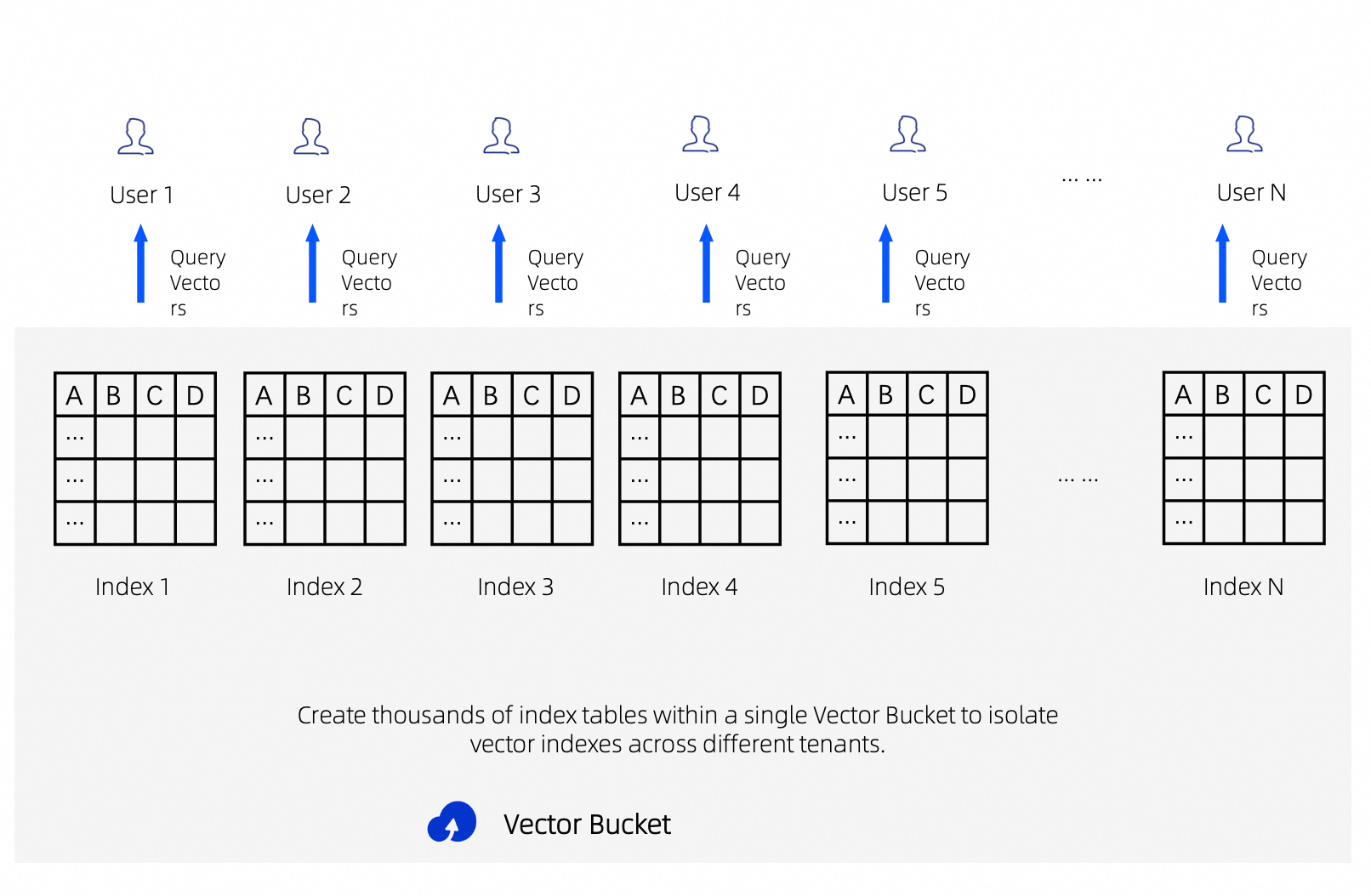
Benefits of Multi-Index Architecture
-
Data isolation: Each tenant stores data in a separate index, preventing cross-tenant data leakage at the infrastructure level.
-
Faster retrieval: Smaller indexes reduce per-query search scope. Combined with concurrent retrieval and result merging, this significantly cuts response time.
-
Operational flexibility: Each index can have its own dimensions, model, and distance metric. Deleting a tenant's data only requires deleting the index — no row-level filtering needed.
Build Multi-Index Architecture via CLI
The oss-vectors-embed CLI tool writes files to specific indexes, enabling per-tenant or per-dimension ingestion.
For installation instructions, see Use the OSS Vectors Embed CLI to write and retrieve vector data.
Prerequisites:
-
Environment variables
OSS_ACCESS_KEY_ID,OSS_ACCESS_KEY_SECRET, andDASHSCOPE_API_KEYare configured. -
A Vector Bucket and the corresponding tenant indexes have been created.
Replace these placeholders with your actual values:
|
Placeholder |
Description |
|
|
Alibaba Cloud account ID |
|
|
Vector Bucket name |
Write Data to Tenant-Specific Indexes
Write each tenant's data to its own index for isolation.
# Write tenant A's document to tenant A's index
oss-vectors-embed \
  --account-id "<your-account-id>" \
  --vectors-region cn-hangzhou \
  put \
  --vector-bucket-name "<your-vector-bucket>" \
  --index-name "tenantcompanya" \
  --model-id text-embedding-v4 \
  --text-value "Tenant A knowledge base document content" \
  --key "doc_001" \
  --metadata '{"tenant": "company_a", "category": "faq"}'

# Write tenant B's document to tenant B's index
oss-vectors-embed \
  --account-id "<your-account-id>" \
  --vectors-region cn-hangzhou \
  put \
  --vector-bucket-name "<your-vector-bucket>" \
  --index-name "tenantcompanyb" \
  --model-id text-embedding-v4 \
  --text-value "Tenant B knowledge base document content" \
  --key "doc_001" \
  --metadata '{"tenant": "company_b", "category": "manual"}'
Query a Specific Tenant's Index
Query a specific tenant's index to enforce data isolation.
# Query only tenant A's index
oss-vectors-embed \
  --account-id "<your-account-id>" \
  --vectors-region cn-hangzhou \
  query \
  --vector-bucket-name "<your-vector-bucket>" \
  --index-name "tenantcompanya" \
  --model-id text-embedding-v4 \
  --text-value "frequently asked questions" \
  --top-k 5 \
  --return-metadata
Build Multi-Index Architecture via SDK
Python SDK
Install the alibabacloud-oss-v2 SDK:
pip install alibabacloud-oss-v2Configure the OSS_ACCESS_KEY_ID and OSS_ACCESS_KEY_SECRET environment variables.
Create Multi-Tenant Indexes
Batch-create independent vector indexes with tenant ID suffixes.
import alibabacloud_oss_v2 as oss
import alibabacloud_oss_v2.vectors as oss_vectors

ACCOUNT_ID = "<your-account-id>"
REGION = "cn-hangzhou"
BUCKET = "<your-vector-bucket>"


def create_vector_client():
    credentials_provider = oss.credentials.EnvironmentVariableCredentialsProvider()
    cfg = oss.config.load_default()
    cfg.credentials_provider = credentials_provider
    cfg.region = REGION
    cfg.account_id = ACCOUNT_ID
    return oss_vectors.Client(cfg)


client = create_vector_client()

# Batch-create indexes for each tenant
tenant_ids = ["companya", "companyb", "companyc"]

for tenant_id in tenant_ids:
    index_name = f"tenant{tenant_id}"
    result = client.put_vector_index(oss_vectors.models.PutVectorIndexRequest(
        bucket=BUCKET,
        index_name=index_name,
        dimension=1024,
        data_type="float32",
        distance_metric="cosine",
    ))
    print(f"Index {index_name} created, status_code={result.status_code}")
Sample output:
Index tenantcompanya created, status_code=200
Index tenantcompanyb created, status_code=200
Index tenantcompanyc created, status_code=200
Write Data to Tenant-Specific Indexes
Write each tenant's data to their own index.
import alibabacloud_oss_v2 as oss
import alibabacloud_oss_v2.vectors as oss_vectors

ACCOUNT_ID = "<your-account-id>"
REGION = "cn-hangzhou"
BUCKET = "<your-vector-bucket>"


def create_vector_client():
    credentials_provider = oss.credentials.EnvironmentVariableCredentialsProvider()
    cfg = oss.config.load_default()
    cfg.credentials_provider = credentials_provider
    cfg.region = REGION
    cfg.account_id = ACCOUNT_ID
    return oss_vectors.Client(cfg)


client = create_vector_client()

# Write data to tenant A's index
result = client.put_vectors(oss_vectors.models.PutVectorsRequest(
    bucket=BUCKET,
    index_name="tenantcompanya",
    vectors=[
        {
            "key": "faq_001",
            "data": {"float32": [0.1] * 1024},  # Vector dimension must match the index
            "metadata": {"tenant": "company_a", "category": "faq"}
        }
    ]
))
print(f"Tenant A write complete, status_code={result.status_code}")

# Write data to tenant B's index
result = client.put_vectors(oss_vectors.models.PutVectorsRequest(
    bucket=BUCKET,
    index_name="tenantcompanyb",
    vectors=[
        {
            "key": "manual_001",
            "data": {"float32": [0.2] * 1024},  # Vector dimension must match the index
            "metadata": {"tenant": "company_b", "category": "manual"}
        }
    ]
))
print(f"Tenant B write complete, status_code={result.status_code}")
Sample output:
Tenant A write complete, status_code=200
Tenant B write complete, status_code=200
Concurrent Multi-Index Retrieval
Query multiple indexes concurrently and merge results by distance to reduce response time.
from concurrent.futures import ThreadPoolExecutor, as_completed

import alibabacloud_oss_v2 as oss
import alibabacloud_oss_v2.vectors as oss_vectors

ACCOUNT_ID = "<your-account-id>"
REGION = "cn-hangzhou"
BUCKET = "<your-vector-bucket>"


def create_vector_client():
    credentials_provider = oss.credentials.EnvironmentVariableCredentialsProvider()
    cfg = oss.config.load_default()
    cfg.credentials_provider = credentials_provider
    cfg.region = REGION
    cfg.account_id = ACCOUNT_ID
    return oss_vectors.Client(cfg)


def search_index(client, index_name, query_vector, top_k=10):
    """Search a single index"""
    result = client.query_vectors(oss_vectors.models.QueryVectorsRequest(
        bucket=BUCKET,
        index_name=index_name,
        query_vector=query_vector,
        return_metadata=True,
        return_distance=True,
        top_k=top_k,
    ))
    return {
        "index": index_name,
        "status_code": result.status_code,

        "vectors": result.vectors or [ ],

    }


def parallel_search(index_names, query_vector, top_k=10):
    """Concurrently search multiple indexes and merge results"""
    client = create_vector_client()

    all_vectors = [ ]


    with ThreadPoolExecutor(max_workers=len(index_names)) as executor:
        futures = {
            executor.submit(search_index, client, idx, query_vector, top_k): idx
            for idx in index_names
        }
        for future in as_completed(futures):
            result = future.result()
            print(f"Index {result['index']} returned {len(result['vectors'])} results")
            all_vectors.extend(result["vectors"])

    # Sort by distance ascending (smaller distance = more similar), take global TopK
    all_vectors.sort(key=lambda v: v.get("distance", float("inf")))
    return all_vectors[:top_k]


# Concurrently search 3 partitioned indexes
indices = ["tenantcompanya", "tenantcompanyb", "tenantcompanyc"]
query_vec = {"float32": [0.1] * 1024}  # Vector dimension must match the index

results = parallel_search(indices, query_vec, top_k=5)
print(f"\nGlobal Top5 after merging:")
for v in results:
    print(f"  key={v.get('key')}, distance={v.get('distance')}, metadata={v.get('metadata')}")
Sample output:
Index tenantcompanya returned 1 results
Index tenantcompanyb returned 1 results
Index tenantcompanyc returned 0 results

Global Top5 after merging:
  key=faq_001, distance=0.0, metadata={'tenant': 'company_a', 'category': 'faq'}
key=manual_001, distance=0.19999998807907104, metadata={'tenant': 'company_b', 'category': 'manual'}Note: Results are merged and sorted by distance on the client side. For higher precision, use a Rerank model for secondary ranking.
Go SDK
Install the alibabacloud-oss-go-sdk-v2 SDK:
go get github.com/aliyun/alibabacloud-oss-go-sdk-v2Configure the OSS_ACCESS_KEY_ID and OSS_ACCESS_KEY_SECRET environment variables.
Create Multi-Tenant Indexes
package main

import (
	"context"
	"fmt"
	"log"

	"github.com/aliyun/alibabacloud-oss-go-sdk-v2/oss"
	"github.com/aliyun/alibabacloud-oss-go-sdk-v2/oss/credentials"
	"github.com/aliyun/alibabacloud-oss-go-sdk-v2/oss/vectors"
)

const (
	region     = "cn-hangzhou"
	bucketName = "<your-vector-bucket>"
	accountId  = "<your-account-id>"
)

func main() {
	cfg := oss.LoadDefaultConfig().
		WithCredentialsProvider(credentials.NewEnvironmentVariableCredentialsProvider()).
		WithRegion(region).
		WithAccountId(accountId)

	client := vectors.NewVectorsClient(cfg)

	// Batch-create indexes for each tenant

	tenantIDs := [ ]string{"companya", "companyb", "companyc"}


	for _, tenantID := range tenantIDs {
		indexName := fmt.Sprintf("tenant%s", tenantID)
		result, err := client.PutVectorIndex(context.TODO(), &vectors.PutVectorIndexRequest{
			Bucket:         oss.Ptr(bucketName),
			IndexName:      oss.Ptr(indexName),
			Dimension:      oss.Ptr(1024),
			DataType:       oss.Ptr("float32"),
			DistanceMetric: oss.Ptr("cosine"),
		})
		if err != nil {
			log.Printf("Index %s creation failed: %v", indexName, err)
			continue
		}
		fmt.Printf("Index %s created, status_code=%d\n", indexName, result.StatusCode)
	}
}
Sample output:
Index tenantcompanya created, status_code=200
Index tenantcompanyb created, status_code=200
Index tenantcompanyc created, status_code=200
Concurrent Multi-Index Retrieval
package main

import (
	"context"
	"fmt"
	"log"
	"sort"
	"sync"

	"github.com/aliyun/alibabacloud-oss-go-sdk-v2/oss"
	"github.com/aliyun/alibabacloud-oss-go-sdk-v2/oss/credentials"
	"github.com/aliyun/alibabacloud-oss-go-sdk-v2/oss/vectors"
)

const (
	region     = "cn-hangzhou"
	bucketName = "<your-vector-bucket>"
	accountId  = "<your-account-id>"
	dimension  = 1024
)


func makeVector(val float32, dim int) [ ]float32 {


	v := make([ ]float32, dim)

	for i := range v {
		v[i] = val
	}
	return v
}

func main() {
	cfg := oss.LoadDefaultConfig().
		WithCredentialsProvider(credentials.NewEnvironmentVariableCredentialsProvider()).
		WithRegion(region).
		WithAccountId(accountId)

	client := vectors.NewVectorsClient(cfg)


	indices := [ ]string{"tenantcompanya", "tenantcompanyb", "tenantcompanyc"}

	queryVector := map[string]any{"float32": makeVector(0.1, dimension)}

	var mu sync.Mutex

	var allVectors [ ]map[string]any

	var wg sync.WaitGroup

	for _, indexName := range indices {
		wg.Add(1)
		go func(idx string) {
			defer wg.Done()

			result, err := client.QueryVectors(context.TODO(), &vectors.QueryVectorsRequest{
				Bucket:         oss.Ptr(bucketName),
				IndexName:      oss.Ptr(idx),
				QueryVector:    queryVector,
				ReturnMetadata: oss.Ptr(true),
				ReturnDistance:  oss.Ptr(true),
				TopK:           oss.Ptr(10),
			})
			if err != nil {
				log.Printf("Index %s query failed: %v", idx, err)
				return
			}
			fmt.Printf("Index %s returned %d results\n", idx, len(result.Vectors))

			mu.Lock()
			allVectors = append(allVectors, result.Vectors...)
			mu.Unlock()
		}(indexName)
	}

	wg.Wait()

	// Sort by distance ascending, take global Top5
	sort.Slice(allVectors, func(i, j int) bool {
		di, _ := allVectors[i]["distance"].(float64)
		dj, _ := allVectors[j]["distance"].(float64)
		return di < dj
	})

	topK := 5
	if len(allVectors) < topK {
		topK = len(allVectors)
	}

	fmt.Printf("\nGlobal Top%d after merging:\n", topK)
	for _, v := range allVectors[:topK] {
		fmt.Printf("  key=%v, distance=%v, metadata=%v\n", v["key"], v["distance"], v["metadata"])
	}
}
Sample output:
Index tenantcompanya returned 1 results
Index tenantcompanyc returned 0 results
Index tenantcompanyb returned 1 results

Global Top2 after merging:
  key=faq_001, distance=0, metadata=map[category:faq tenant:company_a]
  key=manual_001, distance=0.19999998807907104, metadata=map[category:manual tenant:company_b]
Best Practices
-
Index naming convention: Use tenant IDs or business dimensions as index name suffixes (e.g.,
tenant{tenantid}). Index names support only lowercase letters and digits — underscores and hyphens are not allowed. -
High tenant count: Use index names for logical isolation. Index creation takes seconds with minimal overhead.
-
Ultra-low latency requirements: When a single index exceeds tens of millions of vectors, partition by business logic (e.g., time period, category) and use concurrent multi-index retrieval with result merging.
-
Result reranking: After consolidating results from multiple indexes, rerank by distance or use a Rerank model for more precise ordering.
-
Index cleanup: Delete a tenant's data by calling
DeleteVectorIndex. No row-level filtering needed.