How to migrate Intelligent Media Management document preview to the new version
Intelligent Media Management (IMM) provides an online document preview feature for various document formats. You can store documents in Object Storage Service (OSS) to preview them online anytime, anywhere. The document service has multiple API versions. This topic describes how to migrate from the Intelligent Media feature in the OSS Data Processing module to the new online document preview service.
Background
Future feature development and optimizations for Intelligent Media Management (IMM) will focus on the new version, and the legacy version will be gradually phased out. All APIs for x-oss-process data processing capabilities provided by IMM, such as Media Processing, Document Processing, Image Recognition, and File Processing, now use the new version of IMM.
Prerequisites
-
The IMM project and the bucket must be in the same region.
-
You must access OSS by using a custom domain name. Previews work only when files are accessed through a custom domain name.
NoteIf you receive a prompt that the domain name has not been added to the WebView allowlist for your mini program, contact Intelligent Media Management technical support through the DingTalk user group (Group ID: 88490020073). The technical support team will configure the allowlist based on the WeChat trusted domain verification file that you provide.
Migration procedure
To migrate, follow these steps:
-
Bind the new version in the console.
-
Unbind the legacy version in the console.
-
Use Document Preview.
Step 1: Bind the new version
-
Log on to the OSS console.
-
In the left-side navigation pane, click Bucket List, and then click the name of the target bucket.
-
In the left-side navigation pane, choose Data Processing.
The Image Processing, Document Processing, Media Processing, File Processing, Image Recognition, ZIP Package Extraction, Intelligent Media, and Event Notifications sub-items appear.
-
Click Document Processing, and then on the binding page that appears, click Bind Bucket to IMM Project.
-
In the Bind Intelligent Media Management Project dialog box, in the IMM Configuration area, select one of the following binding methods:
-
Create New Project: Enter a name for the project. The system automatically creates a corresponding IMM project in the bucket's region and binds it to the current bucket.
For example, enter the project name
doc-convert. The project name must be 1 to 128 characters long and can contain only letters, digits, hyphens (-), and underscores (_). It must start with a letter or an underscore (_). For Authorization Method, select AliyunIMMDefaultRole and click OK to complete the binding. -
Bind Existing Project: From the drop-down list, select the IMM project that you want to bind to the bucket.
For Authorization Method, select AliyunIMMDefaultRole and click OK to complete the binding.
-
-
Click the Document Preview module, click Create Style, enter a Style Name, and then click OK. For more information about styles, see Styles.
Set Output Format to HTML, turn on Allow Printing, Allow Copying, and Allow Exporting as PDF, and keep Add Watermark turned off.
After you create the style, the new style record appears in the style list, showing the Style Name, Style Type, Code, Creation Time, and Actions columns.
Step 2: Unbind the legacy version
-
The new and legacy versions are incompatible. After you unbind the legacy version, the document preview feature of the legacy IMM project becomes unavailable. This affects both the OSS console and SDK calls to the document preview API. Therefore, perform this unbinding operation with caution.
-
When you unbind a bucket from a legacy IMM project, ensure that you select the correct bucket to avoid disrupting the normal operation of the IMM and OSS consoles.
-
Log on to the OSS console.
-
In the left-side navigation pane, click Bucket List, and then click the name of the target bucket.
-
In the left-side navigation pane, choose Data Processing.
In the expanded submenu, click Intelligent Media.
-
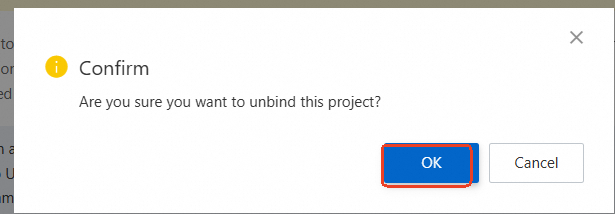
On the Intelligent Media page, find the legacy IMM project bound to the current bucket. Click the
 icon, select Unbind, and then click OK.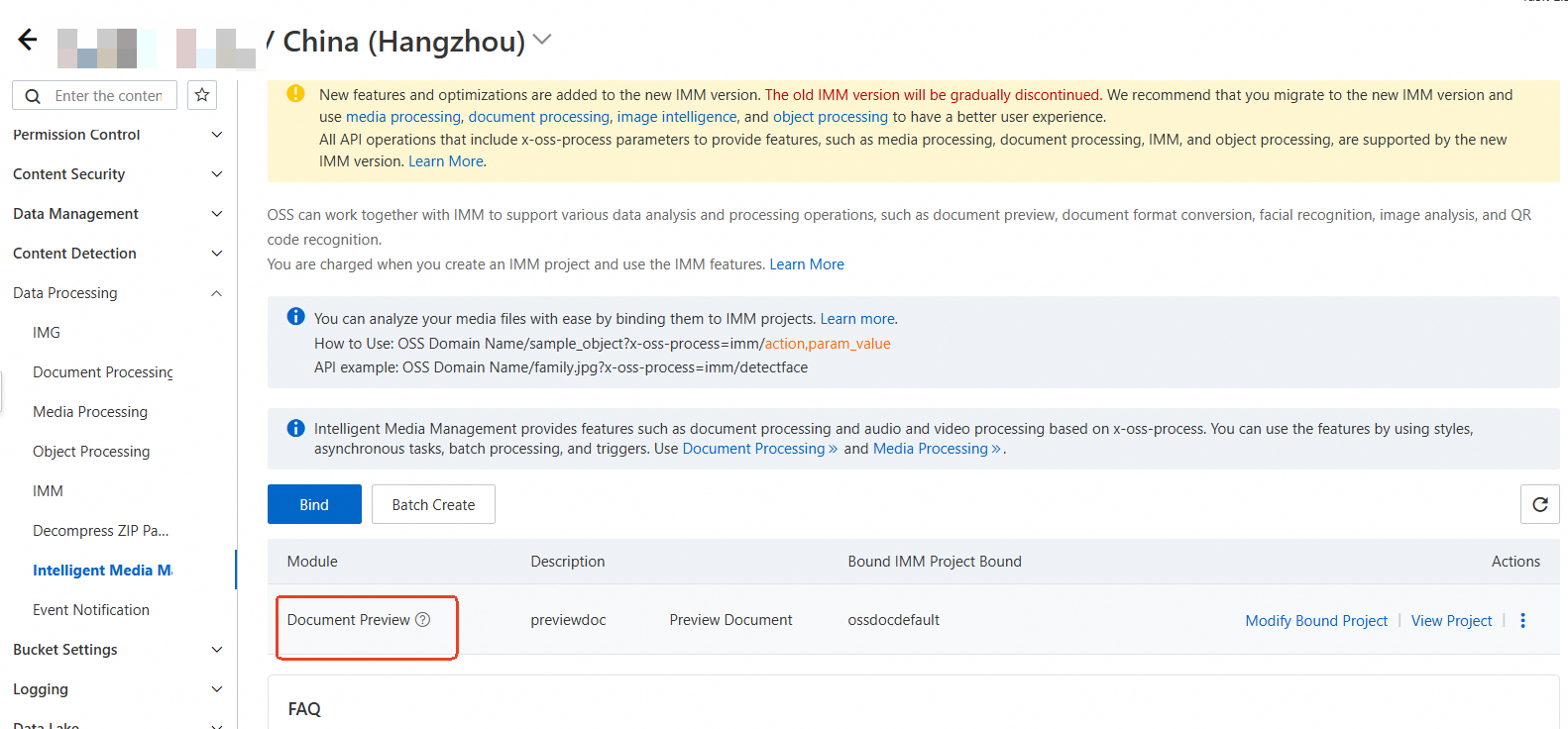
Step 3: Use document preview
Generate a presigned URL
Java
This requires Java SDK 3.17.4 or later. For installation information, see Installation.
package com.aliyun.oss.demo;
import com.aliyun.oss.*;
import com.aliyun.oss.common.auth.*;
import com.aliyun.oss.common.comm.SignVersion;
import com.aliyun.oss.model.GeneratePresignedUrlRequest;
import java.net.URL;
import java.util.Date;
public class Demo {
    public static void main(String[] args) throws Throwable {
        // Specify your custom domain name, for example, http://static.example.com.
        String endpoint = "http://static.example.com";
        // Obtain access credentials from environment variables. Before running this sample code, ensure the OSS_ACCESS_KEY_ID and OSS_ACCESS_KEY_SECRET environment variables are set.
        EnvironmentVariableCredentialsProvider credentialsProvider = CredentialsProviderFactory.newEnvironmentVariableCredentialsProvider();
        // Specify the bucket name, for example, examplebucket.
        String bucketName = "examplebucket";
        // Specify the full path of the object. If the object is not in the root directory of the bucket, include the full path, such as exampledir/exampleobject.png.
        String objectName = "exampledir/exampleobject.png";
        // Specify the region where the bucket is located. For China (Hangzhou), set the region to cn-hangzhou.
        String region = "cn-hangzhou";
        // Create an OSSClient instance.
        // When the OSSClient instance is no longer needed, call the shutdown method to release resources.
        ClientBuilderConfiguration clientBuilderConfiguration = new ClientBuilderConfiguration();
        // Set this parameter to true to enable CNAME.
        clientBuilderConfiguration.setSupportCname(true);
        // Explicitly declare the use of Signature V4.
        clientBuilderConfiguration.setSignatureVersion(SignVersion.V4);
        OSS ossClient = OSSClientBuilder.create()
                .endpoint(endpoint)
                .credentialsProvider(credentialsProvider)
                .clientConfiguration(clientBuilderConfiguration)
                .region(region)
                .build();
        try {
            // Specify document processing parameters.
            String style = "doc/preview,export_1,print_1/watermark,text_SW50ZXJuYWwgTWF0ZXJpYWxz,size_30,t_60";
            // Set the expiration time of the presigned URL to 3,600 seconds.
            Date expiration = new Date(new Date().getTime() + 3600 * 1000);
            GeneratePresignedUrlRequest req = new GeneratePresignedUrlRequest(bucketName, objectName, HttpMethod.GET);
            req.setExpiration(expiration);
            req.setProcess(style);
            URL signedUrl = ossClient.generatePresignedUrl(req);
            System.out.println(signedUrl);
        } catch (OSSException oe) {
            System.out.println("Caught an OSSException, which means your request made it to OSS, "
                    + "but was rejected with an error response for some reason.");
            System.out.println("Error Message:" + oe.getErrorMessage());
            System.out.println("Error Code:" + oe.getErrorCode());
            System.out.println("Request ID:" + oe.getRequestId());
            System.out.println("Host ID:" + oe.getHostId());
        } catch (ClientException ce) {
            System.out.println("Caught a ClientException, which means the client encountered "
                    + "a serious internal problem while trying to communicate with OSS, "
                    + "such as not being able to access the network.");
            System.out.println("Error Message:" + ce.getMessage());
        } finally {
            if (ossClient != null) {
                ossClient.shutdown();
            }
        }
    }
}
Python
This requires Python SDK 2.18.4 or later. For installation information, see Installation (Python SDK V1).
# -*- coding: utf-8 -*-
import oss2
from oss2.credentials import EnvironmentVariableCredentialsProvider
# Obtain access credentials from environment variables. Before running this sample code, ensure the OSS_ACCESS_KEY_ID and OSS_ACCESS_KEY_SECRET environment variables are set.
auth = oss2.ProviderAuthV4(EnvironmentVariableCredentialsProvider())
# Specify the bucket name.
bucket_name = 'examplebucket'
# Specify your custom domain name, for example, https://static.example.com.
endpoint = 'https://static.example.com'
# Specify the Alibaba Cloud region ID.
region = 'cn-hangzhou'
# Initialize the bucket with a custom domain name. If you use the default domain name, use bucket = oss2.Bucket(auth, endpoint, bucket_name, region=region).
bucket = oss2.Bucket(auth, endpoint, bucket_name, is_cname=True, region=region)
# Specify the object to process.
key = 'example.docx'
# Specify the expiration time in seconds.
expire_time = 3600
# Construct the processing instruction for online preview.
image_process = 'doc/preview,export_1,print_1/watermark,text_SW50ZXJuYWwgTWF0ZXJpYWxz,size_30,t_60'
# Generate a presigned URL with processing parameters.
url = bucket.sign_url('GET', key, expire_time, params={'x-oss-process': image_process}, slash_safe=True)
# Print the presigned URL.
print(url)
Go
This requires Go SDK 3.0.2 or later. For installation information, see Install OSS Go SDK.
package main
import (
"context"
"flag"
"log"
"time"
"github.com/aliyun/alibabacloud-oss-go-sdk-v2/oss"
"github.com/aliyun/alibabacloud-oss-go-sdk-v2/oss/credentials"
)
// Define global variables.
var (
region string // Storage region
bucketName string // Bucket name
objectName string // Object name
)
// The init function is used to initialize command-line parameters.
func init() {
flag.StringVar(®ion, "region", "", "The region in which the bucket is located.")
flag.StringVar(&bucketName, "bucket", "", "The name of the bucket.")
flag.StringVar(&objectName, "object", "", "The name of the object.")
}
func main() {
// Parse command-line parameters.
flag.Parse()
// Check if the bucket name is empty.
if len(bucketName) == 0 {
flag.PrintDefaults()
log.Fatalf("invalid parameters, bucket name required")
}
// Check if the region is empty.
if len(region) == 0 {
flag.PrintDefaults()
log.Fatalf("invalid parameters, region required")
}
// Check if the object name is empty.
if len(objectName) == 0 {
flag.PrintDefaults()
log.Fatalf("invalid parameters, object name required")
}
// Load the default configuration and set the credential provider and region.
cfg := oss.LoadDefaultConfig().
WithCredentialsProvider(credentials.NewEnvironmentVariableCredentialsProvider()).
WithRegion(region).
// Specify your custom domain name, for example, http://static.example.com.
WithEndpoint("http://static.example.com").
WithUseCName(true)
// Create an OSS client.
client := oss.NewClient(cfg)
// Generate a presigned URL for GetObject.
result, err := client.Presign(context.TODO(), &oss.GetObjectRequest{
Bucket: oss.Ptr(bucketName),
Key: oss.Ptr(objectName),
// Set the document processing parameters.
Process: oss.Ptr("doc/preview,export_1,print_1/watermark,text_SW50ZXJuYWwgTWF0ZXJpYWxz,size_30,t_60"),
}, oss.PresignExpires(10*time.Minute))
if err != nil {
log.Fatalf("failed to get object presign %v", err)
}
log.Printf("request method:%v\n", result.Method)
log.Printf("request expiration:%v\n", result.Expiration)
log.Printf("request url:%v\n", result.URL)
if len(result.SignedHeaders) > 0 {
// If the result includes signed headers, you must include them in your GET request to avoid signature errors.
log.Printf("signed headers:\n")
for k, v := range result.SignedHeaders {
log.Printf("%v: %v\n", k, v)
}
}
}Node.js
This requires Node.js SDK 8.0 or later. For installation information, see Installation (Node.js SDK).
const OSS = require("ali-oss");
// Define a function to generate a presigned URL.
async function generateSignatureUrl(fileName) {
  // Get the presigned URL.
  const client = new OSS({
    // Specify your custom domain name, for example, http://static.example.com.
    endpoint: 'http://static.example.com',
    // Obtain access credentials from environment variables. Before running this sample code, ensure the OSS_ACCESS_KEY_ID and OSS_ACCESS_KEY_SECRET environment variables are set.
    accessKeyId: process.env.OSS_ACCESS_KEY_ID,
    accessKeySecret: process.env.OSS_ACCESS_KEY_SECRET,
    bucket: 'examplebucket',
    // Specify the region where the bucket is located. For China (Hangzhou), set the region to oss-cn-hangzhou.
    region: 'oss-cn-hangzhou',
    authorizationV4: true,
    cname: true
  });
  // Generate a presigned URL that includes document processing parameters.
  return await client.signatureUrlV4('GET', 3600, {
    headers: {}, // Set the request headers based on the actual request to be sent.
    queries: {
      "x-oss-process": "doc/preview,export_1,print_1/watermark,text_SW50ZXJuYWwgTWF0ZXJpYWxz,size_30,t_60" // Add document processing parameters.
    }
  }, fileName);
}
// Call the function and pass the file name.
generateSignatureUrl('yourFileName').then(url => {
  console.log('Generated Presigned URL:', url);
}).catch(err => {
  console.error('Error generating presigned URL:', err);
});
PHP
This requires PHP SDK 2.7.0 or later. For installation information, see Installation (PHP SDK V1).
<?php
if (is_file(__DIR__ . '/../autoload.php')) {
    require_once __DIR__ . '/../autoload.php';
}
if (is_file(__DIR__ . '/../vendor/autoload.php')) {
    require_once __DIR__ . '/../vendor/autoload.php';
}
use OSS\OssClient;
use OSS\Core\OssException;
use OSS\Http\RequestCore;
use OSS\Http\ResponseCore;
use OSS\Credentials\EnvironmentVariableCredentialsProvider;
// Obtain access credentials from environment variables. Before running this sample code, ensure the OSS_ACCESS_KEY_ID and OSS_ACCESS_KEY_SECRET environment variables are set.
$provider = new EnvironmentVariableCredentialsProvider();
//Specify your custom domain name, for example, http://static.example.com.
$endpoint = "http://static.example.com";
// Specify the bucket name, for example, examplebucket.
$bucket= "examplebucket";
// If the document is in the root directory of the bucket, specify the document name. If not, include the full path, such as exampledir/example.docx.
$object = 'example.docx';
$config = array(
        "provider" => $provider,
        "endpoint" => $endpoint,
        "signatureVersion" => OssClient::OSS_SIGNATURE_VERSION_V4,
        "cname"	=> true,
        "region"=> "cn-hangzhou"
    );
$ossClient = new OssClient($config);
// Generate a presigned URL with document processing parameters that is valid for 3,600 seconds. You can access this URL directly in a browser.
$timeout = 3600;
$options = array(
    // Construct the processing instruction for online preview.
    OssClient::OSS_PROCESS => "doc/preview,export_1,print_1/watermark,text_SW50ZXJuYWwgTWF0ZXJpYWxz,size_30,t_60");
$signedUrl = $ossClient->signUrl($bucket, $object, $timeout, "GET", $options);
print("Presigned URL: \n" . $signedUrl);
The following is an example of a generated presigned URL:
http://static.example.com/example.docx?x-oss-process=doc%2Fpreview%2Cexport_1%2Cprint_1%2Fwatermark%2Ctext_SW50ZXJuYWwgTWF0ZXJpYWxz%2Csize_30%2Ct_60&x-oss-date=20250122T020741Z&x-oss-expires=3600&x-oss-signature-version=OSS4-HMAC-SHA256&x-oss-credential=LTAI********************%2F20250122%2Fcn-hangzhou%2Foss%2Faliyun_v4_request&x-oss-signature=514ed93accdb80921c4b2897c6147fdb1599308c6457f68ee0ac2f771c7d0312Copy the generated URL, paste it into the address bar of your browser, and press Enter to preview the WebOffice document.
For detailed parameter descriptions, see WebOffice online preview.
Related API operations
The operations described previously are based on API operations. If your program requires a high degree of customization, you can directly initiate REST API requests. To do this, you must manually write the code to calculate the signature. For more information about how to calculate the Authorization common request header, see Signature V4 (recommended).
Preview information
-
Document to preview: example.docx
-
Pages to preview: The first 3 pages of the document
-
Watermark information for preview pages:
-
Watermark type: Text watermark
-
Watermark text: Internal Material
-
Font size: 30
-
Transparency: 60
-
-
Permissions for preview pages: Allow users to copy, export, and print
Processing example
GET /example.docx?x-oss-process=doc/preview,export_1,print_1/watermark,text_5YaF6YOo6LWE5paZ,size_30,t_60 HTTP/1.1
Host: doc-demo.oss-cn-hangzhou.aliyuncs.com
Date: Fri, 28 Oct 2022 06:40:10 GMT
Authorization: SignatureValue
Permissions
By default, an Alibaba Cloud account has all permissions. In contrast, a Resource Access Management (RAM) user or RAM role associated with an Alibaba Cloud account has no permissions by default. The Alibaba Cloud account owner or an administrator must grant permissions to the RAM user or RAM role using a RAM policy or a bucket policy.
|
API operation |
Action |
Description |
|
GetObject |
|
Download an object. |
|
|
If you specify the version of an object using versionId when you download the object, you must have the permissions for this action. |
|
|
|
If the metadata of an object contains X-Oss-Server-Side-Encryption: KMS when you download the object, you must have the permissions for this action. |
|
API operation |
Action |
Description |
|
None |
|
The permissions to use IMM through OSS for data processing. |
|
API operation |
Action |
Description |
|
GenerateWebofficeToken |
|
Used to obtain a Weboffice credential. |
|
RefreshWebofficeToken |
|
Used to refresh a Weboffice credential. |
Billing
Calling the IMM service generates billable items for both OSS and IMM:
-
OSS side: The following billable items are generated. For pricing details, see OSS Pricing:
API
Billable item
Description
GetObject
GET requests
You are charged request fees based on the number of successful requests.
Outbound traffic over the Internet
If you call the GetObject operation by using a public endpoint, such as oss-cn-hangzhou.aliyuncs.com, or an acceleration endpoint, such as oss-accelerate.aliyuncs.com, you are charged fees for outbound traffic over the Internet based on the data size.
Retrieval of IA objects
If IA objects are retrieved, you are charged IA data retrieval fees based on the size of the retrieved IA data.
Retrieval of Archive objects in a bucket for which real-time access is enabled
If you retrieve Archive objects in a bucket for which real-time access is enabled, you are charged Archive data retrieval fees based on the size of retrieved Archive objects.
Transfer acceleration fees
If you enable transfer acceleration and use an acceleration endpoint to access your bucket, you are charged transfer acceleration fees based on the data size.
-
IMM side: The following billable items are generated. For pricing details, see IMM Billable Items:
API
Billable item
Description
GenerateWebofficeToken
DocumentWebofficePreview
You are charged document processing fees based on the number of API calls.
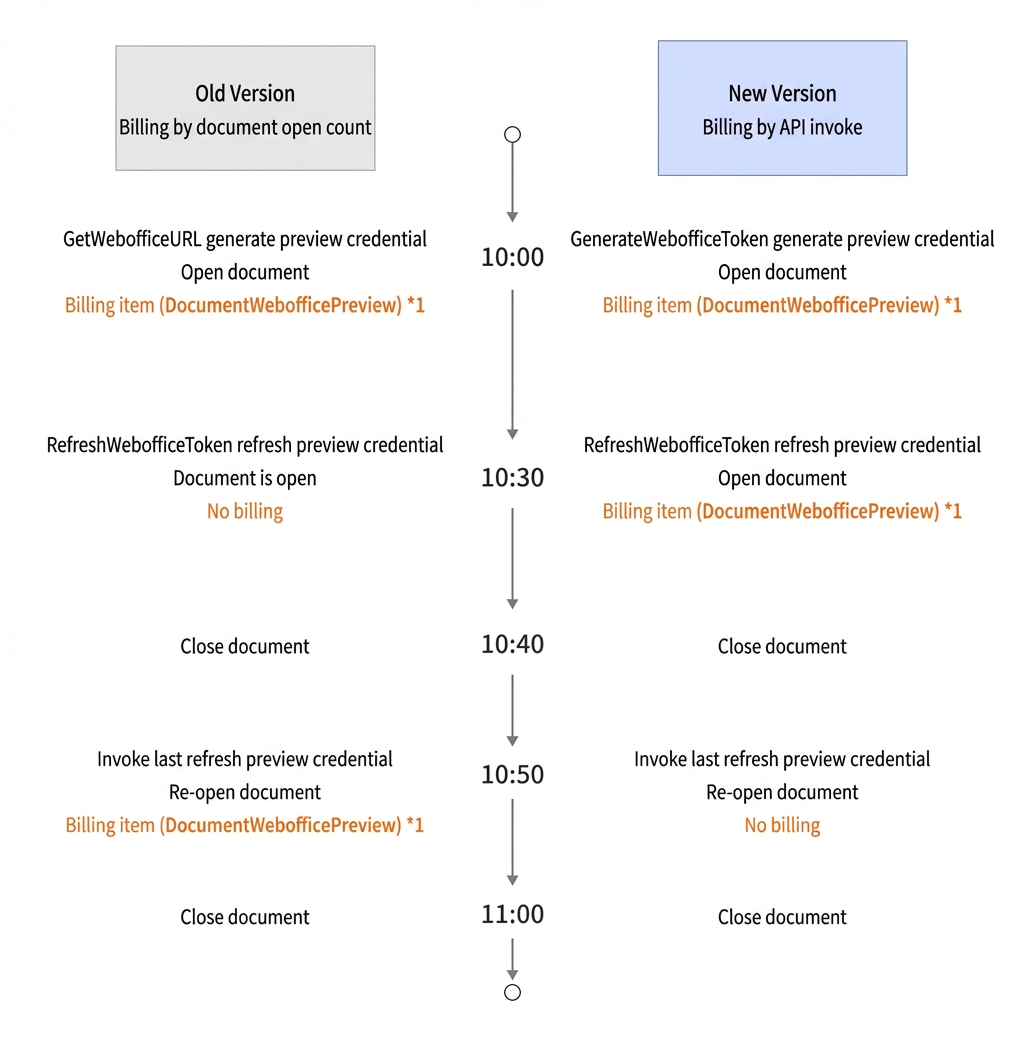
ImportantYou are charged for previewing a document online based on the number of times the document is opened for projects created before December 1, 2023, and based on the number of API calls for projects created on and after this date.
RefreshWebofficeToken
Billing comparison: Legacy vs. new versions