Static website hosting lets you serve a static website directly from an OSS on CloudBox bucket. Once enabled, the bucket serves your HTML, CSS, and JavaScript files using the bucket's endpoint as the website's domain.
Prerequisites
Before you begin, ensure that you have:
OSS on CloudBox available in one of the supported regions: China (Hangzhou), China (Shanghai), China (Shenzhen), China (Heyuan), China (Beijing), or China (Chengdu)
A cloud box purchased. For more information, see Purchase a cloud box
A Virtual Private Cloud (VPC) and a vSwitch created in the OSS on CloudBox. For more information, see Create a VPC and a vSwitch
A VPC internal network set up with a single tunnel configured for secure connection. To apply for this feature, contact technical support
How static website hosting works
When a browser requests a URL on your bucket's endpoint, OSS resolves the request using two special objects:
Default homepage (
index.html): returned when a browser accesses the root domain or a URL ending with/. The object must exist in the root directory and allow anonymous access (ACL set topublic-read). If the subfolder homepage feature is enabled, the object must also exist in each subdirectory that needs its own homepage.Default 404 page (
error.html): returned when OSS cannot find the requested object. The object must exist in the root directory and allow anonymous access (ACL set topublic-read).
To set the ACL for these objects, see ACL settings.
Configuration example
The following bucket structure shows a typical setup after enabling static website hosting:
Bucket
 ├── index.html      ← default homepage (root)
 ├── error.html      ← default 404 page
 ├── example.txt
 └── subdir/
      └── index.html ← default homepage (subdirectory, required when subfolder homepage is enabled)
Set up static website hosting using the OSS console
Step 1: Configure static pages
Log on to the OSS console.
In the left-side navigation pane, choose Data Service > OSS on CloudBox Buckets. On the OSS on CloudBox Buckets page, click the target bucket.
In the left-side navigation pane, choose Data Management > Static Pages.
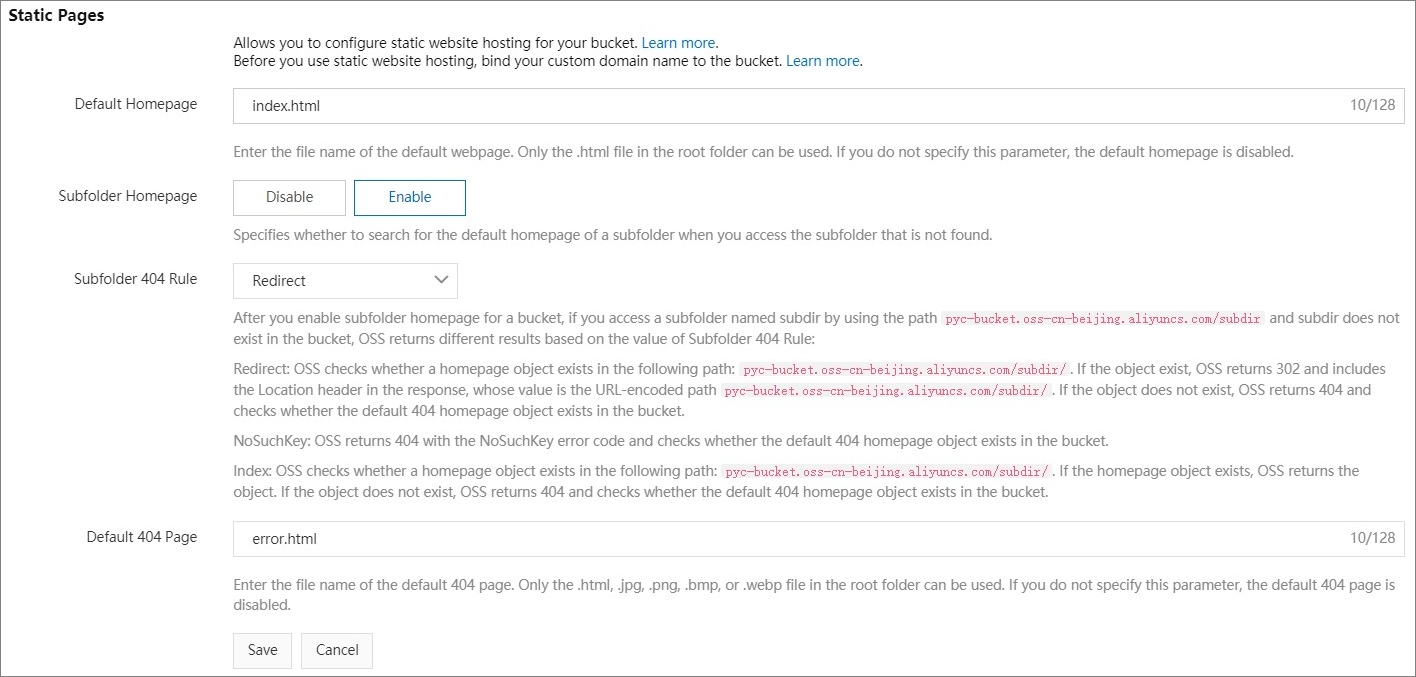
On the Static Pages tab, click Settings and configure the parameters based on your use case. Option A: Subfolder homepage disabled (recommended for simple sites) Use this option when you want all directory requests (URLs ending with
/) to return the root-level homepage. Option B: Subfolder homepage enabled (for sites with directory structure) Use this option when each subdirectory has its ownindex.html, and you want requests to subdirectory URLs to serve that subdirectory's homepage. Subfolder 404 rule options The following example usesexamplediras the non-existent object athttps://examplebucket.oss-cn-hangzhou.aliyuncs.com/exampledir.Parameter Description Default homepage The homepage OSS returns when a browser accesses the static website's domain name. Set to index.html.Subfolder homepage Select Disabled. Requests to the root domain or any URL ending with /return the root-level index page.Default 404 page The error page OSS returns when a browser requests a file that does not exist. Must be a file in the root directory. Set to error.html.Error page status code The HTTP status code for the error page response. Set to 404 or 200. Parameter Description Default homepage The homepage OSS returns when a browser accesses the static website's domain name. Set to index.html.Subfolder homepage Select Enabled. Requests to the root domain return the root-level index page. Requests to a URL ending with /return the index page of the corresponding directory. For example, accessinghttps://examplebucket.oss-cn-hangzhou.aliyuncs.com/subdir/returnsindex.htmlin thesubdir/folder.Subfolder 404 rule Determines the response when a request targets a non-existent object. See the rule descriptions below this table. Default 404 page The error page OSS returns when a browser requests a file that does not exist. Must be a file in the root directory. Set to error.html.Error page status code The HTTP status code for the error page response. Set to 404 or 200. Rule Behavior Redirect (default) Checks if exampledir/index.htmlexists. If it does, returns a 302 redirect tohttps://examplebucket.oss-cn-hangzhou.aliyuncs.com/exampledir/index.html. If not, returns 404 and checks forerror.html. Iferror.htmlalso does not exist, returns a 404 status code.NoSuchKey Directly returns 404 and checks for error.html.Index Checks if exampledir/index.htmlexists. If it does, returns 200 with the file content. If not, checks forerror.html.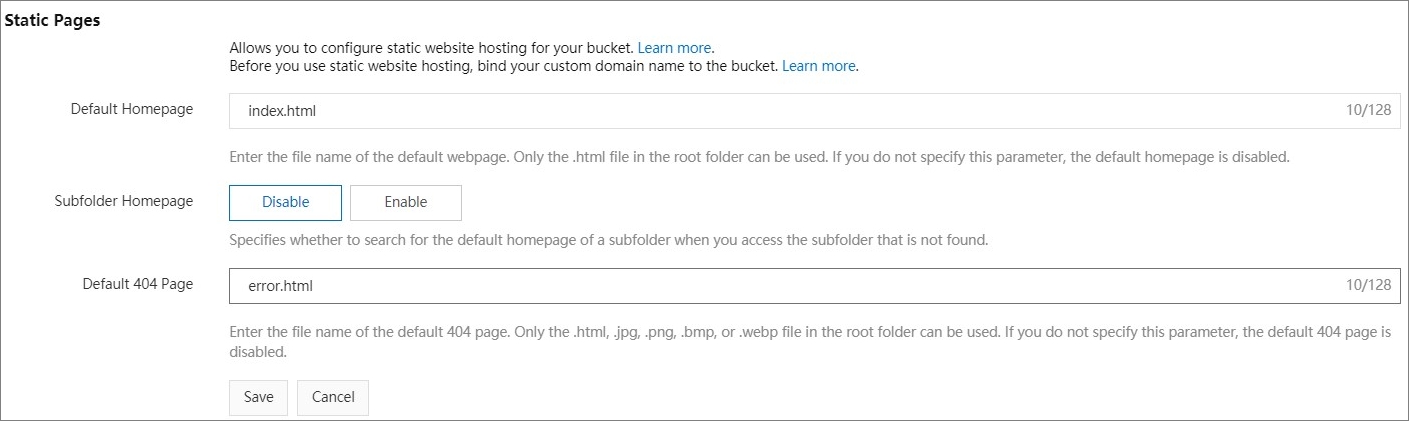
Click Save.
Step 2: Upload the default homepage
Create a file named
index.htmlwith the following content:<html> <head> <title>My Website Home Page</title> <meta charset="utf-8"> </head> <body> <p>Now hosted on OSS.</p> </body> </html>Upload
index.htmlto the root directory ofexamplebucket. Set the object ACL topublic-read.If the bucket contains subdirectories (such as
subdir/), uploadindex.htmlto each subdirectory as well. Set the object ACL topublic-readfor each.
Step 3: Upload the default 404 page
Create a file named
error.htmlwith the following content:<html> <head> <title>Hello OSS!</title> <meta charset="utf-8"> </head> <body> <p>This is error 404 page.</p> </body> </html>Upload
error.htmlto the root directory ofexamplebucket. Set the object ACL topublic-read.
Set up static website hosting using an Alibaba Cloud SDK
Set up static website hosting using ossutil
For ossutil instructions, see put-bucket-website.
Set up static website hosting using the RESTful API
For custom integrations that require direct API calls, see PutBucketWebsite. Direct API calls require you to compute request signatures manually.
FAQ
Why is my subdirectory returning the root homepage instead of the subdirectory homepage?
The subfolder homepage feature must be enabled. In the Static Pages settings, set Subfolder homepage to Enabled and upload index.html to each subdirectory with ACL set to public-read.