Can you delete specific tags from a bucket?
This topic describes different methods for deleting specific tags from a bucket in Object Storage Service (OSS).
Procedure
OSS console
-
Log on to the OSS console.
-
In the left-side navigation pane, click Buckets. On the page that appears, click the name of the target bucket.
-
In the left-side navigation pane, choose Bucket Settings.
-
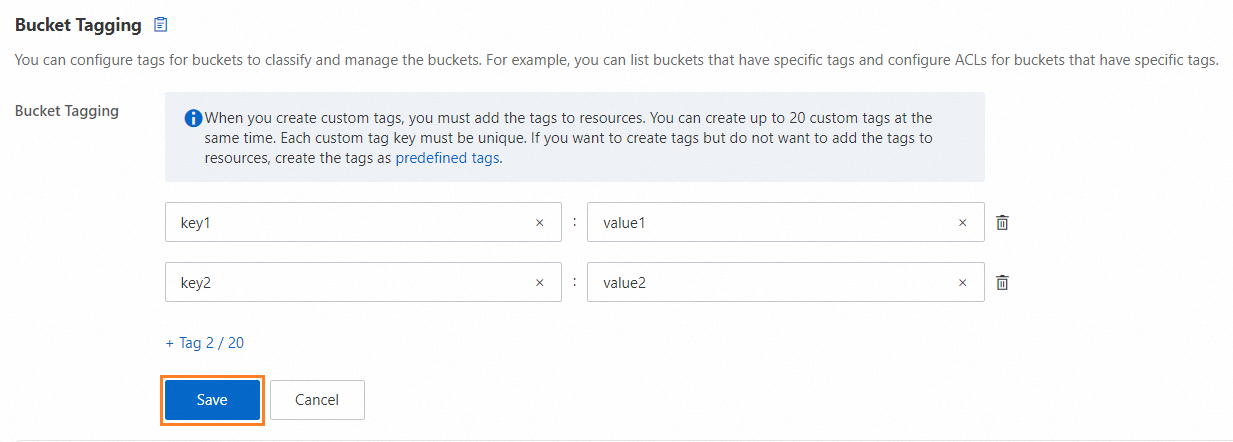
On the Bucket Tagging page, click Settings.
-
Click the
 icon next to the tag that you want to delete and then click Save.
Alibaba Cloud SDKs
Only the Alibaba Cloud SDKs for Java, PHP, Python, and Go allow you to delete specific tags from a bucket.
With an Alibaba Cloud SDK for a different programming language, you can delete a specific tag by overwriting the bucket's entire tag set. For example, if a bucket has two tags (key1:value1 and key2:value2) and you want to delete the key2:value2 tag, you can set a new tag set that contains only the key1:value1 tag.
For more information about setting bucket tags, see Manage bucket tags.
Java
import com.aliyun.oss.*;
import com.aliyun.oss.common.auth.*;
import com.aliyun.oss.common.comm.SignVersion;
import com.aliyun.oss.model.GenericRequest;

public class Demo {
    public static void main(String[] args) throws Throwable {
        // In this example, the endpoint of the China (Hangzhou) region is used. Specify your actual endpoint.
        String endpoint = "https://oss-cn-hangzhou.aliyuncs.com";
        // Obtain access credentials from environment variables. Before you run the sample code, make sure that the OSS_ACCESS_KEY_ID and OSS_ACCESS_KEY_SECRET environment variables are configured.
        EnvironmentVariableCredentialsProvider credentialsProvider = CredentialsProviderFactory.newEnvironmentVariableCredentialsProvider();
        // Specify the name of the bucket. Example: examplebucket.
        String bucketName = "examplebucket";
        // Specify the region in which the bucket is located. For example, if the bucket is located in the China (Hangzhou) region, set the region to cn-hangzhou.
        String region = "cn-hangzhou";

        // Create an OSSClient instance.
        // Call the shutdown method to release resources when the OSSClient is no longer in use.
        ClientBuilderConfiguration clientBuilderConfiguration = new ClientBuilderConfiguration();
        clientBuilderConfiguration.setSignatureVersion(SignVersion.V4);
        OSS ossClient = OSSClientBuilder.create()
        .endpoint(endpoint)
        .credentialsProvider(credentialsProvider)
        .clientConfiguration(clientBuilderConfiguration)
        .region(region)
        .build();

        try {
            // Delete the specific tag that is configured for the bucket.
            GenericRequest genericRequest  = new GenericRequest();
            genericRequest.setBucketName(bucketName);
            // For example, delete the tag whose key is key1.
            genericRequest.addParameter("tagging","key1");
            ossClient.deleteBucketTagging(genericRequest);
        } catch (OSSException oe) {
            System.out.println("Caught an OSSException, which means your request made it to OSS, "
                    + "but was rejected with an error response for some reason.");
            System.out.println("Error Message:" + oe.getErrorMessage());
            System.out.println("Error Code:" + oe.getErrorCode());
            System.out.println("Request ID:" + oe.getRequestId());
            System.out.println("Host ID:" + oe.getHostId());
        } catch (ClientException ce) {
            System.out.println("Caught an ClientException, which means the client encountered "
                    + "a serious internal problem while trying to communicate with OSS, "
                    + "such as not being able to access the network.");
            System.out.println("Error Message:" + ce.getMessage());
        } finally {
            if (ossClient != null) {
                ossClient.shutdown();
            }
        }
    }
}
PHP
<?php
if (is_file(__DIR__ . '/../autoload.php')) {
    require_once __DIR__ . '/../autoload.php';
}
if (is_file(__DIR__ . '/../vendor/autoload.php')) {
    require_once __DIR__ . '/../vendor/autoload.php';
}

use OSS\OssClient;
use OSS\Core\OssException;
use OSS\Model\Tag;

// Obtain access credentials from environment variables. Before you run this sample code, make sure that the OSS_ACCESS_KEY_ID and OSS_ACCESS_KEY_SECRET environment variables are set.
$accessKeyId = getenv("OSS_ACCESS_KEY_ID");
$accessKeySecret = getenv("OSS_ACCESS_KEY_SECRET");
// The China (Hangzhou) region is used in this example. Specify the actual region.
$endpoint = "https://oss-cn-hangzhou.aliyuncs.com";
// Specify the bucket name. For example, examplebucket.
$bucket= "examplebucket";

$ossClient = new OssClient($accessKeyId, $accessKeySecret, $endpoint, false);

try {
    // Delete specific tags from the bucket.
    $tags = array();
    $tags[] = new Tag("key1", "value1");
    $tags[] = new Tag("key2", "value2");
    $ossClient->deleteBucketTags($bucket, $tags);

} catch (OssException $e) {
    printf(__FUNCTION__ . ": FAILED\n");
    printf($e->getMessage() . "\n");
    return;
}

print(__FUNCTION__ . ": OK" . "\n");
Python
# -*- coding: utf-8 -*-
import oss2
from oss2.credentials import EnvironmentVariableCredentialsProvider
# Obtain access credentials from the environment variables. Before you run the sample code, make sure that you have configured environment variables OSS_ACCESS_KEY_ID and OSS_ACCESS_KEY_SECRET.
auth = oss2.ProviderAuth(EnvironmentVariableCredentialsProvider())
# Specify the endpoint of the region in which the bucket is located. For example, if the bucket is located in the China (Hangzhou) region, set the endpoint to https://oss-cn-hangzhou.aliyuncs.com.
# Specify the name of the bucket. Example: examplebucket.
bucket = oss2.Bucket(auth, 'https://oss-cn-hangzhou.aliyuncs.com', 'examplebucket')

params = dict()
# Delete the tag whose key is key1.
params['tagging'] = "key1"
# Delete the specified tag of the bucket.
result = bucket.delete_bucket_tagging(params=params)
# Display the returned HTTP status code.
print('http status:', result.status)
Go
package main

import (
	"fmt"
	"os"

	"github.com/aliyun/aliyun-oss-go-sdk/oss"
)

func main() {
	// Obtain access credentials from environment variables. Before you run this sample code, make sure that the OSS_ACCESS_KEY_ID and OSS_ACCESS_KEY_SECRET environment variables are set.
	provider, err := oss.NewEnvironmentVariableCredentialsProvider()
	if err != nil {
		fmt.Println("Error:", err)
		os.Exit(-1)
	}

	// Create an OSSClient instance.
	// Set yourEndpoint to the Endpoint of your bucket. For example, for the China (Hangzhou) region, set the Endpoint to https://oss-cn-hangzhou.aliyuncs.com. For other regions, use the actual Endpoint.
	// Set yourRegion to the region where your bucket is located. For example, for the China (Hangzhou) region, set the region to cn-hangzhou. For other regions, use the actual region.
	clientOptions := []oss.ClientOption{oss.SetCredentialsProvider(&provider)}
	clientOptions = append(clientOptions, oss.Region("yourRegion"))
	// Set the signature version.
	clientOptions = append(clientOptions, oss.AuthVersion(oss.AuthV4))
	client, err := oss.New("yourEndpoint", "", "", clientOptions...)
	if err != nil {
		fmt.Println("Error:", err)
		os.Exit(-1)
	}

	// Specify the bucket name.
	// Delete the bucket tag whose key is key1.
	err = client.DeleteBucketTagging("examplebucket", oss.AddParam("tagging", "key1"))
	if err != nil {
		fmt.Println("Error:", err)
		os.Exit(-1)
	}
}
ossutil
You can use the ossutil command-line tool to delete tags from a bucket. For information about how to install ossutil, see Install ossutil.
The following example shows how to delete the tag set from the examplebucket bucket.
ossutil api delete-bucket-tags --bucket examplebucketossutil does not support deleting specific tags. It can only delete all tags from a bucket at once. You can overwrite the existing tag set of the bucket. For example, if a bucket has two tags (key1:value1 and key2:value2) and you want to delete the key2:value2 tag, you can set a new tag set that contains only the key1:value1 tag.
For more information about this command, see delete-bucket-tags.
API reference
The methods in this topic are based on API operations. For custom requirements, you can make REST API requests directly, which requires you to manually write code to calculate the signature. For more information, see DeleteBucketTags.