API FAQ
This document answers frequently asked questions about API operations.
1. Do I need to call CreateJobGroup every time I assign a job?
Yes, you do. A job group is a logical group for outbound call jobs. For example, you can group outbound call jobs for the same day or the same batch into a single job group. For the same JobGroup, you can call the AssignJobs API operation multiple times to assign jobs. To ensure the performance of AssignJobs, assign no more than 25 jobs per call.
2. A job completion message returns a job ID. How do I associate this ID with the return parameters of the job I initiated?
You do not need to associate the job completion message with the return value of the AssignJobs API operation. Instead, you can associate the phoneNumber and referenceId input parameters of the AssignJobs API operation with the corresponding values in the message body. One job corresponds to one contact. The contact information includes parameters such as phoneNumber and referenceId. The referenceId is a unique business identifier for the contact, such as a membership number.
3. What is the process for integrating with a message queue (MQ)? (a. Dependency package version, b. Is the message type normal message?)
For information about the required MQ dependency versions, see the MQ documentation. You must use normal messages.
4. List of MQ Service Official Websites
https://www.aliyun.com/product/rocketmq?spm=a2c4g.11186623.2.9.291c2545nsym2O
5. Post-integration API call sequence:
First, call the CreateJobGroup API operation, and then call the AssignJobs API operation. For more information, see the developer guide for quick integration: https://help.aliyun.com/document_detail/166158.html?spm=a2c4g.11186623.6.561.140b59afLUhSYJ
6. How can I find out which tags were hit for a phone number? Which API operation provides this information?
After each call job is finished, a job completion message is sent. The message contains the customer's phone number and the job ID from the job assignment. Using the job ID, you can call the DescribeJob API operation to retrieve information about the tags that were hit during the call for that job. The Summary in the DescribeJob response contains all the tags and values that were hit during the call. The Summary.SummaryName parameter is the tag name, and the Summary.Content parameter is the tag value.
7. How do I subscribe to a message queue?
For more information, see https://help.aliyun.com/document_detail/29551.html.
https://help.aliyun.com/document_detail/169008.html?
8. After I enable RocketMQ, how do I get job completion information for outbound calls?
Contact the Intelligent Outbound Call product and operations team and provide the following information:
1) The AccessKey ID and AccessKey secret of a RAM user that has permissions for both outbound calls and RocketMQ.
2) The topic ID and group ID for RocketMQ.
3) The outbound call business ID.
4) Information about the RocketMQ message queue instance.
9. I configured a RocketMQ message queue but cannot receive job completion messages. What is the problem?
This may be because your RocketMQ instance is not a public network instance. You must use a public network instance to receive job completion messages.
10. Which API operation do I call to get the status of a job group? What are the possible statuses?
Call the DescribeJobGroup API operation to retrieve the status of a job group. The possible statuses are Scheduling (0), Executing (1), Succeeded (2), Paused (3), Failed (4), and Canceled (5).
11. Common API error messages
1. The API call returns the following error: Permission.Instance : You are not permitted to operate this instance. User=123456789, Instance=null.
Check the following items:
1) If you must provide an outbound call instance ID, check whether the instance ID belongs to your tenant and whether you have the required permissions.
2) If you do not need to provide an outbound call instance ID, check whether you provided the correct user-related ID, AccessKey ID, and AccessKey secret.
3) If the previous checks pass, verify that the egress IP address used to access the outbound call API is added to the IP address whitelist in RAM. This issue can occur when you add a new server.
2. The CreateJobGroup API call returns the following error: Handle job group error
Check the following items:
1) Check whether the scenario (ScriptId) called in your code is in the Published state. You cannot initiate outbound call jobs if the scenario is in the Draft state.
2) Check whether the scenario you are calling has been deleted in the console.
3) Check whether the script ID belongs to the corresponding business ID.
4) If you added a new server, check whether the new server's egress IP address is added to the IP address whitelist for accessing the outbound call product in RAM authentication.
3. Error when calling the AssignJobs API: ParameterNull.Job
Check whether JobJson was uploaded in your code.
4. Is the honorific parameter required in AssignJobs?
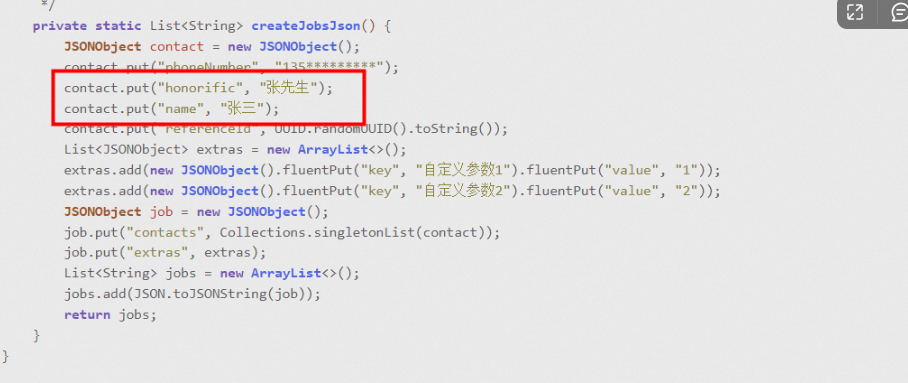
Yes, it is a required parameter. Even if your script does not use the name and honorific parameters, you must still pass a value. The backend does not validate the content of these parameters. The name and honorific parameters are commonly used in outbound call scenarios, and any values you pass for them are directly replaced in the script.
5. The ModifyJobGroup API call returns the following error: Handle job group error;
When you call the ModifyJobGroup API operation to modify job group information, the job group must be in the Draft or Suspended state. You cannot modify a job group if it is in another state, such as Completed, Scheduling, Paused, or Stopped. Check the status of the job group before you call the operation.