Grant permissions for a business instance
When you grant permissions for a business instance, the authorized account can operate only that specific instance and cannot access other instances.
Introduction
You can configure stricter permission policies for specific instances as needed.
Procedure
The user who performs these steps must have administrative permissions for Resource Access Management (RAM).
Step 1: Log on to the Resource Access Management (RAM) console. Go to the Policies page and create a policy.
Step 2: Select Script Editor
Step 3: Copy the following script. Replace the placeholders with your Alibaba Cloud account ID and the ID of the business instance that you want to authorize.
NoteTo authorize an account for multiple service instances:
{
"Effect": "Allow",
"Action": "outboundbot:*",
"Resource": "acs:outboundbot:cn-shanghai:1136759417152033:instance/35d744ec-47e7-4738-bb61-eac0a6941415"
}
You can copy this code again, append it to the script, and change the business ID.
ImportantThe following code block is an example and includes only common API operations. It does not grant permissions for all API operations. To grant permissions for an API operation that is not included in the example, add "outboundbot:APIName" to the Action array.
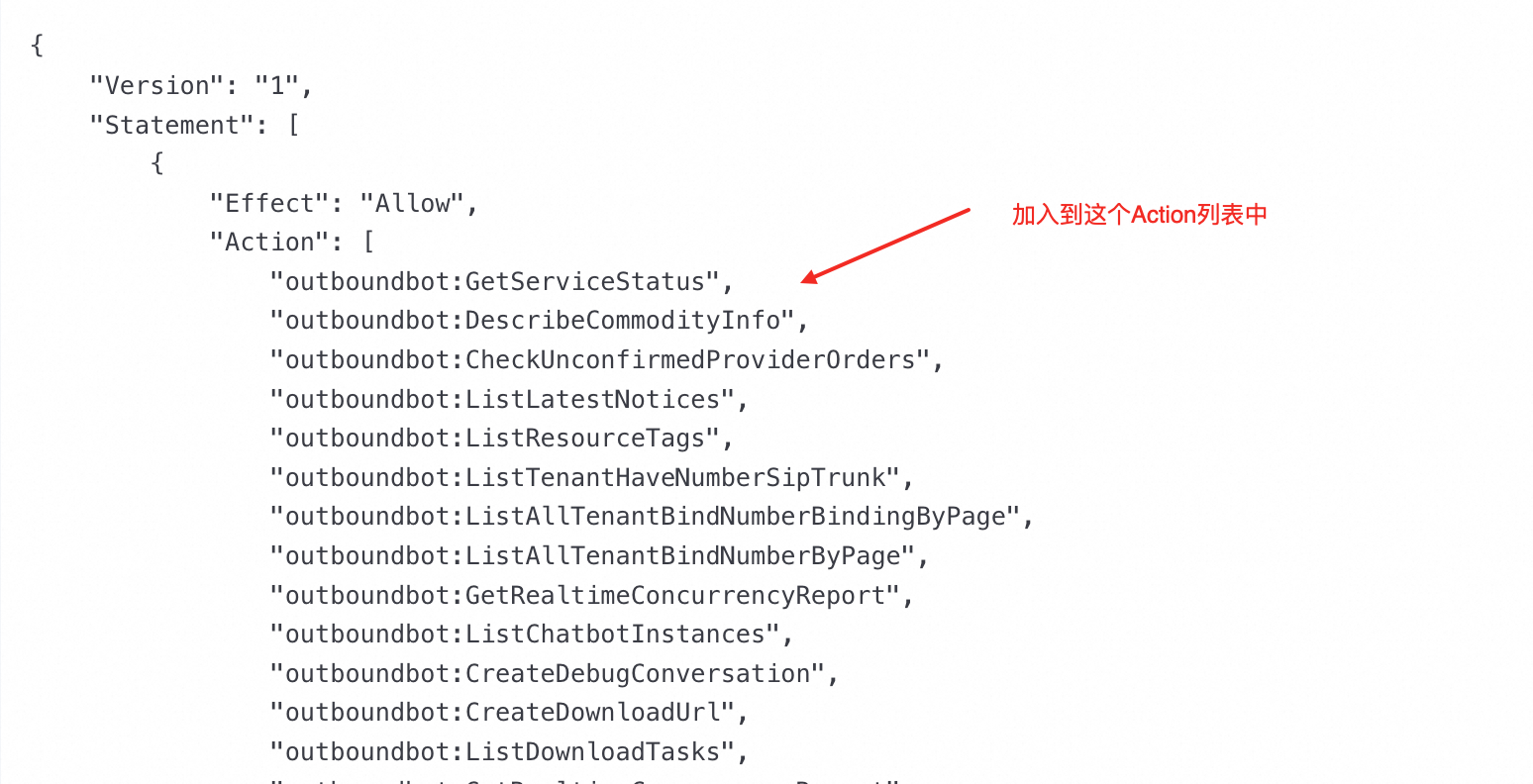
{
    "Version": "1",
    "Statement": [
        {
            "Effect": "Allow",
            "Action": [
                "outboundbot:GetServiceStatus",
                "outboundbot:DescribeCommodityInfo",
                "outboundbot:CheckUnconfirmedProviderOrders",
                "outboundbot:ListLatestNotices",
                "outboundbot:ListResourceTags",
                "outboundbot:ListTenantHaveNumberSipTrunk",
                "outboundbot:ListAllTenantBindNumberBindingByPage",
                "outboundbot:ListAllTenantBindNumberByPage",
                "outboundbot:GetRealtimeConcurrencyReport",
                "outboundbot:ListChatbotInstances",
                "outboundbot:CreateDebugConversation",
                "outboundbot:CreateDownloadUrl",
                "outboundbot:DescribeTenantBindNumber",
                "outboundbot:TenantBindNumber",
                "outboundbot:ListDownloadTasks",
                "outboundbot:GetRealtimeConcurrencyReport",
                "outboundbot:GetConcurrencyTrendingReport",
                "outboundbot:DescribePurchaseInfo",
                "outboundbot:DescribePresetStatus",
                "outboundbot:DescribeCallOverview",
                "outboundbot:DescribePresetInstance",
                "outboundbot:ListInstances",
                "outboundbot:ListJobGroupsAsync",
                "outboundbot:GetEmptyNumberNoMoreCallsInfo",
                "outboundbot:Log",
                "outboundbot:GetAgentProfileTemplate",
                "outboundbot:SubmitPromptOptimizationTask",
                "outboundbot:GetPromptOptimizationTaskResult",
                "outboundbot:ListDebugConversations",
                "outboundbot:GetVersion",
                "outboundbot:GetSummaryInfo",
                "outboundbot:ListSystemAgentProfiles",
                "outboundbot:ListConversationDetails",
                "outboundbot:GenerateUploadUrl"
            ],
            "Resource": "*"
        },
        {
            "Effect": "Allow",
            "Action": "notifications:ReadMessageList",
            "Resource": "*"
        },
        {
            "Effect": "Allow",
            "Action": "aegis:DescribeAccesskeyLeakList",
            "Resource": "*"
        },
        {
            "Effect": "Allow",
            "Action": "outboundbot:*",
            "Resource": "acs:outboundbot:cn-shanghai:<YourAlibabaCloudAccountID>:instance/<TheInstanceIDToAssign>"
        }
    ]
}
Step 4: Grant the policy to the user account.