A/B testing integration
-
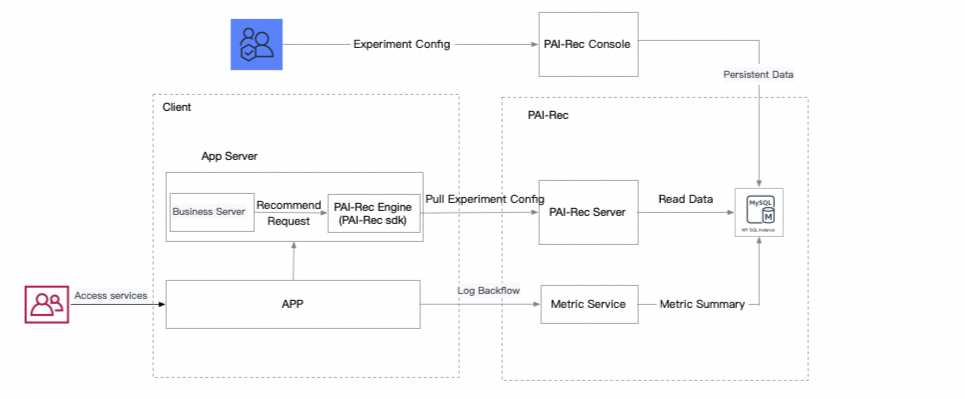
In the diagram, "Client" refers to your client-side service. You can configure experiments in the PAI-Rec console.
-
After you integrate the PAI-Rec engine, the service automatically fetches experiment configurations upon startup. When a recommendation request arrives, the SDK matches the request to an experiment and retrieves the corresponding experiment parameters. The engine uses these parameters to modify its behavior, such as using different recall strategies or calling different ranking models.
-
PAI-Rec provides predefined experiment parameters for your configurations. Use the exact parameter names as specified. Otherwise, the engine cannot find the parameters even if an experiment is matched.
|
Parameter |
Type |
Description |
Example |
|
default.RecallNames |
json array |
A list of all recall strategies to be used. |
"default.RecallNames":[ "HomepageEtrecRecall", "HomepageDssmRecall"] |
|
"recall." + The name of the specific recall |
json object |
Defines the configuration for a new recall. |
{"recall.MyRecall":{"version":"v2"}} |
|
filterNames |
json array |
Lists the filter processes. |
{"filterNames":["UniqueFilter", "UserExposureFilter"]} |
|
default.SortNames |
json array |
Lists the re-ranking processes. |
{"default.SortNames":["ItemRankScore"]} |
|
rankconf |
recconf.RankConfig |
The configuration for the ranking algorithm. |
"rankconf":{"RankAlgoList":["pai_homepage_fm"],"RankScore":"${pai_homepage_fm}"} |
|
features.scene.name |
string |
The name of the recommendation scenario for feature loading. |
"homepagetf" |
|
generalRankConf |
recconf.GeneralRankConfig |
The configuration for coarse ranking. This includes user feature retrieval and the RankConf algorithm configuration. For details, see Configure coarse ranking. |
{"generalRankConf":{"FeatureLoadConfs":[{"FeatureDaoConf":{}}],"RankConf":{},"ActionConfs":[]}} |
|
coldStartGeneralRankConf |
recconf.ColdStartGeneralRankConfig |
The configuration for coarse ranking during a cold start. For details, see Configure coarse ranking. |
{"coldStartGeneralRankConf":{"FeatureLoadConfs":[{"FeatureDaoConf":{}}],"RankConf":{},"ActionConfs":[]}} |
|
coldStartRankConf |
recconf.ColdStartRankConfig |
Specifies the ranking algorithm for the ranking stage in a cold start scenario. |
{"coldStartRankConf":{"RecallName":"ColdStartRecall", "AlgoName":"linucb"}} |
        func (c *HomeFeedController) makeRecommendContext() {
        c.context = context.NewRecommendContext()
        c.context.Size = c.param.Limit
        c.context.Param = &c.param
        c.context.RecommendId = c.RequestId
        c.context.Config = recconf.Config
        c.context.Debug = c.param.Debug
        abcontext := model.ExperimentContext{
                Uid:         c.param.DistinctId,
                RequestId:   c.RequestId,
                FilterParams: map[string]interface{}{},
        }
        if abtest.GetExperimentClient() != nil {
                c.context.ExperimentResult = abtest.GetExperimentClient().MatchExperiment(c.param.SceneId, &abcontext)
                log.Info(c.context.ExperimentResult.Info())
        }
}-
To adjust experiment parameters in your code, retrieve them from the
context.ExperimentResultobject within aRecommendContextobject.
        count := r.recallCount
        if context.ExperimentResult != nil {
                count = context.ExperimentResult.GetLayerParams("").GetInt("recall.base.count", count)
        }
        fmt.Println("test count", count)
The GetLayerParams method retrieves experiment parameters from a specific layer. You can then use methods like Get, GetInt, GetFloat, or GetInt64 to access a specific parameter. The first argument for these methods is the parameter name, and the second is a default value returned if the parameter is not found.
Use dynamic parameters
Similar to using experiment parameters, you can use custom parameters to change the engine's behavior at runtime. This allows you to dynamically modify the service without a restart.
In the left navigation pane, click system configuration > parameter management. Select the current development environment, such as Daily, and the recommendation scenario, such as HomePage. Then, click Create Parameter to add a custom parameter. For example, create a parameter with the name custom_param and the value custom.
// Get the name of the recommendation scenario.
scene := context.GetParameter("scene").(string)
// Retrieve the list of parameters for the scenario, and then use a Get* function to obtain a specific parameter value.
count := abtest.GetParams(scene).GetInt("count", 100)
fmt.Println("recall count:", count)