AI portrait
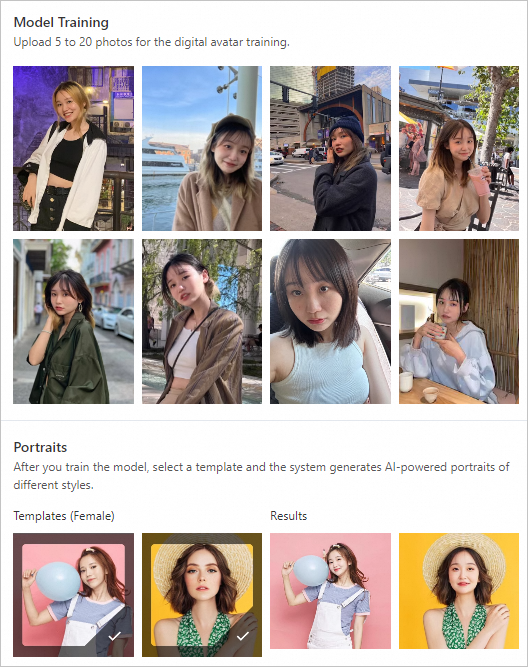
AI Portrait creates custom digital avatars. Upload 5 to 20 photos to train a personalized model, then call the model through an API to generate professional-quality portraits in various styles.
Features
AI Portrait involves the following operations:
Image quality check: Evaluates uploaded images to ensure they meet training requirements.
AI portrait training: Upload 5 to 20 photos to train a custom digital avatar model.
AI portrait creation: Call your digital avatar model through an API and select templates to generate professional-quality portraits.
Facial attribute analysis (optional): A general image analysis feature of multimedia analysis. It detects facial attributes such as face orientation, gender, and face shape from face images.
Deployment options
AI Portrait can be deployed in the following ways:
Method 1: Call the AI Portrait API operations. For more information, see SDK usage notes.
Method 2: Deploy a service using Elastic Algorithm Service (EAS). Portrait Camera Solution.
Billing
Billing for API operations.
Free trial quota: Includes 5 free portrait training calls and 200 free portrait creation calls. Usage beyond the quota is charged at list price.
AI Portrait supports pay-as-you-go and subscription (resource plan) billing. AI Portrait Billing.
EAS deployment pricing.
Demos
Try the code workflow in DSW. For more information, see AI Portrait Generation Example Based on EasyPhoto (WebUI Version).
You can experience the frontend UI in ModelScope.
Explore the open-source WebUI on GitHub.
For help with demos, search for group number 38250008552 in DingTalk to join the PAI AI Portrait partner group.
Get started
Activate AI Portrait
Activate AI Portrait before you start.
Log on to the PAI console.
In the navigation pane on the left, click Scenario-based Solution > AI Portrait.
On the AI Portrait page, click Activate Now. You are redirected to the Pay-As-You-Go Model Service page. Click Activate Now.
After activation, you can purchase a resource plan for a lower price. Without a resource plan, you are charged per call on a pay-as-you-go basis.
On the AI Portrait page, click Purchase Point Package.
On the Subscription Model Service page, configure the parameters, click Buy Now, and complete the payment.
Apply for usage qualification
Join the business group
To call AI Portrait API operations, join the business group. Add DingTalk contact tdaj393 or scan the QR code on the console with the note AI Portrait Application. Submit the User Agreement to the group for review.
Prepare the User Agreement
B2B customers must sign a privacy authorization agreement with end users (B2C) before providing the AI Portrait service.
If the B2B customer has an existing privacy policy, add the following clauses and submit the updated policy to the AI Portrait business group for review.
If no existing agreement exists, draft a privacy policy based on the following clauses and submit it to the business group for review.
Required clauses (modifiable by the B2B customer's legal department):
Information Upload: The product generates content from your uploaded portrait photos. We process this information because it is required to provide the service. In accordance with legal requirements, we encrypt your uploaded information during transmission and storage to ensure its security. We do not extract identifiable information from your uploaded images or use them for identification purposes. To upload this information, we will request your permission to access your camera and photo album.
In the information collection section, add: "Other rules for collecting and using personal information: When you use this service, we process the portraits you upload. If the information you provide contains the personal information of other users, you must ensure that you have obtained legal authorization before providing this personal information to us."
In the data usage and sharing section, add: "Delegated processing: We may delegate the processing of your personal information to our authorized partners so that they can provide certain services or perform functions on our behalf. We will only delegate the processing of your information for the legal, legitimate, necessary, specific, and explicit purposes stated in this policy. Authorized partners can only access the information necessary to perform their duties. If an authorized partner uses your information for purposes not delegated by us, they must obtain your separate consent."
SDK usage
The API call flow is as follows:

Note the following:
Image generation is subject to laws and regulations. Alibaba Cloud Content Moderation reviews all images and templates for compliance. Some content may be filtered in error.
Before model training, call the
aigc_images_checkoperation to check the image quality.Compare the images you sent with the count returned by
aigc_images_checkto determine how many were filtered. Decide whether to continue training or upload new images.If all images are filtered, the server returns
all images are invalid. At least one valid image is required for training.Check the
aigc_images_checkresponse for face detection, decoding, or other issues in valid images.
Supported SDKs.
API SLA
API response times vary by resource availability. For guaranteed SLA, contact your sales manager or join the group through the AI Portrait console to request a solution upgrade.
API
Queries per second (QPS)
Response speed
Portrait Training (aigc_images_train)
2
10 minutes to 24 hours.
Portrait Training Query (get_async_job)
20
1 second.
Solo Portrait Creation (aigc_images_create)
10
15 seconds to 5 minutes.
Multi-person Portrait Creation (aigc_images_create_by_multi_model_ids)
5
15 × N seconds to 5 × N minutes, where N is the number of people.