Grant permissions
Before using LangStudio in Platform for AI (PAI), you must complete two steps: authorize LangStudio to access dependent cloud services, and grant your operation account the appropriate permissions.
Due to a product strategy adjustment, PAI-LangStudio will be retired on March 9, 2027 at 16:00. After the retirement date, you will no longer be able to use LangStudio features in the PAI console, and all associated support services will also be discontinued. For more information, see PAI-LangStudio retirement and migration guide.
Minimum required setup
If you are setting up LangStudio for the first time, complete these steps in order:
Activate dependent services — LangStudio depends on Object Storage Service (OSS), Simple Log Service (SLS), Managed Service for OpenTelemetry, and Elastic Algorithm Service (EAS) of PAI. Activate these services from the PAI console when prompted.
Authorize the LangStudio service role — In the PAI console, click Authorize on the Quick Authorization page to assign the
AliyunPAILangStudioDefaultRoleservice role to your Alibaba Cloud account. The system handles this automatically; no manual role configuration is required.Grant operation account permissions — If you are using a RAM user to manage LangStudio, assign the appropriate workspace member role in PAI. If you are using an Alibaba Cloud account directly, no additional permissions are needed.
For the full authorization procedure, see Authorize LangStudio for the first time.
Dependent cloud services
LangStudio integrates with the following cloud services. Each service must be activated before you can use the corresponding LangStudio feature. If you activate a service using a RAM user, attach the required RAM policy to that user first.
PAI — LangStudio module
Operation account | Details | Reference |
Alibaba Cloud account | No additional authorization required. | N/A |
RAM user (recommended) | PAI provides workspace member roles with different permission scopes. Assign the appropriate member role to each RAM user. |
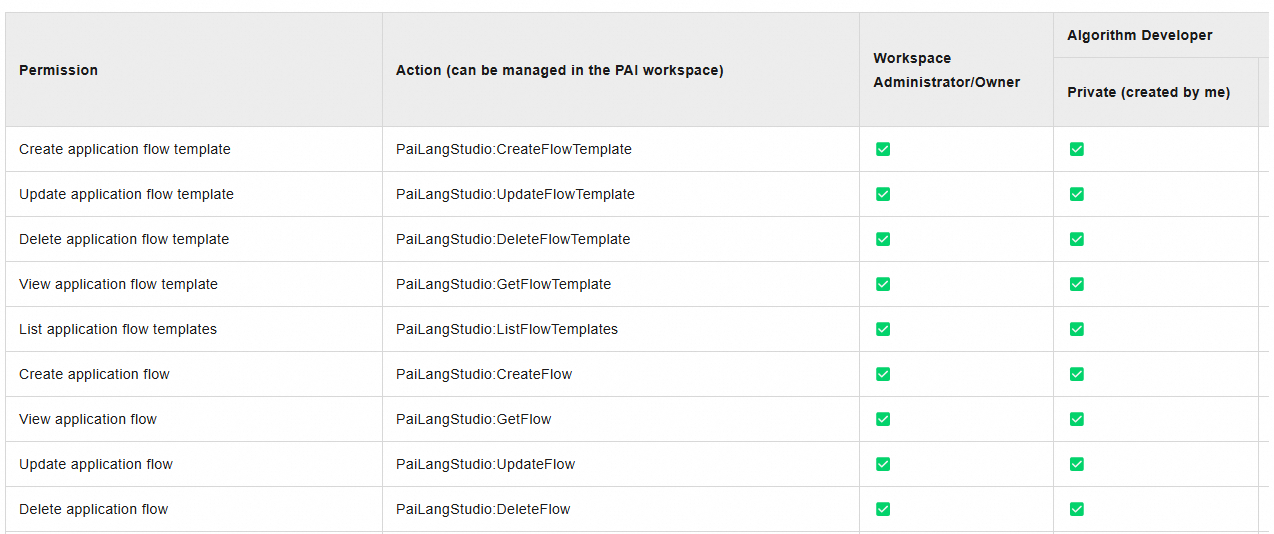
For a full list of member role permissions, see List of roles and permissions — LangStudio.
Object Storage Service (OSS)
OSS stores code and configuration files, development and debugging logs, and service snapshot files generated when you deploy an application flow.
Scenario | Details | Reference |
Activate OSS | Use an Alibaba Cloud account — no additional authorization required. To activate with a RAM user, attach AliyunOSSFullAccess to the RAM user. | |
Use OSS | OSS supports fine-grained RAM policies. Create a bucket to store objects used by LangStudio. |
Managed Service for OpenTelemetry
Managed Service for OpenTelemetry provides trace analysis when you develop and deploy LLM application flows.
Scenario | Details | Reference |
Activate Managed Service for OpenTelemetry | Use an Alibaba Cloud account — no additional authorization required. To activate with a RAM user, attach AliyunARMSFullAccess to the RAM user. | |
View trace analysis | View trace logs from the LangStudio console or the Managed Service for OpenTelemetry console. | — |
Simple Log Service (SLS)
SLS is an indirect dependency — it stores log data for Managed Service for OpenTelemetry.
Scenario | Details | Reference |
Activate Simple Log Service | Use an Alibaba Cloud account — no additional authorization required. To activate with a RAM user, attach AliyunLogFullAccess to the RAM user. | Storage resource hierarchy / Create and authorize a RAM user |
Virtual Private Cloud (VPC)
During application flow deployment, LangStudio queries your VPC configuration to correctly deploy the Elastic Algorithm Service (EAS).
Scenario | Details | Reference |
Activate VPC | Use an Alibaba Cloud account — no additional authorization required. To activate with a RAM user, attach AliyunVPCFullAccess to the RAM user. |
PAI
PAI workspace access is required to use LangStudio modules.
Scenario | Details | Reference |
Activate PAI | Use an Alibaba Cloud account — no additional authorization required. To activate with a RAM user, attach AliyunPAIFullAccess to the RAM user. | Activate PAI and create a default workspace / Log on as a RAM role and use PAI |
DataWorks
DataWorks is required for scheduled knowledge base updates. Activate it only if you use this feature.
Scenario | Details | Reference |
Activate DataWorks | Use an Alibaba Cloud account — no additional authorization required. To activate with a RAM user, attach AliyunDataWorksFullAccess to the RAM user. |
Authorize LangStudio for the first time
The first time you access LangStudio, complete the following steps to authorize the service role and activate dependent services.
Only Alibaba Cloud accounts can authorize the AliyunPAILangStudioDefaultRole service role. RAM users cannot perform this step.
Log on to the PAI console. In the right-side pane, select your workspace and click Enter LangStudio.
Click Authorize.
On the Quick Authorization page, click Confirm Authorization and complete the security verification. The system automatically assigns the
AliyunPAILangStudioDefaultRoleservice role to your account.Click Activate For Free to activate OSS, Simple Log Service, and Managed Service for OpenTelemetry.
Reference: Customize the LangStudio service role policy
Make sure you are familiar with RAM policies before modifying service role permissions. Incorrect changes can make LangStudio unavailable.
By default, LangStudio uses the AliyunPAILangStudioDefaultRole service role with the AliyunPAILangStudioDefaultRolePolicy policy. If you need finer-grained control over cloud resource access, replace the default policy with a custom one.
View the default policy
Log on to the RAM console. In the left navigation pane, choose Identities > Roles.
Search for AliyunPAILangStudioDefaultRole and click the role name.
On the Permissions tab, click the policy name to view and copy the default policy content.
The default policy grants the following permissions:
{
  "Version": "1",
  "Statement": [
    {
      "Action": [
        "eas:CreateService",
        "eas:ListServices",
        "eas:DescribeService",
        "eas:DeleteService",
        "eas:UpdateService",
        "eas:StartService",
        "eas:StopService"
      ],
      "Resource": "*",
      "Effect": "Allow"
    },
    {
      "Action": [
        "oss:GetObject",
        "oss:PutObject",
        "oss:DeleteObject",
        "oss:ListObjects"
      ],
      "Resource": "*",
      "Effect": "Allow"
    },
    {
      "Action": [
        "paillmtrace:GetXtraceToken"
      ],
      "Resource": "*",
      "Effect": "Allow"
    },
    {
      "Action": [
        "paidlc:CreateJob",
        "paidlc:DeleteJob",
        "paidlc:StopJob",
        "paidlc:GetJob",
        "paidlc:UpdateJob",
        "paidlc:ListJobs"
      ],
      "Resource": "*",
      "Effect": "Allow"
    },
    {
      "Action": [
        "paidsw:CreateInstance",
        "paidsw:DeleteInstance",
        "paidsw:UpdateInstance",
        "paidsw:StartInstance",
        "paidsw:StopInstance",
        "paidsw:GetInstance",
        "paidsw:ListInstances"
      ],
      "Resource": "*",
      "Effect": "Allow"
    },
    {
      "Action": "pai:AssumeUser",
      "Resource": "acs:pai:*:*:users/*",
      "Effect": "Allow"
    },
    {
      "Action": "ram:CreateServiceLinkedRole",
      "Resource": "*",
      "Effect": "Allow",
      "Condition": {
        "StringEquals": {
          "ram:ServiceName": "eas.pai.aliyuncs.com"
        }
      }
    },
    {
      "Action": [
        "dataworks:CreateWorkflowDefinition",
        "dataworks:UpdateWorkflowDefinition",
        "dataworks:GetWorkflowDefinition",
        "dataworks:ListWorkflowDefinitions",
        "dataworks:DeleteWorkflowDefinition",
        "dataworks:CreateDeployment",
        "dataworks:GetDeployment",
        "dataworks:ExecDeploymentStage",
        "dataworks:GetJobStatus",
        "dataworks:ImportWorkflowDefinition"
      ],
      "Resource": "*",
      "Effect": "Allow"
    },
    {
      "Action": [
        "paiflow:CreatePipelineRun",
        "paiflow:GetPipelineRun",
        "paiflow:DeletePipelineRun",
        "paidataset:CreateDataset",
        "paidataset:GetDataset",
        "paidataset:UpdateDataset",
        "paidataset:ListDatasets",
        "paidataset:DeleteDataset",
        "paidataset:CreateDatasetVersion",
        "paidataset:GetDatasetVersion",
        "paidataset:UpdateDatasetVersion",
        "paidataset:DeleteDatasetVersion",
        "paidataset:ListDatasetVersions"
      ],
      "Resource": "*",
      "Effect": "Allow"
    }
  ]
}
Create a custom policy
Create a custom policy using the script editor. The following example restricts OSS access to buckets tagged with
Product: PaiLangStudio, using the Condition element in RAM. Keep all other permission statements from the default policy unchanged.NoteOSS supports bucket tags in key-value format. Add the tag
Key: ProductandValue: PaiLangStudioto any bucket you want LangStudio to access. For details, see Manage bucket tags.{ "Version": "1", "Statement": [ { "Action": [ "oss:GetObject", "oss:PutObject", "oss:DeleteObject", "oss:ListObjects" ], "Resource": "*", "Effect": "Allow", "Condition": { "StringEquals": { "oss:BucketTag/Product": "PaiLangStudio" } } } ] }Name the new policy
CustomAliyunPAILangStudioDefaultRolePolicy.Attach
CustomAliyunPAILangStudioDefaultRolePolicyto theAliyunPAILangStudioDefaultRolerole and detachAliyunPAILangStudioDefaultRolePolicyfrom it. For details, see Grant permissions to a RAM role and Revoke permissions from a RAM role.
After the update, LangStudio accesses resources based on the modified policy.
Reference: Verify that the service role is assigned
To confirm that AliyunPAILangStudioDefaultRole is assigned to your Alibaba Cloud account:
Only Alibaba Cloud accounts can assign this service role. RAM users cannot.
Log on to the RAM console. In the left navigation pane, choose Identities > Roles.
On the Roles page, search for AliyunPAILangStudioDefaultRole.
If the role appears in the results, it is already assigned to your account.
If it does not appear, follow the steps in Authorize LangStudio for the first time to assign it.