LLM batch inference
The Elastic Algorithm Service (EAS) LLM intelligent router supports OpenAI-compatible batch inference, which lets you submit large-scale inference requests for background processing. This is ideal for workloads that don't require real-time responses—offline evaluation, data annotation, and content generation—where asynchronous processing significantly reduces GPU costs and maximizes resource utilization.
How it works
Upload a JSONL input file to an Object Storage Service (OSS) bucket, then submit an asynchronous batch job against the LLM intelligent router. The service splits the input into shards, processes them in parallel against the backend inference service, and writes the output to OSS. Query job status at any time; retrieve results when the job reaches completed.
Prerequisites
Before you begin, ensure that you have:
A deployed EAS LLM intelligent router service (standalone or unified deployment)
An OSS bucket dedicated to batch inference input and output files
The following OSS permissions granted to the service's RAM role:
oss:GetObject,oss:ListObjects,oss:PutObject
Files stored in OSS are not deleted automatically and incur ongoing storage charges. Configure OSS lifecycle rules on your batch bucket or prefix to expire old input, output, and error files before you start submitting jobs.
Limits
Resource | Limit |
Maximum requests per input file | 50,000 |
Maximum input file size | 200 MB |
Supported |
|
Supported batch endpoints |
|
Deploy a service with batch inference
Configuration parameters
Configure these parameters in the JSON deployment file. Only JSON-based deployment is supported.
Parameter | Required | Description |
| Yes | OSS path for input files and output results. Must start with |
| Yes | Must be |
| No | OSS endpoint. Defaults to the internal network endpoint of the current region. |
| No | Performance tuning options. See Performance tuning. |
batch_options accepts the following flags as a comma-separated string:
Flag | Default | Description |
|
| Concurrency for processing shards. |
|
| Maximum request lines per shard. |
|
| Timeout for a single inference request. Uses Go duration format: |
|
| Retry count after a single request fails. |
Example: --batch-parallel=10,--batch-lines-per-shard=500,--batch-request-timeout=5m
Deployment options
Choose between two deployment topologies:
Standalone deployment: Deploy the LLM intelligent router and the inference service separately, then associate them.
Unified deployment: Package both services together in a single JSON configuration.
Standalone deployment
Step 1: Deploy the LLM intelligent router.
In Deploy Custom Model > Deploy with JSON, paste the following JSON and click Deploy. Replace llm_gateway.batch_oss_path, metadata.workspace_id, metadata.group, and metadata.name with your values.
{
    "llm_gateway": {
        "batch_oss_path": "oss://your-bucket/path/to/prefix"
    },
    "llm_scheduler": {
        "cpu": 2,
        "memory": 4000,
        "policy": "prefix-cache"
    },
    "metadata": {
        "cpu": 4,
        "gpu": 0,
        "group": "group_llm_gateway",
        "instance": 2,
        "memory": 8000,
        "name": "llm_gateway",
        "type": "LLMGatewayService",
        "workspace_id": "217**3"
    },
    "options": {
        "enable_ram_role": true
    }
}
Step 2: Deploy an LLM service.
Deploy a Qwen3-8B service or another supported model. For details, see LLM Deployment.
Step 3: Associate the LLM service with the router.
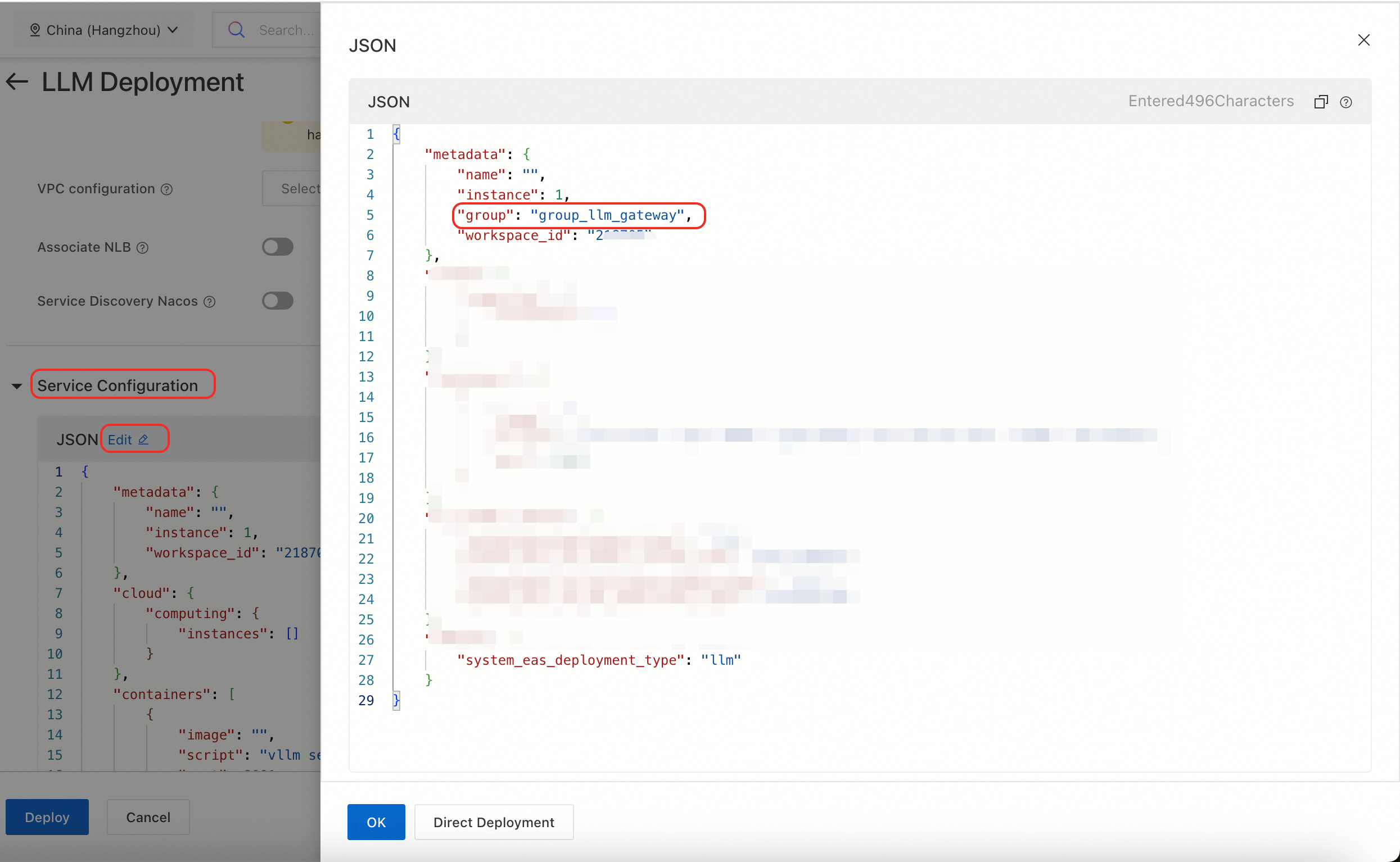
The Service Features > LLM Intelligent Router option on the deployment page does not support routers with batch inference enabled. Instead, after configuring other parameters, go to Service Configuration and click Edit. Add metadata.group to the JSON configuration and set it to the group name used when deploying the LLM intelligent router (for example, group_llm_gateway).
Unified deployment
Add options.enable_ram_role and llm_gateway.batch_oss_path to the LLM intelligent router member in the unified JSON configuration:
{
  "metadata": {
    "group": "feitest",
    "name": "feitest",
    "workspace_id": "217123"
  },
  "members": [
    {
      "llm_gateway": {
        "batch_oss_path": "oss://your-bucket/path/to/prefix", // required
        "infer_backend": "vllm"
      },
      "llm_scheduler": {
        "cpu": 2,
        "memory": 4000,
        "policy": "prefix-cache"
      },
      "metadata": {
        "cpu": 4,
        "gpu": 0,
        "group": "group_llm_gateway",
        "instance": 2,
        "memory": 8000,
        "name": "llm_gateway",
        "type": "LLMGatewayService",
        "workspace_id": "217123"
      },
      "options": {
        "enable_ram_role": true // required
      }
    },
    {
      // inference member
    }
  ]
}
Get access credentials
Batch inference requests must be sent to the LLM intelligent router service. Follow these steps to obtain the public endpoint and token.
On the Elastic Algorithm Service (EAS) page, find the deployed LLM intelligent router service.
Click the service name to open the Overview page. In the Basic Informationsection, click View Endpoint Information .
On the Invocation Method page, copy the Internet Endpoint and Token from the Service-specific Traffic Entry section.
ImportantThe service token is the administrator API key. If the administrator has assigned individual API keys to users through the WebUI console, each user should use their own API key to replace
<YOUR_TOKEN>in the following example.
We recommend that you set them as environment variables for subsequent calls. Example commands:
export YOUR_GATEWAY_URL="https://*********3.cn-hangzhou.pai-eas.aliyuncs.com/api/predict/group_****y.ll****_gateway"
export YOUR_TOKEN="NzY4NWZ*************ZWU5Nw=="
Run a batch job
All examples use $YOUR_GATEWAY_URL and $YOUR_TOKEN from the environment variables set above.
1. Prepare the input file
Create input.jsonl. Each line is a self-contained JSON object representing one inference request.
{"custom_id": "request-1", "method": "POST", "url": "/v1/chat/completions", "body": {"model": "Qwen3-8B", "messages": [{"role": "user", "content": "Hello world!"}]}}
{"custom_id": "request-2", "method": "POST", "url": "/v1/chat/completions", "body": {"model": "Qwen3-8B", "messages": [{"role": "user", "content": "Tell me a joke."}]}}
2. Upload the input file
curl -s "$YOUR_GATEWAY_URL/v1/files" \
  -H "Authorization: Bearer $YOUR_TOKEN" \
  -F purpose="batch" \
-F file="@input.jsonl"3. Create a batch job
Replace <input_file_id> with the id from the upload response.
curl -s "$YOUR_GATEWAY_URL/v1/batches" \
  -H "Authorization: Bearer $YOUR_TOKEN" \
  -H "Content-Type: application/json" \
  -d '{
    "input_file_id": "<input_file_id>",
    "endpoint": "/v1/chat/completions",
    "completion_window": "24h"
}'4. Poll for job status
Replace {batch_id} with the id from the create response.
curl -s "$YOUR_GATEWAY_URL/v1/batches/{batch_id}" \
  -H "Authorization: Bearer $YOUR_TOKEN" \
  -H "Content-Type: application/json"
A job progresses through statuses in this order:
status: validating
status: in_progress
status: in_progress
status: finalizing
status: completedIf status is failed, check the errors field for validation error details.
5. Retrieve the results
Replace {output_file_id} with the output_file_id from the status response.
curl -s "$YOUR_GATEWAY_URL/v1/files/{output_file_id}/content" \
  -H "Authorization: Bearer $YOUR_TOKEN" > output.jsonl
The output is a JSONL file. Output order is not guaranteed to match the input. Use custom_id to match each output line to its input request.
{"id":"batch_xxx","custom_id":"request-1","response":{"status_code":200,"request_id":"req_id_1","body":{...}}}
{"id":"batch_xxx","custom_id":"request-2","response":{"status_code":200,"request_id":"req_id_2","body":{...}}}
If a line contains an error field instead of response, that individual request failed. Collect failed requests by custom_id and resubmit them as a new batch job.
Run a batch job with a script
Save the following script as run_batch.sh. Replace <YOUR_GATEWAY_URL> and <YOUR_TOKEN> with your values.
#!/bin/bash

GATEWAY_URL="<YOUR_GATEWAY_URL>"
TOKEN="<YOUR_TOKEN>"

# 1. Upload the input file
echo "Uploading input file..."
UPLOAD_RESPONSE=$(curl -s "${GATEWAY_URL}/v1/files" \
  -H "Authorization: Bearer ${TOKEN}" \
  -F purpose="batch" \
  -F file="@input.jsonl")

INPUT_FILE_ID=$(echo ${UPLOAD_RESPONSE} | grep -o '"id": *"[^"]*"' | cut -d'"' -f4)
if [ -z "$INPUT_FILE_ID" ]; then
  echo "Failed to upload file. Response: $UPLOAD_RESPONSE"
  exit 1
fi
echo "Input file uploaded. File ID: ${INPUT_FILE_ID}"

# 2. Create the batch job
echo "Creating batch job..."
CREATE_RESPONSE=$(curl -s -X POST "${GATEWAY_URL}/v1/batches" \
  -H "Authorization: Bearer ${TOKEN}" \
  -H "Content-Type: application/json" \
  -d "{
    \"input_file_id\": \"${INPUT_FILE_ID}\",
    \"endpoint\": \"/v1/chat/completions\",
    \"completion_window\": \"24h\"
  }")

BATCH_ID=$(echo ${CREATE_RESPONSE} | grep -o '"id": *"[^"]*"' | cut -d'"' -f4)
if [ -z "$BATCH_ID" ]; then
  echo "Failed to create batch job. Response: $CREATE_RESPONSE"
  exit 1
fi
echo "Batch job created. Batch ID: ${BATCH_ID}"

# 3. Poll the job status until it is complete
echo "Polling batch status..."
while true; do
  STATUS_RESPONSE=$(curl -s "${GATEWAY_URL}/v1/batches/${BATCH_ID}" \
    -H "Authorization: Bearer ${TOKEN}")

  STATUS=$(echo ${STATUS_RESPONSE} | grep -o '"status": *"[^"]*"' | cut -d'"' -f4)
  echo "Current status: ${STATUS}"

  if [[ "$STATUS" == "completed" ]]; then
    OUTPUT_FILE_ID=$(echo ${STATUS_RESPONSE} | grep -o '"output_file_id": *"[^"]*"' | cut -d'"' -f4)
    echo "Batch job completed. Output file ID: ${OUTPUT_FILE_ID}"
    break
  elif [[ "$STATUS" == "failed" ]]; then
    echo "Batch job failed. Check the errors field: ${STATUS_RESPONSE}"
    exit 1
  elif [[ "$STATUS" == "expired" || "$STATUS" == "cancelled" ]]; then
    echo "Batch job ended with status: ${STATUS}."
    exit 1
  fi
  sleep 10
done

# 4. Download the output file
echo "Downloading output file..."
curl -s "${GATEWAY_URL}/v1/files/${OUTPUT_FILE_ID}/content" \
  -H "Authorization: Bearer ${TOKEN}" > output.jsonl

echo "Results saved to output.jsonl."
cat output.jsonl
Run the script:
bash run_batch.shBatch job statuses
Status | Stage | Description | Can cancel |
| Preparation | Job created, waiting to be picked up. | Yes |
| Input file format and parameters are being validated. If validation fails, the job moves to | Yes | |
| Processing | Requests are being sent to the backend inference service. | Yes |
| Completion | All shards processed; system is waiting to aggregate results. | No |
| System is aggregating results and generating the output file. | No | |
| Job succeeded. The output file is available. | No | |
| Job failed during validation. Not processed. | No | |
| Cancellation received; in-progress requests are stopping. | No | |
| Job successfully canceled. | No | |
| Job did not complete within | No |
API reference
The Batch API is compatible with the OpenAI Batch API.
Batch API
Batch object
Field | Type | Description |
| string | Unique identifier for the batch job. |
| string | Always |
| string | API endpoint called by the batch job (for example, |
| string | Model used in the batch request. Currently empty. |
| object | Error details when |
| array | Validation error messages. |
| string | Error code. |
| int | Not supported. Always |
| string | Error message. |
| string | Not supported. Always empty. |
| string | ID of the JSONL input file. |
| string | Time window for job completion (for example, |
| string | Current job status. |
| string | ID of the output file. Present only when the job completes successfully. |
| string | ID of the file containing failed requests. |
| integer | Job creation time (UNIX timestamp, seconds). |
| integer | Time when processing started (UNIX timestamp, seconds). |
| integer | Expiration time. Jobs not completed by this time are automatically terminated (UNIX timestamp, seconds). |
| integer | Time when the job entered the finalizing stage (UNIX timestamp, seconds). |
| integer | Time when the job completed (UNIX timestamp, seconds). |
| integer | Time when the job failed (UNIX timestamp, seconds). |
| integer | Time when the job expired (UNIX timestamp, seconds). |
| integer | Time when cancellation started (UNIX timestamp, seconds). |
| integer | Time when the job was canceled (UNIX timestamp, seconds). |
| object | Request statistics. |
| integer | Total requests. |
| integer | Successful requests. |
| integer | Failed requests. |
| object | Not supported. |
| map | Optional key-value metadata. |
Create a batch job: POST /v1/batches
Request
curl -s "<YOUR_GATEWAY_URL>/v1/batches" \
  -H "Authorization: Bearer <YOUR_TOKEN>" \
  -H "Content-Type: application/json" \
  -d '{
    "input_file_id": "batch_input_11fb297e-653d-47cf-bb6a-a80209dc562b",
    "endpoint": "/v1/chat/completions",
    "completion_window": "24h"
  }'
Request parameters
Parameter | Type | Required | Description |
| string | Yes | ID of the uploaded JSONL file. Maximum 50,000 requests; maximum 200 MB. |
| string | Yes | API endpoint for the batch request. |
| string | No | Time window for completion. Only |
| map | No | Up to 16 key-value pairs. Keys up to 16 characters; values up to 512 characters. |
| object | No | Not supported. Files do not expire automatically. |
Response
Returns the created batch object.
Get batch status: GET /v1/batches/{batch_id}
Request
curl -s "<YOUR_GATEWAY_URL>/v1/batches/batch_98d4d6e3-c7ec-4aa9-969e-fb8531059523" \
  -H "Authorization: Bearer <YOUR_TOKEN>" \
  -H "Content-Type: application/json"
Request parameters
Parameter | Type | Required | Description |
| string | Yes | ID of the batch job. |
Response
Returns the batch object.
Cancel a batch job: POST /v1/batches/{batch_id}/cancel
Only jobs in validating or in_progress status can be canceled.
Request
curl -s -X POST "<YOUR_GATEWAY_URL>/v1/batches/batch_98d4d6e3-c7ec-4aa9-969e-fb8531059523/cancel" \
  -H "Authorization: Bearer <YOUR_TOKEN>"
Request parameters
Parameter | Type | Required | Description |
| string | Yes | ID of the batch job to cancel. |
Response
Returns the updated batch object with status: cancelling.
List batch jobs: GET /v1/batches
Request
curl -s "<YOUR_GATEWAY_URL>/v1/batches" \
  -H "Authorization: Bearer <YOUR_TOKEN>"
Request parameters
Parameter | Type | Required | Description |
| integer | No | Maximum number of results to return. |
| string | No | Cursor for pagination. Pass the |
Response parameters
Parameter | Type | Description |
| string | Always |
| array | Batch objects sorted in reverse chronological order (newest first). |
| string | First |
| string | Last |
| bool | Whether more results exist after |
File API
File object
Field | Type | Description |
| string | Unique file identifier. |
| string | Always |
| integer | File size in bytes. |
| integer | File creation time (UNIX timestamp, seconds). |
| integer | File expiration time (UNIX timestamp, seconds). |
| string | Filename specified at upload. |
| string | Always |
Input file format (JSONL)
One JSON object per line. Each object must include:
Field | Type | Required | Description |
| string | Yes | Unique request identifier. Used to match output to input. |
| string | Yes | HTTP method. Use |
| string | Yes | Inference endpoint. Must match the |
| object | Yes | Request body sent to the inference service. |
Output file format (JSONL)
One JSON object per line. Output order is not guaranteed to match input.
Field | Type | Description |
| string | Batch job ID. |
| string | Custom request ID from the input file. |
| object | Inference response. Present on success. |
| int | HTTP status code from the inference service. |
| string | Inference request ID. |
| object | Response body from the inference service. |
| object | Error information. Present when the request failed. |
| string | Error code. |
| string | Error message. |
Upload a file: POST /v1/files
Request
curl "<YOUR_GATEWAY_URL>/v1/files" \
  -H "Authorization: Bearer <YOUR_TOKEN>" \
  -F purpose="batch" \
  -F file="@input.jsonl"
Request parameters
Parameter | Type | Required | Description |
| File | Yes | JSONL file to upload (multipart/form-data). |
| string | Yes | Must be |
Response
Returns the created file object.
List files: GET /v1/files
Request
curl "<YOUR_GATEWAY_URL>/v1/files" \
  -H "Authorization: Bearer <YOUR_TOKEN>"
Response parameters
Parameter | Type | Description |
| string | Always |
| array | File objects sorted in reverse chronological order (newest first). |
| string | First |
| string | Last |
Get file metadata: GET /v1/files/{file_id}
Request
curl -s "<YOUR_GATEWAY_URL>/v1/files/batch_input_11fb297e-653d-47cf-bb6a-a80209dc562b" \
  -H "Authorization: Bearer <YOUR_TOKEN>"
Request parameters
Parameter | Type | Required | Description |
| string | Yes | ID of the file to query. |
Response
Returns the file object.
Delete a file: DELETE /v1/files/{file_id}
Deleting a file removes only the metadata record in EAS. It does not delete the physical file from your OSS bucket. OSS files accumulate storage charges until you delete them manually or through lifecycle rules.
Request
curl -s -X DELETE "<YOUR_GATEWAY_URL>/v1/files/batch_input_11fb297e-653d-47cf-bb6a-a80209dc562b" \
  -H "Authorization: Bearer <YOUR_TOKEN>"
Request parameters
Parameter | Type | Required | Description |
| string | Yes | ID of the file to delete. |
Response parameters
Parameter | Type | Description |
| string | File ID. |
| string | Always |
| bool |
|
Get file content: GET /v1/files/{file_id}/content
Request
curl -s "<YOUR_GATEWAY_URL>/v1/files/batch_input_11fb297e-653d-47cf-bb6a-a80209dc562b/content" \
  -H "Authorization: Bearer <YOUR_TOKEN>"
Request parameters
Parameter | Type | Required | Description |
| string | Yes | ID of the file. |
Response
Returns the file content as JSONL.
Best practices
Performance tuning
Tune batch_options based on your workload:
`--batch-parallel`: Start at
instance * 2and adjust based on GPU/CPU load on the backend inference service.`--batch-lines-per-shard`: Set so that the total number of shards (input lines divided by lines per shard, rounded up) is an integer multiple of
--batch-parallel. This maximizes GPU utilization. The recommended range is 500–2,000.
Cost management
Configure OSS lifecycle rules: Set expiration rules on the bucket or prefix used for batch files. This is the most effective way to prevent runaway storage costs from accumulating input, output, and error files.
Schedule jobs during off-peak hours: Running compute-intensive batch jobs at night or during low-traffic periods maximizes idle GPU utilization and reduces per-inference cost.
Job management
Split large jobs: For jobs with millions of requests, split them into multiple smaller batch jobs. Smaller jobs isolate failures, simplify retries, and are easier to manage.
FAQ
A job is stuck in pending or validating
Check three things in order: whether EAS service instances are running and have sufficient CPU, memory, and GPU; whether the input file was successfully uploaded to the correct OSS path; and whether the RAM role has oss:GetObject and oss:ListObjects permissions on the batch_oss_path.
A job has failed status
Jobs fail during validation, not execution. Call GET /v1/batches/{batch_id} and inspect the errors field. Common causes are an invalid JSONL format, a missing required field such as custom_id, or a url value that doesn't match the endpoint used when creating the job.
The job completed, but some requests failed
Download the output file using output_file_id. Filter for lines that contain an error field—these are the failed requests. Collect them by custom_id, add them to a new input file, and submit a new batch job to retry.
Diagnosing OSS permission issues
If the job fails during
validatingwith a file-reading error, the RAM role is likely missingoss:GetObject.If the job stays in
finalizingorfinalizefor a long time and eventually expires, the RAM role is likely missingoss:PutObjectfor writing the output file to OSS.