Classifying news based on text analysis algorithms
This topic describes how to quickly build a text classification model by using the text components in PAI.
Background information
News classification is a common scenario in text mining. Many media outlets or content producers manually label news articles for classification. This process consumes significant human resources. PAI provides intelligent text mining algorithms to automate news classification. This includes processes such as word segmentation, word form conversion, stop word filtering, topic modeling, and clustering. This pipeline first uses the PLDA algorithm to discover topics in articles. Then, it performs clustering based on topic weights to automatically classify the news.
The data in this pipeline is fictional and for learning purposes only.
Prerequisites
You have activated PAI (Machine Learning Designer) and created a workspace. For more information, see Activate PAI and create a default workspace.
You have associated a MaxCompute resource with the workspace. For more information, see Manage a workspace.
Classify news using text analysis algorithms
Go to the Machine Learning Designer page.
Log on to the PAI console.
In the left-side navigation pane, click Workspaces. On the Workspaces page, click the name of the workspace that you want to manage.
In the left-side navigation pane, choose .
Build the pipeline.
-
On the Designer page, click the Preset Templates tab.
In the Text Analysis - News Classification section of the template list, click Create.
-
In the Create Pipeline dialog box, configure the parameters. You can use the default settings for all parameters.
The Data Storage parameter specifies an OSS Bucket path to store temporary data and models generated during the pipeline run.
-
Click Confirm.
It takes about 10 seconds to create the pipeline.
In the pipeline list, double-click the Text Analysis - News Classification pipeline to open it.
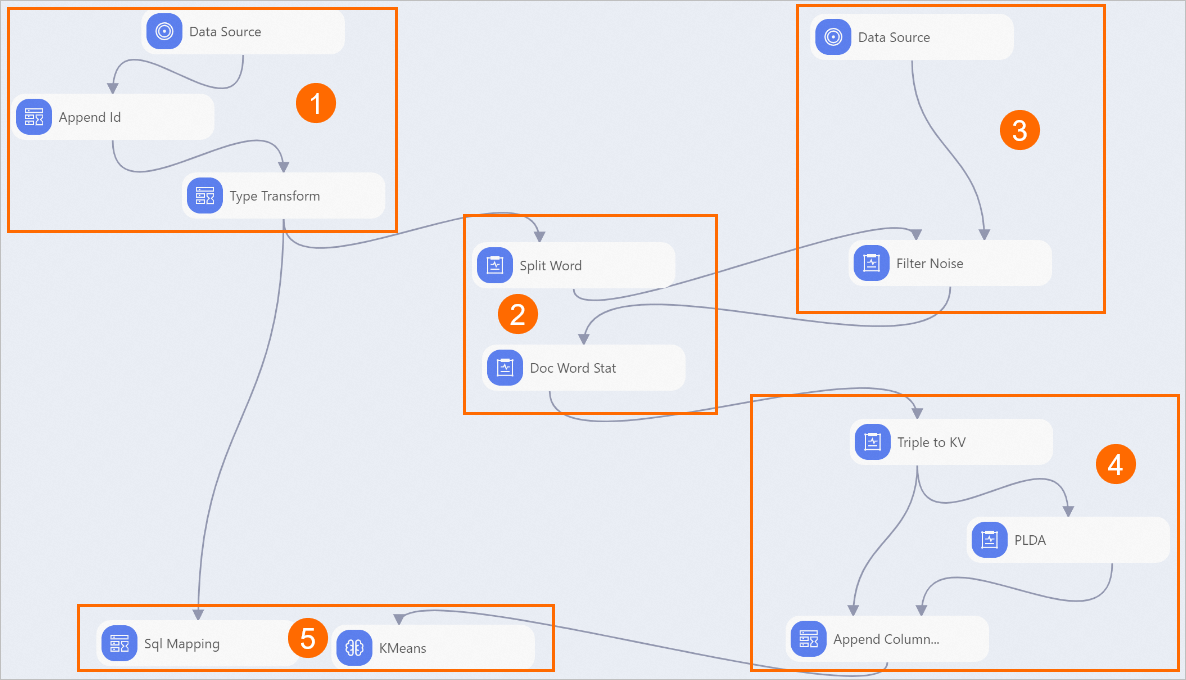
The system automatically builds the pipeline based on the preset template, as shown in the following figure.
Area
Description
①
Add serial numbers. The data source for this pipeline uses individual news articles as units. An ID column must be added to uniquely identify each article for algorithm calculation.
②
Perform word segmentation and word frequency statistics. First, use the Word Segmentation component to segment the content field (news content). Then, calculate the word frequency for the text after filtering out stop words.
③
Filter stop words. This typically involves filtering out punctuation marks and function words that have little impact on the article's meaning.
④
Discover text topics:
The input for the PLDA Text Mining component must be in a ternary format. Therefore, use the Triple to KV component to convert the text to the ternary format. In this format, text is converted to numbers.
Where:
append_id: The unique identifier for each news article.
key_value: The number before the colon is the numeric ID for the word. The number after the colon is the word's frequency.
Use the PLDA component to train the model.
The PLDA algorithm (topic model) can identify the topic words for each article. This pipeline is configured with 50 topics. The fifth output port of the PLDA component outputs the probability of each topic for each article.
⑤
Analyze and evaluate the results. The previous steps converted the text into vectors based on topics. You can now use vector distance to perform clustering and classify the text.
-
Run the pipeline and view the model results.
Click the Run button
 above the canvas.
After the pipeline run is complete, right-click the KMeans component on the canvas and choose to view the classification results.
The table also contains a distance column, which indicates the distance from each news article to the center of the cluster that it belongs to. Where:
cluster_index: The name of each class.
append_id: The unique identifier for each news article.
Right-click the Sql Mapping component on the canvas and choose to view the news articles with append_id 115, 292, 248, and 166.
The news classification results of this pipeline are not ideal. For example, two sports articles, one finance article, and one technology article are assigned to the same class. The main reasons are as follows:
The pipeline uses a small amount of data.
This tutorial only introduces how to use text analysis algorithms for a business scenario. It does not perform feature engineering or detailed tuning on the dataset.
The pipeline template has already configured a Filter Condition for the Sql Mapping component. This lets you directly view the news articles with append_id 115, 292, 248, and 166. To view other news articles, configure the Filter Condition of the Sql Mapping component with the corresponding news IDs, as shown in the following example.
append_id=292 or append_id=115 or append_id=248 or append_id=166 ;