Knowledge-based video intelligent QA solution
Build intelligent QA over knowledge-based videos (online courses, lectures, training recordings) by combining ASR transcription, semantic chunking, multimodal retrieval, and LLM reasoning. Users ask questions and get timestamped answers linked to the relevant video segment.
Overview
Background
Knowledge-based videos — online courses, academic lectures, technical training — pack dense content into recordings that often exceed 30 minutes. Finding a specific topic in a long video is hard:
-
No fine-grained navigation: viewers scrub the timeline manually to find a topic.
-
Shallow search: search covers only titles and descriptions — not content inside the video.
-
No verification loop: QA results don't link back to the video clip, so viewers can't verify answers.
-
Context-window limit: naive splitting breaks semantic continuity and degrades QA accuracy.
LangStudio video knowledge bases solve this with ASR transcription, semantic chunking, multimodal vector retrieval, and LLM-powered QA — returning timestamped answers linked to the exact video segment.
Use cases
|
Scenario |
Value |
Video types |
|
Education and training |
Pinpoint a concept and ask follow-up questions |
Online courses, open lectures, academic talks |
|
Enterprise knowledge |
Extract key decisions and action items from meetings |
Internal training, tech talks, meeting recordings |
|
Healthcare |
Locate critical procedures and clinical explanations |
Surgery tutorials, case reviews |
|
Media production |
Retrieve and reuse footage clips by semantic meaning |
Documentary archives, program production |
|
Autonomous driving and security |
Search for specific events or targets |
Dashcam footage, surveillance video |
|
Industrial manufacturing |
Find troubleshooting guides and standard procedures |
Equipment repair, operation demonstrations |
|
Legal and government |
Locate key testimony and policy interpretations |
Court recordings, policy briefings |
Core architecture
Architecture
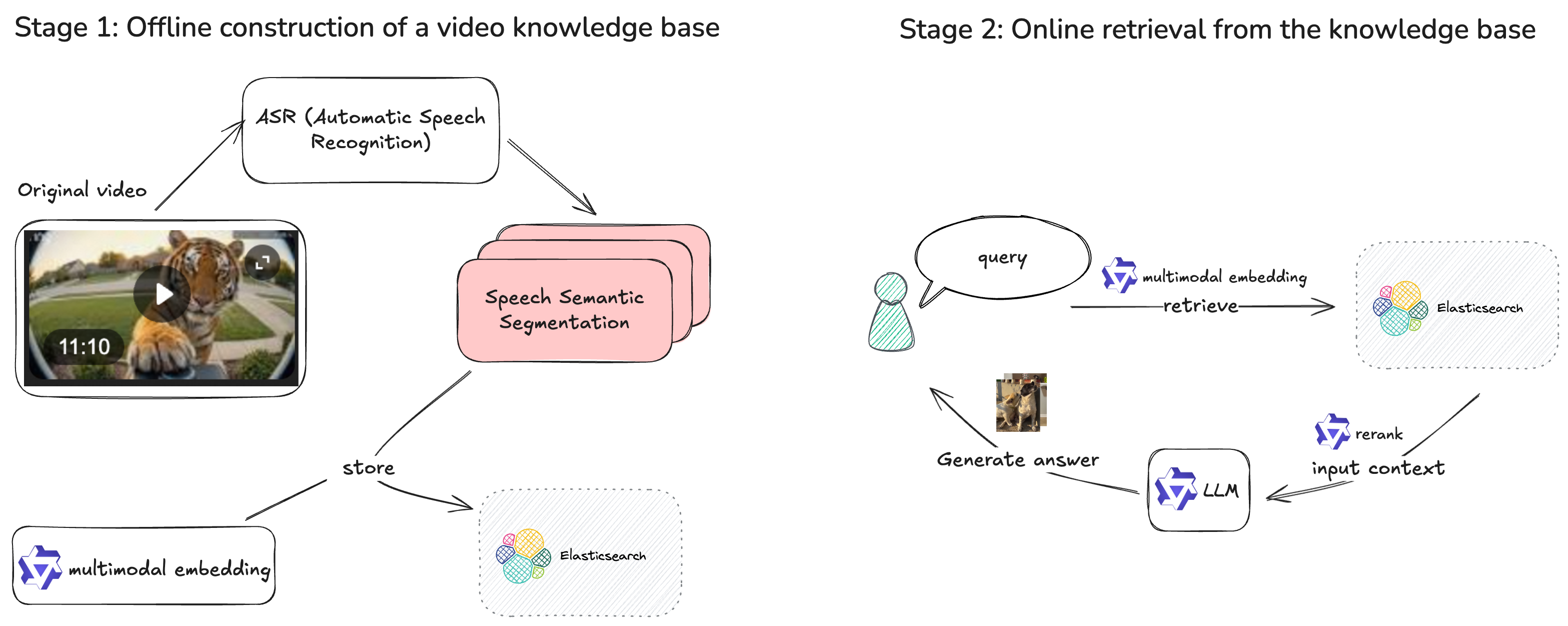
Key capabilities
-
Accurate ASR: high-precision speech transcription in multiple languages
-
Powered by the Qwen3-ASR model with multi-language support
-
Stable, high-quality speech-to-text output
-
-
Precise retrieval: semantic and keyword hybrid search
-
Multimodal embedding: DashScope multimodal embedding and PAI-EAS custom services produce high-quality semantic vectors
-
Hybrid search: Dense + BM25 Sparse retrieval with RRF (Reciprocal Rank Fusion) and weighted fusion ranking balances semantic similarity and keyword matching
-
Multiple storage engines: Elasticsearch and Milvus vector backends for flexible scale
-
-
Better answers: reranking and query rewriting
-
Reranking: a second-pass reranker rescores recalled clips so top results match user intent. Supports models from DashScope, PAI-EAS, and Alibaba Cloud OpenSearch AI.
-
Query rewriting: expands vague or elliptical questions into complete search queries using multi-turn conversation context (for example, "How do I get there?" → "How do I get to the Sahara?")
-
Similarity threshold filtering: filters low-relevance clips by similarity score to reduce noise
-
-
Timestamp accuracy: precise video segment location
-
Each chunk carries timestamp metadata (
chunk_start,chunk_end,chunk_seq), so results map directly to a time range. -
One-click jump from question to the exact video segment, cutting knowledge verification time.
-
Procedure
Create a knowledge base and upload videos
-
Create a video-type knowledge base. Configure the key parameters as follows. For other parameters, see Manage knowledge bases.
-
Type: select Video.
-
Chunking Strategy: we recommend Speech Semantic Segmentation, which transcribes video audio via ASR and creates chunk-level text.
NoteDefault Slicing chunks by video content only and ignores audio.
-
-
Import video files. Open the knowledge base and switch to the Video tab. Click Upload to upload videos from your local machine to the knowledge base OSS data source.
-
Switch between Gallery view and Table view to browse video sources in the OSS directory.
Update the index and view processing results
-
After upload, click Update Index to configure compute resources and VPC for the index update task.
NoteThe selected VPC must reach the VPC where the embedding service and vector database are deployed. Using the same VPC is simplest.
-
Click Operation Records to view execution details for the index task.
-
Click View Task in the Actions column. The workflow task log contains the Job URL (link to the DLC index update task).
-
If the task fails, check the DLC task log for the specific error.
-
After a successful update, click View Results to view the updated document and chunk statistics.
-
-
After indexing, the video status changes from Not indexed to Indexed. Click a video to view its chunks and transcript. Click a chunk to enable or disable it for retrieval.
Metadata management and automatic index updates
Metadata management
Use video metadata as retrieval filters or sort keys to exclude irrelevant documents and reduce noise in generated answers.
-
Edit custom metadata. Metadata is either custom or system-defined.
-
On the knowledge base Overview page, the Metadata area shows the custom metadata type, reference count, and number of values.
-
Click Modify to add or delete custom metadata fields.
-
-
Tag video chunks. Open a video file and click Edit Metadata to tag all chunks in that video. Add metadata filters at retrieval time to narrow results.
Automatic index updates
-
On the knowledge base details page, in the Automatic File Indexing area, click Modify to configure compute resources and VPC. These must match the index update task settings.
-
When enabled, the system creates EventBridge rules to forward OSS file change events and trigger index tasks automatically.
NoteConfiguration changes take up to three minutes to take effect. Wait three minutes before modifying OSS files.
Retrieval testing
On the knowledge base Recall Test page, enter a question to retrieve the most relevant text chunks.
In the retrieval settings panel, set Query Mode to Hybrid retrieval and enabling Rerank.
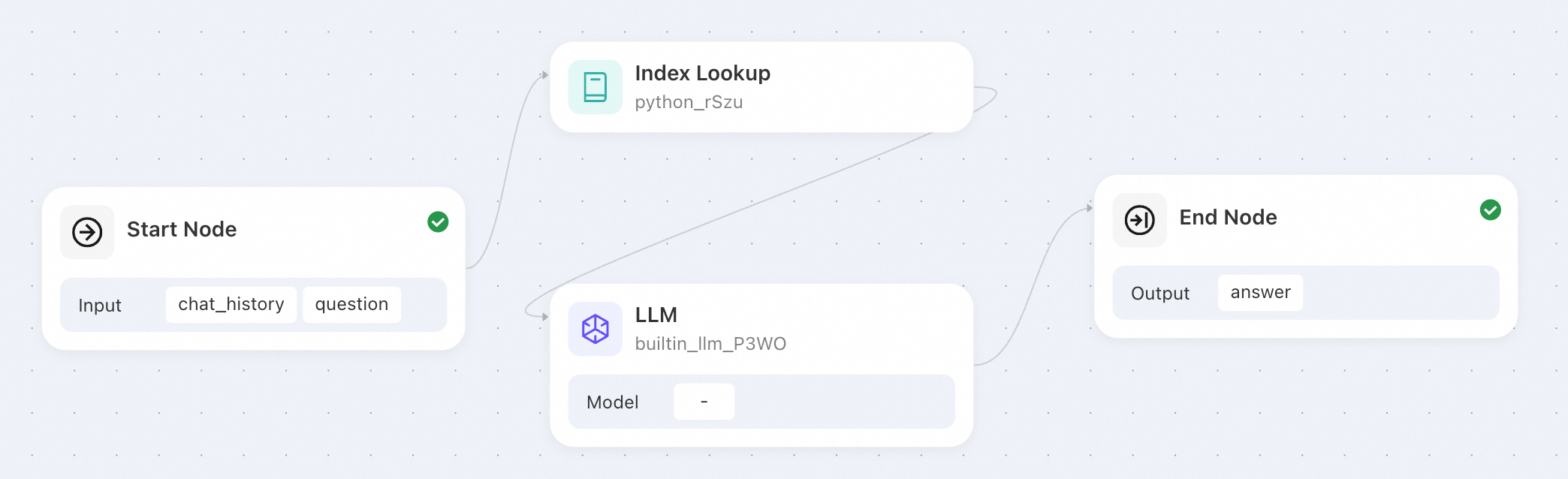
Build a video QA workflow
Example workflow
Start → Knowledge base retrieval → LLM → End
Examples
Example 1: QA over educational long videos
Question: What is the operator precedence in C?
Result: returns the definition from the teaching video with the corresponding chunk information.
Example 2: Q&A pair extraction from educational videos
Generate practice questions from video content, enabling students to review and self-assess.
Node configuration: use file_name metadata in the knowledge base retrieval node to specify the video.
Question: Summarize common Q&A pairs from the video.
Result: generates Q&A pairs from the video, linked to chunks for playback and review.
Example 3: Key conclusion QA and summary
Extract conclusions from video content with time ranges linked to video chunks. In meetings and retrospectives, this confirms action items and ownership.
Node configuration: use the custom class metadata tag in the retrieval node to filter by video type.
Question: What is the relationship between operators and variables?
Result: summarizes across multiple video files.