Install the FeatureStore SDK for Python on a DataWorks exclusive resource group
Install the FeatureStore SDK for Python on a DataWorks exclusive resource group to schedule routine feature engineering tasks.
Prerequisites
|
Method |
Prerequisites |
|
Method 1: Use a new-version exclusive resource group with a built-in image (Recommended) |
|
|
Method 2: Use a new-version exclusive resource group with a custom image (Recommended) |
|
|
Method 3: Use an old-version exclusive resource group for scheduling |
|
Procedure
Method 1: New-version resource group with built-in image (recommended)
-
Log on to the DataWorks console, create an exclusive resource group, and bind the resource group to a DataWorks workspace.
Configure the following parameters. For more information, see Create a serverless resource group.
Parameter
Description
VPC
Select your VPC.
VSwitch
Select your VSwitch.
-
In the navigation pane, click Data Development, select your DataWorks workspace, and then click Go to Data Development.
-
Hover over New and choose New Node > MaxCompute > PyODPS 3. Specify the path and name, and then click Confirm.
-
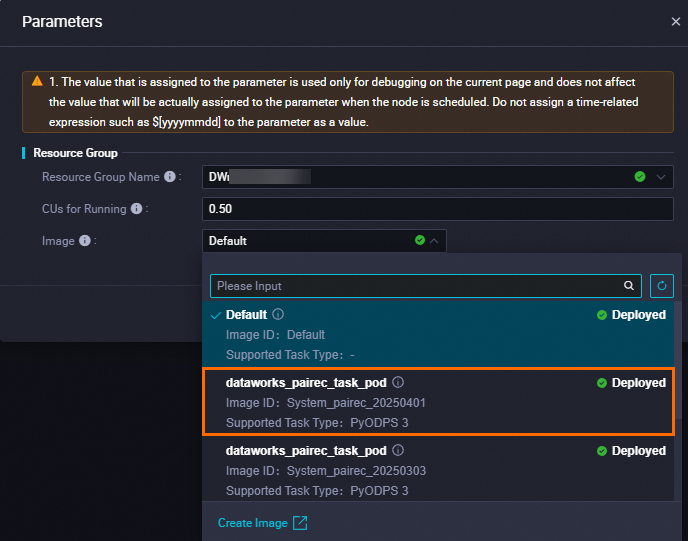
In the node editor, write and run your code. In the dialog box, configure the following parameters.
Parameter
Description
Resource group name
Select your exclusive resource group.
Image
Select the latest PAI-Rec image. This image contains the FeatureStore SDK.
Method 2: New-version resource group with custom image (recommended)
-
Log on to the DataWorks console, create an exclusive resource group, and bind the resource group to a DataWorks workspace.
Configure the following parameters. For more information, see Create a serverless resource group.
Parameter
Description
VPC
Select your VPC.
VSwitch
Select your VSwitch.
-
Log on to the NAT gateway console and create a NAT gateway.
Configure the following parameters. For more information, see Use the SNAT feature of a public NAT gateway to access the internet.
Parameter
Description
VPC
Select your VPC.
VSwitch
Select your VSwitch.
EIP
Select your EIP.
-
Log on to the DataWorks console and configure a custom image.
-
Create a custom image.
Configure the following parameters. For more information, see Create a custom image.
Parameter
Description
Image namespace
Select DataWorks Default.
Image name/ID
Select dataworks_pyodps_task_pod.
Supported task type
Select PyODPS 3.
Installation package
Select Script and enter the following code:
/home/tops/bin/pip3 install https://feature-store-py.oss-cn-beijing.aliyuncs.com/package/feature_store_py-1.8.0-py3-none-any.whl -
Associate the image with a workspace.
For the workspace, select your PAI (DataWorks) workspace.
-
-
Run the task on the exclusive resource group with the custom image.
For more information, see Use an image.
Method 3: Old-version resource group for scheduling
-
Log on to the DataWorks console.
-
In the navigation pane, click Resource Groups.
-
On the Exclusive Resource Groups tab, find the resource group whose Purpose is Data Scheduling. Click the
 icon and select O&M Assistant.
 -
Click Create Command. In the dialog box, configure the command parameters.
Parameter
Recommended value
Command name
Enter a custom name, such as
install.Command type
Manual input (You cannot use pip commands to install third-party packages.)
Command content
/home/tops/bin/pip3 install -i https://pypi.tuna.tsinghua.edu.cn/simple https://feature-store-py.oss-cn-beijing.aliyuncs.com/package/feature_store_py-1.3.1-py3-none-any.whlTimeout
Specify a timeout period.
-
Click Create to create the command.
-
Click Run Command. In the dialog box, click Run.
-
Click the
 button to view the execution status. The installation is complete when the status changes to Successful.