K-means Clustering is an unsupervised learning algorithm that partitions a dataset into K clusters by minimizing the sum of squared errors (SSE) within each cluster. It iteratively assigns data points to the nearest cluster centroid, then recalculates centroid positions until assignments stabilize or the maximum number of iterations is reached.
How it works
-
Select initial centroids. Randomly sample K data points as initial centroids, or use one of the supported initialization methods (random, topk, k-means++, uniform, or an external centroid table).
-
Assign data points to clusters. Compute the distance from each data point to every centroid, then assign each point to its nearest centroid.
-
Update centroids. Recalculate the position of each centroid as the mean of all points assigned to that cluster.
-
Repeat until convergence. Repeat steps 2–3 until the objective function value changes by less than the convergence threshold between iterations, or the maximum iteration count is reached.
K-means Clustering treats data points as spatial vectors. Columns of the INT or DOUBLE type are supported. When the input is in sparse format, columns of the STRING type are also supported.
Configure the component
Method 1: Configure in Machine Learning Designer
On the pipeline details page in Machine Learning Designer, add the K-means Clustering component to the pipeline, then configure the following parameters.
| Tab | Parameter | Description |
|---|---|---|
| Fields Setting | Feature Columns | Columns from the input table used for training. Separate column names with commas (,). INT and DOUBLE types are supported. For sparse input, STRING type is also supported. |
| Appended Columns | Input columns to append to the clustering result table. Separate column names with commas (,). | |
| Input Sparse Matrix | Whether the input data is in sparse format. Sparse data is represented as key-value pairs. | |
| KV Pair Delimiter | Delimiter between key-value pairs. Default: comma (,). | |
| KV Delimiter | Delimiter between keys and values within a pair. Default: colon (:). | |
| Parameters Setting | Clusters | Number of cluster centroids. Valid values: 1–1000. |
| Distance Measurement Method | Distance metric. Valid values: Euclidean, Cosine, Cityblock. | |
| Centroid Initialization Method | Method to initialize centroids. Valid values: Random, First K, Uniform, K-means++, Use Initial Centroid Table. | |
| Maximum Iterations | Maximum number of iterations. Valid values: 1–1000. | |
| Convergence Criteria | Threshold for stopping iterations. The algorithm stops when the objective function difference between two consecutive iterations falls below this value. | |
| Initial Random Seed | Seed for random initialization. Default: current time. Set a fixed value to get stable, reproducible results. | |
| Tuning | Cores | Number of compute cores. Default: determined by the system. |
| Memory Size per Core | Memory per core. Unit: MB. |
Method 2: Use PAI commands
Pass parameters using PAI commands. Use the SQL Script component to run PAI commands. For more information, see Scenario 4: Execute PAI commands within the SQL script component.
pai -name kmeans
    -project algo_public
    -DinputTableName=pai_kmeans_test_input
    -DselectedColNames=f0,f1
    -DappendColNames=f0,f1
    -DcenterCount=3
    -Dloop=10
    -Daccuracy=0.01
    -DdistanceType=euclidean
    -DinitCenterMethod=random
    -Dseed=1
    -DmodelName=pai_kmeans_test_output_model_
    -DidxTableName=pai_kmeans_test_output_idx
    -DclusterCountTableName=pai_kmeans_test_output_couter
-DcenterTableName=pai_kmeans_test_output_center;| Parameter | Required | Default | Description |
|---|---|---|---|
inputTableName |
Yes | — | Name of the input table. |
selectedColNames |
No | All columns | Columns from the input table used for training. Separate column names with commas (,). INT and DOUBLE types are supported. For sparse input, STRING type is also supported. |
inputTablePartitions |
No | All partitions | Partitions from the input table used for training. Supported formats: partition_name=value or name1=value1/name2=value2 for multi-level partitions. Separate multiple partitions with commas (,). |
appendColNames |
No | — | Input columns to append to the clustering result table. Separate column names with commas (,). |
enableSparse |
No | false |
Whether the input data is in sparse format. Valid values: true, false. |
itemDelimiter |
No | , |
Delimiter between key-value pairs. |
kvDelimiter |
No | : |
Delimiter between keys and values within a pair. |
centerCount |
Yes | 10 | Number of cluster centroids. Valid values: 1–1000. |
distanceType |
No | euclidean |
Distance metric. Valid values: euclidean, cosine, cityblock. Formulas:- Euclidean: d(x - c) = (x - c)(x - c)'- Cosine: 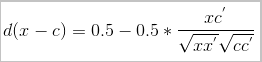 - Cityblock (Manhattan distance): d(x - c) = |x - c| |
initCenterMethod |
No | random |
Centroid initialization method. Valid values: - random: Randomly samples K centroids from input data. The seed parameter controls the random seed.- topk: Uses the first K rows of input data as initial centroids.- uniform: Distributes K initial centroids evenly between the minimum and maximum values.- kmpp: Uses the k-means++ algorithm to select initial centroids.- external: Loads initial centroids from an external table (requires initCenterTableName). |
initCenterTableName |
No | — | Name of the table containing initial centroids. Takes effect only when initCenterMethod=external. |
loop |
No | 100 | Maximum number of iterations. Valid values: 1–1000. |
accuracy |
No | 0.1 | Convergence threshold. The algorithm stops when the objective function difference between two consecutive iterations is less than this value. |
seed |
No | Current time | Initial random seed. Set a fixed value to get stable, reproducible results. |
modelName |
No | — | Name of the output offline model. |
idxTableName |
Yes | — | Name of the clustering result table, which contains the cluster assignment for each record. |
idxTablePartition |
No | — | Partition in the clustering result table. |
clusterCountTableName |
No | — | Name of the clustering statistics table, which contains the number of data points in each cluster. |
centerTableName |
No | — | Name of the clustering centroid table. |
coreNum |
No | System default | Number of compute cores. Valid values: 1–9999. Must be specified together with memSizePerCore. |
memSizePerCore |
No | System default | Memory per core. Valid values: 1024–65536. Unit: MB. |
lifecycle |
No | — | Lifecycle of the output table. Unit: days. |
Output
The component produces three output tables.
Clustering result table (idxTableName)
| Column | Description |
|---|---|
appendColNames |
Appended columns from the input table. |
cluster_index |
ID of the cluster assigned to each data point. |
distance |
Distance from each data point to its assigned cluster centroid. |
Clustering statistics table (clusterCountTableName)
| Column | Description |
|---|---|
cluster_index |
Cluster ID. |
cluster_count |
Number of data points in the cluster. |
Clustering centroid table (centerTableName)
| Column | Description |
|---|---|
cluster_index |
Cluster ID. |
selectedColNames |
Centroid coordinates for each feature column selected during training. |
Examples
Dense input
Step 1: Create test data.
Create an optional initial centroid table:
create table pai_kmeans_test_init_center as
select * from
(
  select 1 as f0, 2 as f1
  union all
  select 1 as f0, 3 as f1
  union all
  select 1 as f0, 4 as f1
) tmp;
Create the input table:
create table pai_kmeans_test_input as
select * from
(
  select 'id1' as id, 1 as f0, 2 as f1
  union all
  select 'id2' as id, 1 as f0, 3 as f1
  union all
  select 'id3' as id, 1 as f0, 4 as f1
  union all
  select 'id4' as id, 0 as f0, 3 as f1
  union all
  select 'id5' as id, 0 as f0, 4 as f1
) tmp;
Step 2: Submit the clustering job.
Using an external centroid table:
drop table if exists pai_kmeans_test_output_idx;
yes
drop table if exists pai_kmeans_test_output_couter;
yes
drop table if exists pai_kmeans_test_output_center;
yes
drop offlinemodel if exists pai_kmeans_test_output_model_;
yes
pai -name kmeans
    -project algo_public
    -DinputTableName=pai_kmeans_test_input
    -DinitCenterTableName=pai_kmeans_test_init_center
    -DselectedColNames=f0,f1
    -DappendColNames=f0,f1
    -DcenterCount=3
    -Dloop=10
    -Daccuracy=0.01
    -DdistanceType=euclidean
    -DinitCenterMethod=external
    -Dseed=1
    -DmodelName=pai_kmeans_test_output_model_
    -DidxTableName=pai_kmeans_test_output_idx
    -DclusterCountTableName=pai_kmeans_test_output_couter
    -DcenterTableName=pai_kmeans_test_output_center;
Using randomly selected initial centroids:
drop table if exists pai_kmeans_test_output_idx;
yes
drop table if exists pai_kmeans_test_output_couter;
yes
drop table if exists pai_kmeans_test_output_center;
yes
drop offlinemodel if exists pai_kmeans_test_output_model_;
yes
pai -name kmeans
    -project algo_public
    -DinputTableName=pai_kmeans_test_input
    -DselectedColNames=f0,f1
    -DappendColNames=f0,f1
    -DcenterCount=3
    -Dloop=10
    -Daccuracy=0.01
    -DdistanceType=euclidean
    -DinitCenterMethod=random
    -Dseed=1
    -DmodelName=pai_kmeans_test_output_model_
    -DidxTableName=pai_kmeans_test_output_idx
    -DclusterCountTableName=pai_kmeans_test_output_couter
    -DcenterTableName=pai_kmeans_test_output_center;
Step 3: View the results.
Clustering result table (idxTableName):
+------------+------------+---------------+------------+
| f0         | f1         | cluster_index | distance   |
+------------+------------+---------------+------------+
| 1          | 2          | 0             | 0.0        |
| 1          | 3          | 1             | 0.5        |
| 1          | 4          | 2             | 0.5        |
| 0          | 3          | 1             | 0.5        |
| 0          | 4          | 2             | 0.5        |
+------------+------------+---------------+------------+
Clustering statistics table (clusterCountTableName):
+---------------+---------------+
| cluster_index | cluster_count |
+---------------+---------------+
| 0             | 1             |
| 1             | 2             |
| 2             | 2             |
+---------------+---------------+
Clustering centroid table (centerTableName):
+---------------+------------+------------+
| cluster_index | f0         | f1         |
+---------------+------------+------------+
| 0             | 1.0        | 2.0        |
| 1             | 0.5        | 3.0        |
| 2             | 0.5        | 4.0        |
+---------------+------------+------------+
Sparse input
Step 1: Create test data.
create table pai_kmeans_test_sparse_input as
select * from
(
  select 1 as id, "s1" as id_s, "0:0.1,1:0.2" as kvs0, "2:0.3,3:0.4" as kvs1
  union all
  select 2 as id, "s2" as id_s, "0:1.1,2:1.2" as kvs0, "4:1.3,5:1.4" as kvs1
  union all
  select 3 as id, "s3" as id_s, "0:2.1,3:2.2" as kvs0, "6:2.3,7:2.4" as kvs1
  union all
  select 4 as id, "s4" as id_s, "0:3.1,4:3.2" as kvs0, "8:3.3,9:3.4" as kvs1
  union all
  select 5 as id, "s5" as id_s, "0:5.1,5:5.2" as kvs0, "10:5.3,6:5.4" as kvs1
) tmp;
When multiple sparse columns are used as input, they are merged. For example, when both kvs0 and kvs1 are selected, the first row expands to:
0:0.1,1:0.2,2:0.3,3:0.4,4:0,5:0,6:0,7:0,8:0,9:0,10:0Missing values are filled with 0. The resulting sparse matrix has 5 rows and 11 columns (indexed 0–10). If a column ID is large (for example, 123456789:0.1), the matrix dimensions grow proportionally, consuming significant CPU and memory. Renumber columns sequentially from 0 or 1 to reduce the matrix size.
Step 2: Submit the clustering job.
pai -name kmeans
    -project algo_public
    -DinputTableName=pai_kmeans_test_sparse_input
    -DenableSparse=true
    -DselectedColNames=kvs0,kvs1
    -DappendColNames=id,id_s
    -DitemDelimiter=,
    -DkvDelimiter=:
    -DcenterCount=3
    -Dloop=100
    -Daccuracy=0.01
    -DdistanceType=euclidean
    -DinitCenterMethod=topk
    -Dseed=1
    -DmodelName=pai_kmeans_test_input_sparse_output_model
    -DidxTableName=pai_kmeans_test_sparse_output_idx
    -DclusterCountTableName=pai_kmeans_test_sparse_output_couter
    -DcenterTableName=pai_kmeans_test_sparse_output_center;
Step 3: View the results.
Clustering result table (idxTableName):
+------------+------------+---------------+---------------------------+
| id         | id_s       | cluster_index | distance                  |
+------------+------------+---------------+---------------------------+
| 4          | s4         | 0             | 2.90215437218629          |
| 5          | s5         | 1             | 0.0                       |
| 1          | s1         | 2             | 0.7088723439378913        |
| 2          | s2         | 2             | 1.1683321445547923        |
| 3          | s3         | 0             | 2.0548722588034516        |
+------------+------------+---------------+---------------------------+
Clustering statistics table (clusterCountTableName):
+---------------+---------------+
| cluster_index | cluster_count |
+---------------+---------------+
| 0             | 2             |
| 1             | 1             |
| 2             | 2             |
+---------------+---------------+
Clustering centroid table (centerTableName):
+---------------+----------------------------------------+----------------------------------+
| cluster_index | kvs0                                   | kvs1                             |
+---------------+----------------------------------------+----------------------------------+
| 0             | 0:2.6,1:0,2:0,3:1.1,4:1.6,5:0         | 6:1.15,7:1.2,8:1.65,9:1.7,10:0  |
| 1             | 0:5.1,1:0,2:0,3:0,4:0,5:5.2           | 6:5.4,7:0,8:0,9:0,10:5.3        |
| 2             | 0:0.6,1:0.1,2:0.75,3:0.2,4:0.65,5:0.7 | 6:0,7:0,8:0,9:0,10:0            |
+---------------+----------------------------------------+----------------------------------+
Troubleshooting
`Algo Job Failed-System Error-Null feature value found`
The input table contains NULL or empty values. Fill missing values using the default imputation values before running the job.
`Algo Job Failed-System Error-Feature count can't be more than 2000000`
Sparse input has a column ID exceeding 2,000,000. Renumber columns sequentially starting from 0 or 1.
`Algo Job Failed-System Error-kIOError:Write failed for message: comparison_measure`
The centroid model is too large to write. Renumber sparse columns starting from 0 or 1 to reduce the model size. If the value of col * centerCount exceeds 270,000,000, remove the modelName parameter from the command and run the job again.
`FAILED: Failed Task createCenterTable:kOtherError:ODPS-0130161:[1,558] Parse exception - invalid token ',', expect ")"`
A column name in the input table is a SQL reserved keyword. Rename the column to avoid conflicts with SQL keywords.
Cosine distance produces fewer than K clusters
When using cosine distance, some clusters may be empty because K initial centroids may include parallel vectors. Parallel vectors are treated as the same centroid, so some data points are never assigned to them. To avoid this, provide explicit initial centroids using an external centroid table (initCenterMethod=external) to ensure K distinct starting points.