One-hot encoding converts a categorical feature with m possible values into m mutually exclusive binary features, with only one active per row. The output is stored in a sparse key-value (KV) structure.
How it works
For each column you specify, the component maps every distinct value to a unique index and outputs a binary indicator for each mapping. A column with three distinct values produces three binary columns, with exactly one set to 1.0 per row.
The component supports two modes:
-
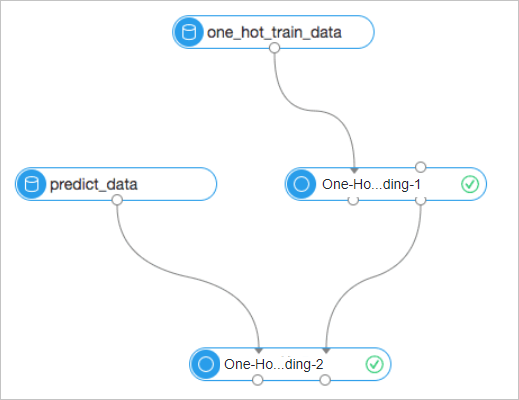
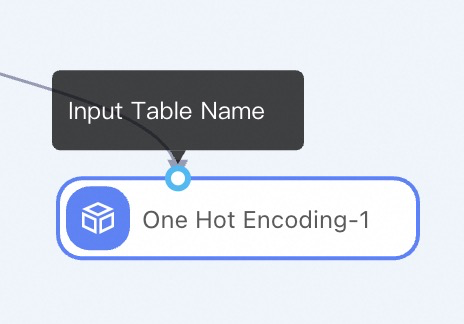
Training: Reads the input data, builds a mapping table, and writes both the encoded result and the model table. Only the left input node (Input Table Name) is required.
-
Prediction: Reads a previously built model table from the right input node (Input Model Table) and applies the existing encoding to new data. Values absent from the mapping table are ignored and not encoded.
Configure the component
Method 1: Configure on the pipeline page
| Tab | Parameter | Description |
|---|---|---|
| Fields setting | Select binary column | Required. The columns to encode. Accepts any data type. |
| Other reserved features | Columns passed through to the output in KV format. Must be DOUBLE type. These columns are not encoded; they are indexed starting from 0. | |
| Appended columns | Columns copied to the output table without any transformation. | |
| Parameters setting | Output table type | KV (sparse, recommended for high-cardinality features) or Table (dense, maximum 1,024 columns). |
| Delete encoding of last enumeration | When set to true, the linear independence of the encoded data is ensured. | |
| Ignore empty elements | When set to true, NULL values are not encoded. When set to false (default), NULL is treated as a distinct category and assigned its own index. | |
| Lifecycle | Retention period of the output table in days. Default: 7. | |
| Cores | Number of cores for the job. Determined by the system if left blank. | |
| Memory size per node | Memory allocated to each core, in MB. Valid range: 2,048–65,536 MB. Determined by the system if left blank. |
Method 2: Use PAI commands
Call the component from the SQL Script component using the following syntax:
PAI -name one_hot
    -project algo_public
    -DinputTable=one_hot_test
    -DbinaryCols=f0,f1,f2
    -DmodelTable=one_hot_model
    -DoutputTable=one_hot_output
    -Dlifecycle=28;
For more information on calling PAI commands, see SQL script.
Parameter reference
| Parameter | Required | Default | Description |
|---|---|---|---|
inputTable |
Yes | — | Name of the input table. |
inputTablePartitions |
No | All partitions | Partitions to use from the input table during training. |
binaryCols |
Yes | — | Comma-separated list of columns to encode. Accepts enumeration features of any data type. |
reserveCols |
No | Empty | Columns passed through in KV format. Must be DOUBLE type. These columns are not encoded and are indexed from 0. |
appendCols |
No | — | Columns copied to the output table without transformation. |
outputTable |
Yes | — | Name of the output table. Results are stored in KV format by default. |
inputModelTable |
No | Empty | An existing model table to use for prediction. Either inputModelTable or outputModelTable must be a non-empty string. When specified, the table must be a valid, non-empty model table. |
outputModelTable |
No | Empty | Name of the model table to write during training. Either inputModelTable or outputModelTable must be a non-empty string. |
lifecycle |
No | 7 | Retention period of the output table in days. |
dropLast |
Yes | false | When true, drops the last binary column for each feature to ensure linear independence of the encoded data. |
outputTableType |
Yes | kv | Output format. kv produces a sparse table suitable for high-cardinality features. table produces a dense table with a maximum of 1,024 columns — an error is raised if the column count exceeds this limit. |
ignoreNull |
Yes | false | When true, NULL values are skipped during encoding. When false, NULL is treated as a distinct category with its own index. |
coreNum |
No | System determined | Number of cores for the job. |
memSizePerCore |
No | System determined | Memory per core in MB. Valid range: 2,048–65,536 MB. |
Note: When using a trained model for subsequent encodings, the parametersdropLast,ignoreNull, andreserveColsare locked to the values set during training and cannot be changed. To use different values for these parameters, retrain the model.
Example
The following example encodes three columns — f0 (BIGINT), f2 (DATETIME), and f4 (BOOLEAN) — while passing f3 (DOUBLE) through as a reserved feature and appending the original f0, f2, and f4 columns to the output.
Step 1: Sample input data
| f0 (BIGINT) | f1 (STRING) | f2 (DATETIME) | f3 (DOUBLE) | f4 (BOOLEAN) |
|---|---|---|---|---|
| 12 | prefix1 | 1970-09-15 12:50:22 | 0.1 | true |
| 12 | prefix3 | 1971-01-22 03:15:33 | 0.4 | false |
| NULL | prefix3 | 1970-01-01 08:00:00 | 0.2 | NULL |
| 3 | NULL | 1970-01-01 08:00:00 | 0.3 | false |
| 34 | NULL | 1970-09-15 12:50:22 | 0.4 | NULL |
| 3 | prefix1 | 1970-09-15 12:50:22 | 0.2 | true |
| 3 | prefix1 | 1970-09-15 12:50:22 | 0.3 | false |
| 3 | prefix3 | 1970-01-01 08:00:00 | 0.2 | true |
| 3 | prefix3 | 1971-01-22 03:15:33 | 0.1 | false |
| NULL | prefix3 | 1970-01-01 08:00:00 | 0.3 | false |
Step 2: PAI command
PAI -project algo_public -name one_hot
    -DinputTable=one_hot
    -DbinaryCols=f0,f2,f4
    -DoutputModelTable=one_hot_model_8
    -DoutputTable=one_hot_in_table_1_output_8
    -DdropLast=false
    -DappendCols=f0,f2,f4
    -DignoreNull=false
    -DoutputTableType=table
    -DreserveCols=f3
    -DcoreNum=4
    -DmemSizePerCore=2048;
Step 3: Output
The model table maps each distinct value to an index. The top row (with col_name fixed to _reserve_) stores the reserved column mapping. All other rows are the encoding mappings.
| col_name | col_value | mapping |
|---|---|---|
| _reserve_ | f3 | 0 |
| f0 | 12 | 1 |
| f0 | 3 | 2 |
| f0 | 34 | 3 |
| f0 | null | 4 |
| f2 | 0 | 5 |
| f2 | 22222222000 | 6 |
| f2 | 33333333000 | 7 |
| f4 | 0 | 8 |
| f4 | 1 | 9 |
| f4 | null | 10 |
Table
The encoded result table (Table format) uses the column naming pattern {field}_{value}_{index}:
| f0 | f2 | f4 | _reserve__f3_0 | f0_12_1 | f0_3_2 | f0_34_3 | f0_null_4 | f2_0_5 | f2_22222222_6 | f2_33333333_7 | f4_0_8 | f4_1_9 | f4_null_10 |
|---|---|---|---|---|---|---|---|---|---|---|---|---|---|
| 12 | 1970-09-15 12:50:22 | true | 0.1 | 1.0 | 0.0 | 0.0 | 0.0 | 0.0 | 1.0 | 0.0 | 0.0 | 1.0 | 0.0 |
| 12 | 1971-01-22 03:15:33 | false | 0.4 | 1.0 | 0.0 | 0.0 | 0.0 | 0.0 | 0.0 | 1.0 | 1.0 | 0.0 | 0.0 |
| NULL | 1970-01-01 08:00:00 | NULL | 0.2 | 0.0 | 0.0 | 0.0 | 1.0 | 1.0 | 0.0 | 0.0 | 0.0 | 0.0 | 1.0 |
| 3 | 1970-01-01 08:00:00 | false | 0.3 | 0.0 | 1.0 | 0.0 | 0.0 | 1.0 | 0.0 | 0.0 | 1.0 | 0.0 | 0.0 |
| 34 | 1970-09-15 12:50:22 | NULL | 0.4 | 0.0 | 0.0 | 1.0 | 0.0 | 0.0 | 1.0 | 0.0 | 0.0 | 0.0 | 1.0 |
| 3 | 1970-09-15 12:50:22 | true | 0.2 | 0.0 | 1.0 | 0.0 | 0.0 | 0.0 | 1.0 | 0.0 | 0.0 | 1.0 | 0.0 |
| 3 | 1970-09-15 12:50:22 | false | 0.3 | 0.0 | 1.0 | 0.0 | 0.0 | 0.0 | 1.0 | 0.0 | 1.0 | 0.0 | 0.0 |
| 3 | 1970-01-01 08:00:00 | true | 0.2 | 0.0 | 1.0 | 0.0 | 0.0 | 1.0 | 0.0 | 0.0 | 0.0 | 1.0 | 0.0 |
| 3 | 1971-01-22 03:15:33 | false | 0.1 | 0.0 | 1.0 | 0.0 | 0.0 | 0.0 | 0.0 | 1.0 | 1.0 | 0.0 | 0.0 |
| NULL | 1970-01-01 08:00:00 | false | 0.3 | 0.0 | 0.0 | 0.0 | 1.0 | 1.0 | 0.0 | 0.0 | 1.0 | 0.0 | 0.0 |
KV
The same data in KV format:
| f0 | f2 | f4 | kv |
|---|---|---|---|
| 12 | 1970-09-15 12:50:22 | true | 0:0.1,1:1,6:1,9:1 |
| 12 | 1971-01-22 03:15:33 | false | 0:0.4,1:1,7:1,8:1 |
| NULL | 1970-01-01 08:00:00 | NULL | 0:0.2,4:1,5:1,10:1 |
| 3 | 1970-01-01 08:00:00 | false | 0:0.3,2:1,5:1,8:1 |
| 34 | 1970-09-15 12:50:22 | NULL | 0:0.4,3:1,6:1,10:1 |
| 3 | 1970-09-15 12:50:22 | true | 0:0.2,2:1,6:1,9:1 |
| 3 | 1970-09-15 12:50:22 | false | 0:0.3,2:1,6:1,8:1 |
| 3 | 1970-01-01 08:00:00 | true | 0:0.2,2:1,5:1,9:1 |
| 3 | 1971-01-22 03:15:33 | false | 0:0.1,2:1,7:1,8:1 |
| NULL | 1970-01-01 08:00:00 | false | 0:0.3,4:1,5:1,8:1 |
Scalability test
Test data: 200 million samples, 100,000 distinct enumeration values.
| Core count | Training time | Prediction time | Acceleration ratio |
|---|---|---|---|
| 5 | 84s | 181s | 1/1 |
| 10 | 60s | 93s | 1.4/1.95 |
| 20 | 46s | 56s | 1.8/3.23 |
Usage notes
-
A single encoding column can have up to tens of millions of distinct values.
-
The KV output uses zero-based indexing.
-
When predicting with a trained model,
dropLast,ignoreNull, andreserveColsare fixed to the values from training and cannot be overridden. Retrain if you need different values. -
When encoding new data using the model, if the data contains discrete values not present in the mapping table of the model, these values are ignored and not encoded. To encode these values, the model mapping table must be retrained.
Console workflow examples:
-
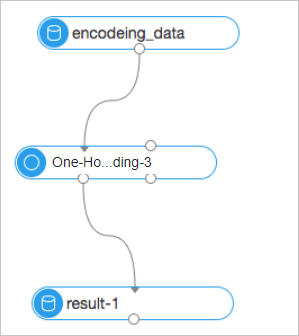
Directly use the component for encoding.
-
Train a model with the component, then use the model to encode new data.