Event notifications
Drive and Photo Service (PDS) provides real-time event notifications for various file operations. You can configure notification subscriptions in the PDS console to receive event messages through Message Service (MNS). The supported event types include file creation, update, move, and deletion. Each event has a detailed message body structure. The configuration takes effect within five minutes. This feature is useful for real-time monitoring and responding to file changes.
In the PDS console, navigate to the domain list. Select a domain, edit its notification subscription, and configure the MNS information. Then, select the events that you want to follow.
Instructions
Your notification subscription becomes active within five minutes after you configure it. Then, when you perform a relevant operation in PDS, PDS sends an event message to your configured MNS topic. The following diagram illustrates this flow.
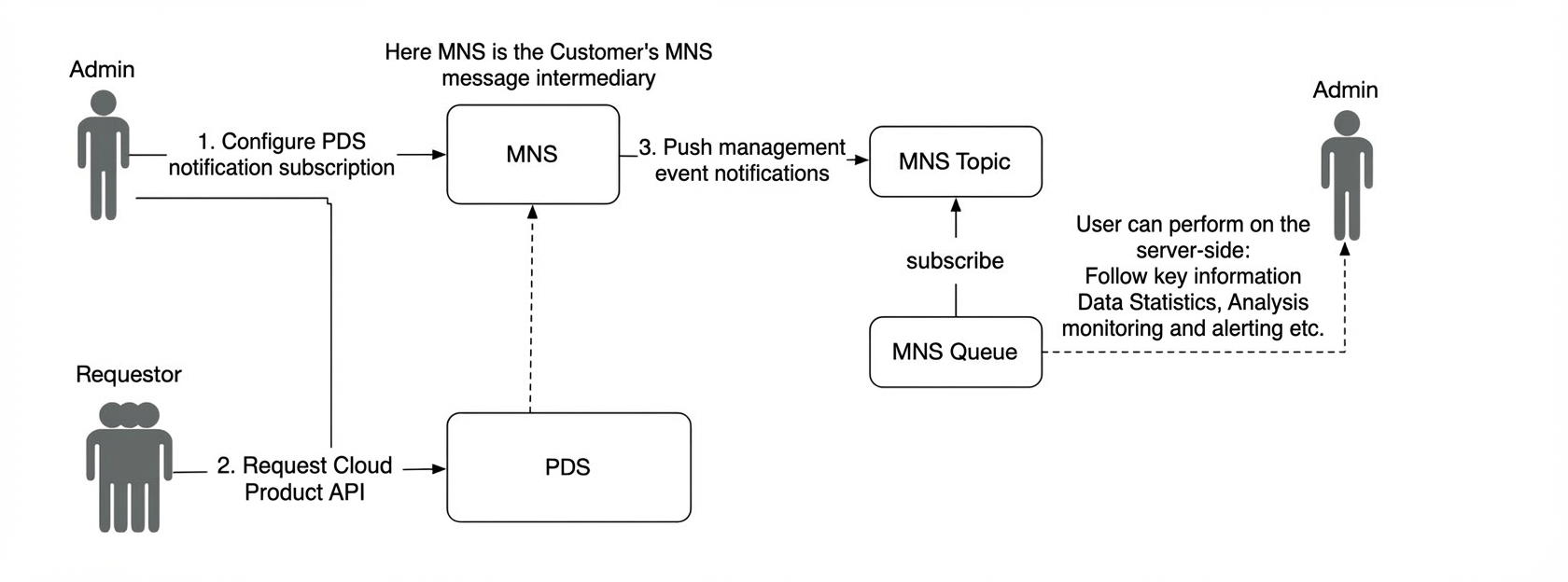
Event types
1. General message body
{
    "event_name":"Event Name",
    "event_source":"",
    "event_time":"",
    "event_version":"",
    "content":{ // Message body
    }
}
General file information struct: EventFileInfo
{
    "drive_id":"",
    "parent_file_id":"",
    "file_id":"",
    "head_revision_id":"",
    "name":"",
    "type":"folder",
    "size":1024,
    "taken_at":"2019-08-20T06:51:27.292Z",
    "local_created_at":"2019-08-20T06:51:27.292Z",
    "file_path":"",
    "file_extension":"",
    "file_category":"",
    "stream_meta":"",
    "content_hash_list":[
      {"hash_name":"","hash_hex_str":"","size":0,"md5":""}
    ]
}
General task event message struct: TaskEventContent
{
  // The ID of the domain related to the task. This field is not empty.
  "domain_id": "domain_id",
  // The ID of the drive related to the task.
  "drive_id": "drive_id",
  // The ID of the file related to the task.
  "file_id": "file_id",
  // The task ID. This field is not empty.
  "task_id": "task_id",
  // The task status. This field is not empty. Valid values: Succeeded, Failed, PartialSucceeded, and Running.
  "state": "Succeeded",
  // The error code if the task failed.
  "error_code": "",
  // The error message if the task failed.
  "error_message": "",
  // The time the task was created. This is a UTC timestamp in milliseconds.
  "created_at": 1747709923123,
  // The time the task was completed. This is a UTC timestamp in milliseconds.
  "finished_at": 1747729923123,
  // The task result information. This varies based on the task type.
  "task_result": "{\"transcode_type\":\"VideoTranscode\",\"transcode_results\":[{\"template_id\":\"264_480p\",\"status\":\"finished\"}]}",
  // The task type. This field is not empty. This is an enumeration value. For more information, see the task events section below.
  "task_type": "OfflineTranscode"
}
2. File events
Trigger: Uploading a file (creating a folder or file).
Event name: FILE.CREATED
Message body:
{
    "domain_id":"",
    "xxx":"See the EventFileInfo fields above.",
    "client_ip":"",
    "umid_token":""
}
Trigger: Updating file metadata.
Event name: FILE.UPDATED
Message body:
{
    "domain_id":"",
    "xxx":"See the EventFileInfo fields above.",
    "updated_labels":["xxx"],
    "attributes":["name","xxxx"] // Updated fields
}
Trigger: Moving a file to the recycle bin. This operation includes all subdirectory files, which are moved asynchronously in the background.
Event name: FILE.TRASHED
Message body:
{
    "domain_id":"",
    "drive_id":"",
    "file_list":[
      {
         "xxx":"See the EventFileInfo fields above."
      }
    ]
}
Trigger: Restoring a file from the recycle bin. This operation includes all subdirectory files, which are restored asynchronously in the background.
Event name: FILE.RESTORED
Message body:
{
    "domain_id":"",
    "drive_id":"",
    "file_list":[
      {
         "xxx":"See the EventFileInfo fields above."
      }
    ]
}
Trigger: Deleting a single file.
Event name: FILE.DELETED
Message body:
{
    "domain_id":"",
    "drive_id":"",
    "xxx":"See the EventFileInfo fields above."
}
Trigger: Deleting files in a batch.
Event name: FILE.BATCHDELETED
Message body:
{
    "domain_id":"",
    "drive_id":"",
    "delete_file_list":[
      {
        "xxx":"See the EventFileInfo fields above."
      }
    ]
}
Trigger: Copying a file. This operation includes all files that are copied asynchronously in the background. A message is sent for each copied file.
Event name: FILE.COPIED
Message body:
{
    "domain_id":"",
    "src_file":{
      "xxx":"See the EventFileInfo fields above."
    },
    "tgt_file":{
      "xxx":"See the EventFileInfo fields above."
    }
}
Trigger: Moving a file.
Event name: FILE.MOVED
Message body:
{
    "domain_id":"",
    "src_file":{
      "xxx":"See the EventFileInfo fields above."
    },
    "tgt_file":{
      "xxx":"See the EventFileInfo fields above."
    }
}
Trigger: Moving a file across drives.
Two messages are sent: one for file deletion and one for file copy.
Trigger: A file review is complete. If multiple files with the same content are submitted for review, a message is generated for each file after the review is complete. A maximum of 500 messages can be sent.
Event name: FILE.INVESTIGATED
Message body:
{
    "domain_id":"",
    "drive_id":"",
    "file_id":"",
    "revision_id":"",
    "content_hash_list":[
      {"hash_name":"","hash_hex_str":"","size":0,"md5":""}
    ],
    "investigation_info":{
      "xxx":"See the InvestigationInfo data structure."
    }
}
3. Task events
The message body for all task events is TaskEventContent. The values of the task_type and task_result fields vary based on the task type. The task_result field contains the JSON-serialized result of the corresponding task result structure. The following sections describe the available task events.
Offline transcoding task event
Task type: OfflineTranscode
Task result structure: OfflineTranscodeTaskResult
{
  // The offline transcoding type. This field is not empty. Valid values: VideoTranscode and AudioTranscode.
  "transcode_type": "VideoTranscode",
  // A list of offline transcoding results.
  "transcode_results": [
    {
      // The ID of the offline transcoding template. This field is not empty.
      "template_id": "264_480p",
      // The transcoding result for the template. This field is not empty. Valid values: running, finished, and failed.
      "status": "finished"
    },
    ...
  ]
}
References
Drive and Photo Service provides a tutorial that shows how to subscribe to event notifications using a lightweight message queue. For more information, see Tutorial example.