iOS client integration
This topic describes how to integrate fusion authentication for iOS clients and provides functional examples of the SDK interfaces.
Integration steps
Download the SDK
Log on to the Phone Number Verification console. On the right side of the Overview page, in the API & SDK section, click Download Now to go to the API & SDK page. Select the Fusion Authentication iOS platform and download the SDK.
Start integration
The SDK dynamic library distinguishes between real-device and simulator architectures. Before integration, choose the appropriate framework version as described in step 1. To inspect or remove a specific architecture, use the lipo <file> -info and lipo <file> -thin commands.
Add the main library and the Network system dependency library.
In Xcode, select your project in the navigation pane on the left, then choose Targets > General > Frameworks, Libraries, and Embedded Content:
Add the main library AlicomFusionAuth.framework and set Embed to Embed & Sign.
Add the system dependency library Network.framework and set Embed to Do Not Embed.
NoteThe default Fusion Authentication SDK is a dynamic library located at \SDK\AlicomFusionAuthSDK\iphoneos\AlicomFusionAuth.framework. This version includes only the arm64 architecture, suitable for real devices but not for simulators.
To run on a simulator, integrate \SDK\AlicomFusionAuthSDK\iphoneos+iphonesimulator\AlicomFusionAuth.framework. This version includes both arm64 (real device) and x86_64 (simulator) architectures and is intended only for development-stage debugging to resolve compilation issues in simulator environments.
WarningBefore submitting your app to the App Store for review, switch to the framework under the iphoneos directory. If the dynamic library contains an x86 architecture, your submission may be rejected.
Configure Build Settings.
Choose Targets > Build Settings > Linking - General > Other Linker Flags and add -ObjC.
Add resource files such as ATAuthSDK.bundle.
Choose Targets > Build Phases > Copy Bundle Resources, click “+”, and add
ATAuthSDK.bundlefrom the SDK folder. Failure to add this file will cause default images or icons on the authorization page to not appear.If your Fusion Authentication plan includes a CAPTCHA policy, also add
AlicomCaptcha4.bundlefrom the SDK folder in the same location. Without it, the CAPTCHA interface cannot be launched.In your Xcode project under Build Phases > Copy Bundle Resources, confirm that both
ATAuthSDK.bundleandAlicomCaptcha4.bundle(both located in AlicomFusionAuthDemo/SDK) have been added.
Optional: Integrate Umeng feature components.
If you have already integrated the Umeng base components, skip this step. Call the relevant interface to disable the Umeng plug-in associated with Fusion Authentication so you can use your existing Umeng components. For details, see Umeng component dependency settings.
If you have not yet integrated Umeng components, add UMCommon.framework and UMDevice.framework from the SDK folder to your project and set Embed to Do Not Embed.
Create an authentication plan
When using the SDK, you will need a plan code. After obtaining your app’s package signature, go to the Phone Number Verification console and navigate to Fusion Authentication Plan Management to obtain your plan code.
Scenarios
The Fusion Authentication SDK supports the following five scenarios. Use the corresponding scenario ID to invoke each one.
Scenario | Scenario ID | Constant declaration |
100001 |
| |
100002 |
| |
100003 |
| |
100004 |
| |
100005 |
|
For detailed policy configuration per scenario, see Global policies.
Interaction flow
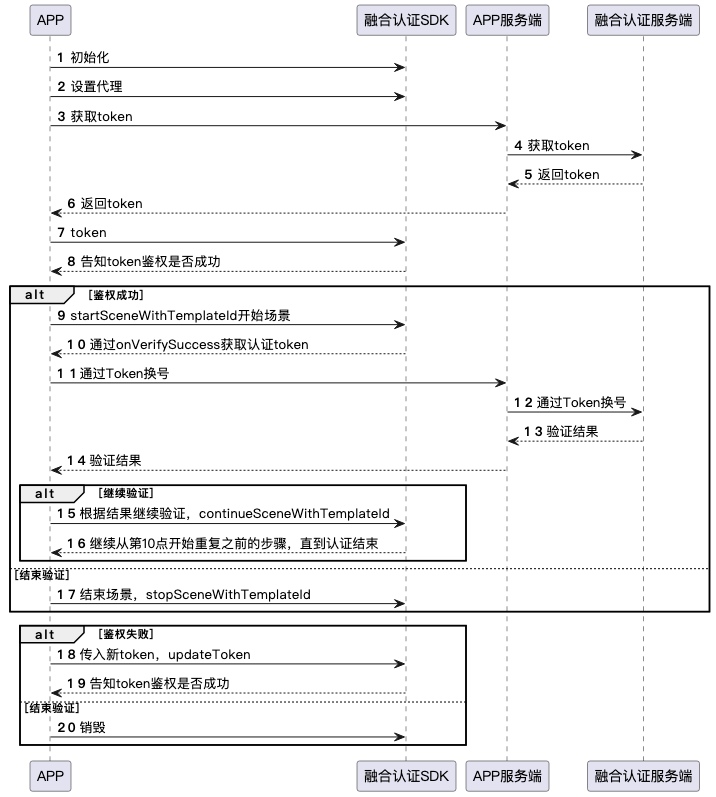
Integrate the Alibaba Cloud Fusion Authentication SDK into the client and complete initialization.
The server calls the GetFusionAuthToken API to obtain an authentication token, then sends it to the client for SDK authentication.
The client launches the scenario authorization page. Some scenarios require user consent (e.g., agreeing to privacy terms or receiving an SMS verification code).
After user authorization, the client receives a unified authentication token via the SDK callback and uploads it to the server.
The server calls the VerifyWithFusionAuthToken API to convert the token into the user’s phone number.
Complete usage example
SDK method reference
Create an instance and initialize the authentication token
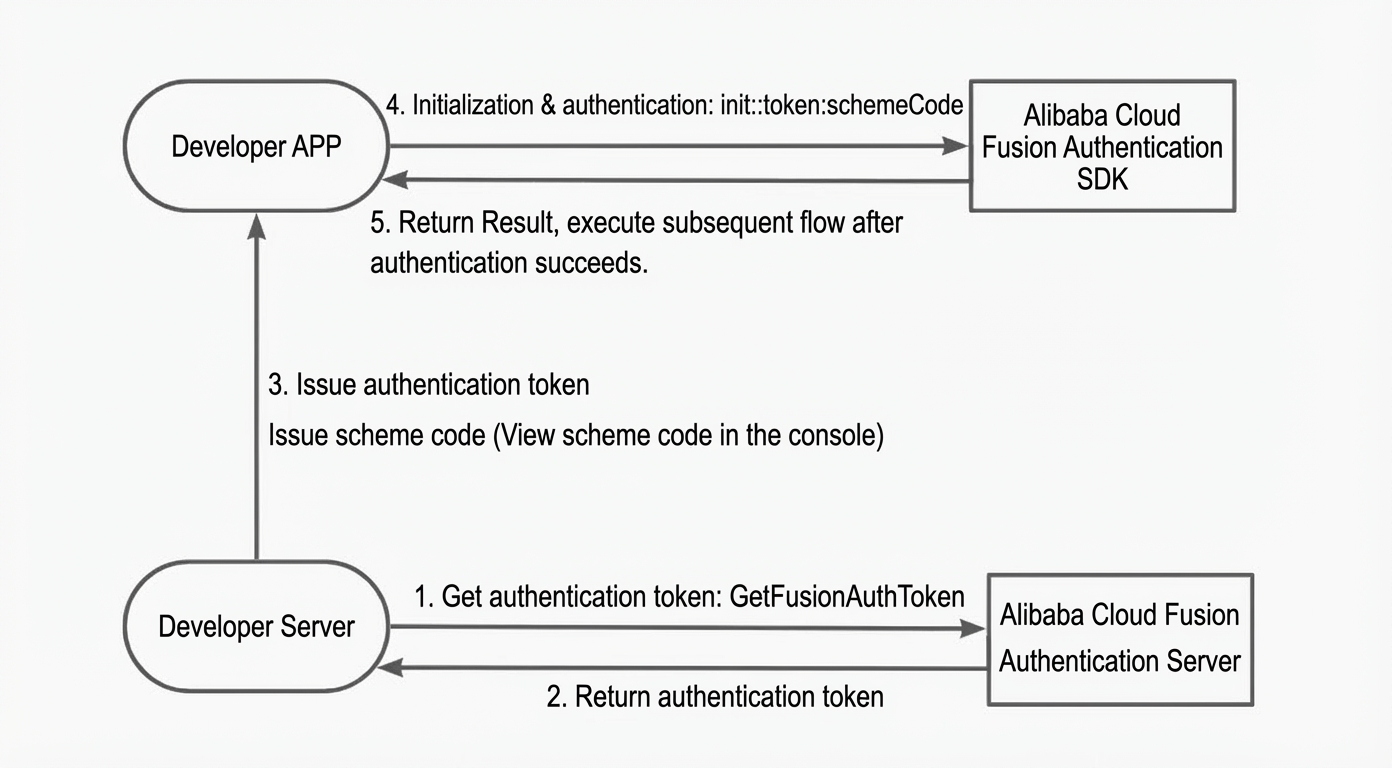
The SDK requires an authentication token at startup for validity verification. Maintain the token’s lifecycle in your app to improve SDK token handling efficiency and quickly launch scenario pages.
Obtain the authentication token from your server. For details, see the GetFusionAuthToken API.
Obtain the plan code after creating an authentication plan in the console. For instructions, see Fusion Authentication Plan Management.
/**
 *  @param token Authentication token
 *  @param schemeCode Plan code
 */
- (instancetype)initWithToken:(AlicomFusionAuthToken *)token schemeCode:(NSString *)schemeCode;Authentication success, failure, or expiration triggers the main flow callback (AlicomFusionAuthDelegate). Implement the following callbacks:
Authentication success: Triggered by the
onSDKTokenAuthSuccess:callback. Perform scenario operations only after this callback succeeds.Authentication failure: Triggered by the
onSDKTokenAuthFailure:failToken:error:callback.Token update: Five minutes before token expiration, the
onSDKTokenUpdate:callback provides a new token. Implement this callback to retrieve the updated token.
Set callbacks
The SDK notifies you of node status through callbacks. Implement the main flow callback as described in AlicomFusionAuthDelegate.
After implementing the main flow callback, set it using the following method.
/**
 *  @param delegate Main SDK flow callback
 */
- (void)setFusionAuthDelegate:(id<AlicomFusionAuthDelegate>)delegate;Start a scenario
Do not call this interface if another scenario is already running. Otherwise, error 100003 occurs.
Call this interface only after successful token authentication.
For the scenario ID (
templateId), see Scenarios.
Use default UI
Using the default UI prevents UI customization.
/**
 *  @param templateId Unique scenario identifier, corresponding to the console scenario ID
 *  @param controller Base view controller from which the SDK presents the Fusion Authentication UI
 */
- (void)startSceneWithTemplateId:(NSString *)templateId viewController:(UIViewController *)controller;Use custom UI
Customize the UI for specific scenarios by implementing the UI flow callback (AlicomFusionAuthUIDelegate). For details, see Interface reference.
/**
 *  @param templateId Unique scenario identifier, corresponding to the console scenario ID
 *  @param controller Base view controller from which the SDK presents the Fusion Authentication UI
 *  @param delegate UI callback for custom UI implementation
 */
- (void)startSceneUIWithTemplateId:(NSString *)templateId
                    viewController:(UIViewController *)controller
                          delegate:(id<AlicomFusionAuthUIDelegate> _Nullable)delegate;
Scenario execution flow
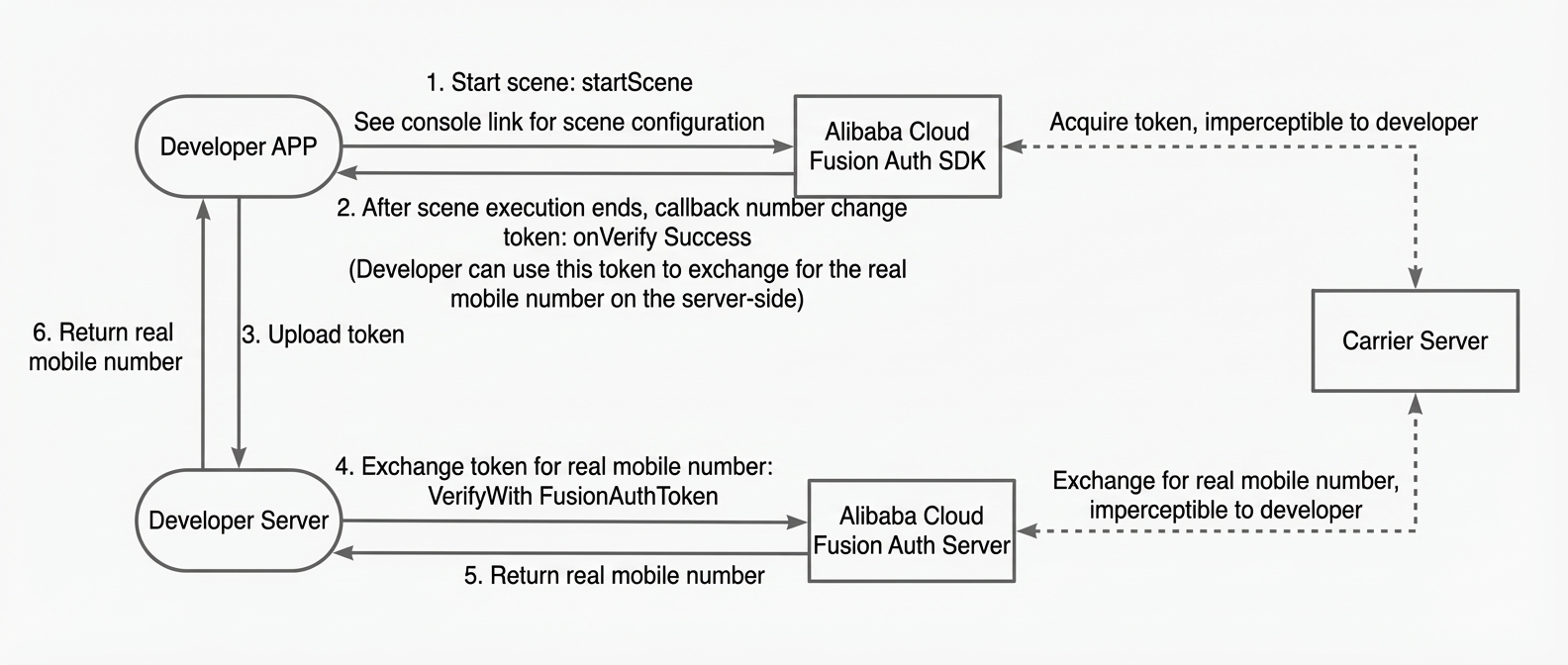
Scenario execution triggers the main flow callback (AlicomFusionAuthDelegate). Implement the following callbacks:
Token retrieval success: Triggered by the
onVerifySuccess:nodeName:maskToken:event:callback, which returns a unified authentication token. Use this token with the VerifyWithFusionAuthToken API to retrieve the phone number.Token retrieval failure: Triggered by the
onVerifyFailed:nodeName:error:callback. After receiving this callback, you can either continue the scenario to proceed to the next verification step or end the scenario.Mid-scenario token success: Triggered during scenario ID 100002 when verifying the current phone number, via the
onHalfwayVerifySuccess:nodeName:maskToken:event:resultBlock:callback. After verifying the current phone number, inform the SDK of the result usingresultBlock. The SDK proceeds based on this result.Scenario completion: Triggered by the
onTemplateFinish:event:callback. Call end the scenario in response.
Continue scenario
Use this interface to resume a scenario after interruption. For example, if server-side verification fails after retrieving the unified authentication token, use this interface to continue the scenario flow.
Call this interface only after calling start.
/**
 *  @param templateId Unique scenario identifier, corresponding to the console scenario ID
 *  @param isSuccess Indicates whether the current scenario verification succeeded, determining the next step (e.g., if phone number retrieval fails, this parameter controls whether to proceed to the next authentication step)
 */
- (void)continueSceneWithTemplateId:(NSString *)templateId isSuccess:(BOOL)isSuccess;End scenario
Call this interface to end a scenario. The scenario stops executing immediately.
Call this interface only after calling start. You must end the current scenario before starting another one. Do not start multiple scenarios simultaneously.
/**
 *  @param templateId Unique scenario identifier, corresponding to the console scenario ID
 */
- (void)stopSceneWithTemplateId:(NSString *)templateId;Destroy service
After destroying the service, all internal SDK modules are destroyed. To reuse the SDK, create a new instance.
- (void)destroy;Other interface reference
Umeng component dependency settings
To use Umeng’s risk detection and phone number scoring features, configure the framework and call the following method to control where Umeng components are initialized.
This is an optional plug-in dependency, not mandatory. You must import the framework configuration; otherwise, the setting has no effect.
/**
 *  Set whether to use the SDK-associated Umeng analytics component.
 *  @note By default, the SDK uses its built-in Umeng component. If your app hasn’t integrated Umeng, follow the SDK integration guide to add the required components. No further action is needed.
 *  @note If your app already integrates Umeng, do not integrate again. Use this interface to disable the built-in link and ensure Umeng is initialized before using this SDK.
 *  @param isUseSupply YES: Use the SDK’s default Umeng component. NO: Use your app’s existing Umeng component. Default is YES.
 */
+ (void)useSDKSupplyUMSDK:(BOOL)isUseSupply;Manually update authentication token
This interface is optional. The SDK internally monitors token expiration and notifies the client via the AlicomFusionAuthDelegate callback before expiration. You can ignore this logic.
Authentication tokens are time-sensitive. Update the token manually just before it expires. For token update logic, see initWithToken.
/**
 *  @param token Authentication token
 */
- (void)updateToken:(AlicomFusionAuthToken *)token;Get SDK version
/**
 *  @return Version number
 */
+ (NSString *)getSDKVersion;Get scenario ID
/**
 *  @return templateId Scenario ID currently in progress
 */
- (NSString *)getCurrentTemplateId;Logging
/**
 * @param enable Whether to print logs (enabled by default)
 */
+ (void)logEnable:(BOOL)enable;Set whether to use the SDK’s built-in CAPTCHA module
/**
 *  Set whether to use the SDK’s built-in CAPTCHA module.
 *  @note CAPTCHA is enabled by default. Disable it using this interface if you don’t need it.
 *  @note Disabling CAPTCHA locally disconnects it from console configuration. You won’t be able to re-enable it via the console.
 *  @param isUseSupply YES: Use CAPTCHA module. NO: Do not use CAPTCHA module. Default is YES.
 */
+ (void)useSDKSupplyCaptchaModule:(BOOL)isUseSupply;Set display page orientation
Default value is UIInterfaceOrientationMaskPortrait. Currently, only fixed portrait and fixed landscape orientations are supported. Dynamic rotation is not supported. Call this method before startScene.
- (void)setInterfaceOrientation:(UIInterfaceOrientationMask)orientation;Main flow callback AlicomFusionAuthDelegate
Authentication token update required (required callback)
This callback triggers during instance initialization and five minutes before token expiration. The SDK manages the token lifecycle.
The SDK retries every 30 seconds. Two consecutive failures result in error 300004.
/**
 *  @param handler Handler instance
 *  @return token Provide the latest token to the SDK for authentication renewal
 */
- (AlicomFusionAuthToken *)onSDKTokenUpdate:(AlicomFusionAuthHandler *)handler;
Token authentication success (required callback)
Ensure you receive this callback before calling startScene to launch a scenario. Otherwise, the SDK reports errors 300001, 300003, or 300006.
Avoid calling startScene directly in this callback. It may trigger multiple times due to token authentication events.
/**
 *  @param handler Handler instance
 */
- (void)onSDKTokenAuthSuccess:(AlicomFusionAuthHandler *)handler;
Token authentication failure (required callback)
This callback triggers on initial token authentication failure or after a token update fails. The SDK becomes unusable. Reset the token or destroy and reinitialize the SDK.
/**
 *  @param handler Handler instance
 *  @param failToken Failed token
 *  @param error Error details
 */
- (void)onSDKTokenAuthFailure:(AlicomFusionAuthHandler *)handler
                    failToken:(AlicomFusionAuthToken *)failToken
                        error:(AlicomFusionEvent *)error;
Authentication success (required callback)
The SDK returns a unified authentication token based on the business flow. Use this token to exchange for the phone number and complete authentication.
The SDK generates an authentication token during one-click login, SMS verification, or user-initiated SMS. Tokens from user-initiated SMS can be reused; others are single-use.
This callback triggers only at the final authentication stage.
If phone number exchange fails, call
continueSceneWithTemplateId:isSuccess:to proceed with the next verification step.
/**
 *  @param handler Handler instance
 *  @param nodeName Node name where the token was obtained
 *  @param maskToken Unified authentication token: Use this token on your server to verify and retrieve the real phone number. If phone number retrieval fails, use the SDK’s continue interface to proceed with the scenario flow.
 */
- (void)onVerifySuccess:(AlicomFusionAuthHandler *)handler
               nodeName:(NSString *)nodeName
              maskToken:(NSString *)maskToken
                  event:(AlicomFusionEvent *)event;
Mid-scenario verification node (required callback)
You need to know the intermediate authentication result; otherwise, it will affect the continued execution of the flow. Currently, this callback is triggered only the first time you change your phone number and receive a Captcha.
/**
 *  @param handler Handler instance
 *  @param nodeName Node name where the token was obtained
 *  @param maskToken Unified authentication token: Use this token on your server to verify and retrieve the real phone number
 *  @param resultBlock Inform the SDK of the verification result: If false, the SDK takes no action. If true, it proceeds to the next node.
 */
- (void)onHalfwayVerifySuccess:(AlicomFusionAuthHandler *)handler
                      nodeName:(NSString *)nodeName
                     maskToken:(NSString *)maskToken
                         event:(AlicomFusionEvent *)event
                   resultBlock:(void (^)(BOOL))resultBlock;
Authentication failure (required callback)
This callback indicates a problem at the current node. Decide whether to proceed to the next node. To continue, call
continueSceneWithTemplateId:isSuccess:to attempt another verification method./** * @param handler Handler instance * @param nodeName Node name where the token was obtained * @param error Error details */ - (void)onVerifyFailed:(AlicomFusionAuthHandler *)handler nodeName:(NSString *)nodeName error:(AlicomFusionEvent *)error;Scenario flow completion (required callback)
This callback triggers when the current scenario ends, whether normally or abnormally. Call end scenario using
stopSceneWithTemplateId:to allow future scenario launches./** * @param handler Handler instance * @param event End event details */ - (void)onTemplateFinish:(AlicomFusionAuthHandler *)handler event:(AlicomFusionEvent *)event;Phone number auto-fill (required callback)
Used for auto-filling the phone number on the SMS verification page.
Applies to the first verification step when changing a phone number (AlicomFusionTemplateId_100002) and verifying a bound phone number (AlicomFusionTemplateId_100005).
Used for phone number consistency checks during password reset (AlicomFusionTemplateId_100003). If inconsistent, the scenario ends and triggers
onTemplateFinish:event:.
/**
 *  Auto-fill phone number for verifying consistency or re-binding during phone number change.
 *  @note SDK handles partial phone number UI internally.
 *  @note For password reset, the user must enter the original phone number for initial verification. The SDK verifies this input against the actual original number or auto-fills during re-binding.
 *  @param handler Handler instance
 *  @param event Event details
 *  @return The user’s current phone number for the next step
 */
- (NSString *)onGetPhoneNumberForVerification:(AlicomFusionAuthHandler *)handler
                                        event:(AlicomFusionEvent *)event;
Rich-text protocol click (required callback)
Triggered when users click protocols during login or registration (AlicomFusionTemplateId_100001). Your app must create a web view to display the protocol content.
/**
 *  Triggered when users click rich-text protocols. Returns protocol title and URL. Your app must open the protocol in a custom container.
 *  @note Applies to one-click login and SMS verification protocol clicks.
 *  @param handler Handler instance
 *  @param protocolName Protocol name
 *  @param protocolUrl Protocol URL
 *  @param event Event details
 */
- (void)onProtocolClick:(AlicomFusionAuthHandler *)handler
           protocolName:(NSString *)protocolName
            protocolUrl:(NSString *)protocolUrl
                  event:(AlicomFusionEvent *)event;
Authentication interruption (required callback)
Temporary authentication interruptions. Display appropriate messages based on the event.
Type 1: Flow cannot continue due to validation failures (e.g., incorrect phone number length, unchecked privacy agreement). Show a toast message.
Type 2: Time-consuming operations requiring a loading indicator (e.g., risk detection start, SMS request start, user-initiated SMS content retrieval). The SDK returns status code 900003 for loading start and 900004 for loading end. Show or hide the indicator accordingly.
/**
 *  @note Triggers under these conditions: 1. Proceeding without checking the privacy agreement box; 2. Invalid phone number format; 3. SDK starting or ending node loading; 4. Interface availability checks.
 *  @param handler Handler instance
 *  @param event Interruption reason
 */
- (void)onVerifyInterrupt:(AlicomFusionAuthHandler *)handler
                    event:(AlicomFusionEvent *)event;
Scenario event callback (optional callback)
This callback provides notifications for all SDK events, including UI clicks, navigation, and errors.
Do not implement business logic in this callback.
/**
 *  @param handler Handler instance
 *  @param event Click event. See AlicomFusionEvent.h for definitions.
 */
- (void)onAuthEvent:(AlicomFusionAuthHandler *)handler
          eventData:(AlicomFusionEvent *)event;
UI interface reference
UI flow callback AlicomFusionAuthUIDelegate
One-click login:
onPhoneNumberVerifyUICustomDefined:templateId:nodeId:UIModel:SMS verification:
onSMSCodeVerifyUICustomDefined:templateId:nodeId:isAutoInput:view:Upstream SMS verification:
onSMSSendVerifyUICustomDefined:templateId:nodeId:smsContent:receiveNum:view:Navigation bar:
onNavigationControllerCustomDefined:templateId:nodeId:navigation:
All callbacks in this delegate are optional. If unimplemented, the SDK uses default UI pages.
The nodeId corresponds to node IDs in Fusion Authentication scenarios. View these IDs in the console to customize UI per node.
All delegate callbacks execute on the main thread.
One-click login custom UI
The one-click login interface cannot be fully customized. Modify it using the AlicomFusionNumberAuthModel parameters.
/**
 *  @param handler Handler instance
 *  @param templateId Scenario ID
 *  @param nodeId Node ID
 *  @param model Custom UI properties
 */
- (void)onPhoneNumberVerifyUICustomDefined:(AlicomFusionAuthHandler *)handler
                                templateId:(NSString *)templateId
                                    nodeId:(NSString *)nodeId
                                   UIModel:(AlicomFusionNumberAuthModel *)model;
One-click login custom UI parameters AlicomFusionNumberAuthModel
typedef NS_ENUM(NSUInteger, AlicomFusionPresentationDirection){
    AlicomFusionPresentationDirectionBottom = 0,
    AlicomFusionPresentationDirectionRight,
    AlicomFusionPresentationDirectionTop,
    AlicomFusionPresentationDirectionLeft,
};
/**
 *  Builds a control’s frame. Called during view layout to determine the control’s position.
 *  @param  screenSize Screen size. Use this to detect portrait or landscape orientation.
 *  @param  superViewSize Super view size. Use this to assist in re-layout.
 *  @param  frame Default control position.
 *  @return New control position.
 */
typedef CGRect(^AlicomFusionBuildFrameBlock)(CGSize screenSize, CGSize superViewSize, CGRect frame);
/* One-click login custom UI */
@interface AlicomFusionNumberAuthModel : NSObject
/// If you reassign otherLoginButton to your own button and want to follow the orchestration flow, call this method after the button is tapped.
- (void)otherPhoneLogin;
/// Title label
@property (nonatomic, strong) UILabel * _Nullable nameLabel;
/// Switch to phone number login button. If removed and replaced with your own button, call otherPhoneLogin to maintain SDK logic.
@property (nonatomic, strong) UIButton * _Nullable otherLoginButton;
/// Callback for "More login options" tap
@property (nonatomic, copy) void(^moreLoginActionBlock)(void);
/** Layout block for the "Login" text on the one-click login page. Defaults to standard layout if unimplemented. */
@property (nonatomic, copy) AlicomFusionBuildFrameBlock nameLabelFrameBlock;
/** Layout block for the "Log in with another phone number" button. Defaults to standard layout if unimplemented. */
@property (nonatomic, copy) AlicomFusionBuildFrameBlock otherLoginButtonFrameBlock;
/**
 *  Notes: Y-axis distance settings. Warning: All Y-axis settings <=0 are ignored.
 *  Full-screen mode: Based on 375×667 pt. For other screen sizes, scale using ratio = screen height / 667 (e.g., Y × ratio).
 */
#pragma mark- Full-screen and popup mode settings
/**
 *  The view that renders and displays all controls on the authorization page is called the content view.
 *  If unimplemented, defaults to full-screen mode.
 *  For popup mode: x >= 0 || y >= 0, width <= screen width || height <= screen height.
 */
@property (nonatomic, copy) AlicomFusionBuildFrameBlock contentViewFrameBlock;
#pragma mark- Portrait and landscape mode settings
/** Supported interface orientations. Default is UIInterfaceOrientationMaskPortrait. Caution: Avoid UIInterfaceOrientationMaskPortraitUpsideDown on notch screens. */
@property (nonatomic, assign) UIInterfaceOrientationMask supportedInterfaceOrientations;
#pragma mark- Navigation bar (full-screen mode only)
/** Hide navigation bar during authorization page display. Default is NO. */
@property (nonatomic, assign) BOOL navIsHidden;
/** Hide navigation bar after the login view controller disappears. Default is NO. */
@property (nonatomic, assign) BOOL navIsHiddenAfterLoginVCDisappear;
/** Prevent automatic dismissal on back button tap. If YES, tapping the back button does not dismiss the page and returns status code 700010. You must manually call TXCommonHandler cancelLoginVCAnimated to hide the page. Default is NO. */
@property (nonatomic, assign) BOOL suspendDisMissVC;
/** Navigation bar theme color */
@property (nonatomic, strong) UIColor *navColor;
/** Navigation bar title (content, font, size, color) */
@property (nonatomic, copy) NSAttributedString *navTitle;
/** Navigation bar back button image */
@property (nonatomic, strong) UIImage *navBackImage;
/** Hide navigation bar back button. Default is NO. */
@property (nonatomic, assign) BOOL hideNavBackItem;
/** Custom right-side navigation bar control. Add gestures or buttons when creating this view. */
@property (nonatomic, strong) UIView *navMoreView;
/** Layout block for the navigation bar back button. Defaults to standard layout if unimplemented. */
@property (nonatomic, copy) AlicomFusionBuildFrameBlock navBackButtonFrameBlock;
/** Layout block for the navigation bar title. Defaults to standard layout if unimplemented. */
@property (nonatomic, copy) AlicomFusionBuildFrameBlock navTitleFrameBlock;
/** Layout block for the navigation bar right-side more view. Defaults to standard layout if unimplemented. Boundary: CGRectGetMinX(frame) >= (superViewSize / 0.3) && CGRectGetWidth(frame) <= (superViewSize.width / 3.0). */
@property (nonatomic, copy) AlicomFusionBuildFrameBlock navMoreViewFrameBlock;
#pragma mark- Full-screen and popup mode shared properties
#pragma mark- Authorization page animations
/** Authorization page presentation direction. Default is AlicomFusionPresentationDirectionBottom. Affects only built-in animations. */
@property (nonatomic, assign) AlicomFusionPresentationDirection presentDirection;
/** Authorization page show/hide animation duration. Default is 0.25s. Set <= 0 to disable. Affects only built-in animations. */
@property (nonatomic, assign) CGFloat animationDuration;
/** Authorization page entry animation (popup and full-screen). If nil or unset, uses built-in animation. The SDK modifies animation properties (removedOnCompletion = NO, fillMode = kCAFillModeForwards, delegate). */
@property (nonatomic, strong, nullable) CAAnimation *entryAnimation;
/** Authorization page exit animation (popup and full-screen). If nil or unset, uses built-in animation. The SDK modifies animation properties (removedOnCompletion = NO, fillMode = kCAFillModeForwards, delegate). */
@property (nonatomic, strong, nullable) CAAnimation *exitAnimation;
/** Authorization page background entry animation (popup only). If nil or unset, uses built-in animation. The SDK modifies animation properties (removedOnCompletion = NO, fillMode = kCAFillModeForwards, delegate). */
@property (nonatomic, strong, nullable) CAAnimation *bgEntryAnimation;
/** Authorization page background exit animation (popup only). If nil or unset, uses built-in animation. The SDK modifies animation properties (removedOnCompletion = NO, fillMode = kCAFillModeForwards, delegate). */
@property (nonatomic, strong, nullable) CAAnimation *bgExitAnimation;
#pragma mark- Status bar
/** Hide status bar. Default is NO. */
@property (nonatomic, assign) BOOL prefersStatusBarHidden;
/** Status bar style. Default is UIStatusBarStyleDefault. */
@property (nonatomic, assign) UIStatusBarStyle preferredStatusBarStyle;
#pragma mark- Background
/** Authorization page background color */
@property (nonatomic, strong) UIColor *backgroundColor;
/** Authorization page background image */
@property (nonatomic, strong) UIImage *backgroundImage;
/** Background image content mode. Default is UIViewContentModeScaleAspectFill. */
@property (nonatomic, assign) UIViewContentMode backgroundImageContentMode;
#pragma mark- Logo
/** Logo image */
@property (nonatomic, strong) UIImage *logoImage;
/** Hide logo. Default is NO. */
@property (nonatomic, assign) BOOL logoIsHidden;
/** Layout block for the logo. Defaults to standard layout if unimplemented. */
@property (nonatomic, copy) AlicomFusionBuildFrameBlock logoFrameBlock;
#pragma mark- Slogan
/** Slogan text (content, font, size, color) */
@property (nonatomic, copy) NSAttributedString *sloganText;
/** Hide slogan. Default is NO. */
@property (nonatomic, assign) BOOL sloganIsHidden;
/** Layout block for the slogan. Defaults to standard layout if unimplemented. */
@property (nonatomic, copy) AlicomFusionBuildFrameBlock sloganFrameBlock;
#pragma mark- Phone number
/** Masked phone number color */
@property (nonatomic, strong) UIColor *numberColor;
/** Masked phone number font size. Values less than 16 are ignored. */
@property (nonatomic, strong) UIFont *numberFont;
/**
 *  Layout block for the phone number. Only x and y values take effect. Defaults to standard layout if unimplemented.
 *  Note: Position must stay within the parent content view.
 */
@property (nonatomic, copy) AlicomFusionBuildFrameBlock numberFrameBlock;
#pragma mark- Login button
/** Login button text (content, font, size, color) */
@property (nonatomic, strong) NSAttributedString *loginBtnText;
/** Login button background images: @[active, disabled, highlighted]. Default height is 50.0 pt. */
@property (nonatomic, strong) NSArray<UIImage *> *loginBtnBgImgs;
/**
 *  Automatically hide the loading spinner after tapping the login button. Default is YES (hides automatically after successful token retrieval).
 *  If NO, manually call [[TXCommonHandler sharedInstance] hideLoginLoading] to hide it.
 */
@property (nonatomic, assign) BOOL autoHideLoginLoading;
/**
 *  Layout block for the login button. Defaults to standard layout if unimplemented.
 *  Note: Must stay within the parent content view. Height must be >=20. Width must be >= half the parent view width.
 */
@property (nonatomic, copy) AlicomFusionBuildFrameBlock loginBtnFrameBlock;
#pragma mark- Privacy agreement
/** Checkbox images: [unchecked, checked] */
@property (nonatomic, copy) NSArray<UIImage *> *checkBoxImages;
/** Checkbox image edge insets. Default is UIEdgeInsetsZero. Ensures images don’t distort when control size minus insets equals image size. */
@property (nonatomic, assign) UIEdgeInsets checkBoxImageEdgeInsets;
/** Checkbox checked state. Default is NO. */
@property (nonatomic, assign) BOOL checkBoxIsChecked;
/** Hide checkbox. Default is NO. */
@property (nonatomic, assign) BOOL checkBoxIsHidden;
/** Checkbox size (width = height). Must be greater than 0. */
@property (nonatomic, assign) CGFloat checkBoxWH;
/** Agreement 1: [name, URL]. Note: All three agreement names must be unique. */
@property (nonatomic, copy) NSArray<NSString *> *privacyOne;
/** Agreement 2: [name, URL]. Note: All three agreement names must be unique. */
@property (nonatomic, copy) NSArray<NSString *> *privacyTwo;
/** Agreement 3: [name, URL]. Note: All three agreement names must be unique. */
@property (nonatomic, copy) NSArray<NSString *> *privacyThree;
/** Agreement name connector strings. Default is ["and", "、", "、"] (first uses "and", others use "、"). Uses default if empty. */
@property (nonatomic, copy) NSArray<NSString *> *privacyConectTexts;
/** Agreement text colors: [non-clickable, clickable] */
@property (nonatomic, copy) NSArray<UIColor *> *privacyColors;
/** Agreement text alignment: center, left, or right. Default is left. */
@property (nonatomic, assign) NSTextAlignment privacyAlignment;
/** Agreement prefix text */
@property (nonatomic, copy) NSString *privacyPreText;
/** Agreement suffix text */
@property (nonatomic, copy) NSString *privacySufText;
/** Carrier agreement name prefix. Supports only <([《(【『 */
@property (nonatomic, copy) NSString *privacyOperatorPreText;
/** Carrier agreement name suffix. Supports only >)]》)】』 */
@property (nonatomic, copy) NSString *privacyOperatorSufText;
/** Carrier agreement display order. Default is 0 (first agreement). Max value is 3 (fourth agreement). */
@property (nonatomic, assign) NSInteger privacyOperatorIndex;
/** Agreement font size. Values less than 12.0 are ignored. */
@property (nonatomic, strong) UIFont *privacyFont;
/** Expand checkbox tap area to include the prefix text ("I have read and agree to"). Default is NO. */
@property (nonatomic, assign) BOOL expandAuthPageCheckedScope;
/**
 *  Layout block for the entire agreement (including checkbox). Defaults to standard layout if unimplemented.
 *  Width less than checkbox width is ignored. Min x/y is 0. Max width/height is parent view size.
 *  Final size adapts to the set width.
 */
@property (nonatomic, copy) AlicomFusionBuildFrameBlock privacyFrameBlock;
/**
 *  Animation for agreement text when login is tapped without consent. If nil or unset, no animation plays.
 *  The SDK modifies animation properties (removedOnCompletion = NO, fillMode = kCAFillModeRemoved, delegate).
 */
@property (nonatomic, strong, nullable) CAAnimation *privacyAnimation;
#pragma mark- Switch to other methods
/** "Switch" button title (content, font, size, color) */
@property (nonatomic, copy) NSAttributedString *changeBtnTitle;
/** Hide "Switch" button. Default is NO. */
@property (nonatomic, assign) BOOL changeBtnIsHidden;
/** Layout block for the "Switch" button. Defaults to standard layout if unimplemented. */
@property (nonatomic, copy) AlicomFusionBuildFrameBlock changeBtnFrameBlock;
#pragma mark- Agreement detail page
/** Navigation bar background color */
@property (nonatomic, strong) UIColor *privacyNavColor;
/** Navigation bar title font and size */
@property (nonatomic, strong) UIFont *privacyNavTitleFont;
/** Navigation bar title color */
@property (nonatomic, strong) UIColor *privacyNavTitleColor;
/** Navigation bar back button image */
@property (nonatomic, strong) UIImage *privacyNavBackImage;
#pragma mark- Custom control addition and layout
/**
 *  Add custom controls. Note: Create, initialize, and add custom views to the parent view on the main thread.
 *  @param  superCustomView Parent view
*/
@property (nonatomic, copy) void(^customViewBlock)(UIView *superCustomView);
/**
 *  Called after each authorization page layout. Use this block to set frames for custom controls.
 *  @param  screenSize Screen size
 *  @param  contentViewFrame Content view frame
 *  @param  nameLabelFrame Name label frame
 *  @param  otherLoginBtnFrame Other login button frame
 *  @param  navFrame Navigation bar frame (full-screen only)
 *  @param  titleBarFrame Title bar frame (popup only)
 *  @param  logoFrame Logo frame
 *  @param  sloganFrame Slogan frame
 *  @param  numberFrame Phone number frame
 *  @param  loginFrame Login button frame
 *  @param  changeBtnFrame Switch button frame
 *  @param  privacyFrame Agreement frame (including checkbox)
*/
@property (nonatomic, copy) void(^customViewLayoutBlock)(CGSize screenSize, CGRect contentViewFrame,CGRect nameLabelFrame,CGRect otherLoginBtnFrame,CGRect navFrame, CGRect titleBarFrame, CGRect logoFrame, CGRect sloganFrame, CGRect numberFrame, CGRect loginFrame, CGRect changeBtnFrame, CGRect privacyFrame);
#pragma mark - Secondary privacy agreement popup settings
/** Show secondary privacy agreement popup. Default is NO. */
@property (nonatomic, assign) BOOL privacyAlertIsNeedShow;
/** Execute login after tapping the popup button. Default is YES. */
@property (nonatomic, assign) BOOL privacyAlertIsNeedAutoLogin;
/** Custom show animation for the secondary privacy popup. Default is slide-up animation. */
@property (nonatomic, strong, nullable) CAAnimation *privacyAlertEntryAnimation;
/** Custom hide animation for the secondary privacy popup. Default is slide-down animation. */
@property (nonatomic, strong, nullable) CAAnimation *privacyAlertExitAnimation;
/** Popup corner radii (top-left, bottom-left, bottom-right, top-right). Requires four values. Values <=0 produce sharp corners. Default is 0. */
@property (nonatomic, copy) NSArray<NSNumber *> *privacyAlertCornerRadiusArray;
/** Popup background color. Default is white. */
@property (nonatomic, strong) UIColor *privacyAlertBackgroundColor;
/** Popup opacity. Range: 0.3–1.0. Default is 1.0 (opaque). */
@property (nonatomic, assign) CGFloat privacyAlertAlpha;
/** Popup title font size. Minimum is 12. Default is 12. */
@property (nonatomic, strong) UIFont *privacyAlertTitleFont;
/** Popup title color. Default is black. */
@property (nonatomic, strong) UIColor *privacyAlertTitleColor;
/** Popup title background color. Default is white. */
@property (nonatomic, strong) UIColor *privacyAlertTitleBackgroundColor;
/** Popup title alignment. Default is center. */
@property (nonatomic, assign) NSTextAlignment privacyAlertTitleAlignment;
/** Popup agreement content font size. Minimum is 12. Default is 12. */
@property (nonatomic, strong) UIFont *privacyAlertContentFont;
/** Popup agreement content background color. Default is white. */
@property (nonatomic, strong) UIColor *privacyAlertContentBackgroundColor;
/** Popup agreement content colors: [non-clickable, clickable]. Default is [0x999999, 0x1890FF]. */
@property (nonatomic, copy) NSArray<UIColor *> *privacyAlertContentColors;
/** Popup agreement text alignment: center, left, or right. Default is left. */
@property (nonatomic, assign) NSTextAlignment privacyAlertContentAlignment;
/** Popup button background images: @[active, highlighted]. Default height is 50.0 pt. */
@property (nonatomic, copy) NSArray<UIImage *> *privacyAlertBtnBackgroundImages;
/** Popup button text colors: [active, highlighted]. Default is black. */
@property (nonatomic, copy) NSArray<UIColor *> *privacyAlertButtonTextColors;
/** Popup button font size. Minimum is 10. Default is 18. */
@property (nonatomic, strong) UIFont *privacyAlertButtonFont;
/** Show popup close button. Default is YES. */
@property (nonatomic, assign) BOOL privacyAlertCloseButtonIsNeedShow;
/** Popup close button image. Default is built-in "X" image. */
@property (nonatomic, strong) UIImage *privacyAlertCloseButtonImage;
/** Show popup background mask. Default is YES. */
@property (nonatomic, assign) BOOL privacyAlertMaskIsNeedShow;
/** Close popup when tapping the background mask. Default is YES. */
@property (nonatomic, assign) BOOL tapPrivacyAlertMaskCloseAlert;
/** Popup mask background color. Default is black. */
@property (nonatomic, strong) UIColor *privacyAlertMaskColor;
/** Popup mask opacity. Range: 0.3–1.0. Default is 0.5. */
@property (nonatomic, assign) CGFloat privacyAlertMaskAlpha;
/** Popup mask show animation. Default is fade-in. */
@property (nonatomic, strong) CAAnimation *privacyAlertMaskEntryAnimation;
/** Popup mask hide animation. Default is fade-out. */
@property (nonatomic, strong) CAAnimation *privacyAlertMaskExitAnimation;
/** Popup size. Must fit within parent content view. Height >=50. Width >=0. Default: centered, width = screen width − 80, height = 200. */
@property (nonatomic, copy) AlicomFusionBuildFrameBlock privacyAlertFrameBlock;
/** Popup title size. Must fit within parent. Width = popup width (min 100). Height = text height (min 15). Default: x=0, y=0. */
@property (nonatomic, copy) AlicomFusionBuildFrameBlock privacyAlertTitleFrameBlock;
/** Popup content size. Starts below the title. Final size adapts to set width. Must fit within parent. */
@property (nonatomic, copy) AlicomFusionBuildFrameBlock privacyAlertPrivacyContentFrameBlock;
/** Popup button size. Default: centered, width = half parent width, height = 50. */
@property (nonatomic, copy) AlicomFusionBuildFrameBlock privacyAlertButtonFrameBlock;
/** Popup close button size. Must fit within parent. Default: width=44, height=44, 15 from right, 0 from top. */
@property (nonatomic, copy) AlicomFusionBuildFrameBlock privacyAlertCloseFrameBlock;
/**
 *  Add custom controls to the secondary authorization popup. Note: Create, initialize, and add custom views to the parent view on the main thread.
 *  @param  superPrivacyAlertCustomView Parent view
 */
@property (nonatomic, copy) void(^privacyAlertCustomViewBlock)(UIView *superPrivacyAlertCustomView);
/**
 *  Called after secondary popup layout. Use this block to set frames for custom controls.
 *  @param  privacyAlertFrame Popup frame
 *  @param  privacyAlertTitleFrame Popup title frame
 *  @param  privacyAlertPrivacyContentFrame Popup agreement content frame
 *  @param  privacyAlertButtonFrame Popup confirm button frame
 *  @param  privacyAlertCloseFrame Popup close button frame
 */
@property (nonatomic, copy) void(^privacyAlertCustomViewLayoutBlock)(CGRect privacyAlertFrame, CGRect privacyAlertTitleFrame, CGRect privacyAlertPrivacyContentFrame, CGRect privacyAlertButtonFrame, CGRect privacyAlertCloseFrame);
#pragma mark - Getter
/// Get current carrier name
@property (nonatomic, copy, readonly) NSString *_Nullable getCurrentCarrierName;
@end
Page | Property | Type | Description |
Status bar | prefersStatusBarHidden | BOOL | Hide status bar. Default is NO. |
preferredStatusBarStyle | UIStatusBarStyle | Status bar style. Default is UIStatusBarStyleDefault. | |
Navigation bar | navIsHidden | BOOL | Hide navigation bar. Default is NO. |
navColor | UIColor | Navigation bar theme color. | |
navTitle | NSAttributedString | Navigation bar title (content, font, size, color). | |
navBackImage | UIImage | Navigation bar back button image. | |
hideNavBackItem | BOOL | Hide navigation bar back button. Default is NO. | |
navMoreView | UIView | Custom right-side navigation bar control. Add gestures or buttons when creating this view. | |
navBackButtonFrameBlock | AlicomFusionBuildFrameBlock | Layout block for the navigation bar back button. Defaults to standard layout if unimplemented. | |
navTitleFrameBlock | AlicomFusionBuildFrameBlock | Layout block for the navigation bar title. Defaults to standard layout if unimplemented. | |
navMoreViewFrameBlock | AlicomFusionBuildFrameBlock | Layout block for the navigation bar right-side more view. Defaults to standard layout if unimplemented. Boundary: CGRectGetMinX(frame) >= (superViewSize / 0.3) && CGRectGetWidth(frame) <= (superViewSize.width / 3.0). | |
privacyNavColor | UIColor | Agreement detail page navigation bar background color. | |
privacyNavTitleFont | UIFont | Agreement detail page navigation bar title font and size. | |
privacyNavTitleColor | UIColor | Agreement detail page navigation bar title color. | |
privacyNavBackImage | UIImage | Agreement detail page navigation bar back button image. | |
Logo area | logoImage | UIImage | Logo image. |
logoIsHidden | BOOL | Hide logo. Default is NO. | |
logoFrameBlock | AlicomFusionBuildFrameBlock | Layout block for the logo. Defaults to standard layout if unimplemented. | |
Slogan | sloganText | NSAttributedString | Slogan text (content, font, size, color). |
sloganIsHidden | BOOL | Hide slogan. Default is NO. | |
sloganFrameBlock | AlicomFusionBuildFrameBlock | Layout block for the slogan. Defaults to standard layout if unimplemented. | |
Mask | numberColor | UIColor | Set the mask color. |
numberFont | UIFont | Masked number font size. Values less than 16 are ignored. | |
numberFrameBlock | AlicomFusionBuildFrameBlock | Layout block for the phone number. Only x and y take effect. Defaults to standard layout if unimplemented. Must stay within parent view. | |
Login button | loginBtnText | NSAttributedString | Login button text (content, font, size, color). |
loginBtnBgImgs | NSArray<UIImage *> | Login button background images: [active, disabled, highlighted]. Default height is 50.0 pt. | |
autoHideLoginLoading | BOOL | Automatically hide the loading spinner after tapping the login button. Values:
| |
loginBtnFrameBlock | AlicomFusionBuildFrameBlock | Layout block for the login button. Defaults to standard layout if unimplemented. Must stay within parent content view. Height must be >=40. Width must be >= half parent view width. | |
Switch to other methods | changeBtnTitle | NSAttributedString | "Switch" button title (content, font, size, color). |
changeBtnIsHidden | BOOL | Hide "Switch" button. Default is NO. | |
changeBtnFrameBlock | AlicomFusionBuildFrameBlock | Constructs the frame for changeBtn. This method is called when the view layout or layout changes. If you do not implement it, default handling is applied. | |
Custom control area (e.g., other login methods) | customViewBlock | Add custom controls. Note: Create, initialize, and add custom views to the parent view on the main thread. | |
customViewLayoutBlock |
| ||
Agreement section | checkBoxImages | NSArray<UIImage *> | Checkbox images: [unchecked, checked]. |
checkBoxIsChecked | BOOL | Checkbox checked state. Default is NO. | |
checkBoxIsHidden | BOOL | Hide checkbox. Default is NO. | |
checkBoxWH | CGFloat | Checkbox size (width = height). Must be greater than 0. | |
privacyOne | NSArray<NSString *> | Agreement 1: [name, URL]. Note: All three agreement names must be unique. | |
privacyTwo | NSArray<NSString *> | Agreement 2: [name, URL]. Note: All three agreement names must be unique. | |
privacyThree | NSArray<NSString *> | Agreement 3: [name, URL]. Note: All three agreement names must be unique. | |
privacyColors | NSArray<UIColor *> | Agreement text colors: [non-clickable, clickable]. | |
privacyAlignment | NSTextAlignment | Agreement text alignment: center or left. Default is left. | |
privacyPreText | NSString | Agreement prefix text. | |
privacySufText | NSString | Agreement suffix text. | |
privacyOperatorPreText | NSString | Carrier agreement name prefix. Supports only <, (, [, {, (, 【, 『. | |
privacyOperatorSufText | NSString | Carrier agreement name suffix. Supports only >, ), ], }, ), 】, 』. | |
privacyFont | UIFont | Agreement font size. Values less than 12.0 are ignored. | |
privacyFrameBlock | AlicomFusionBuildFrameBlock | Layout block for the entire agreement (including checkbox). Defaults to standard layout if unimplemented. Width less than checkbox width is ignored. Min x/y is 0. Max width/height is parent view size. Final size adapts to set width. | |
privacyOperatorColor | UIColor | Carrier agreement text color (highest priority). If unset, uses clickable color from privacyColors. If privacyColors is unset, uses default color. | |
privacyOneColor | UIColor | Agreement 1 text color (highest priority). If unset, uses clickable color from privacyColors. If privacyColors is unset, uses default color. | |
privacyTwoColor | UIColor | Agreement 2 text color (highest priority). If unset, uses clickable color from privacyColors. If privacyColors is unset, uses default color. | |
privacyThreeColor | UIColor | Agreement 3 text color (highest priority). If unset, uses clickable color from privacyColors. If privacyColors is unset, uses default color. | |
Other full-screen page properties | contentViewFrameBlock | AlicomFusionBuildFrameBlock | Full-screen and popup mode: The view that renders all controls is called the content view. If unimplemented, defaults to full-screen mode. For popup mode: x > 0 || y > 0, width < screen width || height < screen height. |
supportedInterfaceOrientations | UIInterfaceOrientationMask | Portrait and landscape mode: Caution—avoid UIInterfaceOrientationMaskPortraitUpsideDown on notch screens. | |
presentDirection | AlicomFusionPresentationDirection | Authorization page presentation direction. Default is AlicomFusionPresentationDirectionBottom. Affects only built-in animations. | |
Title bar | alertTitleBarColor | UIColor | Title bar background color. |
alertBarIsHidden | BOOL | Whether the title bar is hidden. | |
alertTitle | NSAttributedString | Title bar title (content, size, color). | |
alertCloseImage | UIImage | Title bar close button image. | |
alertCloseItemIsHidden | BOOL | Show title bar close button. Default is NO. | |
Other popup page properties | contentViewFrameBlock | AlicomFusionBuildFrameBlock | Full-screen and popup mode: The view that renders all controls is called the content view. If unimplemented, defaults to full-screen mode. |
supportedInterfaceOrientations | UIInterfaceOrientationMask | Portrait and landscape mode: Caution—avoid UIInterfaceOrientationMaskPortraitUpsideDown on notch screens! | |
presentDirection | AlicomFusionPresentationDirection | Authorization page presentation direction. Default is AlicomFusionPresentationDirectionBottom. | |
alertBlurViewColor | UIColor | Bottom mask background color. Default is black. | |
alertBlurViewAlpha | CGFloat | Bottom mask opacity. Default is 0.5. | |
alertCornerRadiusArray | NSArray<NSNumber *> | Content view corner radii (top-left, bottom-left, bottom-right, top-right). Requires four values. Values <=0 produce sharp corners. | |
Configure secondary privacy agreement popup page
Optional method: Close secondary authorization popup for one-click login
/**
 * Close secondary authorization popup
 */
- (void)closePrivactAlertView;
Usage example
[[TXCommonHandler sharedInstance] closePrivactAlertView];SMS verification custom UI
/**
 *  @param handler Handler instance
 *  @param templateId Template ID
 *  @param nodeId Node ID
 *  @param isAutoInput Whether the phone number is auto-filled
 *  @param view SMS verification view
 */
- (void)onSMSCodeVerifyUICustomDefined:(AlicomFusionAuthHandler *)handler
                            templateId:(NSString *)templateId
                                nodeId:(NSString *)nodeId
                           isAutoInput:(BOOL)isAutoInput
                                  view:(AlicomFusionVerifyCodeView *)view;
SMS verification custom UI parameters AlicomFusionVerifyCodeView
#pragma mark - Manual phone number input (templates 100001, 100002, 100003, 100004)
/// Parent view for requesting verification code
@property (nonatomic, strong) UIView *verifyCodeSendView;
/// Country code display area. You can use the font property to set the font and size of the country code display. Example:
/// // Customize the country code font size
/// verifyView.countryCodeLabel.font = [UIFont systemFontOfSize:14];
@property (nonatomic, strong) UILabel *countryCodeLabel;
/// Phone number input field
@property (nonatomic, strong) UITextField *phoneTextField;
/// Divider line
@property (nonatomic, strong) UIView *lineView;
#pragma mark - Auto-filled phone number (templates 100002, 100005)
/// Phone number section
@property (nonatomic, strong) UILabel *phoneNumLabel; // Masked with *
@property (nonatomic, strong) NSString *phoneNumText; // Real phone number
/// Explanation section
@property (nonatomic, strong) UILabel *phoneNumExplainLabel;
#pragma mark - Buttons
/// Request verification code button
@property (nonatomic, strong) UIButton *verifyCodeSendBtn;
#pragma mark Agreement (template 100001)
/// Checkbox
@property (nonatomic, strong) UIButton *checkBoxBtn;
/// Privacy agreement
@property (nonatomic, strong) UITextView *privacyTextView;
#pragma mark - Verification code section
/// Parent view for submitting verification code
@property (nonatomic, strong) UIView *verifyCodeSubmitView;
/// Success message after sending
@property (nonatomic, strong) UILabel *expainLabel;
/// Verification code input field
@property (nonatomic, strong) AlicomFusionVerifyCodeInputView *codeView;
/// Submit verification button
@property (nonatomic, strong) UIButton *verifyCodeSubmitBtn;
/// Tap gesture to dismiss keyboard
@property (nonatomic, strong) UITapGestureRecognizer *tapGesture;
/// Verification code button tap event. If implementing your own button event, call this method to send the code.
/// - Parameters:
///   - phoneNumber: Phone number
///   - checked: Whether the agreement was accepted (applies only to template 100001)
- (void)verifyCodeBtnClick:(NSString *)phoneNumber
                   checked:(BOOL)checked;
/// Submit verification code
/// - Parameters:
///   - phoneNumber: Phone number
///   - code: Verification code
- (void)submitVerifyCodeBtnClick:(NSString *)phoneNumber
code:(NSString *)code;If you customize the send button, call
verifyCodeBtnClick:checked:to send the verification code.If you customize the submit button, call
submitVerifyCodeBtnClick:code:to submit the verification code.
Upstream SMS verification custom UI
Applies to nodes where users send SMS to complete verification.
/**
 *  @param handler Handler instance
 *  @param templateId Scenario ID
 *  @param nodeId Node ID
 *  @param smsContent SMS content
 *  @param receiveNum Receiving number
 *  @param view Upstream SMS verification view
 */
- (void)onSMSSendVerifyUICustomDefined:(AlicomFusionAuthHandler *)handler
                            templateId:(NSString *)templateId
                                nodeId:(NSString *)nodeId
                            smsContent:(NSString *)smsContent
                            receiveNum:(NSString *)receiveNum
                                  view:(AlicomFusionUpGoingView *)view;
Upstream SMS verification custom UI parameters AlicomFusionUpGoingView
/// Top explanation background
@property (nonatomic, strong) UIView *contentBgView;
/// Top explanation text
@property (nonatomic, strong) UILabel *contentLabel;
/// SMS content title
@property (nonatomic, strong) UILabel *upGoingTitleLabel;
/// SMS content
@property (nonatomic, strong) UILabel *upGoingContentLabel;
/// Receiving number title
@property (nonatomic, strong) UILabel *phoneTitleLabel;
/// Receiving number
@property (nonatomic, strong) UILabel *phoneContentLabel;
/// Send SMS button
@property (nonatomic, strong) UIButton *upGoingSendBtn;
/// "I've sent SMS" button
@property (nonatomic, strong) UIButton *upGoingAlreadySendBtn;
/**
 *  Go to send upstream SMS
 *  @param smsContent SMS content
 *  @param receiveNum Receiving number
 */
- (void)gotoSendUpGoing:(NSString *)smsContent receiveNum:(NSString *)receiveNum;
/// Confirm SMS sent
- (void)upGoingAlreadySend;If you customize the send button, call
gotoSendUpGoing:receiveNum:to send the SMS.If you customize the "I've sent SMS" button, call
upGoingAlreadySendto complete verification.
Navigation bar custom UI
/**
 *  @param handler Handler instance
 *  @param templateId Template ID
 *  @param nodeId Node ID
 *  @param naviController Navigation controller
 */
- (void)onNavigationControllerCustomDefined:(AlicomFusionAuthHandler *)handler
                                 templateId:(NSString *)templateId
                                     nodeId:(NSString *)nodeId
                                 navigation:(UINavigationController *)naviController;