Engine versions 5.6, 5.7, and 8.0
A database engine is the core component of a database. PolarDB for MySQL offers three major engine versions: 5.6, 5.7, and 8.0.
The following figure shows the position of the PolarDB for MySQL database engine in the PolarDB for MySQL architecture.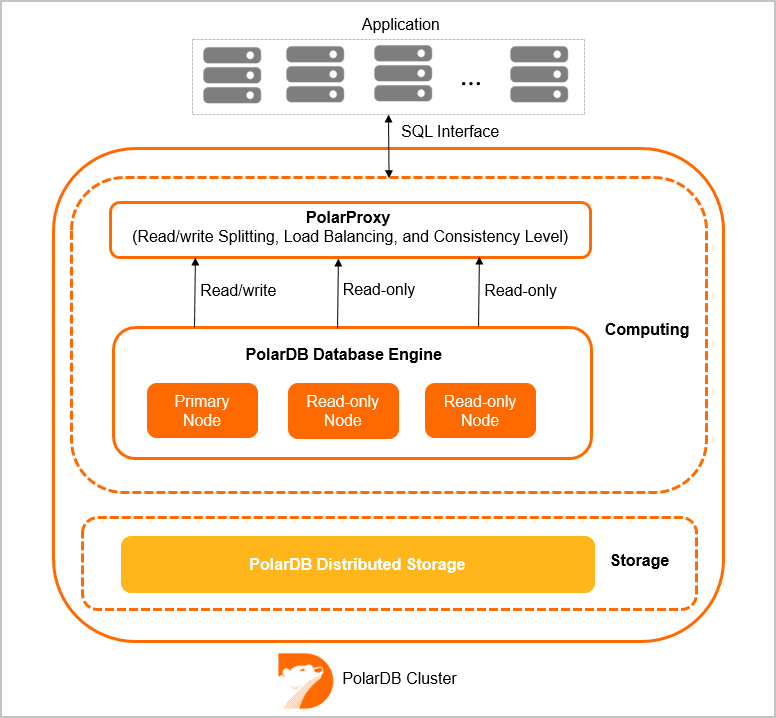
Engine version structure
A PolarDB for MySQL engine version number consists of a major version, a minor version, and a revision. The following figure illustrates this structure using PolarDB for MySQL 8.0 as an example: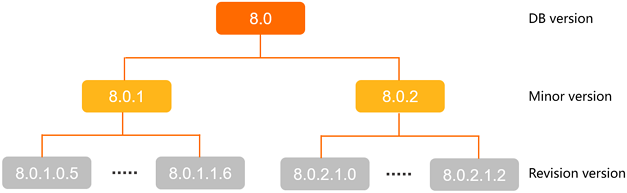
The major version is the primary identifier for a PolarDB for MySQL engine version. A major version typically includes one or more minor versions. For example, major version 5.6 contains only the minor version 5.6.16, whereas major version 8.0 includes both 8.0.1 and 8.0.2. Different minor versions can have significant feature variations. Select the minor version that best fits your business requirements before you purchase a cluster. A minor version can also have multiple revisions. Revisions introduce optimizations, improvements, or new features. Both minor versions and revisions also include security and performance enhancements.
PolarDB for MySQL engine versions are backward-compatible. Newer major versions include all features of older ones, so you do not need to modify your applications after an upgrade. For more information about how to upgrade your engine version, see Upgrade an engine version.
Release notes
Each engine version has release notes that list its new features, enhancements, and bug fixes. For more information, see the following topics:
Engine version compatibility
The PolarDB for MySQL engine is compatible with the following:
-
ANSI/ISO SQL standard. PolarDB for MySQL lets you change the SQL compatibility mode to ANSI. To do this, set the sql_mode cluster parameter to ANSI. To learn how to modify cluster parameters, see Set cluster and node parameters.
-
ODBC versions 0 to 3.51.
-
XML features that follow W3C and XPath standards.
-
PolarDB for MySQL 5.7 and 8.0 support the native JSON data type as defined by RFC 7159 and ECMA-262.
The following table shows the compatibility of PolarDB for MySQL engine versions with community MySQL versions.
|
Engine version |
Compatible MySQL version |
|
8.0.2 |
8.0.18 and earlier |
|
8.0.1 |
8.0.13 and earlier |
|
5.7 |
5.7.28 and earlier |
|
5.6 |
5.6.16 and earlier |
SQL syntax for new features
CREATE TABLE
For CREATE TABLE syntax, compatibility is automatically ensured by adding specific syntax during operations like SHOW CREATE TABLE, when using the mysqldump tool, or when synchronizing the binary log. The following examples provide more details:
-
The required compatibility syntax is automatically included in the output of
SHOW CREATE TABLE. Example:CREATE TABLE `t1` (c1 int, KEY(c1) GLOBAL) ENGINE=InnoDB PARTITION BY HASH (`c1`) PARTITIONS 4; Query OK, 0 rows affected (0.06 sec) SHOW CREATE TABLE t1; +-------+----------------------------------------------------------------------------------------------------------------------------------------------------------------------------------------------------------------------+ | Table | Create Table | +-------+----------------------------------------------------------------------------------------------------------------------------------------------------------------------------------------------------------------------+ | t1 | CREATE TABLE `t1` ( `c1` int(11) DEFAULT NULL, KEY `c1` (`c1`) /*!99990 800020207 GLOBAL */ ) ENGINE=InnoDB DEFAULT CHARSET=utf8mb4 COLLATE=utf8mb4_0900_ai_ci /*!50100 PARTITION BY HASH (`c1`) PARTITIONS 4 */ |
-
The
mysqldumptool automatically includes the required compatibility syntax in its output. Example:CREATE TABLE `t1` (c1 int, KEY(c1) GLOBAL) ENGINE=InnoDB PARTITION BY HASH (`c1`) PARTITIONS 4; DEFAULT CHARSET=utf8mb4 COLLATE=utf8mb4_0900_ai_ci PARTITION BY HASH (`c1`); --result mysqldump --compact test t1 include/mysqlbinlog.inc /*!50530 SET @@SESSION.PSEUDO_SLAVE_MODE=1*/; /*!50003 SET @OLD_COMPLETION_TYPE=@@COMPLETION_TYPE,COMPLETION_TYPE=0*/; DELIMITER /*!*/; ROLLBACK/*!*/; # [empty] # original_commit_timestamp= MICROSECONDS-FROM-EPOCH (YYYY-MM-DD HOURS:MINUTES:SECONDS TZ) # immediate_commit_timestamp= MICROSECONDS-FROM-EPOCH (YYYY-MM-DD HOURS:MINUTES:SECONDS TZ) /*!80001 SET @@session.original_commit_timestamp= MICROSECONDS-FROM-EPOCH*//*!*/; /*!80014 SET @@session.original_server_version= ORIGINAL_SERVER_VERSION*//*!*/; /*!80014 SET @@session.immediate_server_version= IMMEDIATE_SERVER_VERSION*//*!*/; SET @@SESSION.GTID_NEXT= '#'/*!*/; use `test`/*!*/; SET TIMESTAMP=#/*!*/; SET @@session.pseudo_thread_id=#/*!*/; SET @@session.foreign_key_checks=1, @@session.sql_auto_is_null=0, @@session.unique_checks=1, @@session.autocommit=1/*!*/; SET @@session.sql_mode=1168113696/*!*/; SET @@session.auto_increment_increment=1, @@session.auto_increment_offset=1/*!*/; /*!\C utf8mb4 *//*!*/; SET @@session.character_set_client=255,@@session.collation_connection=255,@@session.collation_server=255/*!*/; SET @@session.lc_time_names=0/*!*/; SET @@session.collation_database=DEFAULT/*!*/; /*!80011 SET @@session.default_collation_for_utf8mb4=255*//*!*/; /*!80013 SET @@session.sql_require_primary_key=0*//*!*/; CREATE TABLE `t1` ( `c1` int(11) DEFAULT NULL, KEY `c1` (`c1`) /*!99990 800020207 GLOBAL */ ) ENGINE=InnoDB DEFAULT CHARSET=utf8mb4 COLLATE=utf8mb4_0900_ai_ci /*!50100 PARTITION BY HASH (`c1`) PARTITIONS 4 */ /*!*/; -
The required compatibility syntax is automatically added during binary log synchronization.
This example shows binary log synchronization from PolarDB for MySQL 8.0.2.2.0 to MySQL 8.0.27:
-
Use Data Transmission Service (DTS) to synchronize the binary log from PolarDB for MySQL to MySQL. For more information, see Synchronize data from PolarDB for MySQL to ApsaraDB RDS for MySQL.
-
Check the binary log synchronization results on PolarDB for MySQL 8.0.2.2.0 and MySQL.
Result in PolarDB for MySQL:
root:test> show create table t6;
+-------+--------------------------------------------------------------+
| Table | Create Table                                                 |
+-------+--------------------------------------------------------------+
| t6    | CREATE TABLE `t6` (
  `a` int(11) DEFAULT NULL,
  `b` int(11) DEFAULT NULL
) ENGINE=InnoDB DEFAULT CHARSET=utf8mb4 COLLATE=utf8mb4_0900_ai_ci
/*!99990 800020200 PARTITION BY HASH (`a`)
SUBPARTITION BY LIST (`b`)
(PARTITION p0
 (SUBPARTITION s0 VALUES IN (1,2,3,4,5) ENGINE = InnoDB,
  SUBPARTITION s1 VALUES IN (6,7,8,9,10) ENGINE = InnoDB),
 PARTITION p1
 (SUBPARTITION s2 VALUES IN (1,2,3,4,5) ENGINE = InnoDB,
  SUBPARTITION s3 VALUES IN (6,7,8,9,10) ENGINE = InnoDB)) */ |
+-------+--------------------------------------------------------------+
1 row in set (4.72 sec)
Result in MySQL:
root:test> show create table t6;
+-------+------------------------------------------------------------+
| Table | Create Table                                               |
+-------+------------------------------------------------------------+
| t6    | CREATE TABLE `t6` (
  `a` int DEFAULT NULL,
  `b` int DEFAULT NULL
) ENGINE=InnoDB DEFAULT CHARSET=utf8mb4 COLLATE=utf8mb4_0900_ai_ci |
+-------+------------------------------------------------------------+
1 row in set (0.00 sec)
As shown in the output, the result in MySQL does not include the new features from PolarDB for MySQL.
NoteAfter data synchronization from PolarDB for MySQL to MySQL, new features specific to PolarDB for MySQL are not available.
-
Other DDL operations
For DDL operations other than CREATE TABLE, you must manually add compatibility comments for PolarDB for MySQL syntax. Use the following format:
/*!99990 800020200 Special new PolarDB Syntax SQL supported >= version 2.2.0 */Example:
CREATE TABLE `t1` (
`c1` int(11) DEFAULT NULL,
KEY `c1` (`c1`) /*!99990 800020207 GLOBAL */
) ENGINE=InnoDB DEFAULT CHARSET=utf8mb4 COLLATE=utf8mb4_0900_ai_ci
/*!50100 PARTITION BY HASH (`c1`)
PARTITIONS 4 */
Checking the engine version
You can check the engine version of your cluster in the following ways:
-
Log on to the PolarDB console. On the Basic Information page of your cluster, view the Kernel Version.
-
Alternatively, run the
show variables like "%polardb_version%";orshow variables like '%rds_release_date%';command to get the version number.Note-
For PolarDB for MySQL 5.6 clusters, you can only use the
show variables like '%rds_release_date%';command to get the version number. -
For a detailed description of the PolarDB for MySQL engine version number, see How engine versions are structured.
-
Engine version upgrade
-
Major and minor version upgrades
-
Major version upgrade
The major version upgrade feature allows you to upgrade, for example, from PolarDB for MySQL 5.6 to PolarDB for MySQL 8.0.
-
Minor version upgrade
PolarDB for MySQL currently does not support minor version upgrades. However, you can use DTS to migrate or synchronize data from the source version to a cluster of the target version to complete the upgrade. For more information about how to migrate or synchronize data, see Data migration solutions overview.
-
-
Revision upgrade
To learn how to upgrade a revision, see Upgrade a revision.