Auto plan cache
You can use the auto plan cache feature of PolarDB for MySQL to cache execution plans for SQL statements. This shortens query optimization time and improves query performance. This topic describes the background information, prerequisites, parameters, and interfaces for the auto plan cache feature.
Background information
Choosing an execution plan involves many factors, such as statistics, different join orders, and query transformations. The optimization time varies for different query statements. For some SQL statements, the query optimization time can be a large part of the total running time. If these statements run frequently, the long optimization time increases the system load. Caching and reusing execution plans reduces the optimization time for each run. This improves query performance, lowers the database load, and increases throughput capacity.
For many other queries, the optimization time is small, but the running time is heavily influenced by the execution plan. Different parameter values in an SQL statement can correspond to different optimal execution plans. In some scenarios, MySQL retrieves actual data from the engine based on parameter values for further optimization.
Using a fixed execution plan for these queries may not improve query response time or reduce load overhead. It can even cause performance regression.
PolarDB for MySQL provides the auto plan cache feature to improve the query performance of SQL statements with long optimization times, reduce system load, and avoid performance regression from fixed execution plans. The auto plan cache feature has three modes: AUTO, DEMAND, and ENFORCE. You can set the loose_plan_cache_type parameter to one of these modes to cache execution plans in the plan cache. This reduces optimization time and improves query performance. A cached execution plan is automatically invalidated if the statistics of a referenced table change or if a Data Definition Language (DDL) operation is performed on a referenced table.
Prerequisites
Your PolarDB cluster must meet one of the following version requirements:
-
PolarDB for MySQL 8.0.1 with a revision version of 8.0.1.1.33 or later.
-
PolarDB for MySQL 8.0.2 with a revision version of 8.0.2.2.12 or later.
Parameters
You can set the parameters in the following table in the PolarDB console. For more information, see Set cluster and node parameters.
|
Parameter |
Description |
|
loose_plan_cache_type |
The mode for auto plan cache. Valid values:
|
|
loose_plan_cache_expire_time |
If an execution plan in the plan cache is not hit within this time, its memory is reclaimed. The unit is seconds. Value range: 0 to 4294967295. Default value: 1800. |
|
loose_auto_plan_cache_pct_threshold |
The threshold for the percentage of optimization time in the total running time of a statement. Value range: 0 to 100. Default value: 20. |
|
loose_auto_plan_cache_time_threshold |
The threshold for the total running time of an SQL statement. The unit is microseconds. Value range: 0 to 18446744073709551615. Default value: 400. |
|
loose_auto_plan_cache_count_threshold |
When the Value range: 0 to 18446744073709551615. Default value: 512. Note
The cached execution plan takes effect only when the number of times it has been cached is greater than or equal to the value of the |
Interface descriptions
-
dbms_sql.add_plan_cache(schema, query): Caches the execution plan of a specified SQL statement in the plan cache.When the
loose_plan_cache_typeparameter is set to DEMAND, you can use this built-in stored procedure to cache the execution plan of a specified SQL statement. The following example shows how:CALL dbms_sql.add_plan_cache("test", "SELECT * FROM t_for_plan WHERE c1 > 1 AND c1 < 10");After this statement is executed, the execution plan is cached for any SQL statement that matches the
SELECT * FROM t_for_plan WHERE c1 > ? AND c1 < ?template. -
dbms_sql.display_plan_cache_table(): Displays information about the tables referenced in the current plan cache. The following example shows how:CALL dbms_sql.display_plan_cache_table()\GThe following result is returned:
*************************** 1. row ***************************
 SCHEMA_NAME: test
  TABLE_NAME: t_for_plan
   REF_COUNT: 1
     VERSION: 0
VERSION_TIME: 2023-03-10 17:21:35.605264
The following table describes the parameters.
-
SCHEMA_NAME: The name of the schema where the referenced table resides.
-
TABLE_NAME: The name of the referenced table.
-
REF_COUNT: The number of times the table is referenced in the plan cache.
-
VERSION: The version of the referenced table in the plan cache.
-
VERSION_TIME: The time when the current version of the table was referenced.
-
-
dbms_sql.delete_sharing_by_rowid(row_id): Deletes the execution plan of a specified SQL statement.The
row_idis the row ID of the execution plan stored in themysql.sql_sharingtable.Example
-
Run the following command to view the execution plan information in the cache.
SELECT Id, Schema_name, Type, Digest_text FROM mysql.sql_sharing WHERE Type = 'PLAN_CACHE'\GThe following result is returned:
*************************** 1. row ***************************
         Id: 1
Schema_name: test
       Type: PLAN_CACHE
Digest_text: SELECT * FROM `t_for_plan` WHERE `c1` > ? AND `c1` < ?
The query result shows that the
row_idvalue is 1. -
Delete the execution plan from the previous query.
CALL dbms_sql.delete_sharing_by_rowid(1);
-
Get cached information from the plan cache
The execution plans of SQL statements are stored in the SQL Sharing module. You can run the following SQL statement to query the cached information in the plan cache from the INFORMATION_SCHEMA.SQL_SHARING table.
SELECT TYPE, REF_BY, SQL_ID, SCHEMA_NAME, DIGEST_TEXT, PLAN_ID, PLAN, PLAN_EXTRA, EXTRA FROM INFORMATION_SCHEMA.SQL_SHARING WHERE json_contains(REF_BY, '"PLAN_CACHE"') or json_contains(REF_BY, '"PLAN_CACHE(DEMAND)"')\GExample
-
Prepare the data.
CREATE TABLE t_for_plan AS WITH RECURSIVE t(c1, c2, c3) AS (SELECT 1, 1, 1 UNION ALL SELECT c1+1, c1 % 50, c1 %200 FROM t WHERE c1 < 1000) SELECT c1, c2, c3 FROM t; CREATE INDEX i_c1_c2 on t_for_plan(c1, c2); -
Set the auto plan cache mode to DEMAND.
You can set the auto plan cache mode in one of the following two ways.
-
On the Parameters page in the PolarDB console, set the
loose_plan_cache_typeparameter to DEMAND. After the setting is complete, disconnect from and then reconnect to the database. -
In the current database connection, run the following command to set the
plan_cache_typeparameter for the current session todemand.SET plan_cache_type=demand;
-
-
Run the following command to cache the execution plan of the specified SQL statement in the plan cache.
CALL dbms_sql.add_plan_cache("test", "SELECT * FROM t_for_plan WHERE c1 > 1 AND c1 < 10"); -
Run the query statement.
SELECT * FROM t_for_plan WHERE c1 > 1 AND c1 < 10; -
Query the cached information in the plan cache.
SELECT TYPE, REF_BY, SQL_ID, SCHEMA_NAME, DIGEST_TEXT, PLAN_ID, PLAN, PLAN_EXTRA, EXTRA FROM INFORMATION_SCHEMA.SQL_SHARING WHERE json_contains(REF_BY, '"PLAN_CACHE"') or json_contains(REF_BY, '"PLAN_CACHE(DEMAND)"')\GThe following result is returned:
*************************** 1. row ***************************
       TYPE: SQL
     REF_BY: ["PLAN_CACHE(DEMAND)"]
     SQL_ID: 9jrvksr3wjux6
SCHEMA_NAME: test
DIGEST_TEXT: SELECT * FROM `t_for_plan` WHERE `c1` > ? AND `c1` < ?
    PLAN_ID: NULL
       PLAN: NULL
 PLAN_EXTRA: NULL
      EXTRA: {"TRACE_ROW_ID":1}
*************************** 2. row ***************************
       TYPE: PLAN
     REF_BY: ["PLAN_CACHE"]
     SQL_ID: 9jrvksr3wjux6
SCHEMA_NAME: test
DIGEST_TEXT: NULL
    PLAN_ID: 08xftakma6pm6
       PLAN: /*+ INDEX(`t_for_plan`@`select#1` `i_c1_c2`) */
 PLAN_EXTRA: {"access_type":["`t_for_plan`:range"]}
      EXTRA: {"PLAN_CACHE_INFO":{"tables":[`test`.`t_for_plan`], "versions":[0], "hits": 0}}
In the
EXTRAfield,PLAN_CACHE_INFOshows the referenced tables, the versions of the referenced tables, and the number of execution plan hits.
Query performance
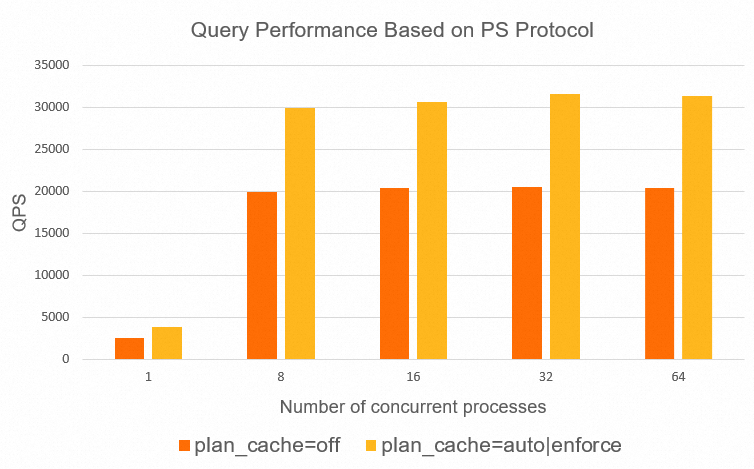
A stress test was conducted on an 8 core, 32 GB cluster. The database contained 25 tables, with each table storing 4 million rows of data. The stress test used the SQL statement SELECT id FROM sbtestN WHERE k IN(...), where the length of the IN list was 20. Performance was tested with the loose_plan_cache_type parameter set to OFF, AUTO, and ENFORCE under both Prepared Statement (PS) and non-PS protocols. The test results are as follows:
-
Performance test results under the PS protocol:
-
Performance test results under the non-PS protocol:
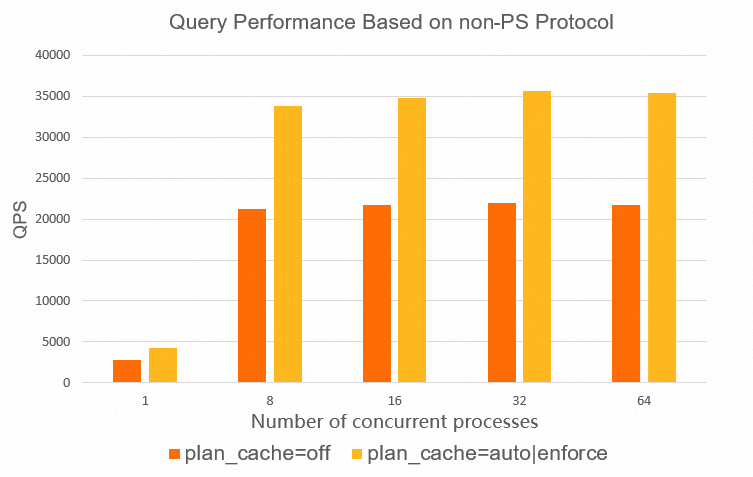
The test results show that the auto plan cache feature improves performance by more than 50% under both PS and non-PS protocols.