Enable binary logging
This topic describes how to enable binary logging for a PolarDB cluster.
Background information
PolarDB is a cloud-native database that is fully compatible with MySQL. By default, it uses higher-level physical logs instead of binary logs. To better integrate with the MySQL ecosystem, PolarDB supports manually enabling binary logging. After you enable binary logging, you can connect to data services such as ElasticSearch and AnalyticDB, and set up real-time data synchronization from PolarDB to RDS, from RDS to PolarDB, or between PolarDB clusters.
Limits
If your PolarDB cluster was created after April 5, 2019, you can directly enable binary logging. If your PolarDB cluster was created before April 5, 2019, you must first upgrade the minor version of your cluster to the latest version before you enable binary logging. For more information about how to upgrade the minor version, see Minor version management.
Billing
Binary log files occupy part of the cluster storage space, and storage fees are charged. You can adjust the storage space occupied by binary log files by setting the binary log retention period.
Billing examples
Subscription
If your cluster already has a subscription-based storage type, no additional charges are incurred if the storage space is sufficient.
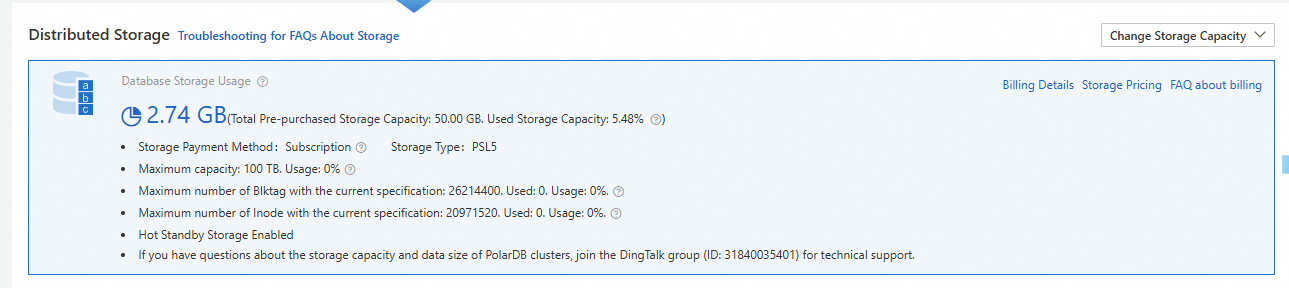
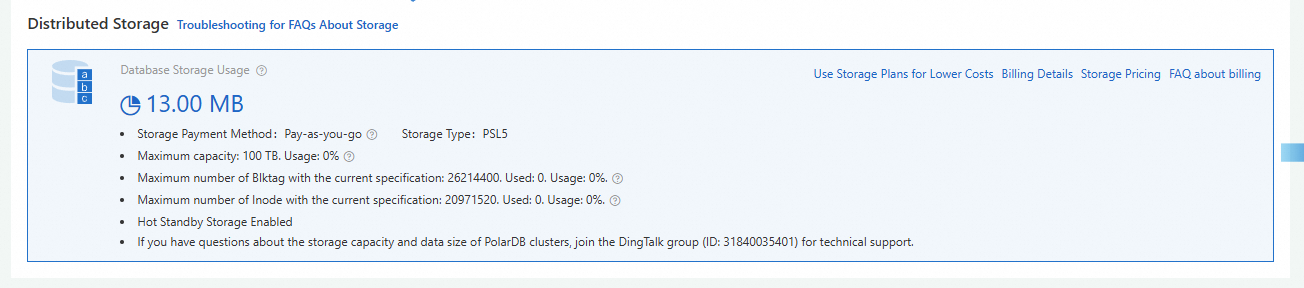
Pay-as-you-go
If your cluster already has a pay-as-you-go storage type, binary log space is charged based only on the actual storage space occupied by the data.
Usage notes
-
Binary logging is disabled by default. After you enable binary logging, the cluster automatically restarts. Typically, the restart task is completed within 5 minutes. During the restart, services experience a transient interruption of about 40 seconds. The exact duration depends on the data volume and the number of tables. We recommend that you perform this operation during off-peak hours and ensure that your applications have a reconnection mechanism.
-
After binary logging is enabled, write performance decreases while read performance is not affected. In most cases, the performance impact of enabling binary logging does not exceed 10%. Under extreme pressure, the impact may reach 40%. For more information, see FAQ.
-
When pulling, subscribing to, or synchronizing binary logs (for example, by using tools such as DTS), we recommend that you use the PolarDBPrimary Endpoint because it directly points to the primary node that generates binary logs, providing better compatibility and stability. For more information about how to view the Primary Endpoint, see View endpoints and ports.
-
After binary logging is enabled, when the database submits an oversized transaction, it blocks the submission of other transactions and may affect the restart and specification change duration of the cluster.
-
The loose_polar_log_bin parameter described in this topic is a global-level parameter. To use session-level binary logging, you must enable the sql_log_bin parameter.
NoteThe sql_log_bin parameter controls whether to enable session-level binary logging. By default, this parameter is disabled. To enable it, go to Quota Center. In the row where the quota name is polardb sql_log_bin parameter permission, in the Actions column, click Apply to enable it.
-
If you use DTS to migrate from RDS to PolarDB, binary logging is automatically enabled.
-
Binary logs record only data changes that occur after binary logging is enabled. INSERT, DELETE, and UPDATE operations performed before binary logging is enabled are not recorded in binary log files.
Enable binary logging
Enable binary logging when purchasing a new cluster
When creating a cluster, select the Cluster Configurations option on the Enable Binary Logging checkbox. For more information, see Custom purchase and Purchase a subscription cluster.
Enable binary logging for existing clusters
After binary logging is enabled, the cluster automatically restarts. The restart task is completed within 5 minutes. During the restart, services experience a transient interruption of about 40 seconds. The exact duration depends on the data volume and the number of tables. We recommend that you perform this operation during off-peak hours and ensure that your applications have a reconnection mechanism.
-
Log in to the PolarDB console,In the navigation pane on the left, click Clusters. Select the Region where the cluster is deployed, and then click the cluster ID to go to the cluster details page。
-
You can enable binary logging by using one of the following methods:
-
Method 1:
-
Go to the Binary Logs page of the cluster.
-
Click Enable Now.
-
In the Enable Binary Logging dialog box, set the effective time to Now or Scheduled.
NoteIf you select Scheduled, specify the effective time.
-
Click OK.
-
-
Method 2: Enable binary logging by setting the loose_polar_log_bin parameter.
-
In the left-side navigation pane, choose .
-
Find the loose_polar_log_bin parameter and modify its value. For more information, see Modify parameter values.
Note-
If your PolarDB for MySQL cluster version is MySQL 5.6, change the current value to ON_WITH_GTID;
-
If your PolarDB for MySQL cluster version is MySQL 5.7 or MySQL 8.0, change the current value to ON.
-
-
-
Disable binary logging
-
Log in to the PolarDB console,In the navigation pane on the left, click Clusters. Select the Region where the cluster is deployed, and then click the cluster ID to go to the cluster details page。
-
You can disable binary logging by using one of the following methods:
-
Method 1:
-
Go to the Binary Logs page of the cluster.
-
Click Disable Binary Logging.
-
In the Disable Binary Logging dialog box, set the effective time to Now or Scheduled. You can choose whether to select Clear Local Binary Logs.
NoteIf you select Scheduled, specify the effective time.
-
Click OK.
-
-
Method 2: Disable binary logging by setting the loose_polar_log_bin parameter.
-
In the left-side navigation pane, choose .
-
Find the loose_polar_log_bin parameter and modify its value. For more information, see Modify parameter values.
Note-
If your PolarDB for MySQL cluster version is MySQL 5.6, change the current value to OFF_WITH_GTID;
-
If your PolarDB for MySQL cluster version is MySQL 5.7 or MySQL 8.0, change the current value to OFF.
-
After binary logging is disabled, existing binary log files are retained. We recommend that you shorten the binary log retention period first, wait for unnecessary files to be automatically deleted, and then disable binary logging.
-
-
-
Binary log retention period
Retention policies
Binary log files have the following two retention policies:
-
After binary logging is enabled, binary log files are retained for 3 days by default. Binary log files that are older than 3 days are automatically deleted.
Note-
For PolarDB for MySQL clusters purchased before November 23, 2023, binary log files are retained for two weeks (14 days) by default.
-
For PolarDB for MySQL clusters purchased before January 17, 2024, binary log files are retained for one week (7 days) by default.
-
-
After binary logging is disabled, existing binary log files are retained and are not automatically deleted.
Modify the retention period
-
Modifying the binary log retention period does not cause transient interruptions or require a cluster restart.
-
However, if modifying the retention period causes a large volume of binary log files to be deleted (for example, 10 TB), database write exceptions may occur temporarily during the cleanup. Therefore, when binary log files are large, we recommend that you perform this operation during off-peak hours and shorten the retention period in multiple steps, deleting a portion of binary log data each time.
-
Deleted binary log files cannot be recovered.
-
If binary logging is enabled for your cluster, you can modify the binary log retention period by using one of the following methods:
-
If the cluster version is PolarDB for MySQL 5.6, you can modify the loose_expire_logs_hours parameter (value range: 0 to 2376, unit: hours, default value: 72) to set the binary log retention period. A value of 0 means binary log files are not automatically deleted. For more information about parameter settings, see Modify parameter values.
-
If the cluster version is PolarDB for MySQL 5.7 or 8.0, you can modify the binlog_expire_logs_seconds parameter (value range: 0 to 4294967295, unit: seconds, default value: 259200) to set the binary log retention period. A value of 0 means binary log files are not automatically deleted. For more information about parameter settings, see Modify parameter values.
ImportantAfter you modify the values of these two parameters to set the binary log retention period, existing binary log files in the cluster are not immediately deleted. To delete existing binary log files, use one of the following methods:
-
When the last binary log file in the cluster reaches
max_binlog_size, the system switches to a new binary log file, and these existing binary log files are automatically deleted. -
Use a privileged account to run the flush binary logs command to immediately trigger a binary log file switch and delete expired binary log files.
-
You can also restart the cluster. After the restart, existing binary log files are automatically deleted.
-
-
-
If binary logging is not enabled for your cluster and you want to delete binary log files, you can re-Enable binary logging, set the binary log retention period parameter (loose_expire_logs_hours or binlog_expire_logs_seconds) to a small value, wait for files to be automatically deleted after the retention period expires, and then disable binary logging.
Obtain and view binary logs
You can use the mysqlbinlog tool to view and parse binary logs. For more information, see Remotely obtain and parse the binary log files of a PolarDB for MySQL cluster.
FAQ
-
Q: How long are binary log files retained?
A: If binary logging is enabled for your cluster, binary log files are retained for 3 days by default. Binary log files older than 3 days are automatically deleted.
Note-
For PolarDB for MySQL clusters purchased before November 23, 2023, binary log files are retained for two weeks (14 days) by default.
-
For PolarDB for MySQL clusters purchased before January 17, 2024, binary log files are retained for one week (7 days) by default.
If binary logging is disabled for your cluster, existing binary log files are retained and are not automatically deleted.
NoteYou can modify the binary log retention period for clusters with binary logging enabled by modifying parameters. For more information, see Binary log retention period.
-
-
Q: What does the error message
Could not find first log file name in binary log index filemean?A:
Could not find first log file name in binary log index fileBased on this error message, the binary logs have been cleaned up. Deleted binary logs cannot be recovered. -
Q: Can I disable binary logging after enabling it?
A: Set the loose_polar_log_bin parameter to OFF and submit the change.
NoteAfter binary logging is disabled, existing binary log files are retained. You can shorten the binary log retention period first, wait for unnecessary files to be automatically deleted, and then disable binary logging.
-
Q: How do I reduce the storage space occupied by binary logs?
A: You can set the binary log retention period parameter (loose_expire_logs_hours or binlog_expire_logs_seconds) to a small value to reduce the storage space occupied by binary log files.
-
Q: How much does enabling binary logging affect performance?
A: Enabling binary logging does not affect query (SELECT) performance. It only affects write and update (INSERT, UPDATE, DELETE, etc.) performance. In most cases, the performance impact of enabling binary logging does not exceed 10%. Under extreme pressure, the impact may reach 40%.
-
Q: After binary logging is enabled, the cluster automatically restarts. How long does the restart task take?
A: Generally, the restart task is completed within 5 minutes. During the restart, services experience a transient interruption of about 40 seconds. The exact duration depends on the data volume and the number of tables. We recommend that you perform this operation during off-peak hours and ensure that your applications have a reconnection mechanism.
-
Q: How do I remotely obtain and view binary log content?
A: For more information, see Remotely obtain and parse the binary log files of a PolarDB for MySQL cluster.
-
Q: Why can I not use the Perform lockless schema changes using lockless change tickets feature of DMS to perform schema changes such as adding indexes on PolarDB for MySQL clusters?
A: Binary logging is disabled by default for PolarDB for MySQL clusters. To use the lock-free schema change feature of DMS, enable binary logging for your PolarDB for MySQL cluster first. If you do not want to enable binary logging, you can also use online DDL commands to change the table schema.
-
Q: Can I use canal to capture MySQL changes after binary logging is enabled?
A: Yes, you can use canal to capture MySQL changes.
-
Q: Does running the
SHOW BINARY LOGSstatement to query the binary log file size affect cluster performance?A: No. The
SHOW BINARY LOGSstatement is a management operation and has almost no impact on cluster performance. It does not directly affect the read and write performance of the database like data write operations (such as INSERT, UPDATE, and DELETE). Therefore, you can use this command with confidence. -
Q: How do I query the last write time of binary logs in PolarDB for MySQL?
A: Use the
show full binary logsstatement to view the name, size, and last write time of all binary log files.NoteThis feature is supported for PolarDB for MySQL clusters with the following requirements:
-
MySQL 8.0.2, with a minor version of 8.0.2.2.0 or later.
-
MySQL 8.0.1, with a minor version of 8.0.1.1.14 or later.
-
MySQL 5.7, with a minor version of 5.7.1.0.27 or later.
-
MySQL 5.6, with a minor version of 5.6.1.0.38 or later.
-
-
Q: How do I view binary log content at a specific time in PolarDB for MySQL?
A: You cannot directly specify a time to back up data. You can first perform point-in-time recovery, and then parse binary logs to view the content.