Multi-node deployment architecture
A PolarDB for MySQL cluster of Cluster Edition deploys multiple compute nodes in the primary zone: one primary node and one to fifteen read-only nodes. Read-only nodes serve two purposes — they distribute read traffic to reduce load on the primary node, and they provide automatic failover if the primary node fails.
Usage limits
Only PolarDBCluster Edition supports multi-node deployment. For more information about the feature comparison across editions, see Enterprise editions.
Multi-node architecture
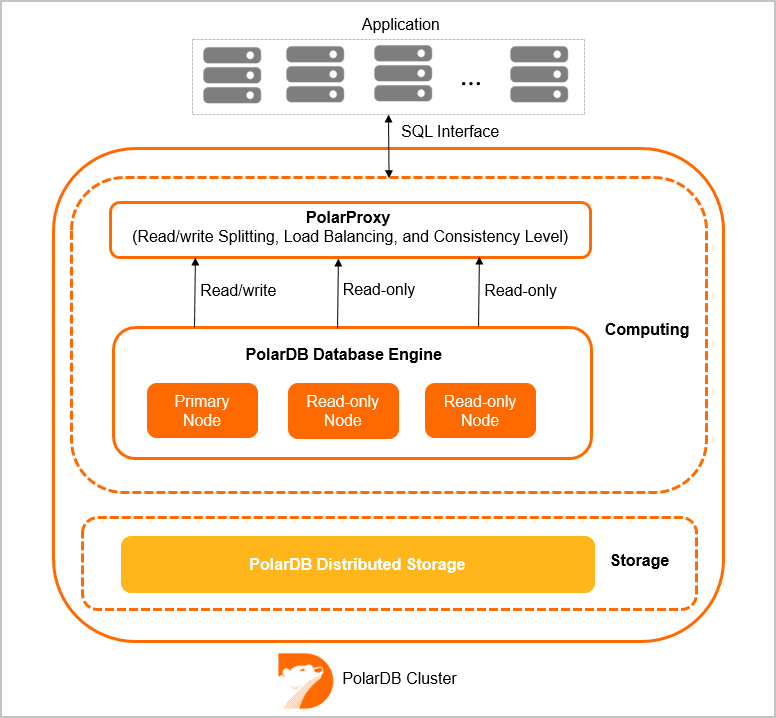
Each PolarDB cluster contains one primary node and multiple read-only nodes. The maximum number of read-only nodes is 15 and the minimum is 1.
The multi-node architecture ensures high availability of the cluster. When a system failure occurs, automatic failover is performed between the readable/writable primary node and the read-only nodes.
In addition, the PolarDB PolarProxy feature enables read/write splitting and other features on these nodes. For more information, see What is a database proxy.
Node specification requirements in a cluster
To ensure the stability and high availability of the cluster, the following limits apply to the specification combination of the primary node and read-only nodes:
The memory of a newly added read-only node cannot be less than half the memory of the primary node.
The CPU core count of a newly added read-only node has minimum specification requirements. The corresponding rules are as follows:
Primary node (read/write node) CPU specification
Minimum CPU specification allowed for read-only nodes
2
2
4
4
8
4
16
8
32
16
64
32
88
64
120
64
The Multi-Master Cluster (Limitless) edition is not subject to the above limits.
When adding column store read-only nodes, due to their analytical workload characteristics, it is recommended to use specifications higher than the primary node (read/write node).
Add or remove read-only nodes
PolarDBCluster Edition supports up to 15 read-only nodes and must always have at least one read-only node (to ensure high availability of the cluster).
You can manually add or remove read-only nodes based on actual needs to adjust cluster performance. For specific operations, see Add or remove nodes.
Adding a read-only node takes approximately 5 minutes. The actual time depends on factors such as the number of nodes being added, the number of databases and tables, and the database load. Adding nodes has no impact on the database.
When a read-only node is removed, connections on that node are briefly interrupted, while other nodes are not affected. We recommend that you remove nodes during off-peak hours and ensure that your applications have an automatic reconnection mechanism.
We recommend that you use the default cluster endpoint to connect your applications. After adding or removing read-only nodes, PolarDB automatically adjusts, and no application configuration changes are required: after adding read-only nodes, PolarDB automatically identifies new nodes and distributes traffic to them for load balancing; after removing read-only nodes, PolarDB automatically masks failed nodes.