PolarDB Serverless scalability
PolarDB Serverless is the productized result of the mature technology proposed in a SIGMOD 2021 paper. By using two core technologies, Global Consistency (High-Performance Mode) and imperceptible failover, it achieves a high level of capability in cross-machine scaling and cross-machine failover. This topic uses the Sysbench tool to test the scalability of PolarDB Serverless. You can follow the method described in this topic to run the test and quickly understand the scalability of Serverless.
Demonstration
Single-node vertical scaling (scale-up) | Multi-node horizontal scaling (scale-out) |
Test configurations
The ECS instance and the PolarDB for MySQL cluster are in the same region and Virtual Private Cloud (VPC).
The PolarDB for MySQL cluster is configured as follows:
Number of clusters: 1
Billing method: Serverless
Database engine: MySQL 8.0.1
Product edition: Enterprise Edition
Storage type: PSL5
NoteWhen you purchase a Serverless cluster, you can keep the default settings for parameters such as Maximum Number of Read-Only Nodes and Maximum PCUs per Node. For more information, see Create a serverless cluster.
The ECS instance is configured as follows:
Number of instances: 1
Instance type: ecs.g7.4xlarge (16 vCPU, 64 GiB)
Image: Alibaba Cloud Linux 3.2104 LTS 64-bit
System disk: ESSD, performance level PL0, 100 GB
Test tool
Sysbench is an open-source, cross-platform benchmarking tool used to evaluate the performance of databases such as MySQL. The tool supports multi-threaded testing and offers flexible configuration options.
Preparations
Purchase the environment
Based on the test configurations, purchase an ECS instance and a PolarDB for MySQL Serverless cluster.
Install Sysbench
Log on to the ECS instance as the root user and install Sysbench.
sudo yum -y install sysbenchThis example uses Alibaba Cloud Linux. If you use a different operating system, you must adjust the installation command accordingly. For more information, see the official Sysbench documentation.
Configure the cluster
Go to the PolarDB console to create a database, create a database account, and obtain the endpoint and port number.
If the ECS instance and the PolarDB for MySQL cluster are in the same VPC, you do not need to configure a cluster whitelist. After you create the cluster, the system automatically adds the VPC CIDR block of the cluster to the default group.
If the ECS instance and the PolarDB for MySQL cluster are not in the same VPC, you can add the public IP address of the ECS instance to a new IP whitelist group, or add the security group of the ECS instance to the cluster whitelist.
Use the Cluster Endpoint, not the Primary address.
Prepare data
Use Sysbench to prepare 128 tables in the PolarDB for MySQL cluster, with each table containing 1,000,000 rows of data. This process may trigger automatic scaling of the Serverless cluster. After data preparation is complete, wait 3 to 5 minutes for the primary node to scale back to 1 PCU. Use the following command to prepare the data, adjusting the parameters as needed:
Serverless cluster parameters:
<host>: The cluster endpoint.<port>: The port number for the cluster endpoint. The default is 3306.<user>: The database account.<password>: The password for the database account.<database>: The database name.
Other parameters:
--db-ps-mode: Set todisableto disable prepared statements, which ensures that all transactional SQL is executed as raw SQL statements.--threads: The number of concurrent threads. You can create different workloads by using different numbers of threads. This example uses 32 threads for data preparation, which is expected to take about 5 minutes.
sysbench /usr/share/sysbench/oltp_read_write.lua --mysql-host=<host> --mysql-port=<port> --mysql-user=<user> --mysql-password=<password> --mysql-db=<database> --tables=128 --table-size=1000000 --report-interval=1 --range_selects=1 --db-ps-mode=disable --rand-type=uniform --threads=32 --time=12000 prepareSingle-node scale-up test
Use Sysbench to verify that the primary node can automatically scale based on the workload.
Adjust Serverless configuration
During the single-node scaling test, you must ensure that no read-only nodes are added. Go to the PolarDB console. On the cluster details page, in the Database Nodes section, adjust the Serverless Configuration. Set Maximum Resources for Single Node to 32, Minimum Resources for Single Node to 1, Maximum Read-only Nodes and Minimum Read-only Nodes to 0.
Initial test: Low workload (16 threads)
First, run a simple test with 16 threads to get a basic understanding of the scalability of Serverless.
Run the following stress test command. Set the
--threadsparameter to 16 and adjust the other parameters based on your situation. For more information, see Parameter descriptions.sysbench /usr/share/sysbench/oltp_read_write.lua --mysql-host=<host> --mysql-port=<port> --mysql-user=<user> --mysql-password=<password> --mysql-db=<database> --tables=128 --table-size=1000000 --report-interval=1 --range_selects=1 --db-ps-mode=disable --rand-type=uniform --threads=16 --time=12000 runUnder a fixed load of 16 concurrent threads, the throughput (TPS) gradually increases while latency (LAT) decreases over time, eventually stabilizing. This demonstrates that performance improves significantly as Serverless automatically scales up.
[ 1s ] thds: 16 tps: 213.66 qps: 4447.86 (r/w/o: 3148.95/856.63/442.29) lat (ms,95%): 101.13 err/s: 0.00 reconn/s: 0.00
[ 2s ] thds: 16 tps: 459.08 qps: 9155.60 (r/w/o: 6394.12/1843.32/918.16) lat (ms,95%): 74.46 err/s: 0.00 reconn/s: 0.00
[ 3s ] thds: 16 tps: 801.00 qps: 16050.95 (r/w/o: 11238.97/3209.99/1602.00) lat (ms,95%): 52.89 err/s: 0.00 reconn/s: 0.00
[ 4s ] thds: 16 tps: 862.99 qps: 17226.87 (r/w/o: 12061.91/3439.97/1724.99) lat (ms,95%): 53.85 err/s: 0.00 reconn/s: 0.00
[ 5s ] thds: 16 tps: 946.00 qps: 18952.00 (r/w/o: 13262.00/3797.00/1893.00) lat (ms,95%): 53.85 err/s: 0.00 reconn/s: 0.00
[ 6s ] thds: 16 tps: 1107.01 qps: 22123.11 (r/w/o: 15484.07/4424.02/2215.01) lat (ms,95%): 17.01 err/s: 0.00 reconn/s: 0.00
[ 7s ] thds: 16 tps: 1164.00 qps: 23299.98 (r/w/o: 16313.98/4658.00/2328.00) lat (ms,95%): 16.12 err/s: 0.00 reconn/s: 0.00
[ 8s ] thds: 16 tps: 1159.00 qps: 23179.93 (r/w/o: 16230.95/4630.99/2317.99) lat (ms,95%): 16.71 err/s: 0.00 reconn/s: 0.00
[ 9s ] thds: 16 tps: 1191.00 qps: 23814.06 (r/w/o: 16663.04/4770.01/2381.01) lat (ms,95%): 15.83 err/s: 0.00 reconn/s: 0.00
[ 10s] thds: 16 tps: 1196.00 qps: 23892.05 (r/w/o: 16728.04/4771.01/2393.01) lat (ms,95%): 15.83 err/s: 0.00 reconn/s: 0.00
[ 11s] thds: 16 tps: 1196.00 qps: 23899.05 (r/w/o: 16715.03/4792.01/2392.00) lat (ms,95%): 16.12 err/s: 0.00 reconn/s: 0.00
[ 12s] thds: 16 tps: 1209.00 qps: 24253.07 (r/w/o: 16992.05/4843.01/2418.01) lat (ms,95%): 15.55 err/s: 0.00 reconn/s: 0.00
[ 13s] thds: 16 tps: 1203.00 qps: 24028.95 (r/w/o: 16818.97/4804.99/2405.00) lat (ms,95%): 15.83 err/s: 0.00 reconn/s: 0.00
[ 14s] thds: 16 tps: 1225.00 qps: 24479.97 (r/w/o: 17132.98/4895.99/2451.00) lat (ms,95%): 15.55 err/s: 0.00 reconn/s: 0.00
[ 15s] thds: 16 tps: 1236.99 qps: 24748.88 (r/w/o: 17327.92/4946.98/2473.99) lat (ms,95%): 15.27 err/s: 0.00 reconn/s: 0.00
[ 16s] thds: 16 tps: 1243.00 qps: 24858.99 (r/w/o: 17404.99/4968.00/2486.00) lat (ms,95%): 15.27 err/s: 0.00 reconn/s: 0.00
[ 17s] thds: 16 tps: 1251.00 qps: 25017.07 (r/w/o: 17510.05/5005.01/2502.01) lat (ms,95%): 15.27 err/s: 0.00 reconn/s: 0.00
[ 18s] thds: 16 tps: 1244.98 qps: 24888.58 (r/w/o: 17415.70/4982.92/2489.96) lat (ms,95%): 15.27 err/s: 0.00 reconn/s: 0.00
[ 19s] thds: 16 tps: 1243.01 qps: 24857.24 (r/w/o: 17398.17/4974.05/2485.02) lat (ms,95%): 15.55 err/s: 0.00 reconn/s: 0.00
[ 20s] thds: 16 tps: 1241.00 qps: 24813.91 (r/w/o: 17368.94/4962.98/2481.99) lat (ms,95%): 15.27 err/s: 0.00 reconn/s: 0.00
[ 21s] thds: 16 tps: 1244.01 qps: 24905.13 (r/w/o: 17445.09/4971.03/2489.01) lat (ms,95%): 15.27 err/s: 0.00 reconn/s: 0.00
[ 22s] thds: 16 tps: 1246.00 qps: 24904.91 (r/w/o: 17420.94/4992.98/2490.99) lat (ms,95%): 15.27 err/s: 0.00 reconn/s: 0.00
[ 23s] thds: 16 tps: 1220.99 qps: 24463.88 (r/w/o: 17131.92/4888.98/2442.99) lat (ms,95%): 15.83 err/s: 0.00 reconn/s: 0.00
[ 24s] thds: 16 tps: 1240.00 qps: 24721.07 (r/w/o: 17296.05/4945.01/2480.01) lat (ms,95%): 15.83 err/s: 0.00 reconn/s: 0.00
[ 25s] thds: 16 tps: 1234.01 qps: 24709.19 (r/w/o: 17301.13/4941.04/2467.02) lat (ms,95%): 15.55 err/s: 0.00 reconn/s: 0.00
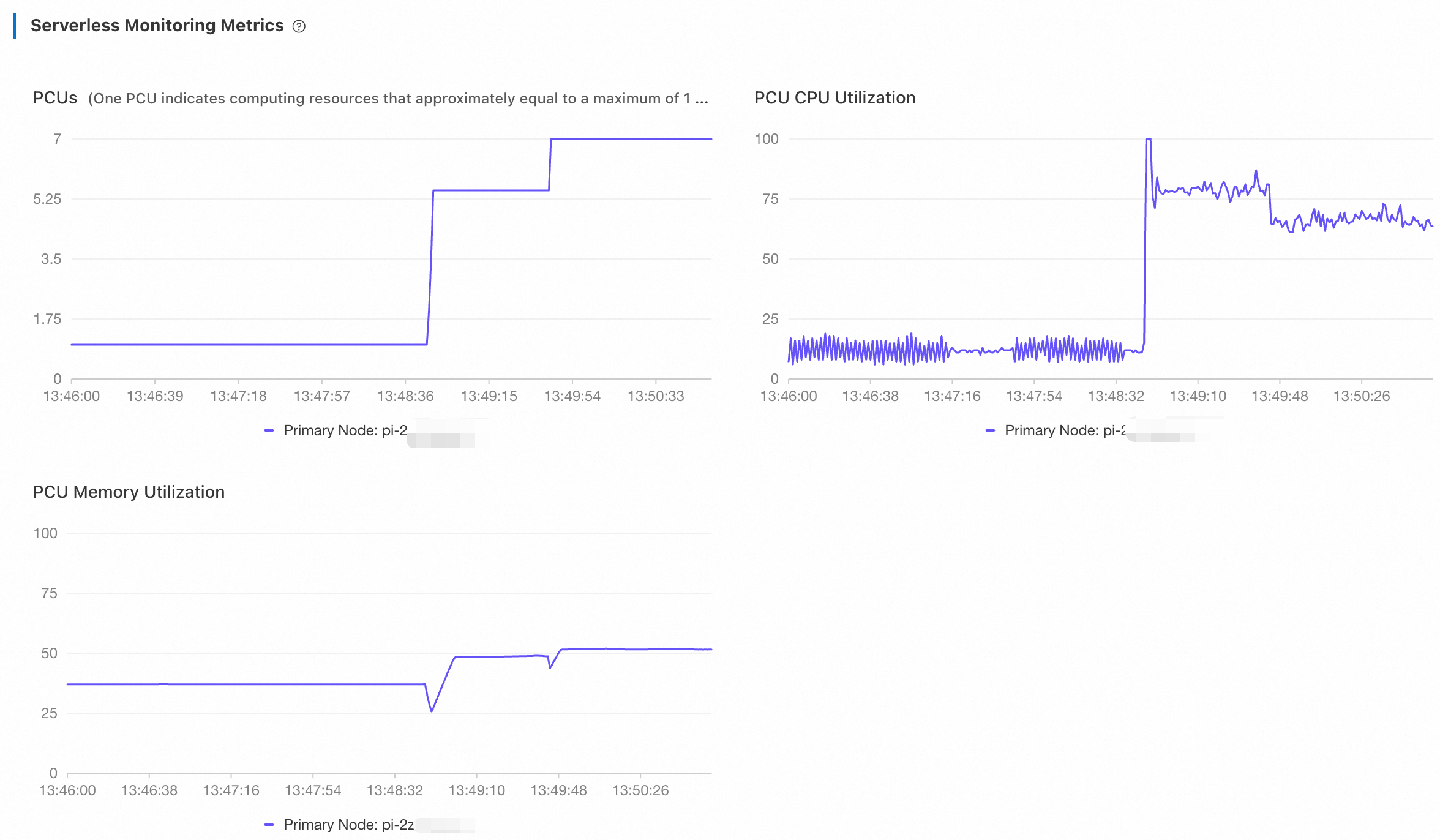
Return to the PolarDB console. On the Performance Monitoring page, view the Serverless Monitoring Metrics metrics. Select a time range of the last 5 minutes to view the following monitoring information:
The number of PCUs scales up from 1 to 7 and then stabilizes. During this scale-up, CPU utilization gradually decreases as resources are added. The memory utilization curve shows a pulse-like pattern at each scale-up event. This happens because memory resources expand each time the PCU count increases, causing a momentary drop in utilization. The database then uses the expanded memory to improve its capabilities, for example, by enlarging the buffer pool. This leads to a gradual increase in memory utilization until it reaches a new stable state.
Stop the stress test command and wait for 5 minutes. Then, adjust the time range to the last 10 minutes to view the following monitoring information:
After the workload stops, the number of PCUs steps down from 7 to 1. CPU utilization instantly drops to near zero. Because the read/write mix test includes
UPDATErequests, PolarDB continues to runpurge undooperations after the test stops, which consumes a small amount of CPU resources. During each scale-down step, memory utilization first drops and then steps up. This happens because before scaling down, PolarDB first reclaims memory by adjusting internal parameters, causing utilization to drop. The system then reduces the container's total memory. With a smaller denominator, the calculated utilization percentage rises.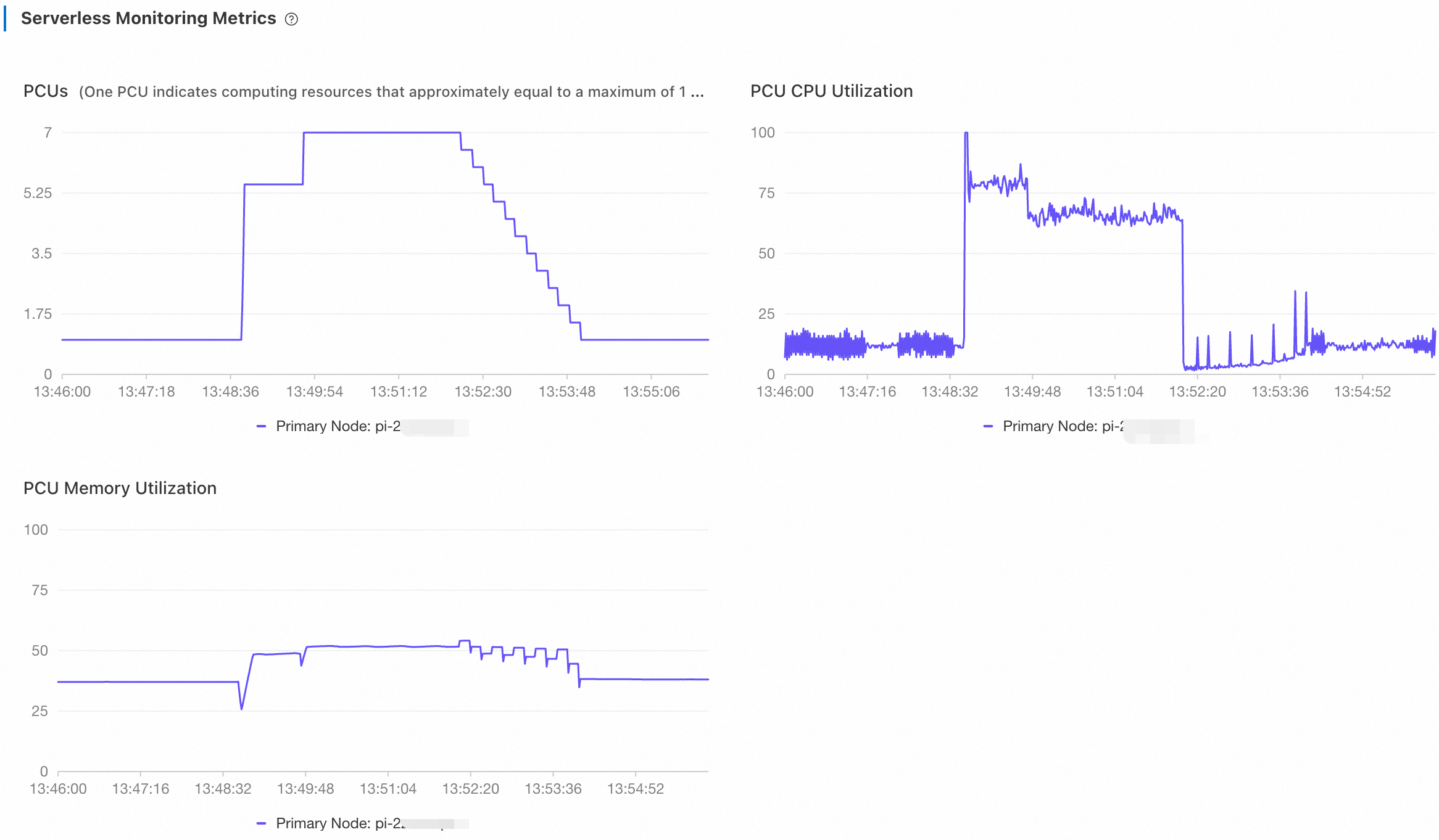
Advanced test: High workload (128 threads)
Next, set the number of threads (--threads parameter) to 128 to check the time required for the PolarDB Serverless cluster to scale up to its maximum specification of 32 PCUs. Stop the test after it runs for a period of time.
Run the following stress test command. Set the
--threadsparameter to 128 and adjust the other parameters based on your situation. For more information, see Parameter descriptions.sysbench /usr/share/sysbench/oltp_read_write.lua --mysql-host=<host> --mysql-port=<port> --mysql-user=<user> --mysql-password=<password> --mysql-db=<database> --tables=128 --table-size=1000000 --report-interval=1 --range_selects=1 --db-ps-mode=disable --rand-type=uniform --threads=128 --time=12000 runTest results: The changes in TPS and LAT are clearly visible in the results.
[ 1s ] thds: 128 tps: 255.58 qps: 6572.15 (r/w/o: 4904.90/1028.30/638.95) lat (ms,95%): 493.24 err/s: 0.00 reconn/s: 0.00
[ 2s ] thds: 128 tps: 329.05 qps: 6495.97 (r/w/o: 4505.67/1332.20/658.10) lat (ms,95%): 502.20 err/s: 0.00 reconn/s: 0.00
[ 3s ] thds: 128 tps: 484.00 qps: 9462.03 (r/w/o: 6536.02/1965.01/961.00) lat (ms,95%): 397.39 err/s: 0.00 reconn/s: 0.00
[ 4s ] thds: 128 tps: 617.00 qps: 12411.00 (r/w/o: 8700.00/2476.00/1235.00) lat (ms,95%): 308.84 err/s: 0.00 reconn/s: 0.00
[ 5s ] thds: 128 tps: 947.00 qps: 18894.96 (r/w/o: 13238.97/3765.99/1890.00) lat (ms,95%): 207.82 err/s: 0.00 reconn/s: 0.00
[ 6s ] thds: 128 tps: 1178.00 qps: 23711.93 (r/w/o: 16608.95/4739.99/2362.99) lat (ms,95%): 193.38 err/s: 0.00 reconn/s: 0.00
[ 7s ] thds: 128 tps: 1646.01 qps: 32910.21 (r/w/o: 23024.15/6593.04/3293.02) lat (ms,95%): 118.92 err/s: 0.00 reconn/s: 0.00
[ 8s ] thds: 128 tps: 1949.97 qps: 39100.30 (r/w/o: 27395.51/7805.86/3898.93) lat (ms,95%): 97.55 err/s: 0.00 reconn/s: 0.00
[ 9s ] thds: 128 tps: 1817.02 qps: 36469.35 (r/w/o: 25581.24/7252.07/3636.03) lat (ms,95%): 97.55 err/s: 0.00 reconn/s: 0.00
[ 10s ] thds: 128 tps: 1811.02 qps: 35930.30 (r/w/o: 25078.21/7233.06/3619.03) lat (ms,95%): 344.08 err/s: 0.00 reconn/s: 0.00
[ 11s ] thds: 128 tps: 2753.00 qps: 55055.05 (r/w/o: 38527.04/11023.01/5505.01) lat (ms,95%): 89.16 err/s: 0.00 reconn/s: 0.00
[ 12s ] thds: 128 tps: 3100.00 qps: 62071.95 (r/w/o: 43455.96/12414.99/6200.99) lat (ms,95%): 80.03 err/s: 0.00 reconn/s: 0.00
[ 13s ] thds: 128 tps: 3704.68 qps: 74093.50 (r/w/o: 51881.45/14799.70/7412.35) lat (ms,95%): 65.65 err/s: 0.00 reconn/s: 0.00
[ 14s ] thds: 128 tps: 3854.81 qps: 77007.13 (r/w/o: 53896.29/15404.23/7706.61) lat (ms,95%): 63.32 err/s: 0.00 reconn/s: 0.00
[ 15s ] thds: 128 tps: 3312.22 qps: 66303.36 (r/w/o: 46415.05/13265.87/6622.44) lat (ms,95%): 116.80 err/s: 0.00 reconn/s: 0.00
[ 16s ] thds: 128 tps: 4340.22 qps: 86709.44 (r/w/o: 60660.11/17362.89/8686.45) lat (ms,95%): 56.84 err/s: 0.00 reconn/s: 0.00
[ 17s ] thds: 128 tps: 4560.03 qps: 91326.51 (r/w/o: 63947.36/18259.10/9120.05) lat (ms,95%): 53.85 err/s: 0.00 reconn/s: 0.00
[ 18s ] thds: 128 tps: 4820.00 qps: 96408.03 (r/w/o: 67498.02/19270.01/9640.00) lat (ms,95%): 49.21 err/s: 0.00 reconn/s: 0.00
[ 19s ] thds: 128 tps: 5006.03 qps: 100113.67 (r/w/o: 70082.47/20019.13/10012.07) lat (ms,95%): 45.79 err/s: 0.00 reconn/s: 0.00
[ 20s ] thds: 128 tps: 5204.00 qps: 104167.00 (r/w/o: 72909.00/20850.00/10408.00) lat (ms,95%): 49.21 err/s: 0.00 reconn/s: 0.00
[ 21s ] thds: 128 tps: 5748.54 qps: 114801.91 (r/w/o: 80345.63/22966.18/11490.09) lat (ms,95%): 38.25 err/s: 0.00 reconn/s: 0.00
[ 22s ] thds: 128 tps: 6136.09 qps: 122818.85 (r/w/o: 85988.29/24555.37/12275.18) lat (ms,95%): 41.10 err/s: 0.00 reconn/s: 0.00
[ 23s ] thds: 128 tps: 6587.44 qps: 131697.82 (r/w/o: 92187.18/26333.77/13176.88) lat (ms,95%): 35.59 err/s: 0.00 reconn/s: 0.00
[ 24s ] thds: 128 tps: 6878.41 qps: 137531.19 (r/w/o: 96271.73/27501.64/13757.82) lat (ms,95%): 27.66 err/s: 0.00 reconn/s: 0.00
[ 25s ] thds: 128 tps: 7893.04 qps: 157878.73 (r/w/o: 110521.51/31572.15/15785.07) lat (ms,95%): 23.52 err/s: 0.00 reconn/s: 0.00
[ 26s ] thds: 128 tps: 8388.51 qps: 167614.22 (r/w/o: 117280.16/33556.04/16778.02) lat (ms,95%): 20.37 err/s: 0.00 reconn/s: 0.00
[ 27s ] thds: 128 tps: 7126.82 qps: 142573.33 (r/w/o: 99831.43/28492.27/14249.63) lat (ms,95%): 30.26 err/s: 0.00 reconn/s: 0.00
[ 28s ] thds: 128 tps: 7322.07 qps: 146553.34 (r/w/o: 102610.94/29302.27/14640.13) lat (ms,95%): 34.95 err/s: 0.00 reconn/s: 0.00
[ 29s ] thds: 128 tps: 9056.98 qps: 181159.61 (r/w/o: 126808.73/36229.92/18120.96) lat (ms,95%): 18.61 err/s: 0.00 reconn/s: 0.00
[ 30s ] thds: 128 tps: 9248.17 qps: 185038.45 (r/w/o: 129542.42/37003.69/18492.35) lat (ms,95%): 18.28 err/s: 0.00 reconn/s: 0.00
[ 31s ] thds: 128 tps: 8557.03 qps: 171085.61 (r/w/o: 119727.43/34244.12/17114.06) lat (ms,95%): 21.89 err/s: 0.00 reconn/s: 0.00
[ 32s ] thds: 128 tps: 8860.43 qps: 177226.63 (r/w/o: 124058.04/35448.73/17719.86) lat (ms,95%): 20.37 err/s: 0.00 reconn/s: 0.00
[ 33s ] thds: 128 tps: 8858.83 qps: 177127.54 (r/w/o: 123997.58/35410.31/17719.65) lat (ms,95%): 20.74 err/s: 0.00 reconn/s: 0.00
[ 34s ] thds: 128 tps: 9133.69 qps: 182669.81 (r/w/o: 127877.67/36526.76/18265.38) lat (ms,95%): 19.29 err/s: 0.00 reconn/s: 0.00
[ 35s ] thds: 128 tps: 7856.16 qps: 157188.24 (r/w/o: 110013.18/31457.65/15717.32) lat (ms,95%): 26.68 err/s: 0.00 reconn/s: 0.00
[ 36s ] thds: 128 tps: 9395.88 qps: 187889.57 (r/w/o: 131549.30/37551.52/18788.76) lat (ms,95%): 18.28 err/s: 0.00 reconn/s: 0.00
[ 37s ] thds: 128 tps: 9587.05 qps: 191738.04 (r/w/o: 134173.73/38392.21/19172.10) lat (ms,95%): 17.63 err/s: 0.00 reconn/s: 0.00
[ 38s ] thds: 128 tps: 9890.86 qps: 197719.21 (r/w/o: 138395.05/39541.44/19782.72) lat (ms,95%): 16.71 err/s: 0.00 reconn/s: 0.00
[ 39s ] thds: 128 tps: 9382.06 qps: 187797.26 (r/w/o: 131483.88/37543.25/18770.13) lat (ms,95%): 18.61 err/s: 0.00 reconn/s: 0.00
[ 40s ] thds: 128 tps: 8974.16 qps: 179305.25 (r/w/o: 125513.28/35850.65/17941.33) lat (ms,95%): 20.74 err/s: 0.00 reconn/s: 0.00
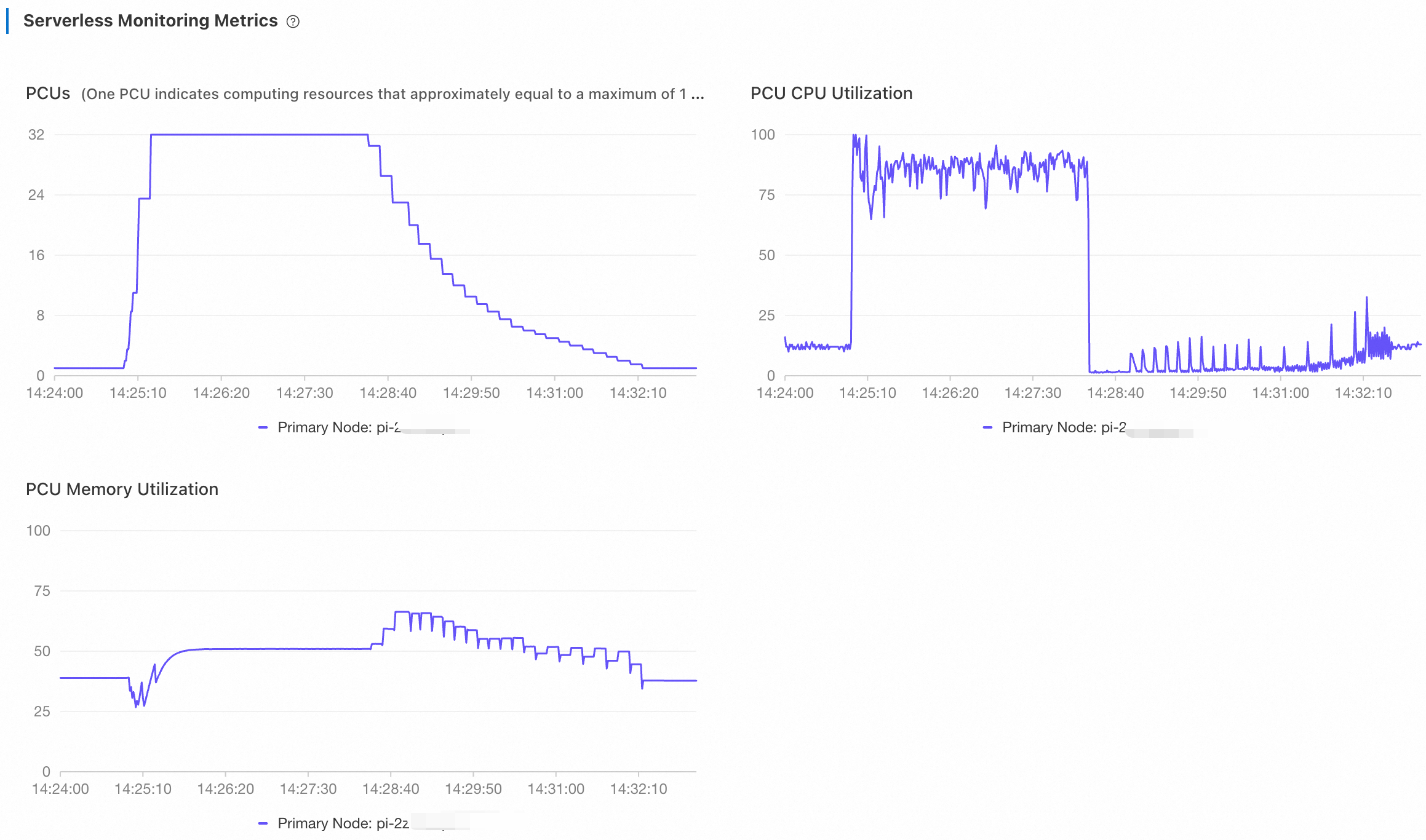
Go to the PolarDB console. On the Performance Monitoring page, view the Serverless Monitoring Metrics metrics. Adjust the time range based on the test time to see the following monitoring information:
It takes about 23 seconds to scale up from 1 PCU to 32 PCUs. Scaling down is more gradual than scaling up, taking about 233 seconds.
Multi-node scale-out test
In a traditional MySQL cluster with one primary and multiple read-only nodes, the read-only nodes experience binary log replication latency. They typically cannot handle read operations for transaction processing (TP) workloads and are used only for workloads that are not sensitive to global consistency, such as reporting. In addition, because binary log replication syncs only the logs of committed transactions, read-only nodes cannot handle read-after-write operations within a transaction.
PolarDB Serverless leverages Global Consistency (High-Performance Mode), abbreviated as SCC, to achieve lossless read scaling across nodes. Serverless clusters enable SCC by default on all scaled-out read-only nodes. SCC, combined with the advanced transaction splitting technology of PolarProxy, allows read-after-write requests that occur before, within, or across transactions to be easily offloaded to the read-only nodes of the cluster, while ensuring global consistency. As a result, the resources freed up on the primary node can support more write requests. When you use the unique Cluster Endpoint to access a Serverless cluster, you are not affected by read consistency issues across nodes. This means you do not need to be concerned about whether a request is executed directly by the primary node or forwarded to a read-only node.
Adjust Serverless configuration
To ensure that read-only nodes are automatically added during this test, go to the PolarDB console. In the database nodes section of the cluster details page, adjust the Serverless configuration. Set Maximum Resources for Single Node to 32, Minimum Resources for Single Node to 1, Maximum Read-only Nodes to 7, and Minimum Read-only Nodes to 0.
Initial test: Low workload (128 threads)
First, run a test with 128 threads to get a basic understanding of the horizontal scalability of Serverless.
Run the following stress test command. Set the
--threadsparameter to 128 and adjust the other parameters based on your situation. For more information, see Parameter descriptions.NoteBefore you start the stress test, ensure that the primary node has scaled down to 1 PCU after the previous test ended.
sysbench /usr/share/sysbench/oltp_read_write.lua --mysql-host=<host> --mysql-port=<port> --mysql-user=<user> --mysql-password=<password> --mysql-db=<database> --tables=128 --table-size=1000000 --report-interval=1 --range_selects=1 --db-ps-mode=disable --rand-type=uniform --threads=128 --time=12000 runGo to the PolarDB console. On the Basic Information page, in the Database Nodes section, you can see that the system automatically starts creating a read-only node after the stress test runs for a while.
On the Database Nodes page, the primary node status is Running. The system has automatically created a read-only node with the status Creating. Both nodes have a specification of 1~32 (PCU).
After a period of time, the system enters a steady state and no longer creates additional read-only nodes.
In the steady state, the cluster contains 1 primary node and 1 read-only node, both with a specification of 1~32 (PCU), and both in the Running status.
After reaching a steady state, the stress test results are as follows. Compared with the single-node test under the same load, performance improves, with QPS increasing from a range of 170,000–190,000 to 230,000–250,000. Based on the QPS, the maximum throughput of the single-node scaling test has been exceeded.
[ 380s ] thds: 128 tps: 12283.50 qps: 245769.03 (r/w/o: 172064.02/49140.01/24565.00) lat (ms,95%): 12.30 err/s: 0.00 reconn/s: 0.00
[ 381s ] thds: 128 tps: 12130.52 qps: 242748.33 (r/w/o: 169953.23/48529.07/24266.03) lat (ms,95%): 12.75 err/s: 0.00 reconn/s: 0.00
[ 382s ] thds: 128 tps: 11773.37 qps: 235230.41 (r/w/o: 164628.18/47061.48/23540.74) lat (ms,95%): 13.46 err/s: 0.00 reconn/s: 0.00
[ 383s ] thds: 128 tps: 11818.34 qps: 236862.94 (r/w/o: 165837.86/47387.39/23637.68) lat (ms,95%): 13.22 err/s: 0.00 reconn/s: 0.00
[ 384s ] thds: 128 tps: 12256.00 qps: 244827.02 (r/w/o: 171359.02/48952.00/24516.00) lat (ms,95%): 12.52 err/s: 0.00 reconn/s: 0.00
[ 385s ] thds: 128 tps: 11642.80 qps: 232605.08 (r/w/o: 162797.26/46538.21/23269.61) lat (ms,95%): 13.95 err/s: 0.00 reconn/s: 0.00
[ 386s ] thds: 128 tps: 11887.52 qps: 237890.35 (r/w/o: 166533.25/47574.07/23783.04) lat (ms,95%): 13.22 err/s: 0.00 reconn/s: 0.00
[ 387s ] thds: 128 tps: 11976.71 qps: 239438.16 (r/w/o: 167591.91/47888.83/23957.42) lat (ms,95%): 12.98 err/s: 0.00 reconn/s: 0.00
[ 388s ] thds: 128 tps: 11851.25 qps: 237002.04 (r/w/o: 165893.53/47422.01/23686.50) lat (ms,95%): 13.22 err/s: 0.00 reconn/s: 0.00
[ 389s ] thds: 128 tps: 11814.80 qps: 236300.95 (r/w/o: 165410.17/47245.19/23645.59) lat (ms,95%): 13.22 err/s: 0.00 reconn/s: 0.00
[ 390s ] thds: 128 tps: 12098.45 qps: 242237.01 (r/w/o: 169622.30/48415.80/24198.90) lat (ms,95%): 12.75 err/s: 0.00 reconn/s: 0.00
[ 391s ] thds: 128 tps: 12336.12 qps: 246454.50 (r/w/o: 172480.75/49303.50/24670.25) lat (ms,95%): 12.52 err/s: 0.00 reconn/s: 0.00
[ 392s ] thds: 128 tps: 11945.89 qps: 239275.83 (r/w/o: 167517.48/47863.57/23894.78) lat (ms,95%): 12.98 err/s: 0.00 reconn/s: 0.00
[ 393s ] thds: 128 tps: 11279.36 qps: 225387.14 (r/w/o: 157785.00/45044.42/22557.72) lat (ms,95%): 16.12 err/s: 0.00 reconn/s: 0.00
[ 394s ] thds: 128 tps: 12452.98 qps: 249195.65 (r/w/o: 174437.76/49848.93/24908.97) lat (ms,95%): 12.30 err/s: 0.00 reconn/s: 0.00
[ 395s ] thds: 128 tps: 12309.96 qps: 246263.11 (r/w/o: 172425.38/49220.82/24616.91) lat (ms,95%): 12.52 err/s: 0.00 reconn/s: 0.00
[ 396s ] thds: 128 tps: 12335.14 qps: 246424.82 (r/w/o: 172409.97/49344.56/24670.28) lat (ms,95%): 12.52 err/s: 0.00 reconn/s: 0.00
[ 397s ] thds: 128 tps: 12657.74 qps: 253323.88 (r/w/o: 177365.42/50639.98/25318.49) lat (ms,95%): 12.52 err/s: 0.00 reconn/s: 0.00
[ 398s ] thds: 128 tps: 12463.22 qps: 249100.31 (r/w/o: 174343.02/49835.86/24921.43) lat (ms,95%): 12.30 err/s: 0.00 reconn/s: 0.00
[ 399s ] thds: 128 tps: 12302.96 qps: 246006.16 (r/w/o: 172209.41/49191.83/24604.92) lat (ms,95%): 13.52 err/s: 0.00 reconn/s: 0.00
[ 400s ] thds: 128 tps: 12543.66 qps: 250979.24 (r/w/o: 175685.27/50211.65/25082.33) lat (ms,95%): 12.08 err/s: 0.00 reconn/s: 0.00
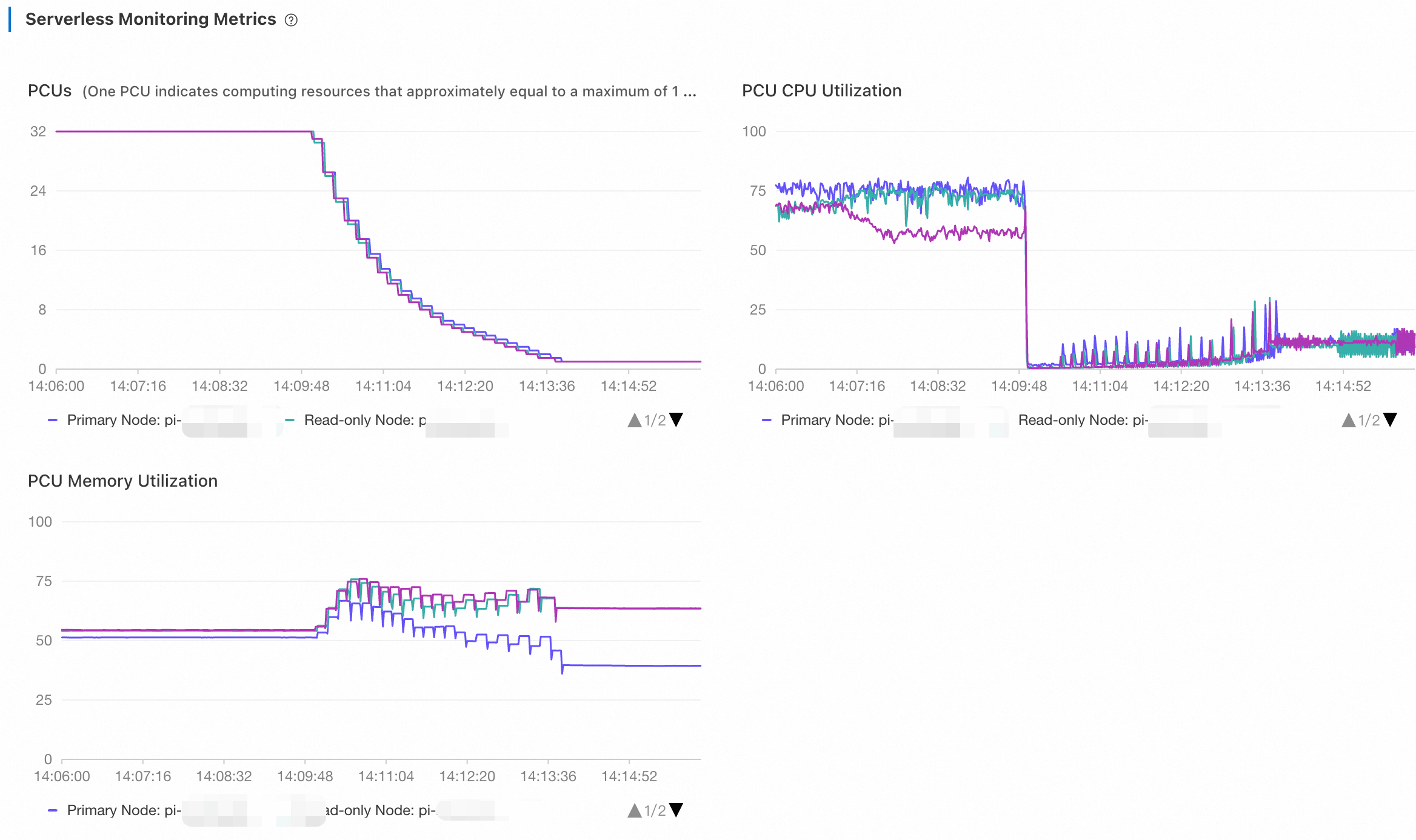
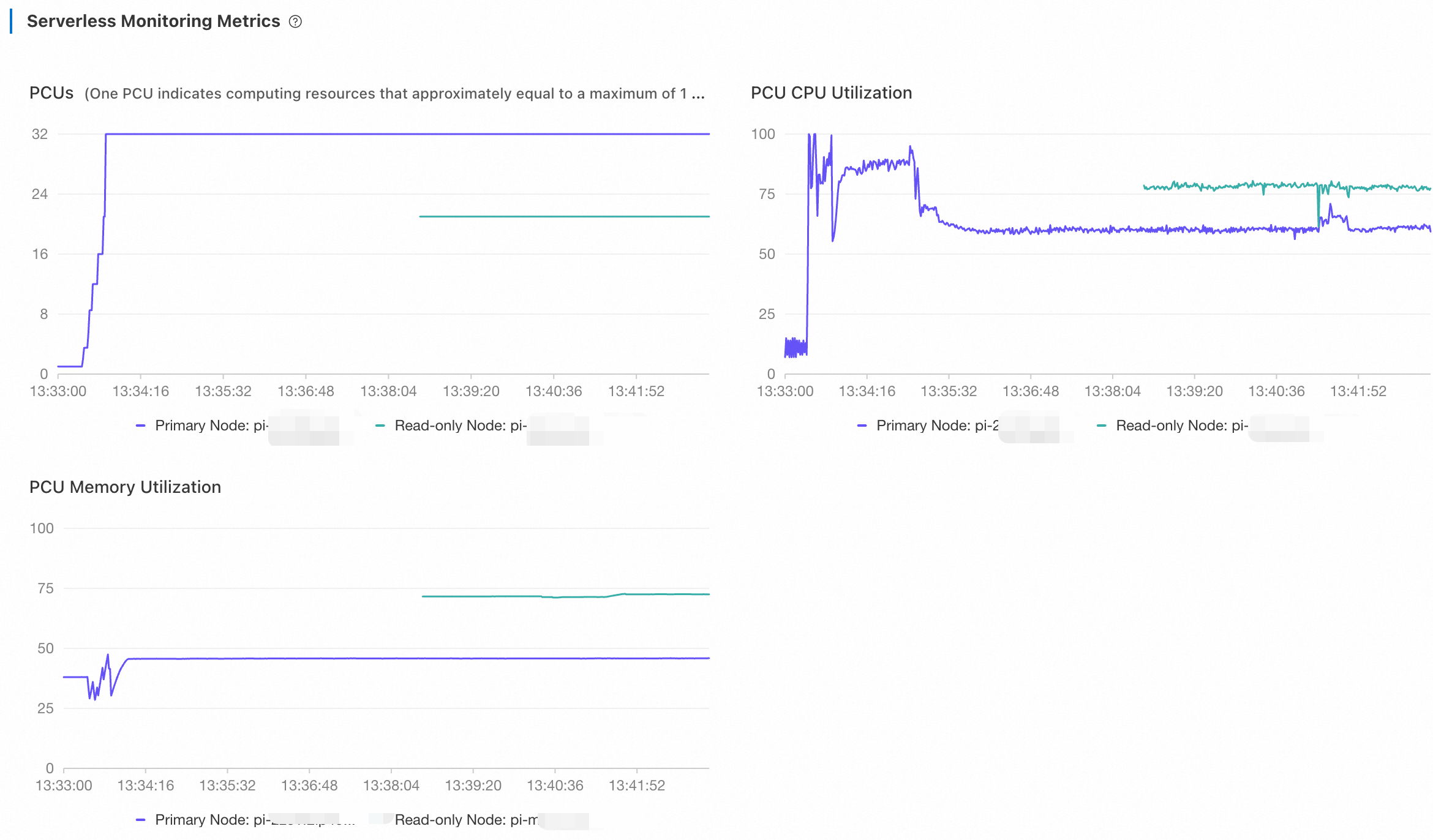
Return to the PolarDB console. On the Performance Monitoring page, view the Serverless Monitoring Metrics metrics. Adjust the time range based on the test time to see the following monitoring information:
The primary node quickly scales up to 32 PCUs. The newly created read-only node begins to handle a portion of the read load, which causes the CPU utilization of the primary node to decrease. Because the CPU utilization of the new read-only node does not exceed the default scaling threshold of 80%, only one read-only node is added under this load.
Advanced test: High workload (256 threads)
Next, stop the current stress test and double the number of threads. Set the --threads parameter to 256.
Run the following stress test command. Set the
--threadsparameter to 256 and adjust the other parameters based on your situation. For more information, see Parameter descriptions.sysbench /usr/share/sysbench/oltp_read_write.lua --mysql-host=<host> --mysql-port=<port> --mysql-user=<user> --mysql-password=<password> --mysql-db=<database> --tables=128 --table-size=1000000 --report-interval=1 --range_selects=1 --db-ps-mode=disable --rand-type=uniform --threads=256 --time=12000 runAfter a while, the system begins to add new read-only nodes.
At this point, the cluster has been scaled to one primary node and two read-only nodes. Each node has a computing specification of 1 to 32 PCUs, and all nodes are in the Running state.
After reaching a steady state, the stress test results are as follows. Compared with the single-node test, performance improves significantly, with QPS increasing from a range of 170,000–190,000 to 410,000–430,000. Based on the QPS, the maximum throughput of the single-node scaling test has been exceeded.
[ 380s ] thds: 256 tps: 20983.38 qps: 419912.49 (r/w/o: 294032.22/83921.51/41958.76) lat (ms,95%): 15.27 err/s: 0.00 reconn/s: 0.00
[ 381s ] thds: 256 tps: 19709.97 qps: 394083.33 (r/w/o: 275803.53/78853.87/39425.93) lat (ms,95%): 18.28 err/s: 0.00 reconn/s: 0.00
[ 382s ] thds: 256 tps: 20247.20 qps: 404845.07 (r/w/o: 283347.85/81004.82/40492.41) lat (ms,95%): 17.32 err/s: 0.00 reconn/s: 0.00
[ 383s ] thds: 256 tps: 19439.70 qps: 388749.11 (r/w/o: 272105.88/77767.82/38875.41) lat (ms,95%): 17.95 err/s: 0.00 reconn/s: 0.00
[ 384s ] thds: 256 tps: 19733.79 qps: 394861.82 (r/w/o: 276485.09/78907.15/39469.58) lat (ms,95%): 19.29 err/s: 0.00 reconn/s: 0.00
[ 385s ] thds: 256 tps: 19805.78 qps: 396040.56 (r/w/o: 277207.89/79219.11/39613.55) lat (ms,95%): 18.28 err/s: 0.00 reconn/s: 0.00
[ 386s ] thds: 256 tps: 21433.68 qps: 428320.81 (r/w/o: 299729.70/85723.74/42867.37) lat (ms,95%): 14.73 err/s: 0.00 reconn/s: 0.00
[ 387s ] thds: 256 tps: 19648.55 qps: 394356.79 (r/w/o: 276257.37/78799.32/39300.11) lat (ms,95%): 18.61 err/s: 0.00 reconn/s: 0.00
[ 388s ] thds: 256 tps: 20151.18 qps: 402221.60 (r/w/o: 281391.54/80538.71/40291.35) lat (ms,95%): 17.95 err/s: 0.00 reconn/s: 0.00
[ 389s ] thds: 256 tps: 18467.41 qps: 368955.14 (r/w/o: 258280.70/73735.63/36938.81) lat (ms,95%): 22.69 err/s: 0.00 reconn/s: 0.00
[ 390s ] thds: 256 tps: 21047.63 qps: 420911.63 (r/w/o: 294591.85/84216.52/42103.26) lat (ms,95%): 15.55 err/s: 0.00 reconn/s: 0.00
[ 391s ] thds: 256 tps: 20513.85 qps: 410704.91 (r/w/o: 287573.83/82111.38/41019.69) lat (ms,95%): 16.12 err/s: 0.00 reconn/s: 0.00
[ 392s ] thds: 256 tps: 20873.15 qps: 417344.86 (r/w/o: 292109.99/83485.58/41749.29) lat (ms,95%): 16.12 err/s: 0.00 reconn/s: 0.00
[ 393s ] thds: 256 tps: 20481.81 qps: 409684.27 (r/w/o: 286805.38/81931.26/40947.64) lat (ms,95%): 17.01 err/s: 0.00 reconn/s: 0.00
[ 394s ] thds: 256 tps: 20949.63 qps: 419428.70 (r/w/o: 293643.89/83863.54/41921.27) lat (ms,95%): 15.83 err/s: 0.00 reconn/s: 0.00
[ 395s ] thds: 256 tps: 21592.69 qps: 431159.81 (r/w/o: 301760.67/86219.76/43179.38) lat (ms,95%): 14.73 err/s: 0.00 reconn/s: 0.00
[ 396s ] thds: 256 tps: 21664.14 qps: 433183.73 (r/w/o: 303157.90/86694.56/43331.28) lat (ms,95%): 14.46 err/s: 0.00 reconn/s: 0.00
[ 397s ] thds: 256 tps: 20855.41 qps: 417208.14 (r/w/o: 292070.69/83438.63/41698.82) lat (ms,95%): 15.83 err/s: 0.00 reconn/s: 0.00
[ 398s ] thds: 256 tps: 20789.33 qps: 415768.51 (r/w/o: 291087.56/83091.30/41589.65) lat (ms,95%): 16.12 err/s: 0.00 reconn/s: 0.00
[ 399s ] thds: 256 tps: 21519.15 qps: 430768.92 (r/w/o: 301522.04/86225.58/43021.29) lat (ms,95%): 14.73 err/s: 0.00 reconn/s: 0.00
[ 400s ] thds: 256 tps: 21255.99 qps: 424663.85 (r/w/o: 297236.90/84900.97/42525.98) lat (ms,95%): 15.27 err/s: 0.00 reconn/s: 0.00
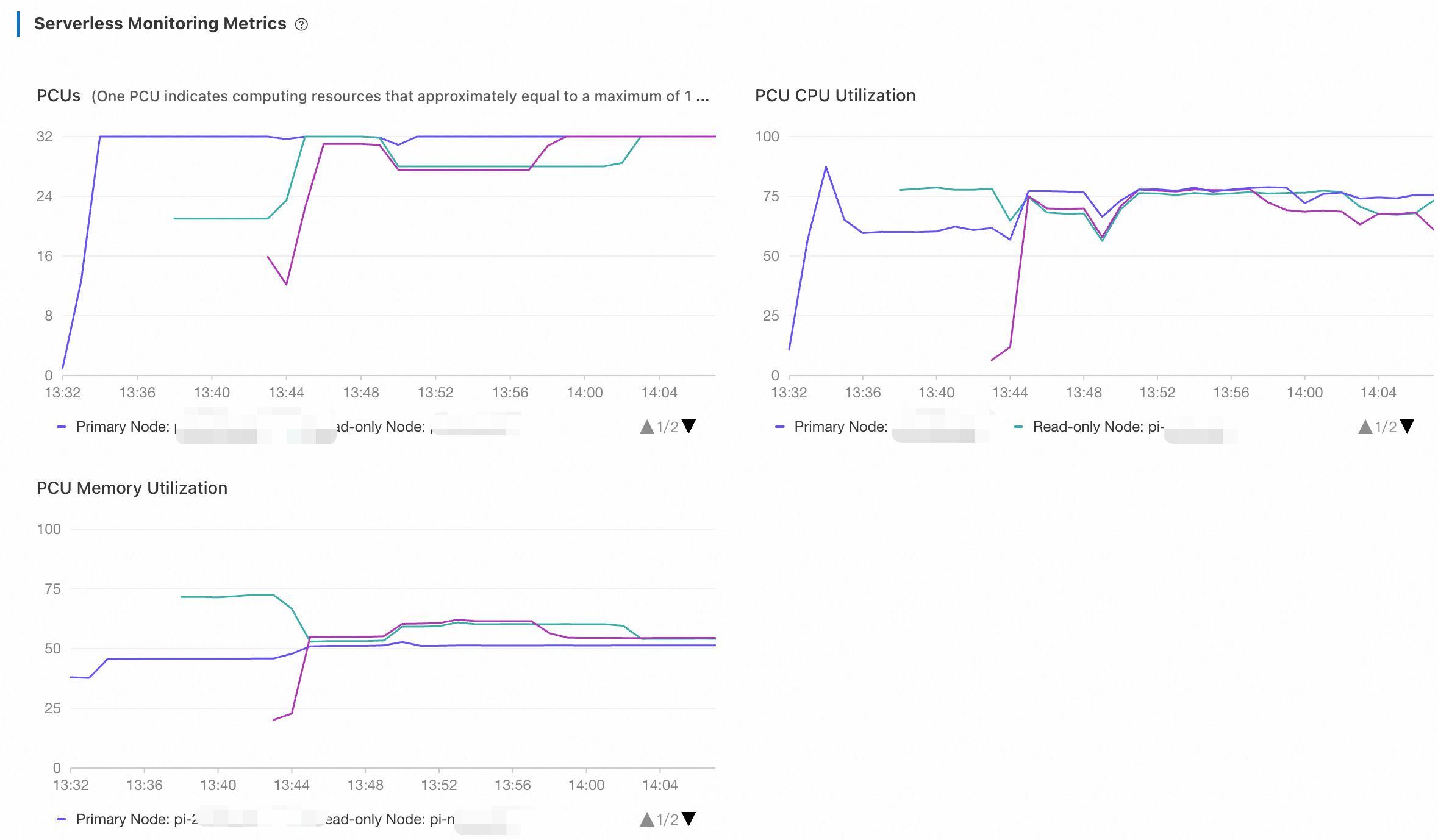
Go to the PolarDB console. On the Performance Monitoring page, view the Serverless Monitoring Metrics metrics. Adjust the time range based on the test time to see the following monitoring information:
In the Serverless monitoring information, you can see the load curves of multiple read-only nodes. When a new read-only node is added, the load on the existing nodes gradually decreases until a state of approximate equilibrium is reached. This indicates that the Proxy has successfully balanced the load to the newly added read-only node. To avoid frequent scaling fluctuations, the Serverless service uses a wide threshold range for scaling up and down.
After the test runs for a while, stop the stress test. Adjust the time range based on the test time to see the following monitoring information:
The compute nodes of the cluster automatically begin to scale down, gradually reaching 1 PCU in about 2 to 3 minutes. When the stress stops, the CPU utilization of the read-only nodes drops immediately. The primary node, however, still needs to perform
purge undooperations, so its CPU consumption continues for a short period before it also scales down to 1 PCU.After an additional 15 to 20 minutes, the read-only nodes are gradually decommissioned. To prevent frequent scaling oscillations, Serverless retains idle nodes for a period before removing them.