Serverless
The serverless feature provides dynamic scaling capabilities to PolarDB clusters. Each node in a cluster can be scaled up within seconds to handle sudden increases in workloads without affecting business operations. When workloads decrease, nodes can be scaled down to save costs.
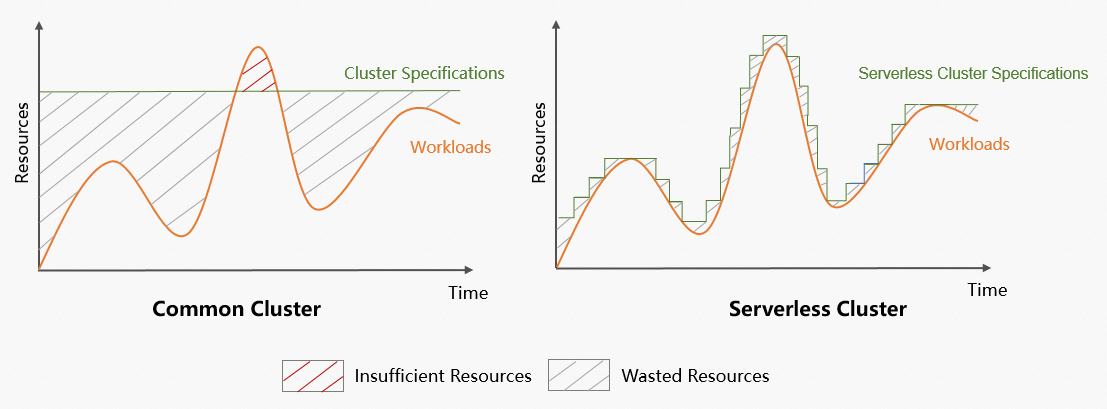
With Serverless feature, you don't have to worry about the resource configuration of your database cluster when you create and use databases. The following section shows the changes in resource usage and specifications of a common cluster and a serverless cluster when your business fluctuates:
|
|
|
Overview
The serverless feature provides real-time elasticity for CPU, memory, storage, and network resources. It offers vertical resource isolation for network and storage, supports pay-as-you-go billing, and enables elastic allocation of compute and storage resources. This allows you to independently adjust compute and storage capacity to handle workload fluctuations, enabling a rapid response to business changes while optimizing costs and improving efficiency.
Item | Description |
Formats |
|
Scaling method |
|
PCU (PolarDB Capacity Unit) | The serverless feature uses the PCU (PolarDB Capacity Unit) as the unit for per-second billing and resource elasticity. One PCU is roughly equivalent to the computing capacity of 1 vCPU and 2 GB of memory. The PCU of a node is dynamically adjusted based on the workload within a range that you specify. The minimum scaling increment is 0.5 PCU. |
Formats
Serverless cluster | Serverless for defined-spec clusters |
 |  |
Note
|
Note
|
Elastic scaling
Scale-up and scale-out triggers
Vertical scaling (scale-up)
PolarDB monitors the CPU utilization, memory usage, and other kernel-level metrics of the primary and read-only nodes. During a monitoring period, the system typically triggers a scale-up for a node when any of the following conditions is met:
The CPU utilization is higher than the preset threshold (default: 80%).
The memory usage is higher than a specific threshold:
Serverless format
Scale-up threshold
Serverless cluster
90%
Serverless feature for clusters with defined specifications
Less than or equal to 32 GB
90%
64 GB
92%
128 GB
96%
256 GB to 512 GB
98%
Other memory specifications
Vertical scaling is not supported.
A read-only node's specifications are less than half of the primary node's.
For example, if a read-only node has specifications of 4 PCU and the primary node has specifications of 10 PCU, the read-only node is scaled up to at least 5 PCU.
Horizontal scaling (scale-out)
If a read-only node in a cluster has scaled up to its configured maximum limit and still meets the scale-up trigger conditions (for example, its CPU utilization exceeds the custom threshold), a horizontal scale-out is triggered.
Scale-down and scale-in triggers
Vertical scaling (scale-down)
A scale-down is triggered for a node when its CPU utilization falls below the custom threshold (default: 50%) and its memory usage is below a specific threshold. The memory usage thresholds are as follows:
Serverless format
Scale-down threshold
Serverless cluster
80%
Serverless feature for clusters with defined specifications
Less than or equal to 32 GB
80%
64 GB
86%
128 GB
90%
256 GB to 512 GB
94%
Other memory specifications
Vertical scaling is not supported, so no scale-down threshold applies.
Horizontal scaling (scale-in)
A scale-in is triggered for a read-only node if its CPU utilization remains below 15% and the CPU utilization of all other read-only nodes remains below 60% for a sustained period of 15 to 30 minutes.
NoteTo prevent node jitter, only one read-only node is scaled in at a time. The cooldown period between consecutive scale-in events is 15 to 30 minutes.
To immediately scale in all read-only nodes, modify the Serverless Configuration. Setting both the Maximum Number of Read-only Nodes and Minimum Number of Read-only Nodes to 0 immediately triggers a scale-in of all read-only nodes.
The scaling range is determined by the minimum and maximum number of read-only nodes and the scaling limits per node that you configure. For more information, see Set scaling policies for a Serverless cluster or Set a scaling policy for serverless resources.
The metrics used to trigger scaling vary based on different parameter and serverless configurations. You can customize the CPU utilization threshold, but you cannot change the thresholds for other metrics.
When a cluster experiences a sudden workload increase, its nodes do not scale to the target capacity in a single step. Instead, they scale incrementally to approach the capacity required by the current workload. The minimum scaling increment is 0.5 PCU. To adapt more quickly to the traffic, the scaling increment is automatically adjusted for subsequent scaling events based on current PCU usage.
To receive timely notifications when cluster nodes scale down or scale in, configure alert rules in Performance Monitoring in the console. For details about how to configure alert rules, see Create an alert rule.
Benefits
The serverless feature can dynamically scale cluster resources in seconds based on workloads. The serverless feature provides the following benefits:
-
High availability
The multi-node architecture ensures the high availability of serverless clusters. Serverless clusters offer the same service level agreement (SLA) as common clusters to ensure stability.
-
High scalability
-
Wide scaling range
A single cluster can be scaled between 0 and 1,000 CPU cores without interrupting business.
-
Scalability in seconds
Workload detection is accomplished in five seconds and cluster resources are scaled up within a second when your workloads increase. If your workloads decrease, cluster resources are automatically scaled down in a tiered manner.
-
No business interruption
The scaling process has no impact on business.
-
-
Strong data consistency
Global consistency (high-performance mode) is provided. Clusters support strong data consistency. Data can be read immediately after it is written to read-only nodes, while the performance is almost the same as in weak consistency mode.
-
Cost-effectiveness
Serverless clusters are billed in PCUs in the pay-as-you-go billing method. This reduces costs by up to 80%.
-
Zero O&M
The PolarDB serverless team is responsible for all operations and maintenance work, such as system upgrades, system deployment, scaling, and alert processing. These operations are performed in the background and do not affect the services that are running in the system. This ensures continuous service delivery and allows you to focus on developing your business.
Scenarios
Serverless clusters
-
Scenarios in which workloads fluctuate dramatically
-
Scenarios that require infrequent access to databases, such as databases in development and testing environments
-
Scenarios in which intermittent scheduled tasks are involved, such as teaching and student experiments
-
Scenarios that handle inconsistent and unpredictable workloads, such as IoT and edge computing
-
Scenarios that need to reduce O&M costs and improve O&M efficiency
Serverless clusters with defined specifications
-
Scenarios in which workloads fluctuate dramatically
-
Scenarios that handle inconsistent and unpredictable workloads, such as IoT and edge computing
-
Scenarios that need to reduce O&M costs and improve O&M efficiency
-
Scenarios that need to satisfy fluctuation requirements based on existing PolarDB clusters.
Prerequisites
Serverless clusters
Clusters running the MySQL 5.6 database engine are not supported.
Clusters with the YiTian ARM CPU architecture are not supported.
Serverless for defined-spec clusters
To enable the serverless feature for a cluster with defined specifications, the cluster must meet the following version requirements:
Engine version:
MySQL 5.6: Not supported.
MySQL 5.7: The minor engine version must be 5.7.1.0.29 or later.
MySQL 8.0.1: The minor engine version must be 8.0.1.1.30.1 or later.
MySQL 8.0.2: The minor engine version must be 8.0.2.2.19 or later.
Database proxy (Proxy) version: Must be 2.4.30 or later.
CPU architecture: Must be x86. YiTian ARM is not supported.
Limitations
Serverless clusters
The following features are not supported:
Enterprise Edition: Manual scale-out/scale-in of storage space.
Standard Edition with ESSD storage: Manual scale-in of storage space.
The Global Database Network (GDN) feature is supported, with the following limitations:
The No-activity Suspension feature cannot be enabled for any cluster in the GDN.
If the database engine version meets the following conditions, all clusters in the GDN must have at least one RO node:
MySQL 8.0.1 with a minor engine version earlier than 8.0.1.1.42.
MySQL 8.0.2 with a minor engine version earlier than 8.0.2.2.23.
The following manual operations are superseded by automated Serverless management and are therefore unavailable: Delete a node, Manually change specifications, Temporary upgrade, and Elastic scaling with auto scaling.
The In-Memory Column Index (IMCI) feature is supported, but you must ensure that the Serverless cluster contains at least one read-only node. To do this, you must set the Minimum Number of Read-only Nodes for the Serverless cluster to 1 before you can add a read-only column store node.
Serverless for defined-spec clusters
Single-node clusters without a database proxy do not support the serverless feature because they do not meet the prerequisites. To enable this feature, add a node. Newly purchased single-node clusters that meet the version requirements support the serverless feature by default.
Enterprise Edition: Manual scale-out/scale-in of storage space is not supported.
X-Engine is supported for clusters of the following versions:
PolarDB for MySQL 8.0.1 whose revision version is 8.0.1.1.41 or later.
PolarDB for MySQL 8.0.2 whose revision version is 8.0.2.2.23 or later.
-
Global Database Network (GDN) is supported, but is subject to the following limits:
-
Automatic start and stop cannot be enabled on all serverless clusters in a GDN.
-
Each serverless cluster in the GDN must have at least one read-only node if the cluster meets the following requirements:
-
PolarDB for MySQL 8.0.1 with revision version 8.0.1.1.42 or later.
-
PolarDB for MySQL 8.0.2 with revision version 8.0.2.2.23 or later.
-
-
This feature is mutually exclusive with the Elastic scaling with auto scaling feature. If you enable the Serverless feature on a cluster with defined specifications, you can no longer enable the elastic scaling feature. Similarly, if you enable the elastic scaling feature on a cluster with defined specifications, you can no longer enable the Serverless feature.
For more information about version requirements and limitations, see Enable the serverless feature for a cluster with defined specifications.
Billing
Serverless clusters
Fees include costs for compute nodes, storage space, backup storage (only for usage that exceeds the free quota), and SQL Explorer (optional). For more information, see Serverless billing.
To view your bills, go to the Expenses & Costs page. On the Bill Details tab, select ApsaraDB PolarDB - Serverless from the Product Name drop-down list. For more information, see View bill details.
Serverless feature for clusters with defined specifications
The fees consist of the cost of the cluster with defined specifications and the cost of serverless resources. For information about the fees for resources with defined specifications, see Billable items. For information about the fees for serverless resources, see Serverless billing.
Video introduction
Free trial
Alibaba Cloud provides a Database Solution Experience Center. You can evaluate the dynamic elasticity of PolarDB Serverless online without purchasing any resources.
You can visit PolarDB MySQL Serverless elasticity & pricing power observation to experience it. For more information, see Free trial of PolarDB MySQL Serverless ultimate elasticity.