Resolve cluster storage exhaustion caused by too many data files
This topic describes the symptoms, solution, and routine maintenance for storage exhaustion caused by too many data files.
Symptoms
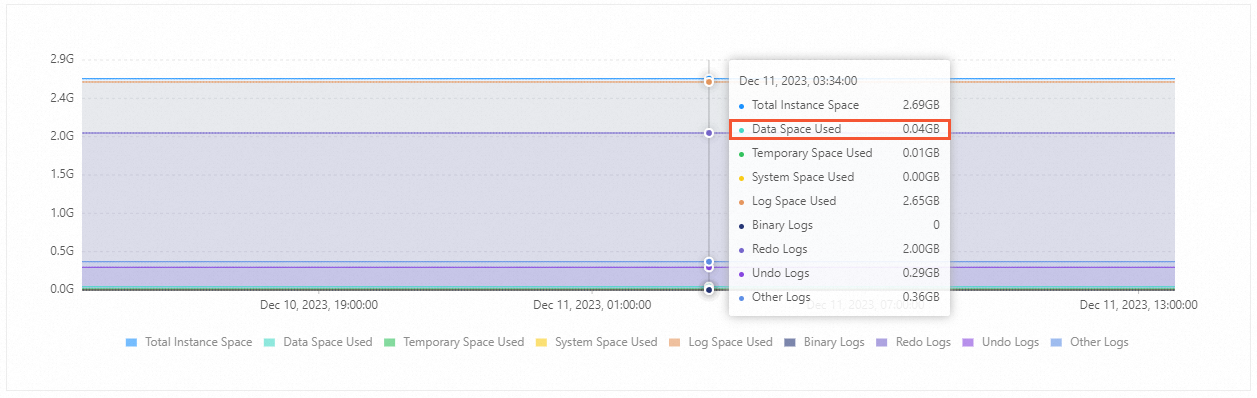
PolarDB for MySQL clusters can occupy excessive storage space when data files have not been organized for a long time. You can confirm that data space usage is high on the Storage Analysis page of the cluster, in the Storage Trend section, as shown in the following figure:
Solution
Delete redundant data by performing the following steps:
Back up your data before you delete a table to prevent data loss.
DELETE does not release storage space. Use the DROP or TRUNCATE command to release storage space.
OPTIMIZE locks the table. Run this operation during off-peak hours.
There is a delay before data file cleanup takes effect. Wait until the used storage space of the cluster decreases.
If the following steps still do not release enough storage space by cleaning up data files, you can clean up other types of files to reduce storage usage. For details, see Resolving full cluster storage caused by excessive log files.
On the SQL Console page, run the following command to view the file sizes of the database and identify the historical or unnecessary data that can be deleted:
SELECT file_name, concat(TOTAL_EXTENTS,'M') as 'FIle_size' FROM INFORMATION_SCHEMA.FILES order by TOTAL_EXTENTS DESCUse the DROP or TRUNCATE command to delete data. Replace the database name and the table name in the command line with the actual values.
DROP TABLE <database name>.<table name>
TRUNCATE TABLE <database name>.<table name>
Routine maintenance
Scale up storage. PolarDB for MySQL uses a storage-compute decoupled architecture. You can choose Manual storage scaling or Configure automatic expansion for ESSD cloud disk storage space, either of the two methods, to scale up the current storage capacity.
Tables on which DELETE operations are frequently performed are prone to tablespace fragments. During off-peak hours, run the
OPTIMIZE TABLE <database name>.<table name>statement to reclaim tablespace. For details, see Use the OPTIMIZE TABLE statement to reclaim tablespaces.