Extrudes a 2D polygon along a 3D path to produce a meshgeom (3D mesh geometry).
Syntax
meshgeom ST_Loft(geometry geom2d, geometry line3d, int4 chamfer);Parameters
| Parameter | Type | Description |
|---|---|---|
geom2d | geometry | A 2D polygon. Only polygon geometries are supported. |
line3d | geometry | A 3D linestring defining the extrusion path. |
chamfer | int4 | Number of segments used to smooth each corner of the 3D path with a Bezier curve. Higher values produce smoother corners and more vertices in the output. |
Description
ST_Loft extrudes a 2D polygon along a 3D path, generating a meshgeom object. At each corner of the 3D path, the function applies a Bezier curve to produce a smooth chamfer. A larger chamfer value produces smoother transitions but increases the number of output vertices.
meshgeom is a geometry type representing a 3D mesh. Use functions such as ST_AsText to convert the result to a readable format.
Effect diagram
The following figure shows a 2D polygon with holes lofted along a 3D path with chamfer set to 4. 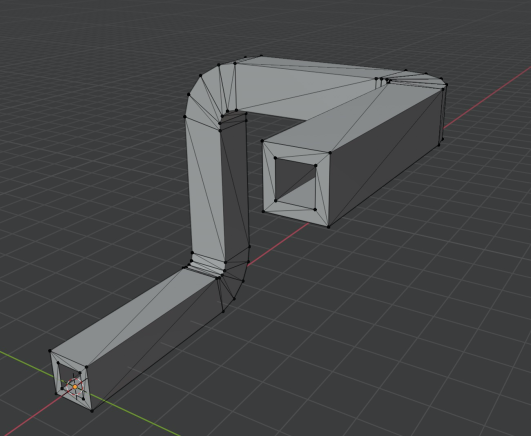
Examples
The following example extrudes a 2D polygon with a hole along a 3D linestring. The chamfer parameter is set to 5. The result is a meshgeom, converted to text with ST_AsText.
SELECT ST_AsText(ST_Loft(
    'POLYGON((0 0, 1 0, 1 1, 0 0), (0.5 0.5, 0.6 0.5, 0.6 0.6, 0.5 0.5))',
    'LINESTRING(0 0 0, 10 0 0, 10 10 0, 10 10 10)', 5));
Output (truncated):
MESHGEOM(PATCH(POLYGON Z ((0 -0.333333333333333 0.666666666666667,0 0.666666666666667 -0.333333333333333,0 -0.333333333333333 -0.333333333333333 ...