Maintain Lance Data with Ray
When you need to perform maintenance operations such as compacting small files, creating scalar indexes, or creating vector indexes on Lance-format data stored on OSS, you can submit a Python job through a Ray application to perform these tasks in parallel on multiple Lance datasets by using Ray's distributed scheduling capabilities. This article describes how to submit Lance data maintenance jobs in a Ray application.
Prerequisites
You have created a publicly accessible Ray application by following the instructions in Create a Ray Application and Ray Application Configuration.
The Lance data files are saved on OSS, and the Ray application and the OSS Bucket are located in the same region.
You have obtained the AccessKey ID and AccessKey Secret required to access OSS.
The memory for the Ray head and worker components must be at least 16 GB. We recommend using the 2-core, 16 GB specification for a trial run to prevent out-of-memory (OOM) errors during large tasks.
The Ray application must be in the same region as the OSS bucket to ensure access through an internal endpoint.
If you cannot access the Ray application via the public endpoint, check whether the IP whitelist is configured correctly.
Background
Ray, Lance, and OSS interaction
When Lance files are stored in OSS, Ray, Lance, and OSS interact as follows:
Component | Description |
Ray | It is responsible for distributed scheduling. A Driver submits multiple remote tasks, and the Ray application assigns the tasks to different Workers to run. |
Lance | Manages the data format and provides maintenance APIs. The script uses the Lance SDK to read and write datasets, perform compaction, and manage indexes. |
OSS | Provides object storage. All Lance dataset components, including data files, version metadata, and index files, are stored at an OSS path. |
Ray's parallelism is best suited for maintaining multiple independent datasets or shards. To avoid version conflicts, ensure that version commits for a single Lance dataset are handled by one task. Do not have multiple Ray tasks simultaneously compacting or building indexes on the same dataset.
Supported maintenance operations
The sample script in this topic includes the following Lance data maintenance operations:
compact: Merges small fragments to reduce subsequent scan and read amplification.
create scalar index: Creates a scalar index for a structured column, such as creating a
BTREEindex on theidcolumn.append: Appends new data to an existing Lance dataset.
reindex: Rebuilds an index of the same name after an append operation to ensure the index covers the new data.
create vector index: Creates a vector index for a vector column, such as
IVF_PQ.
The sample script splits multiple shards into independent Lance datasets and uses multiple Ray workers to perform maintenance tasks in parallel. You can check the task_hostnames in the output to confirm whether the tasks were scheduled across multiple nodes.
Procedure
The following steps describe how to submit a Lance data maintenance job by using the JupyterLab Terminal. The JupyterLab Terminal is a pre-configured environment provided by the Ray application. It has the ray job submit command built-in, so you do not need to install any dependencies locally.
When you submit a job by using JupyterLab Terminal, you also need to add the VPC primary IPv4 CIDR block of the Ray application's cluster to the application allowlist.
Log on to JupyterLab
Open the public JupyterLab URL in your browser.
In the Password or token field, enter the secret that corresponds to
secret.jupyterlab.passwordto access the JupyterLab interface.

Prepare the Python script
In the JupyterLab File Browser, create a working directory (for example,
src), and double-click to enter it. Then, create a Python script file (for example,oss_ray_run.py).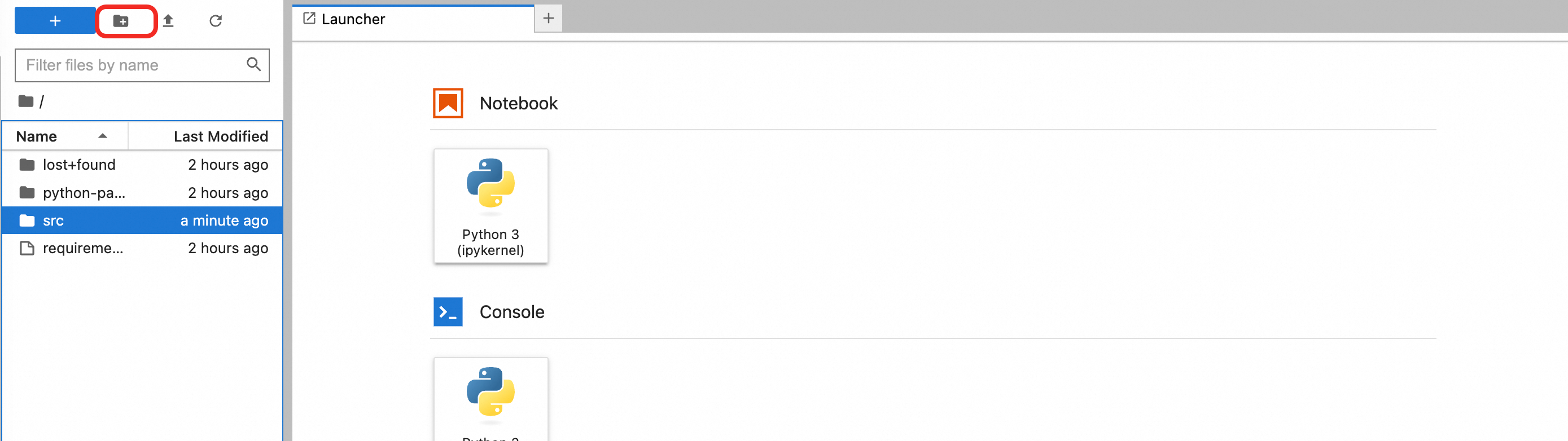

The script splits a root directory into multiple shards, each an independent Lance dataset. Ray then submits a remote task for each shard to enable parallel maintenance across workers.
Configure OSS environment variables
Because the Ray Head and Worker components cannot directly use environment variables from your local machine, you must write the environment variables to a file and submit the file with the
--runtime-envparameter to the Ray application.In your working directory, create a
runtime_env.yamlfile with the following content:env_vars: OSS_ENDPOINT: "https://oss-cn-beijing-internal.aliyuncs.com" OSS_REGION: "cn-beijing" OSS_ACCESS_KEY_ID: "XXXX" OSS_ACCESS_KEY_SECRET: "XXXX" LANCE_ROOT_URI: "oss://BUCKET/DATASET"The following table describes the environment variables.
Variable
Example
Description
OSS_ENDPOINThttps://oss-cn-beijing-internal.aliyuncs.comOSS access address. When the Ray application and OSS are in the same region, we recommend that you use the VPC internal access address to reduce public network access costs and latency.
OSS_REGIONcn-beijingThe region where the OSS bucket is located. This must match the endpoint.
OSS_ACCESS_KEY_IDXXXXThe AccessKey ID for OSS access. For production, use a least-privilege account or temporary credentials from STS.
OSS_ACCESS_KEY_SECRETXXXXThe AccessKey Secret for accessing OSS. Do not commit the actual secret to a code repository.
OSS_SECURITY_TOKENXXXX(Optional) Required when using temporary credentials from STS.
LANCE_ROOT_URIoss://BUCKET/DATASETThe root path of the Lance dataset.
BUCKETis the name of your OSS bucket, andDATASETis the directory prefix for the Lance dataset. The script creates multipleshard=xx.lancesubdirectories under this path.Submit the job and view the results
In JupyterLab, open a new Terminal via File > New Launcher.
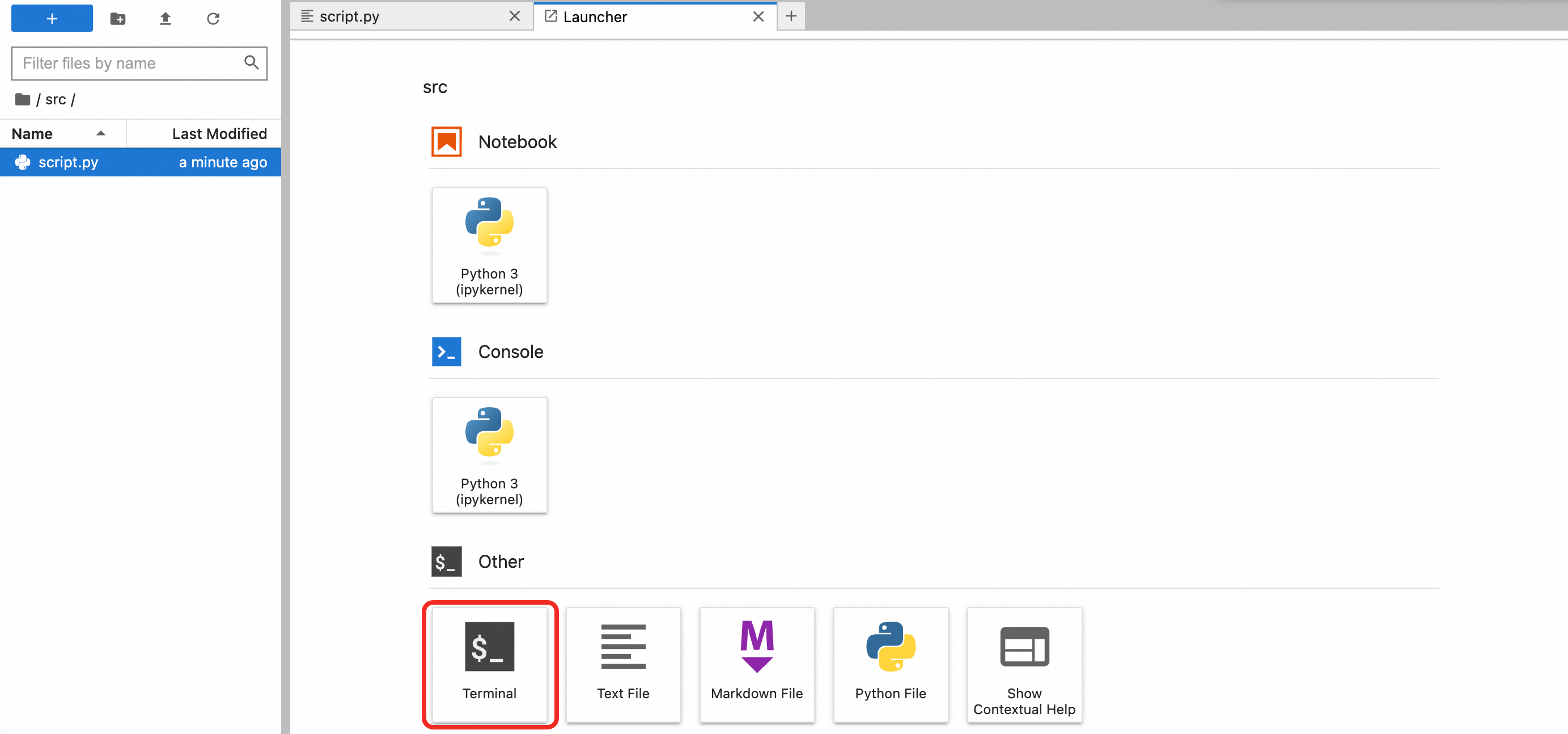
In the JupyterLab Terminal, run the following commands to submit the job and view the logs.
# 1. Go to the parent directory to demonstrate the --working-dir parameter in the job submission.
cd ..

# 2. Set the environment variable. Replace the placeholder with your actual key.
# Job submission anonymous key: secret.jwt.anonKey
ANON_KEY="<YOUR_ANON_KEY>"

# 3. Submit the job and wait for the results.
ray job submit --headers "{\"Authorization\": \"Bearer $ANON_KEY\"}" --working-dir ./src --runtime-env ./src/runtime_env.yaml -- python oss_ray_run.py
Successful execution produces output containing the following key information:

task_hostnames: Shows the nodes where the tasks ran. The presence of multiple hostnames confirms that tasks were distributed across multiple Ray nodes.Comparison of
initialandafter_compactfor each shard: The fragment count drops after compaction, while the row count remains the same.VERIFY_OK: Indicates that all maintenance operations and validations passed.
NoteIf the
WARN_SINGLE_NODE_TASKSwarning appears, it means all tasks ran on a single node. This can happen if you have too few workers, a smallLANCE_DEMO_SHARDSvalue, or low resource requirements per task. To enable multi-node scheduling, increase the number of Ray workers or theLANCE_DEMO_SHARDSenvironment variable.
Code walkthrough
This section explains the core code and purpose of each Lance maintenance operation in the script.
Compact
The compact operation merges multiple small fragments into fewer, larger ones, to reduce subsequent read overhead.
ds = lance.dataset(uri, storage_options=storage_options())
ds.optimize.compact_files(
    target_rows_per_fragment=512,
    max_rows_per_group=512,
    materialize_deletions=True,
    num_threads=2,
)target_rows_per_fragment=512: Controls the target number of rows per fragment after compaction.num_threads=2: The number of threads that Lance uses within the current Ray worker process, not the number of Ray workers.
num_threads is not the number of Ray workers. If you have four Ray tasks and each task has num_threads=2, a maximum of four datasets can be maintained in parallel, and each dataset uses two local threads for compaction.
Create scalar index
Creates a scalar index for a structured column. For the initial creation, use replace=False. After appending data, rebuild the index by using replace=True.
Create a scalar index for the first time:
ds = lance.dataset(uri, storage_options=storage_options())
ds.create_scalar_index("id", "BTREE", name="idx_id", replace=False)
Rebuild the index of the same name after an append operation (reindex):
ds = lance.dataset(uri, storage_options=storage_options())
ds.create_scalar_index("id", "BTREE", name="idx_id", replace=True)
scalar_index_stats = lance.dataset(uri, storage_options=storage_options()).index_statistics("idx_id")
Parameters
"id": The name of the column to be indexed."BTREE": The index type, suitable for filtering queries on structured columns like numbers and strings.replace=False: Prevents overwriting an existing index with the same name. Use this for initial creation.replace=True: Rebuilds an index with the same name. This is the reindex operation.index_statistics("idx_id"): Checks the index coverage.num_unindexed_rows == 0indicates that the index covers all rows.
Create vector index
Creates a vector index on a vector column to enable Approximate Nearest Neighbor (ANN) search.
ds = lance.dataset(uri, storage_options=storage_options())
ds.create_index(
    "vector",
    "IVF_PQ",
    name="idx_vector",
    metric="cosine",
    replace=True,
    num_partitions=16,
    num_sub_vectors=2,
)
Parameters
"vector": The name of the vector column."IVF_PQ": The vector index type.metric="cosine": Uses the cosine distance metric.num_partitions=16: The number of IVF partitions.num_sub_vectors=2: The number of PQ sub-vectors. This must be compatible with the vector dimension.replace=True: Suitable for demos or rebuilding indexes. In production environments, use this option with caution, considering dataset versions and task statuses.
Parallel maintenance with Ray
The core code for maintaining multiple datasets in parallel with Ray is as follows:
refs = [maintain_one_shard.remote(root_uri, shard) for shard in range(SHARDS)]
results = ray.get(refs)
Best practices
Each Ray task should handle one independent dataset or shard. Within that task, perform maintenance operations sequentially:
Ray task 1 -> compact oss://BUCKET/DATASET/shard=00.lance
Ray task 2 -> compact oss://BUCKET/DATASET/shard=01.lance
Ray task 3 -> compact oss://BUCKET/DATASET/shard=02.lance
Ray task 4 -> compact oss://BUCKET/DATASET/shard=03.lance
Assign one Ray task to one independent dataset or shard.
Within a single dataset, execute operations sequentially:
compact, thencreate index,append,reindex, andverify.Allow Ray to handle parallel scheduling across multiple datasets.
Practices to avoid
Do not have multiple Ray tasks perform different maintenance operations on the same dataset simultaneously:
Ray task 1 -> compact oss://BUCKET/DATASET/main.lance
Ray task 2 -> create index oss://BUCKET/DATASET/main.lance
Ray task 3 -> append oss://BUCKET/DATASET/main.lance
Operations like compact, append, and create index on the same Lance dataset can all commit new versions. If multiple tasks try to commit versions to the same dataset simultaneously, it can lead to version conflicts and costly, unpredictable retries.
More information
You can also submit Ray jobs from your local environment, in addition to using the JupyterLab Terminal. For instructions on using the Ray Python SDK and Ray CLI, see Submit a job to a Ray application.