High-dimensional vector search (PASE)
This topic describes how to perform high-dimensional vector search in PolarDB for PostgreSQL and PolarDB for PostgreSQL (Compatible with Oracle) by using the PostgreSQL ANN search extension (PASE) plug-in. PASE is based on the IVFFlat and Hierarchical Navigable Small World (HNSW) algorithms.
Background
Representation learning, a key technology in artificial intelligence (AI), has advanced significantly in recent years. It is used in applications like ad delivery, facial recognition payments, image recognition, and speech recognition. In these applications, data is embedded into high-dimensional vectors, and vector search techniques are used to find related items.
PASE (PostgreSQL ANN search extension) is a high-performance vector search index plug-in for PostgreSQL. It uses mature, stable, and efficient approximate nearest neighbor (ANN) search algorithms, including the IVFFlat algorithm and the HNSW algorithm, to enable high-speed vector queries in PostgreSQL databases. PASE does not currently support feature vector extraction and generation. You must retrieve the feature vectors for your entities. PASE searches for similar vectors within massive datasets.
Intended audience
This topic assumes a basic knowledge of machine learning, search, and recommendation technologies, as it does not define related terms.
Usage notes
-
An index can become bloated. You can check the size of an index by running
select pg_relation_size('index_name');. If the index size is significantly larger than the data size and query performance degrades, you must rebuild the index. -
Frequent data updates can reduce index accuracy. If you require absolute precision, rebuild the index periodically.
-
If you use an IVFFlat index with internal clustering (clustering_type=1), you must insert some data into the table before creating the index.
-
Use a privileged account to execute the SQL examples in this topic.
Limitations
Cross-node parallel queries support only sequential search for high-dimensional vectors.
PASE algorithms
-
IVFFlat algorithm
The IVFFlat algorithm is a simplified version of the IVFADC algorithm. It is suitable for scenarios that require high recall but are not sensitive to query latency (around the 100 ms level). Compared with other algorithms, the IVFFlat algorithm offers the following advantages:
-
If the query vector is a member of the candidate dataset, the IVFFlat algorithm can achieve 100% recall.
-
The algorithm is simple, which results in faster index builds and a smaller storage footprint.
-
You can specify the centroids and control recall by adjusting simple parameters.
-
The algorithm parameters are highly interpretable, giving you full control over the algorithm's accuracy.
The following figure illustrates how the IVFFlat algorithm works.
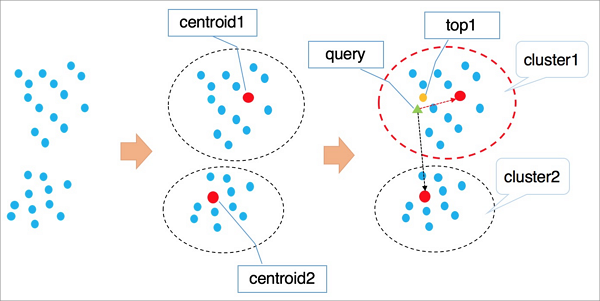
The algorithm works as follows:
-
The algorithm groups points in a high-dimensional space into clusters based on their implicit properties, using an algorithm like k-means. Each cluster has a centroid.
-
To find a vector, the algorithm first iterates through all cluster centroids to locate the n centroids nearest the target.
-
It then iterates through all elements within those clusters and performs a global sort to return the k nearest vectors.
Note-
When searching for cluster centroids, the algorithm automatically excludes distant clusters to speed up the process. However, this means there is no guarantee that all of the optimal top k vectors are within these n clusters, which can result in a loss of precision. You can control the accuracy of the IVFFlat algorithm by adjusting the number of clusters (n). A larger n value improves accuracy but increases the computational workload.
-
The first stage of the IVFFlat and IVFADC algorithms is identical. The main difference is in the second stage of computation. IVFADC uses product quantization to avoid an exhaustive search, but this causes a loss of precision. In contrast, the IVFFlat algorithm performs a brute-force search to avoid precision loss while keeping the computation manageable.
-
-
HNSW algorithm
The Hierarchical Navigable Small World (HNSW) algorithm is suitable for scenarios with very large vector datasets (tens of millions or more) and strict query latency requirements (at the 10 ms level).
HNSW is a proximity-graph-based algorithm that finds likely nearest neighbors by iterating rapidly on the graph. With large datasets, the performance improvement of the HNSW algorithm is more significant than other algorithms. However, storing neighbor points consumes extra storage space, and it can be difficult to improve recall beyond a certain point by simply adjusting parameters.
The following figure illustrates how the HNSW algorithm works.
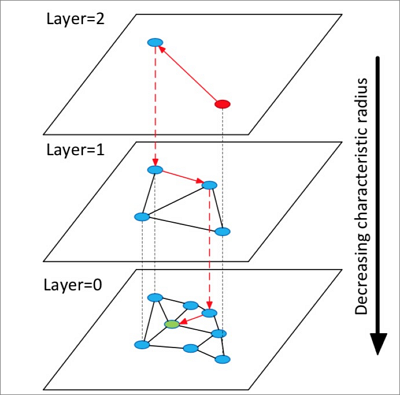
The algorithm works as follows:
-
Build a multi-layer graph. Each layer is a summary of the layer below and forms a skip list over the lower layer, similar to a highway.
-
Randomly choose a point in the top layer to start the search.
-
Search its neighbors and store them in a fixed-length dynamic list sorted by distance to the target. In each subsequent search step, take points from the list, explore their neighbors, and insert newly found neighbors into the list. Each insertion triggers a re-sort, and only the top k points are kept. If the list changes, continue iterating until it converges. Then, use the first point in the list as the entry point for the next layer and move down.
-
Repeat step 3 until you reach the bottom layer.
NoteThe HNSW algorithm extends the single-layer Navigable Small World (NSW) graph into a multi-layer graph and performs nearest neighbor search on the graph. This can achieve a higher query acceleration ratio than clustering-based algorithms.
-
Both algorithms are suited for specific business scenarios. For example, the IVFFlat algorithm is ideal for high-precision image comparison, while the HNSW algorithm is well-suited for recall in search and recommendation systems. More industry-leading algorithms will be integrated into PASE in the future.
Use PASE
-
Create the PASE plug-in. Run the following command:
CREATE EXTENSION pase; -
You can calculate vector similarity using one of the following two methods:
-
Use the PASE data type constructor
Example
SELECT ARRAY[2, 1, 1]::float4[] <?> pase(ARRAY[3, 1, 1]::float4[]) AS distance; SELECT ARRAY[2, 1, 1]::float4[] <?> pase(ARRAY[3, 1, 1]::float4[], 0) AS distance; SELECT ARRAY[2, 1, 1]::float4[] <?> pase(ARRAY[3, 1, 1]::float4[], 0, 1) AS distance;Note-
The
<?>operator calculates the similarity between two vectors. The left vector must be of thefloat4[]data type, and the right vector must be of thepasedata type. -
The
pasetype is a data type defined within the plug-in and can have a maximum of three constructors. Thefloat4[], 0, 1part in the third example is used for illustration. The first parameter isfloat4[]and represents the right vector data type. The second parameter has no special function in this context and can be set to 0. The third parameter indicates the similarity calculation method. A value of 0 indicates Euclidean distance, and a value of 1 indicates the dot product (inner product). -
The calculation fails if the left and right vectors have different dimensions.
-
-
Use the string constructor
Example
SELECT ARRAY[2, 1, 1]::float4[] <?> '3,1,1'::pase AS distance; SELECT ARRAY[2, 1, 1]::float4[] <?> '3,1,1:0'::pase AS distance; SELECT ARRAY[2, 1, 1]::float4[] <?> '3,1,1:0:1'::pase AS distance;NoteBoth the string construction method and the PASE data type construction method are used to calculate the similarity between two vectors. The string construction method uses a colon (:) as a separator. The
3,1,1:0:1part from the third example is explained as follows: the first parameter represents the right vector. The second parameter has no special function in this context and can be set to 0. The third parameter specifies the similarity calculation method, where 0 indicates Euclidean distance and 1 indicates dot product (inner product).
-
-
Create an index. You can create an index using one of the following two algorithms:
NoteIf you use a PASE vector index, no preprocessing of the original vectors is required when you use Euclidean distance as the similarity metric. However, if you use dot product (inner product) or cosine as the similarity metric, you must normalize the vectors. If the original vector is
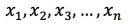 , it must satisfy the condition
  . In this case, the dot product and cosine values are the same.
-
Create an index using the IVFFlat algorithm
Example
CREATE INDEX ivfflat_idx ON vectors_table
USING
  pase_ivfflat(vector)
WITH
  (clustering_type = 1, distance_type = 0, dimension = 256, base64_encoded = 0, clustering_params = "10,100");
The following table describes the parameters.
Parameter
Description
clustering_type
The type of clustering operation that the IVFFlat algorithm performs on vector data. This parameter is required. Valid values:
-
0: external clustering. Loads an externally provided centroid file specified by the clustering_params parameter. -
1: internal clustering. During the index build process, an internal clustering operation is performed using the k-means algorithm. This is controlled by the clustering_params parameter.
We recommend internal clustering for new users.
distance_type
The similarity calculation method. The default value is
0. Valid values:-
0: Euclidean distance. -
1: dot product (inner product). This method requires vector normalization. In this case, the order of dot product (inner product) values is the reverse of that for Euclidean distance values.
Currently, only Euclidean distance is directly supported. To use dot product (inner product), you must normalize the vectors and use the method described in the appendix.
dimension
The vector dimension. This parameter is required. The maximum value is 512.
base64_encoded
Specifies whether the data uses Base64 encoding. The default value is
0. Valid values:-
0: The vector type is represented byfloat4[]. -
1: The vector type is represented by a Base64-encoded string offloat[].
clustering_params
For external clustering, this parameter specifies the path to the centroid file. For internal clustering, this parameter specifies the clustering parameters in the format
clustering_sample_ratio,k. This parameter is required.-
clustering_sample_ratio: The sampling ratio for clustering, with 1000 as the denominator. The value must be an integer in the range (0, 1000]. For example, a value of1means that k-means clustering is performed on a 1/1,000 sample of table data. A larger value increases query accuracy but increases the index creation time. We recommend that the total amount of sampled data does not exceed 100,000 rows. -
k: The number of centroids. A larger value increases query accuracy but increases the index creation time. We recommend that you specify a value in the range [100, 1000].
-
-
Create an index using the HNSW algorithm
Example
CREATE INDEX hnsw_idx ON vectors_table
USING
  pase_hnsw(vector)
WITH
  (dim = 256, base_nb_num = 16, ef_build = 40, ef_search = 200, base64_encoded = 0);
The following table describes the parameters.
Parameter
Description
dim
The vector dimension. This parameter is required. The maximum value is 512.
base_nb_num
The number of neighbors per node in the graph. This parameter is required. A larger value improves query accuracy but increases index build time and index size. We recommend a value in the range [16, 128].
ef_build
The heap length used during index creation. This parameter is required. A larger value improves results but slows the creation process. We recommend a value in the range [40, 400].
ef_search
The default heap length for searches. This parameter is required. A larger value improves results but reduces query performance. You can specify this value at query time. The default value here is 200.
base64_encoded
Specifies whether the data uses Base64 encoding. The default value is
0. Valid values:-
0: The vector type is represented byfloat4[]. -
1: The vector type is represented by a Base64-encoded string offloat[].
-
-
-
Run a query. You can run queries using one of the following two types of indexes:
-
Query using an IVFFlat index
Example
SELECT id, vector <#> '1,1,1'::pase as distance FROM vectors_ivfflat ORDER BY vector <#> '1,1,1:10:0'::pase ASC LIMIT 10;Note-
<#>is the operator for IVFFlat algorithm indexes. -
The
ORDER BYclause activates the vector index. Only ascending sort (ASC) is supported. -
The PASE data type has a three-part format, with parts separated by colons (:). In the example
1,1,1:10:0, the first part is the query vector. The second part is a query parameter for IVFFlat that has a value range of (0, 1000]. A larger value provides higher query accuracy but lower query performance. We recommend that you tune this parameter based on your actual data. The third part specifies the similarity calculation method for the query: 0 indicates Euclidean distance, and 1 indicates dot product (inner product). Vector normalization is required when you use the dot product (inner product) method. In this case, the order of the dot product (inner product) values is the reverse of the order of the Euclidean distance values.
-
-
Query using an HNSW index
Example
SELECT id, vector <?> '1,1,1'::pase as distance FROM vectors_ivfflat ORDER BY vector <?> '1,1,1:100:0'::pase ASC LIMIT 10;Note-
<?>is the operator for HNSW algorithm indexes. -
The
ORDER BYclause activates the vector index. Only ascending sort (ASC) is supported. -
The PASE data type has a three-part format, with each part separated by a colon (:). The following description uses
1,1,1:10:0as an example. The first part is the query vector. The second part is the HNSW search parameter, which has a value range of (0, ∞). A larger value improves query accuracy but degrades query performance. You should tune this parameter based on your actual data. A recommended initial value is 40. The third part specifies the similarity calculation method, where 0 indicates Euclidean distance and 1 indicates dot product (inner product). Vector normalization is required when you use the dot product (inner product). In this case, the order of dot product (inner product) values is the inverse of the order of Euclidean distance values.
-
-
Appendix
-
Example of dot product (inner product) calculation
This example uses an HNSW algorithm index. The following is an example of creating a
FUNCTION:CREATE OR REPLACE FUNCTION inner_product_search(query_vector text, ef integer, k integer, table_name text) RETURNS TABLE (id integer, uid text, distance float4) AS $$ BEGIN RETURN QUERY EXECUTE format(' select a.id, a.vector <?> pase(ARRAY[%s], %s, 1) AS distance from (SELECT id, vector FROM %s ORDER BY vector <?> pase(ARRAY[%s], %s, 0) ASC LIMIT %s) a ORDER BY distance DESC;', query_vector, ef, table_name, query_vector, ef, k); END $$ LANGUAGE plpgsql;NoteFor normalized vectors, the dot product equals the cosine value. Therefore, you can use the preceding method to calculate cosine similarity as well.
-
Custom centroid file for an IVFFlat index
This advanced feature requires you to upload a centroid file to a specified server path and provide that path as an index parameter. For detailed parameter descriptions, see the IVFFlat index parameters. The file format is as follows:
dimension|number_of_centroids|set_of_centroid_vectorsExample
3|2|1,1,1,2,2,2
References
-
Product Quantization for Nearest Neighbor Search
Hervé Jégou, Matthijs Douze, and Cordelia Schmid, "Product Quantization for Nearest Neighbor Search."
-
Yu. A. Malkov and D. A. Yashunin, "Efficient and Robust Approximate Nearest Neighbor Search Using Hierarchical Navigable Small World Graphs."