Cold data archiving (TTL)
The cold data archiving feature helps reduce data storage costs and ensures query performance. This topic describes the technical principles of time-to-live (TTL).
Glossary
Term | Description |
TTL | In the database field, TTL is the abbreviation for "Time To Live". It is the length of time that data can be stored in a database. After this period, the data is automatically cleared. |
Online table | A business table that handles online traffic. It is usually stored on the local disks of a PolarDB-X instance. |
TTL table | A logical table for which a TTL definition is explicitly set. |
Row-oriented table | A TTL table that retains only online hot data after expired cold data is cleared. |
Archived table | A table dedicated to storing archived historical data. It is usually stored on a low-cost storage medium with a high compression ratio, such as Object Storage Service (OSS). |
Early archiving | All data in a TTL table is archived to OSS in advance, regardless of whether it has reached the archiving time point. |
Scheduled cleanup | A TTL table uses a scheduled task to clear expired data that meets the archiving time point. |
Cold data (expired data) | Expired data in an online table that has exceeded its specified time to live based on the TTL definition and is allowed to be automatically cleared. |
Archived table columnstore index | A columnstore index dedicated to storing historical archived data. The data storage format of the columnstore index has a high compression ratio by default. This makes it suitable for storing large amounts of historical data at a low cost. This columnstore index subscribes to the binary logs generated by the primary table to achieve near real-time data synchronization. |
Background
In production environments, some services only need to retain recent data (hot data). These services also need to store expired data (cold data), which is rarely used and continuously accumulates, in a more cost-effective way. This cold data must also be available for business analysis and statistics. The main requirements for handling cold data are as follows:
Clear cold data on a schedule.
Lower cost for cold data storage.
Allow backend services to use archived data for analysis and statistics.
PolarDB-X 2.0 Enterprise Edition provides the cold data archiving (TTL) feature to address these issues.
Cold data archiving feature introduction
Technical architecture
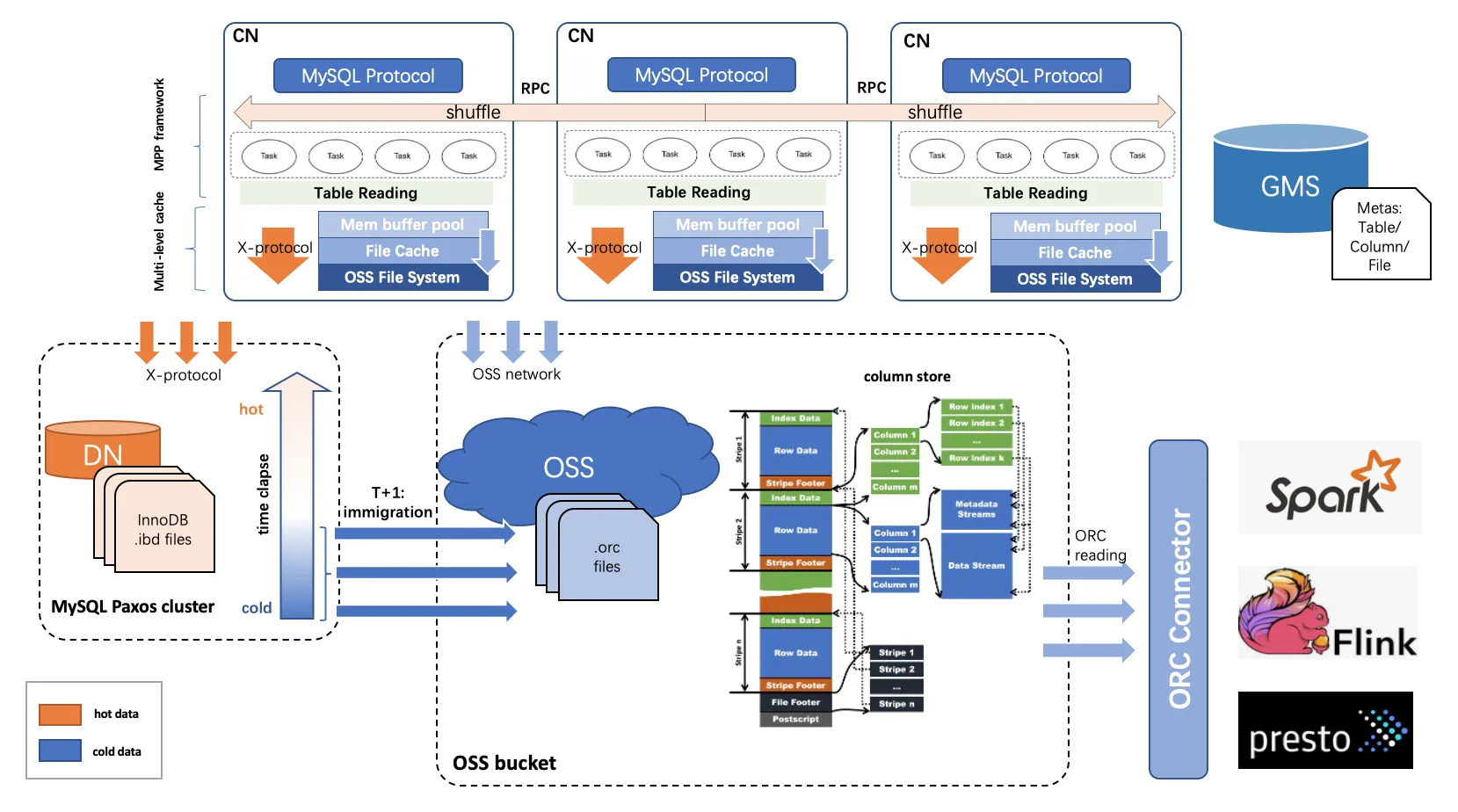
To reduce the storage costs of continuously accumulating historical data, PolarDB-X 2.0 Enterprise Edition provides the cold data archiving feature. Unlike the default method of storing data on local disks, the cold data archiving feature divides data into hot and cold data based on time. It separates expired cold data from the source table and archives it to the more cost-effective Object Storage Service (OSS). Applications can also query the archived data.
Cold data is stored in columnstore format on remote OSS. Hot data remains in row-store format on local disks.
After cold data archiving is complete for an online table, a row-oriented table and an archived table are created:
Row-oriented table: The original business table, which retains only recent hot data. The data is stored on local disks.
Archived table: The archived columnstore index of the original business table. It stores all expired cold data. The data is stored in OSS.
After an online table is archived, you can query the archived table directly on both the primary instance and the column store read-only instance. However, the names of the archived table and the row-oriented table are handled differently on the primary instance and the column store read-only instance:
Primary instance: The archived table and the row-oriented table have different names. The archived table name is the name of a query view. This is because the query performance of the archived table is usually lower than that of the row-oriented table. Their service-level agreements (SLAs) for queries, such as concurrency and response time (RT), are different. Therefore, your application must explicitly specify whether to query the archived table or the row-oriented table.
Column store read-only instance: The archived table and the row-oriented table have the same name. You can access the archived table in the same way as the row-oriented table. Applications can use the original business table name to query cold data directly. In a column store read-only instance, the query performance for the archived table is typically better than on the primary instance, which makes it more suitable for complex analytical queries. Therefore, you should use a column store read-only instance to query archived data frequently.
Cold data compression ratio
Archived tables organize data by column and store it in OSS. Each column in an archived table is compressed. For the same data volume, the storage space required for column-oriented data in an archived table is typically only about 5% to 10% of the original row-oriented storage.
Cold data storage costs
Storage space for cold data is billed separately and supports only the pay-as-you-go billing method. The pricing is as follows:
Billing method | Storage price |
Pay-as-you-go | CNY 0.000167/GB/hour |
Cold data archiving solution based on columnstore indexes
Features of columnstore archiving
The In-Memory Column Index (IMCI) feature provided by PolarDB-X 2.0 Enterprise Edition synchronizes data in real time from row-oriented InnoDB storage to the IMCI in OSS storage. It provides applications with low-cost, high-compression, real-time, and fully MySQL-compatible integrated and transparent hybrid transactional and analytical processing (HTAP) capabilities.
By organizing and storing data by column in OSS, the columnstore index has the following three main features:
High compression ratio: A columnstore index organizes and stores data by table column. It automatically selects the optimal data compression algorithm for each column's data type. This results in a very high overall data compression ratio.
Low storage cost: Object Storage Service (OSS) has low storage costs and is highly cost-effective.
High real-time performance and strong consistency: A columnstore index subscribes to incremental binary logs to maintain real-time synchronization with the primary table. The columnstore index duplicates all columns of the primary table and can be considered a read-only replica or image of the primary table.
The cold data archiving solution based on columnstore indexes provides an integrated solution for various application needs for cold data archiving and inherits several excellent attributes of columnstore indexes. This gives the cold data archiving solution the following distinct advantages:
Cold data is archived to OSS by subscribing to binary logs. The data archiving process does not affect online services. For example, it does not cause lock contention or consume I/O and CPU resources.
Archived cold data has high real-time performance and strong consistency. It supports lightweight analytical processing (AP) queries through a column store read-only instance.
Archived cold data has a high compression ratio. The compressed size is about 1/10 to 1/20 of the original size, which results in low storage costs.
Overall cold data archiving solution
Cold data archiving consists of two main steps:
Transfer of cold data: All cleared cold data is migrated to a storage medium with lower costs and a higher compression ratio to achieve data archiving.
Cleanup of cold data: Expired cold data in business tables is automatically or manually cleared, leaving only the recent hot data defined by the application.
Unlike other cloud database products that use a conventional "archive while cleaning" solution, PolarDB-X 2.0 Enterprise Edition uses an "early archiving and scheduled cleanup" solution.
Early archiving:
You can create a corresponding columnstore index for an online table and use it as a dedicated archived table for storing cold data. When you create a columnstore index, the system uploads all historical data from the online table to the OSS storage of the archived table. It also uses the real-time subscription capability of the columnstore index to subscribe to binary log changes from the online table. This allows all incremental writes to the online table to be synchronized in real time to the OSS storage of the archived table. Therefore, in this phase, all data in the online table, including historical and incremental data, is uploaded to OSS storage, regardless of whether the data has reached the archiving time point. This achieves the "early archiving" effect. When the archived table is created, the first goal of cold data archiving, which is the transfer of cold data, is complete.

After all data in the business table is archived, you can trigger the predefined TTL task for the business table to clear expired data, either automatically or manually. Internally, this TTL task uses DELETE DML statements for row-based archiving or DROP PARTITION DDL statements for partition-based archiving to clear the expired data. When this TTL task clears data, it generates binary logs with special markers. The column store node ignores these binary logs. Therefore, the DELETE operations for row-based archiving or the DROP PARTITION operations for partition-based archiving that are generated by the TTL task on the online table do not affect the data in the archived table. This allows the TTL task to clear expired data only from the online table without clearing data from the archived table. This completes the second goal of cold data archiving: the cleanup of cold data.

Archiving strategies:
TTL tables support the following two archiving strategies, which differ in the method used to clear expired data:
Row-based archiving: The TTL table uses
DELETEDML statements to clear expired data. All cleared expired data is archived to OSS in advance through the columnstore index, as shown in the following figure:
Partition-based archiving: The TTL table uses
DROP (SUB)PARTITIONDDL statements to clear expired data. The data in all cleared expired partitions is archived to OSS in advance through the columnstore index, as shown in the following figure: Note
NoteThe principles of row-based archiving and partition-based archiving are the same. Both are based on using a columnstore index to archive expired data to OSS in advance. The core difference is the method that the TTL table uses to clear expired data.
Cold data archiving procedure
Creating an archived table for a TTL table is the process of creating a columnstore index. During this process, the column store node uploads the historical data of the TTL table to the OSS storage of the archived table based on a snapshot read. It also subscribes to the TTL table's binary logs in real time. This allows it to perform row-to-column conversion for incremental data and upload incremental updates to the OSS storage of the archived table in real time. The following figure shows the procedure:
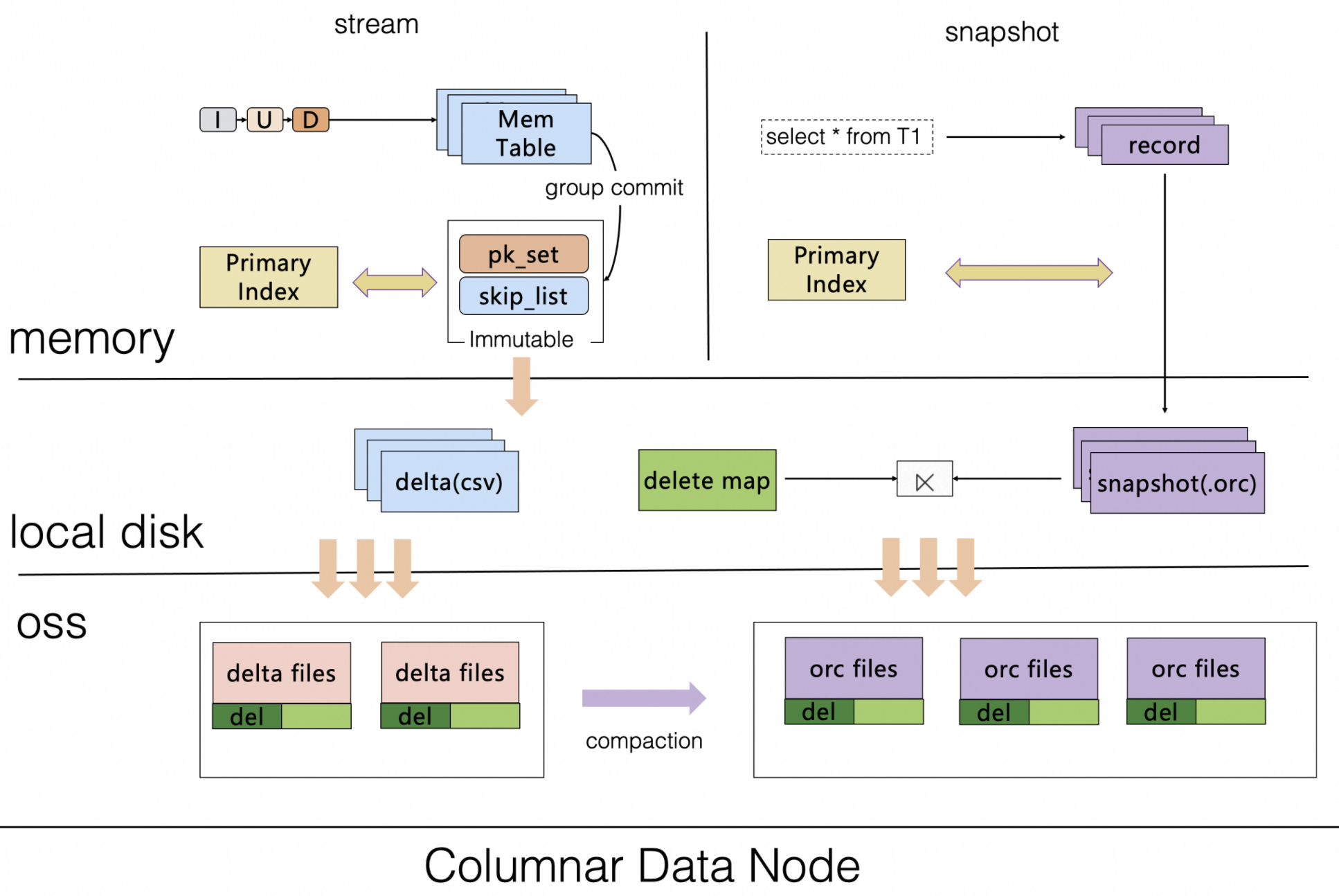
The specific steps of the archiving phase shown in the figure are as follows:
Check whether a TTL definition exists for the online table.
You must manually set the TTL definition for the online table using a DDL statement. This process defines the expiration time column and the data expiration interval.
Create an archived table for the TTL table to store cold data.
The system automatically creates a dedicated columnstore index for archiving on the TTL table. This index uses high-compression, low-cost OSS storage.
This columnstore index automatically uploads the historical data of the TTL table to OSS.
This columnstore index subscribes to the TTL table's binary logs in real time to perform row-to-column conversion for incremental data and upload incremental updates to the OSS storage of the archived table. This achieves real-time synchronization with the TTL table.
The archived table is created.
Cold data cleanup algorithm for TTL tables
TTL tables have the following two data cleanup strategies:
Row-based cleanup: Uses
DELETEDML operations to clear expired data.Partition-based cleanup: Uses DDL operations that delete RANGE partitions to clear expired data.
Row-based cleanup
By default, an algorithm that gradually cleans up data from oldest to newest is used. The cleanup process always starts by clearing the oldest data in the table. After multiple rounds of cleanup, the most recent data is dynamically retained.
Because row-based cleanup uses DML statements and distributed transactions, it generates row locks and binary logs. To avoid creating large-range row locks or consuming excessive CPU and I/O resources during data cleanup, the daily scheduled TTL task automatically calculates a small, appropriate time range for cleanup based on the minimum value of the TTL column.
Row-based cleanup generates many binary logs when using DELETE statements to clear expired data. If a downstream application needs to subscribe to binary logs through PolarDB-X CDC, you can execute the following SQL statement on the primary instance. This makes CDC automatically filter the DELETE binary log events generated during the cleanup process:
SET CDC GLOBAL TASK_EXTRACT_FILTER_ARCHIVE_ENABLED = TRUE;
STOP MASTER;
START MASTER;
This SQL statement must be executed by a privileged account and is supported only for TTL tables that do not have a regular columnstore index. Do not execute this SQL statement on a TTL table that has a columnstore index. After the statement takes effect, binary logs no longer generate DELETE events caused by the TTL table. Execute this SQL statement only after you confirm that no downstream systems need to synchronize these DELETE events.
Cleanup scope algorithm
Assume a TTL definition is TTL_EXPR = `time` EXPIRE AFTER <NUM> MONTH TIMEZONE '+08:00'. This definition means that the TTL table retains data from the most recent NUM months. The upper bound for each cleanup task is calculated as follows:
// Target upper bound of the cleanup time range
CleanupMaxUpperBound = Now - ExpiredDataInterval

// Upper bound of the current cleanup time range
CleanupUpperBound = MIN((MinValue + CleanupDataInterval), (Now - ExpiredDataInterval))
Description:
Parameter | Meaning | Details |
MinValue | The value generated after the minimum value of the TTL time column is adjusted for time granularity. | Time granularity adjustment refers to truncating and rounding down the time based on the
Note that when
|
Now | The value generated after the current time is adjusted for time granularity. | |
CleanupDataInterval | The length of the time range for each data cleanup round. | The calculation method is |
ExpiredDataInterval | The retention period for the TTL table data. | For example: |
Data cleanup example
The following example shows a TTL definition. Assume the current time is 2023-10-01:
CREATE TABLE `tbl` (
	`id` int(11) NOT NULL AUTO_INCREMENT,
	`time` datetime DEFAULT CURRENT_TIMESTAMP,
	PRIMARY KEY (`id`)
) ENGINE = InnoDB DEFAULT CHARSET = utf8mb4
PARTITION BY KEY(`id`)
PARTITIONS 8;

ALTER TABLE `tbl`
MODIFY TTL
SET
TTL_EXPR = `time` EXPIRE AFTER 1 MONTH TIMEZONE '+08:00';
The cleanup process is shown in the following figure:
Day 1:
The minimum time value of the time column in the TTL definition is 2022-10-05 (MinValue). Based on the cleanup time range (CleanupDataInterval), which is 3 months in this example, the cleanup scope for this round is 2022-10-05 ≤ Time < 2023-01-01. The other cleanup scopes are 2023-01-01 ≤ Time < 2023-04-01, 2023-04-01 ≤ Time < 2023-07-01, and 2023-07-01 ≤ Time < 2023-09-01.
Day 2:
Same as Day 1. Data that meets the condition 2023-01-01 ≤ Time < 2023-04-01 is cleared. In this case, 2023-04-01 is the upper bound for this cleanup task (CleanupUpperBound).
Day 3:
Same as Day 1. Data that meets the condition 2023-04-01 ≤ Time < 2023-07-01 is cleared. In this case, 2023-07-01 is the upper bound for this cleanup task (CleanupUpperBound).
Day 4:
This is slightly different. Data that meets the condition 2023-07-01 ≤ Time < 2023-09-01 is cleared. The time range is 2 months. This is because the assumed current time in the figure is 2023-10-01 (Now), and the TTL table is set to retain data for the last month (ExpiredDataInterval is the TTL for the table data). Therefore, this round can only clear data before 2023-09-01. In this case, 2023-09-01 is the upper bound for this cleanup task (CleanupUpperBound).
Partition-based cleanup
For partition-based archiving scenarios, different cleanup logic is used based on the partition expiration policy:
Expiration by fixed time interval: The TTL task calculates the target time range for the current cleanup based on the data expiration interval set in the TTL definition and the current time. It then scans all RANGE partitions. If a partition's data falls completely within the target time range, the partition is considered expired and is deleted.
Expiration by fixed number of partitions: The TTL task determines which partitions are expired based on the number of RANGE partitions to retain, as set in the TTL definition. It starts from the smallest RANGE partition and checks each one until the number of remaining partitions equals the number specified in the TTL definition.
Example of expiration by fixed time interval
Create a range-partitioned table named
tbl:CREATE TABLE `tbl_range` (`time` DATETIME) PARTITION BY RANGE (`time`) ( PARTITION p20231001 VALUES LESS THAN('2023-10-01'), PARTITION p20231101 VALUES LESS THAN('2023-11-01'), PARTITION p20231201 VALUES LESS THAN('2023-12-01'), PARTITION p20240101 VALUES LESS THAN('2024-01-01') );The
tbltable has the following TTL definition:ALTER TABLE `tbl_range` MODIFY TTL SET TTL_EXPR = `time` EXPIRE AFTER 1 MONTH TIMEZONE '+08:00', TTL_PART_INTERVAL = INTERVAL(1, MONTH), ARCHIVE_TYPE = 'PARTITION';NoteThe expiration interval for
tbl_rangeis 1 month, the partition interval is one month, and it is a hash partition.The cleanup process is shown in the following figure:
 Note
NoteAs shown in the figure, when a new TTL task runs, if the current time is
2023-12-03, the current time is first truncated to2023-12-01based on the partition interval unitMONTH. Then, the expiration interval of 1 month is subtracted. The final expiration time point is2023-11-01. Therefore, partitionsp20231101andp20231001are identified as expired and deleted because all their data meets the expiration conditiontime < '2023-11-01'. In addition, before deleting the expired partitionsp20231101andp20231001, the TTL task checks and automatically adds a new RANGE partitionp20240201as needed.

Example of expiration by fixed number of partitions
This expiration policy is typically used when the TTL column is of an integer type.
Create the table
tbl, partitioned into 4 partitions by an integer column:CREATE TABLE `tbl_int` (`uid` BIGINT) PARTITION BY RANGE (`uid`) ( PARTITION p2000000 VALUES LESS THAN(2000000), PARTITION p3000000 VALUES LESS THAN(3000000), PARTITION p4000000 VALUES LESS THAN(4000000), PARTITION p5000000 VALUES LESS THAN(5000000) );TTL definition for
tbl:ALTER TABLE `tbl_int` MODIFY TTL SET TTL_EXPR = `uid` EXPIRE OVER 2 PARTITIONS, TTL_PART_INTERVAL = INTERVAL(1000000, NUMBER), ARCHIVE_TYPE = 'PARTITION';NoteFor the TTL table
tbl, the range partition interval is 1,000,000. A maximum of two partitions are retained, and archiving is performed based on the hash partition.The cleanup process is shown in the following figure:
NoteAs shown in the figure,
p2000000,p3000000,p4000000, andp5000000are the currently created RANGE partitions of the TTL tabletbl_int. When a new TTL task runs, based on the maximum number of partitions to retain, the TTL task starts from the smallest partition,p2000000, and checks each partition to determine if it is expired. This continues until the number of remaining partitions is 2 (p4000000andp5000000). This process calculates the set of expired partitions to be cleared (p2000000andp3000000). Then, before deleting the expired partitions, the TTL task first automatically adds a new partition (p6000000) and finally deletes the expired partitions.
