Long-term Memory (Agent Memory)
Context Service (Context0) provides a Long-term Memory (Agent Memory) service that is fully compatible with the Mem0 API. It enables AI agents to remember user preferences and business facts across sessions, and existing agents can migrate with zero code changes. This topic describes the capability boundaries of Long-term Memory, the three-tier memory data model, and memory scopes and lifecycle, and provides an API overview of memory ingest, retrieval, assembly, management, and promotion.
Overview
An AI agent suffers from "amnesia" at the end of every session: the technology choices, user preferences, and business agreements confirmed in one round of conversation cannot carry over to the next. Long-term Memory enables agents to remember user preferences and business facts across sessions. After a conversation is ingested, Context0 automatically distills it into structured facts and entity profiles, which later sessions can recall on demand.
Mem0 API compatibility
Projects already using Mem0 can switch to Context0 directly without changing any code. Context0 is fully compatible with all 7 Mem0 v1 endpoints (add, get, update, delete, search, and clear operations on /v1/memories). The only difference: DELETE /v1/memories corresponds to DELETE /v1/memories/clear.
Context0 also provides V3 enhanced endpoints, compatible with the Mem0 v1.1 SDK:
|
V3 endpoint |
Description |
|
|
Memory ingest with deduplication; returns |
|
|
Envelope response |
|
|
Request-body filtering plus a paginated envelope response |
Concepts
Three-tier memory model
After a conversation is ingested, Context0 automatically performs a three-tier distillation. You can think of it this way: L2 is a voice recorder (capturing everything in full), L1 is a notebook (extracting the key information), and L0 is a personal profile (understanding a person from a single page).
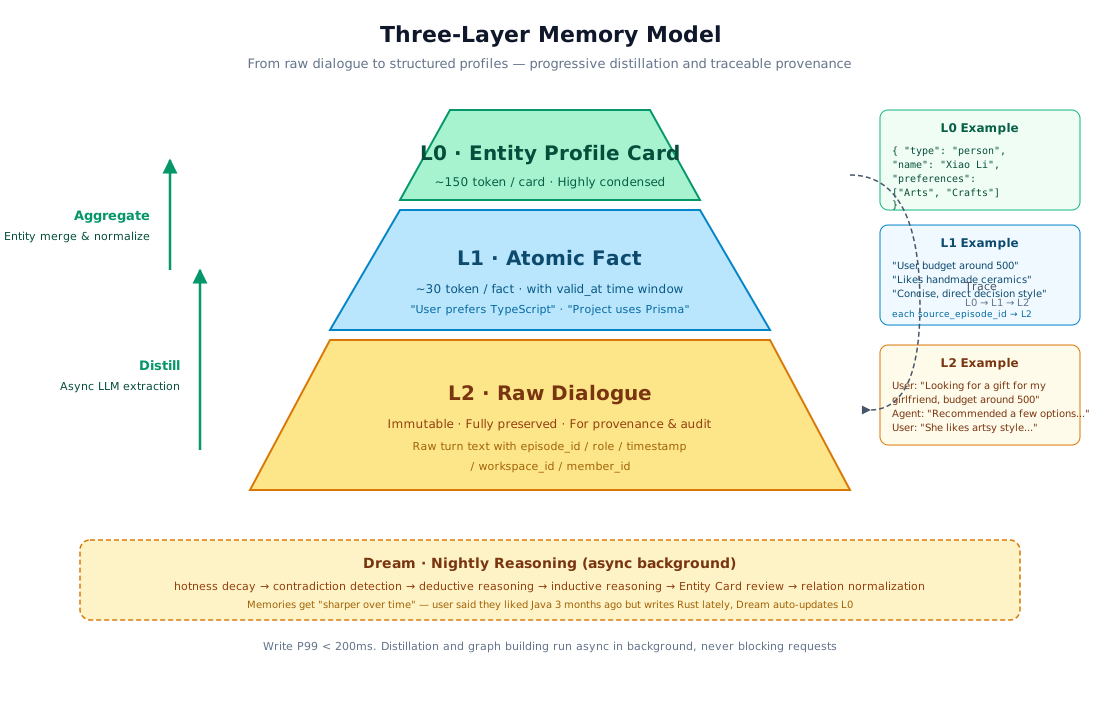
The data flow of the three-tier distillation is as follows:
Conversation ingest ──► L2 Raw Conversations ──LLM extraction──► L1 Atomic Facts ──Entity recognition──► L0 Entity Profile Card
(immutable, traceable) (single facts, time-windowed) (structured entity card)|
Tier |
What it is |
Characteristics |
Example |
|
L2 Raw Conversations |
The complete conversation body |
Immutable and permanently retained, for tracing and auditing |
Verbatim messages between the user and the agent |
|
L1 Atomic Facts |
Facts extracted from conversations by the LLM |
Carry confidence scores and time windows ( |
"User prefers TypeScript", "Target memory < 50MB" |
|
L0 Entity Profile Card |
Structured profile card (about 150 tokens) |
Aggregatable and evolvable, with relationship graph support |
|
Token economics: 1,000 accumulated conversation turns from one user (about 30K tokens) are compressed, after two rounds of distillation, into an L0 profile of about 0.75K tokens — a far higher information density than scattered raw conversations.
Memory scopes
Every memory belongs to a scope. The scope determines the visibility and lifecycle of the memory:
|
Scope |
Range |
Lifecycle |
Typical use |
|
|
A single session |
Archived when the session ends |
Current task context, temporary preferences |
|
|
The same end user |
Retained long term, recallable across sessions |
Tech stack preferences, personal habits, historical decisions |
|
|
The entire workspace |
Retained long term, visible to all members of the workspace |
Team agreements, project standards, shared knowledge |
Memories in the session scope are still retained in the L2 tier after the session ends, but only user- and workspace-level L1 facts appear in cross-session recall results.
Memory lifecycle
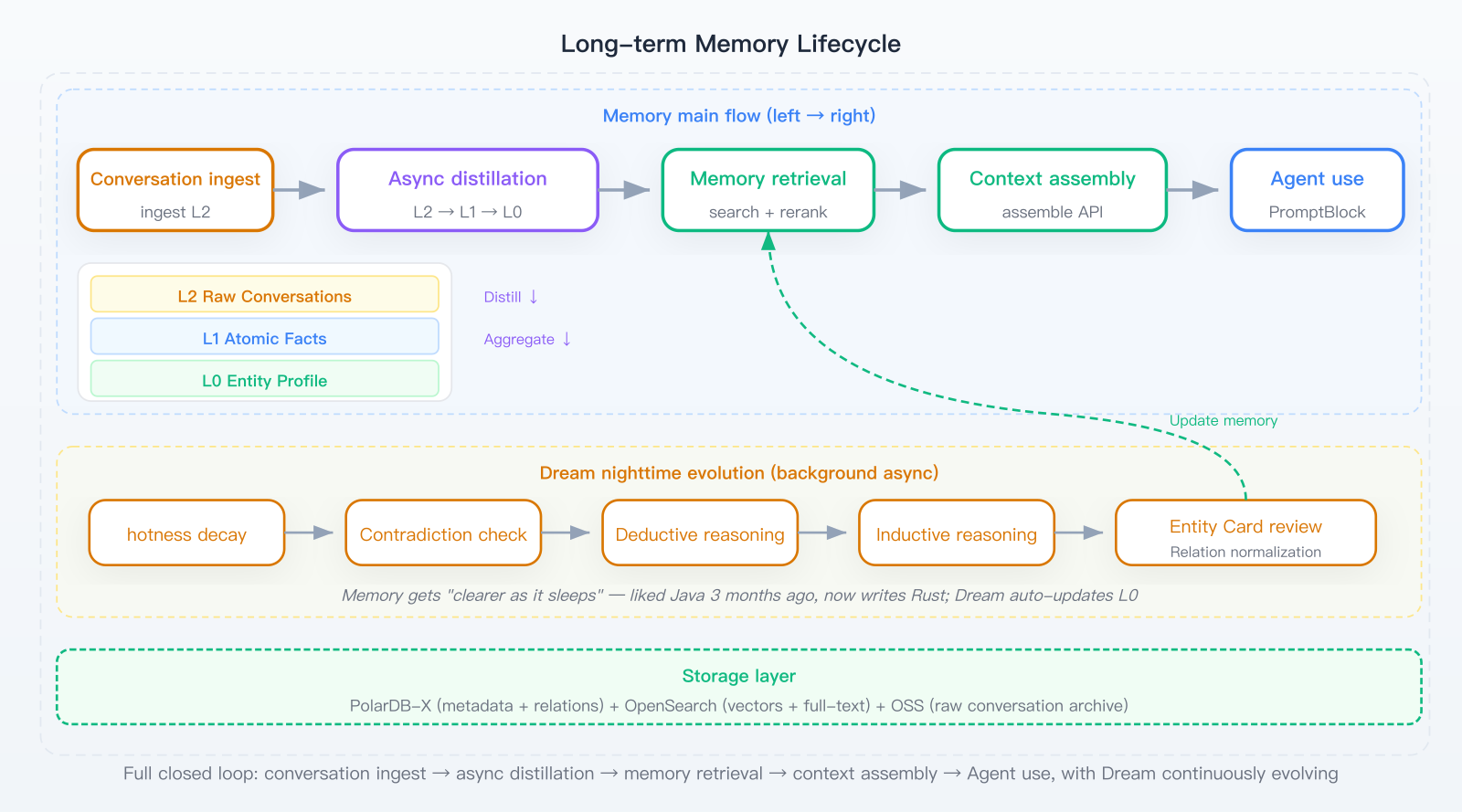
A memory goes through the following stages from ingest to evolution:
Ingest → Async distillation (L2→L1→L0) → Retrieval and recall → Hotness decay / invalidation → Dream nightly evolution|
Stage |
Description |
|
Ingest |
Conversations are ingested through |
|
Async distillation |
A background LLM extracts L1 Atomic Facts from L2, then aggregates them into L0 Entity Profile Cards |
|
Retrieval and recall |
Vector kNN and BM25 lexical retrieval are fused in two paths, ranked by RRF, and the top-k results are returned |
|
Hotness decay |
Memories that have not been recalled for a long time are naturally down-weighted; pinned memories are not affected by decay |
|
Dream evolution |
Runs automatically at night: decays outdated preferences, detects contradictory memories, and consolidates entity profiles |
Preparations
Before you run the examples in this topic, make sure the following items are ready:
|
Item |
Description |
|
Context0 service |
An enabled instance, or a service already deployed by your team |
|
API Key |
Data plane APIs use a User Key; management operations use an Owner Key |
|
Endpoints |
Data plane port |
The examples below all use the following environment variables. Replace the placeholders with your own endpoints and keys:
export API_KEY="<YOUR_API_KEY>"       # User Key for the data plane
export HOST="http://<your-endpoint>"  # Data plane address (port 4040)
export OWNER_KEY="<YOUR_OWNER_KEY>"   # Owner Key for management operations
export OPS_HOST="http://<your-endpoint>:8080"  # Management plane port
For instructions on enabling an instance, obtaining endpoints, and issuing API keys, see Quick Start. For a complete description of the three-tier permission system — Admin Key, Owner Key, and User Key — see the API Key three-tier hierarchy section of Permissions and access control.
API overview
This section provides a calling overview of the Long-term Memory endpoints, helping you map each capability to the right API.
Write memories
Option 1: the ingest endpoint (recommended)
POST /v1/context/ingest is the entry point of the context pipeline. It ingests conversations and automatically triggers memory extraction, deduplication, and source indexing.
curl -X POST "$HOST/v1/context/ingest" \
  -H "X-API-Key: $API_KEY" -H "Content-Type: application/json" \
  -d '{
    "session_id": "sess_001",
    "user_id": "user_001",
    "messages": [
      {"role": "user", "content": "The project prefers TypeScript; use Prisma as the ORM"},
      {"role": "assistant", "content": "OK, the tech stack choice has been recorded"}
    ]
}'|
Parameter |
Required |
Description |
|
|
Yes |
Session ID. Messages with the same ID are grouped into the same session |
|
|
No |
End user identifier; a User Key is automatically bound to its own user |
|
|
Yes |
Message array. Each message contains |
After ingest writes data, memory extraction runs asynchronously in the background. New memories become searchable after a few seconds.
Option 2: the Mem0-compatible endpoint
POST /v1/memories extracts memories directly from a conversation, and the response contains the extraction results.
curl -X POST "$HOST/v1/memories" \
  -H "X-API-Key: $API_KEY" -H "Content-Type: application/json" \
  -d '{
    "messages": [
      {"role": "user", "content": "Use NextAuth for the authentication approach"}
    ],
    "user_id": "user_001",
    "metadata": {"source": "manual"}
  }'
Sample response:
{
  "results": [
    {
      "id": "mem_124",
      "memory": "Use NextAuth for the authentication approach",
      "subject": "authentication",
      "validity": "durable",
      "event": "ADD"
    }
  ]
}
Search memories
-
Semantic search:
POST /v1/memories/search(available in three versions: V1, V2, and V3).curl -X POST "$HOST/v2/memories/search" \ -H "X-API-Key: $API_KEY" -H "Content-Type: application/json" \ -d '{ "query": "tech stack choices", "user_id": "user_001", "limit": 10 }'Parameter
Required
Description
queryYes
Query text. Relevant memories are matched semantically
user_idNo
Restricts results to a user; a User Key is automatically bound to its own user
limitNo
Number of results to return,
[1,200], default 10 (the aliastop_kalso works)cosine_thresholdNo
Similarity lower bound,
[0,1]. Default 0.2 for V1/V2 and 0.1 for V3vector_onlyNo
When
true, only vector recall is used and BM25 is disabledfiltersNo
Additional filters such as time range
Differences between the three versions:
Path
L1 facts
L2 source text
Response format
POST /v1/memories/searchReturned
Not returned
Bare JSON array
POST /v2/memories/searchReturned
Returned (enabled by default)
Bare JSON array
POST /v3/memories/searchReturned
Returned
{"results": [...]}envelopeNoteV3 endpoints align with the Mem0 v1.1 SDK. Entity parameters such as
user_idare recommended to be passed inside thefiltersmap. -
Get a single memory:
GET /v1/memories/{id}.curl "$HOST/v1/memories/mem_123" -H "X-API-Key: $API_KEY"
Use memories in conversations
Automatic injection via assemble (recommended)
POST /v1/context/assemble is the core endpoint for agent integration. It recalls relevant memories and knowledge for a query, selects the best content within a token budget, and outputs structured prompt_blocks that can be concatenated directly into the LLM system prompt.
curl -X POST "$HOST/v1/context/assemble" \
  -H "X-API-Key: $API_KEY" -H "Content-Type: application/json" \
  -d '{
    "session_id": "sess_002",
    "user_id": "user_001",
    "query": "How do I deploy the application?",
    "token_budget": 4000,
    "include_memories": true,
    "recall": {"top_k": 8}
}'|
Parameter |
Required |
Description |
|
|
At least one of |
Session ID |
|
|
At least one of |
End user identifier |
|
|
No |
Recall query. When empty, a zero-query cold start is triggered |
|
|
No |
Output token budget, |
|
|
No |
Boolean. Whether to include memory recall |
|
|
No |
Boolean. Whether to include knowledge base recall |
|
|
No |
List of knowledge base IDs to recall from |
|
|
No |
Number of items to recall, |
After you call assemble, Context0 automatically handles recall and budget allocation. The agent only needs to inject prompt_blocks into the LLM.
In the response, prompt_blocks contains context blocks ordered by priority:
{
  "code": 0,
  "data": {
    "prompt_blocks": [
      {
        "role": "system",
        "tag": "user_profile",
        "content": "User prefers TypeScript + Prisma; NextAuth for authentication",
        "tokens": 30,
        "sources": []
      },
      {
        "role": "system",
        "tag": "knowledge",
        "content": "Deployment process: 1. Prepare .env ...",
        "tokens": 120,
        "sources": ["runbook.pdf"]
      }
    ]
  }
}
Manual injection via the Mem0-compatible endpoint
If you do not use assemble, you can also call /v1/memories/search manually to retrieve relevant memories and concatenate the results into the system prompt:
# 1. Search for relevant memories
curl -X POST "$HOST/v1/memories/search" \
  -H "X-API-Key: $API_KEY" -H "Content-Type: application/json" \
  -d '{"query": "tech stack preferences", "user_id": "user_001", "limit": 5}'

# 2. Concatenate the returned memory content into the system prompt and send it to the LLM
Manage memories
Viewing, editing, pinning, invalidating, and gathering statistics on memories are provided by the following endpoints:
|
Operation |
Endpoint |
Description |
|
List |
|
Lists memories with pagination; supports filtering by |
|
Details |
|
Gets a single memory |
|
Update |
|
Updates content and generates a new version |
|
Delete |
|
Deletes a single memory |
|
Pin |
|
Gives high priority; exempt from hotness decay |
|
Unpin |
|
Restores normal decay |
|
Invalidate |
|
Excludes the memory from recall entirely, rather than down-weighting it |
|
Feedback |
|
Thumbs up or down; affects hotness and Dream evaluation |
|
Edit entity card |
|
Modifies the |
|
Trace sources |
|
Views the original conversations that produced the fact |
|
Version history |
|
Views past modifications |
|
Statistics |
|
Memory count statistics |
|
Clear |
|
Bulk deletion; irreversible |
-
Example: pin a memory:
curl -X POST "$HOST/v1/memories/mem_123/pin" -H "X-API-Key: $API_KEY" -
Example: invalidate a memory:
curl -X POST "$HOST/v3/memories/mem_123/invalidate" -H "X-API-Key: $API_KEY" -
Example: edit an L0 entity card:
curl -X POST "$HOST/v3/entity_cards/card_1_2_alice/edit" \
  -H "X-API-Key: $API_KEY" -H "Content-Type: application/json" \
  -d '{
    "role": "Senior backend engineer",
    "preferences": ["Java", "Spring Boot"],
    "attributes": {"domain": "distributed databases"}
  }'
-
DELETE /v1/memories/clearis irreversible, andconfirmmust betrue. -
Invalidated memories do not accept
feedbackorupdate; a 400 error is returned. -
The request body of
PUT /v1/memories/{id}must contain at least one ofdataandmetadata.
Dashboard operations
In addition to APIs, you can also browse, edit, and search memories in the Dashboard:
-
On the Memories page of the Dashboard, select the Entities tab to browse all L0 entity cards and edit fields such as
role,preferences, andattributes. -
On the Memories page of the Dashboard, select the Search tab. After you enter a query, results are sorted by similarity, with support for time range filtering and feedback (thumbs up or down).
Advanced features
Custom distillation rules
Distillation rules control "what to extract from conversations and how to extract it". You can define the types of content that Context0 focuses on. Priority chain: custom_instructions in the ingest request > member-level rules > workspace default rules > built-in defaults.
For the complete configuration instructions of distillation rules, see the Custom Distillation Rules section of the User Guide.
-
API reference
-
Set a member-level rule (data plane, User Key):
curl -X PUT "$HOST/v1/memories/distill-prompt" \ -H "X-API-Key: $API_KEY" -H "Content-Type: application/json" \ -d '{ "custom_prompt": "Focus on extracting tech stack choices and architecture decisions; ignore small talk", "enabled": true }' -
Set a workspace-level rule (management plane, Owner Key):
curl -X PUT "$OPS_HOST/ops/distill-prompt" \
  -H "X-API-Key: $OWNER_KEY" -H "Content-Type: application/json" \
  -d '{
    "custom_prompt": "Extract technical decisions, project conventions, and team standards",
    "enabled": true
  }'
-
-
Dashboard operations
On the Memories page of the Dashboard, select the Distillation Rules tab to choose members, edit prompts, and view the effective status.
Dream nightly evolution
Dream is the background evolution engine of Context0. It periodically runs the following tasks automatically:
-
Preference decay: preferences that have not been recalled for a long time are automatically down-weighted.
-
Contradiction detection: conflicting memories on the same topic are found and marked.
-
Entity consolidation: L0 Entity Profile Cards are generated or updated by aggregating L1 facts.
Example: manually trigger Dream (Owner Key):
curl -X POST "$HOST/v1/dream/run" \
  -H "X-API-Key: $OWNER_KEY" -H "Content-Type: application/json" \
-d '{}'Dream runs asynchronously and returns a run_id. Only one Dream job is allowed at a time within the same workspace. Call GET /v1/dream/status to check the running status.
Promote memories to the knowledge base
Memory promotion aggregates high-value memories (L1 facts) under the same topic into a knowledge base document. The generated document is reviewed manually before being stored, after which it is retrieved and cited like any regular document. For an end-to-end scenario walkthrough, see Make your agent understand your business over time.
When to use
-
Memories on a topic keep recurring and are also valuable to other team members (such as technology choices or troubleshooting experience).
-
Domain knowledge accumulated from personal conversations is worth upgrading into a team-shared document.
-
The agent has accumulated enough facts on the same topic that manual consolidation would be costly.
When a memory promotion passes review, the target knowledge base drop-down list only shows knowledge bases for which you have the "Editor" permission.
Examples
API reference
The process has three steps: trigger generation, check status, and review.
-
Trigger generation
curl -X POST "$HOST/v1/memory_promotions/generate" \
  -H "X-API-Key: $API_KEY" -H "Content-Type: application/json" \
  -d '{"topic": "Summarize the architecture decisions of this week", "target_member_id": 1}'
Parameter
Type
Required
Description
topicstring
Yes
Promotion topic or prompt
target_member_idlong
Yes
Target member ID. Whose memories to distill from
A response of
{"code": 0}indicates the request has been submitted; generation runs asynchronously. -
Check status
# List
curl "$HOST/v1/memory_promotions?page=0&pageSize=10" -H "X-API-Key: $API_KEY"

# Details
curl "$HOST/v1/memory_promotions/1" -H "X-API-Key: $API_KEY"
Key fields in the detail response:
Field
Description
statusgenerating/pending_review/approved/rejected/generation_failedtitleDocument title generated by the LLM
contentMarkdown body
source_memory_idsList of cited memory IDs
target_kb_idKnowledge base ID written to after approval
target_document_idDocument ID generated after being stored
-
Review (Owner Key, management plane)
# Approve
curl -X POST "$OPS_HOST/ops/promotion/approve" \
  -H "X-API-Key: $OWNER_KEY" -H "Content-Type: application/json" \
  -d '{"promotion_id": 1, "knowledge_base_id": 3}'

# Reject
curl -X POST "$OPS_HOST/ops/promotion/reject" \
  -H "X-API-Key: $OWNER_KEY" -H "Content-Type: application/json" \
  -d '{"promotion_id": 1, "reason": "Content is not accurate enough"}'
Dashboard operations
For the complete procedure on this tab (select the target member, generate, review doubts, and approve or reject), see the Memory Promotion section of the User Guide.
-
Go to the Memory Distillation page in the console sidebar.
-
In the Manual Promotion panel, select the Target Member, enter a promotion topic (such as "Python performance optimization"), and click Generate.
-
Wait for the status to change from generating to pending_review, then click the list row to open the details drawer.
-
Review the generated document content. If there are doubts, resolve them first. You can also edit the title and body directly.
-
Click Approve, select the target knowledge base, and then click Confirm; or click Reject and provide a reason.
When approving, the drop-down list only shows knowledge bases for which you have the Editor permission.
What happens after promotion
-
Original memories are retained: promotion does not delete or modify the source memories, and
source_memory_idsrecords the citation relationship. -
A new document is added to the knowledge base: after approval, a new document is written to the target knowledge base and is subsequently recalled through the knowledge base retrieval path.
-
Status is traceable: each promotion record retains the complete review chain (generation, review, storage), which you can view through the list API by filtering on
status.
Data security
Long-term Memory involves end users' conversation content and preference profiles. Context0 guarantees data isolation and auditability through the following mechanisms:
|
Security mechanism |
Description |
|
Workspace-level physical isolation |
Indexes are physically partitioned by workspace; data across workspaces is completely invisible to each other |
|
Member-level permission control |
A User Key can only access data of the |
|
Enforced ES query isolation |
All ES queries are forced to carry |
|
Three-tier API Key permissions |
Admin Key (management plane) / Owner Key (workspace owner) / User Key (bound to an end user) |
|
Audit logs |
All memory read and write operations are recorded in audit logs |
In production environments, assign distinct user_id values to different agents and end users to avoid mixing up memories.
FAQ
|
Symptom |
Resolution |
|
Memories cannot be found after ingest |
Distillation is asynchronous; L1 facts become searchable after a few seconds. Wait a moment and try again. |
|
L0 entity card is not updated |
L0 updates are less frequent (triggered by Dream or entity recognition). Call |
|
Mem0 SDK connection fails |
Confirm that |
|
Memory search results are irrelevant |
Raise the similarity lower bound by adjusting |
|
|
Check that |
|
Clearing memories returns a 400 error |
In the request body, |
|
Updating or giving feedback on a memory returns a 400 error |
Possible causes: (1) the memory has been invalidated and cannot be modified or given feedback on; (2) the update request contains neither |
|
Dream returns a 409 error |
A Dream job is already running in the same workspace. Wait for it to finish and try again. |