Cost-effective context storage with external columns
An external column is a PolarDB-X feature that offloads large fields, such as AI conversation content, JSON snapshots, and binary attachments like images or PDFs, from a primary table to OSS. By adding the EXTERNALIZE keyword to a large field definition when creating a table, you can lower storage costs, improve service stability, and optimize memory usage—all without changing your application's SQL queries.
Background
Agent and Copilot applications are becoming the fastest-growing and most resource-intensive workloads for OLTP databases. Consider a typical chat_messages table. Structured metadata like session_id / user_id / role / ts / token occupies only a few hundred bytes per row and handles nearly all filtering and aggregation. In contrast, large JSON fields like content / tool_calls / context_snapshot / attachments can range from kilobytes to megabytes. A single row containing context from a RAG query, a long JSON response from a tool, or a base64-encoded screenshot can easily exceed 100 KB. This payload often accounts for over 95% of the total data volume, leading to high storage costs, Buffer Pool contention, and bloated backup sizes.
The external column feature in PolarDB-X addresses this challenge by offloading large fields, such as AI conversation text, chain-of-thought data, images, or PDF attachments, from the primary table to OSS. When a large field is offloaded, the primary table stores only a pointer to its location, while the actual data resides in OSS. Using an external column in PolarDB-X requires no changes to your application logic. Simply add the EXTERNALIZE keyword to the column definition when you create the table. Your INSERT / UPDATE / DELETE / SELECT statements work exactly as they would with a regular table.
Benefits
Lower costs: Storing large fields in OSS reduces storage costs from SSD prices to object storage prices. Additionally, backups based on OSS benefit from techniques like deduplication, further lowering backup costs.
Greater stability: The Binlog size on the data node (DN) drops from megabytes to kilobytes. Commits from other services in the same database are no longer affected by large-field writes, resulting in more stable tail latency.
Better memory efficiency: Offloading large text fields prevents them from consuming limited Buffer Pool memory. The Buffer Pool can then be dedicated to caching frequently accessed small metadata, leading to better cache efficiency for the same amount of memory.
Typical scenarios
Storing chat histories for AI Agents is a typical scenario for external columns. A single session can contain multi-turn conversations, code snippets, and tool call results, with individual messages ranging from kilobytes to megabytes. As the number of sessions grows from millions to billions, storing this data directly in InnoDB can bloat the Binlog and exhaust the Buffer Pool. Managing a dual-system architecture with both MySQL and OSS requires you to handle transactional consistency and garbage collection (GC). External columns combine the simplicity and transactional semantics of InnoDB with the low cost of OSS, and let the database engine handle the complexity.
CREATE TABLE chat_messages (
    id         BIGINT PRIMARY KEY AUTO_INCREMENT,
    session_id BIGINT,
    user_id    BIGINT,
    role       ENUM('user','assistant','system'),
    token_count INT,
    created_at DATETIME,
    content    LONGTEXT EXTERNALIZE,
    KEY idx_session (session_id, created_at)
) PARTITION BY KEY(session_id);

-- Write data
INSERT INTO chat_messages(session_id, user_id, role, content, token_count, created_at)
VALUES (10001, 42, 'user', '{...conversation content...}', 1200, NOW());

-- Assemble context
SELECT role, content FROM chat_messages
WHERE session_id = 10001 ORDER BY created_at DESC LIMIT 20;

-- Update data
UPDATE chat_messages SET content = '{...new content...}' WHERE id = 1;

-- Delete data
DELETE FROM chat_messages WHERE session_id = 10001;
This feature is completely transparent to ORMs like MyBatis/JPA and AI frameworks like LangChain/LlamaIndex. You can integrate session data seamlessly with a single MySQL table, requiring zero code changes on the application side.
Prerequisites
This feature is available only for Enterprise Edition instances.
Your instance version must be 2.6.0_5.4.21-20260619 or later.
Note-
For information about the instance version naming rules, see Release notes.
-
For information about how to view the version of an instance, see View and update the engine version of a PolarDB for Xscale instance.
-
Syntax
Create a table
Add the EXTERNALIZE keyword at the end of a column definition to specify that its data should be stored externally in OSS.
CREATE TABLE chat_messages (
    id         BIGINT PRIMARY KEY AUTO_INCREMENT,
    session_id BIGINT,
    user_id    BIGINT,
    role       ENUM('user','assistant','system'),
    token_count INT,
    created_at DATETIME,
    content    LONGTEXT EXTERNALIZE,
    KEY idx_session (session_id, created_at)
) PARTITION BY KEY(session_id);
Add a column
You can also add an external column to an existing table by using the ALTER TABLE statement.
ALTER TABLE chat_messages ADD COLUMN reasoning LONGTEXT EXTERNALIZE;Supported data types
Text family:
TEXT / TINYTEXT / MEDIUMTEXT / LONGTEXTBinary family:
BLOB / TINYBLOB / MEDIUMBLOB / LONGBLOB
The column character set must be omitted or belong to the utf8 family (utf8, utf8mb3, or utf8mb4). Using other character sets will result in an error during table creation.
View the CREATE TABLE statement
The SHOW CREATE TABLE statement returns a logical view. You will see content LONGTEXT EXTERNALIZE, not the underlying physical column names. The physical implementation is completely transparent.
Application transparency
After the table is created, your application's SQL queries remain exactly the same.
INSERT INTO chat_messages(session_id, user_id, role, content, token_count, created_at)
VALUES (10001, 42, 'assistant', '{...response content...}', 800, NOW());

UPDATE chat_messages SET content = '{...new content...}' WHERE id = 1;

SELECT content FROM chat_messages WHERE session_id = 10001;
The database automatically handles uploading large fields to and fetching them from OSS. This process is invisible to the application. If a SQL query does not involve an external column (for example, querying only the ROLE column), it follows a path involving only the data node (DN), delivering performance identical to a regular table.
How it works
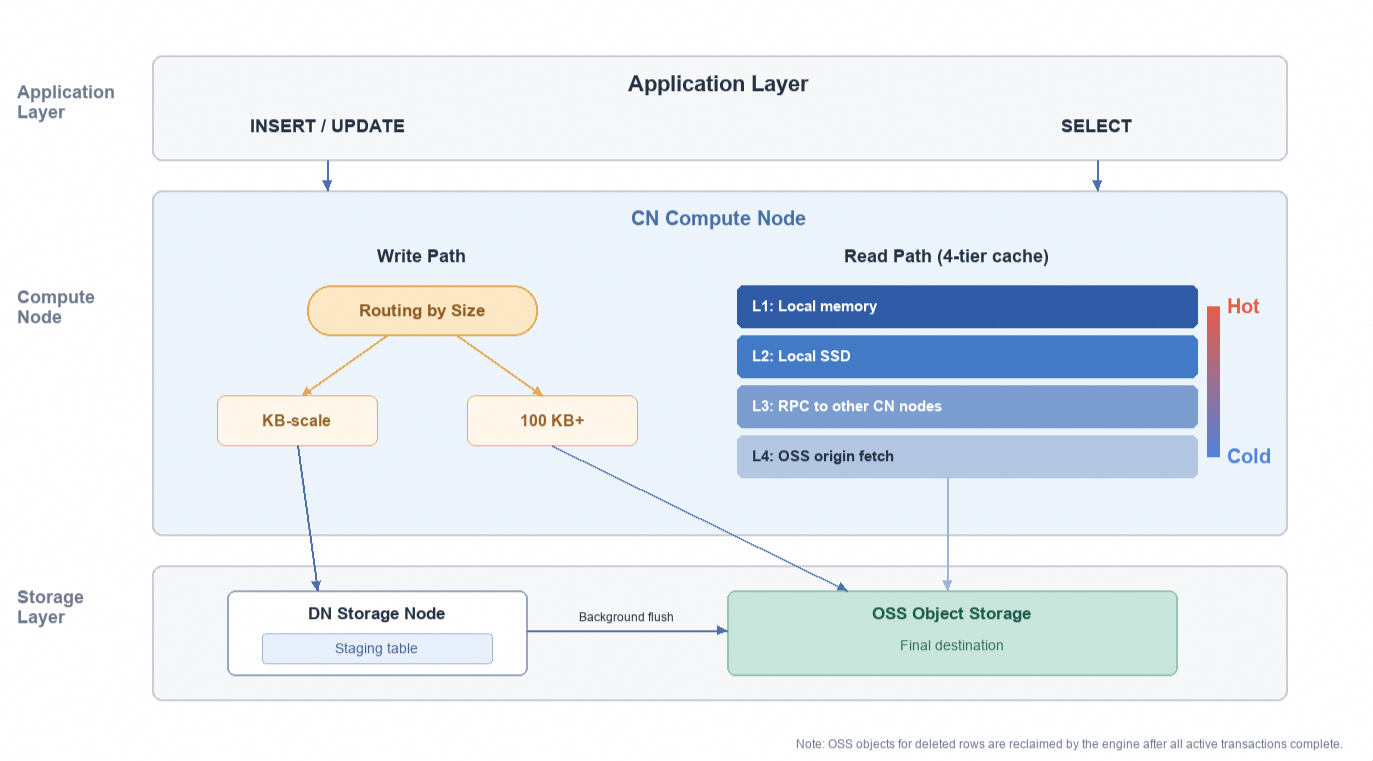
The engine automatically routes data based on column size
Over 100 KB: Data is uploaded directly to OSS during a write operation. The primary table stores only a pointer. The transaction waits for confirmation from OSS before committing, ensuring full transactional semantics.
Kilobyte-level: Data is first written to a local staging table (InnoDB), and the operation returns immediately. The data is then flushed to OSS asynchronously in the background. This provides write latency equivalent to writing directly to InnoDB, while still benefiting from the long-term storage cost of OSS.
Reads use a four-level cache
Data is fetched from local memory, then local SSD, then via an RPC call to another compute node (CN), and finally from OSS as a last resort. Most hot reads are served by the first two levels, avoiding access to OSS.
Deletions are managed automatically by the engine
After you
DELETEa row, the corresponding OSS object is cleaned up by GC after all active transactions end, so the application layer does not need to write reconciliation scripts or manually delete it.
Key outcomes
Consistent write performance: Write latency for kilobyte-sized columns is identical to writing directly to InnoDB. For columns larger than 100 KB under high concurrency, writes are faster than with InnoDB.
Nearly imperceptible read impact: Hot reads hit the local cache, delivering latency comparable to querying a regular column.
Zero operational overhead: The engine handles everything automatically. No reconciliation scripts or manual cleanup in OSS are needed.
Usage examples
Scenario 1: Split columns for multimodal messages
A response from an AI assistant might include the main answer, attachments, tool call results, and chain-of-thought data. These fields have different read frequencies. For example, content is read every time context is assembled, while reasoning is typically accessed only for auditing purposes.
CREATE TABLE chat_messages_v2 (
    id          BIGINT PRIMARY KEY AUTO_INCREMENT,
    session_id  BIGINT,
    role        ENUM('user','assistant','system'),
    token_count INT,
    created_at  DATETIME,
    content     LONGTEXT EXTERNALIZE,
    attachments LONGBLOB EXTERNALIZE,
    tool_calls  LONGTEXT EXTERNALIZE,
    reasoning   LONGTEXT EXTERNALIZE,
    KEY idx_session (session_id, created_at)
) PARTITION BY KEY(session_id);

-- Write a multimodal message
INSERT INTO chat_messages_v2(session_id, role, content, reasoning, token_count, created_at)
VALUES (10001, 'assistant', 'Main answer text...', 'Chain-of-thought content...', 3500, NOW());

-- Daily operations read only the content column
SELECT content FROM chat_messages_v2 WHERE session_id = 10001 ORDER BY created_at;

-- The reasoning column is read only for auditing
SELECT reasoning FROM chat_messages_v2 WHERE id = 12345;
Caching is column-granular: Each external column has its own independent OSS object and cache entry.
The
contentcolumn is repeatedly accessed bySELECTstatements, so the LRU cache keeps it cached locally.The
reasoningcolumn is rarely accessed and is naturally evicted from the cache.When an audit query runs
SELECT reasoning, the data is fetched from OSS in tens of milliseconds, which is perfectly acceptable for debugging scenarios.
Scenario 2: Integrate with AI frameworks
External columns are completely transparent to ORMs (MyBatis/JPA) and AI frameworks (LangChain/LlamaIndex). The following examples for Spring AI and LangChain4j demonstrate two different contracts and schemas, both implemented with pure SQL.
Spring AI (Append)
The "append per message" semantic is a natural fit for the chat_messages table shown earlier, so the same table structure can be reused.
-- Reuse the previous chat_messages table
CREATE TABLE chat_messages (
    id         BIGINT PRIMARY KEY AUTO_INCREMENT,
    session_id BIGINT,
    user_id    BIGINT,
    role       ENUM('user','assistant','system'),
    token_count INT,
    created_at DATETIME,
    content    LONGTEXT EXTERNALIZE,
    KEY idx_session (session_id, created_at)
) PARTITION BY KEY(session_id);
public class PolarDBXChatMemory implements ChatMemory {
private final JdbcTemplate jdbc;
@Override
public void add(String conversationId, Message message) {
jdbc.update(
"INSERT INTO chat_messages(session_id, role, content, created_at) "
+ "VALUES (?, ?, ?, NOW())",
conversationId, message.getMessageType().name(), message.getText());
}
@Override
public List<Message> get(String conversationId, int lastN) {
return jdbc.query(
"SELECT role, content FROM chat_messages WHERE session_id = ? "
+ "ORDER BY created_at DESC LIMIT ?",
(rs, i) -> toMessage(rs.getString("role"), rs.getString("content")),
conversationId, lastN);
}
@Override
public void clear(String conversationId) {
jdbc.update("DELETE FROM chat_messages WHERE session_id = ?", conversationId);
}
}LangChain4j (Replace)
The "replace full session" semantic is better suited for a key-value table where the entire message history for a session is serialized into a single JSON object and stored in an external column.
CREATE TABLE chat_memory_store (
    session_id BIGINT PRIMARY KEY,
    messages   LONGTEXT EXTERNALIZE
);
public class PolarDBXChatMemoryStore implements ChatMemoryStore {
private final JdbcTemplate jdbc;
@Override
public List<ChatMessage> getMessages(Object sessionId) {
String json = jdbc.query(
"SELECT messages FROM chat_memory_store WHERE session_id = ?",
rs -> rs.next() ? rs.getString(1) : null, sessionId);
return json == null ? List.of() : ChatMessageDeserializer.messagesFromJson(json);
}
@Override
public void updateMessages(Object sessionId, List<ChatMessage> messages) {
String json = ChatMessageSerializer.messagesToJson(messages);
jdbc.update(
"INSERT INTO chat_memory_store(session_id, messages) VALUES (?, ?) "
+ "ON DUPLICATE KEY UPDATE messages = VALUES(messages)",
sessionId, json);
}
@Override
public void deleteMessages(Object sessionId) {
jdbc.update("DELETE FROM chat_memory_store WHERE session_id = ?", sessionId);
}
}Usage limits
DDL
Operation | Supported | Notes |
| Yes | The table must have a primary key. |
| Yes | The table must have a primary key. |
| Yes | OSS objects are deleted asynchronously. |
| No |
|
| No |
|
| No | External columns cannot have a default value. |
Regular indexes ( | No | However, they can be included in the covering columns of a global secondary index (GSI). |
Deleting the last column-oriented index (CCI) | No | External columns depend on a column-oriented index (CCI) to work. |
| No | — |
| No | — |
| No | — |
| No | — |
Non-utf8 character sets | No | Only |
DQL / DML
When a WHERE clause or an UPDATE SET clause involves an external column, the SQL statement is not pushed down to the data node (DN) for execution. Instead, it is executed on the compute node (CN). This may increase the execution cost and time. In practice, large fields are usually located by primary key. Therefore, this limitation is not typically a bottleneck.
Performance reference
The following data is from a public cloud instance with four Compute Nodes (CNs) and four Data Nodes (DNs). The instance uses a simple schema with a primary key and one MEDIUMBLOB column.
Writing small columns (KB-level)
Small columns are written through the staging path. This operation is a single local InnoDB INSERT on a Data Node (DN). As long as backpressure is not triggered, which occurs when the staging table backlog reaches its threshold, the write latency is identical to a direct InnoDB write. This method is well-suited for scenarios that involve large columns in the kilobyte range.
Writing large columns (hundreds of KB or more)
The write performance of the direct-to-OSS method for large fields is driven by both data size and concurrency. Tests show a clear performance crossover point between writing to external columns and using traditional InnoDB:
Lower crossover point: With a single thread, the external column method starts to outperform InnoDB when the data size reaches 500 KB. At a concurrency of 64, this crossover point drops to 300 KB. At a concurrency of 256, it drops further to 140 KB. The higher the concurrency, the lower the data size at which the external column method gains an advantage.
Breaks the I/O ceiling: Beyond the crossover point, the performance gap widens exponentially. Under the dual pressures of large fields and high concurrency, InnoDB quickly hits the disk I/O bottleneck and experiences severe lock contention, which causes throughput to decrease instead of increase. In contrast, the external column method bypasses this physical limitation by only writing an address pointer of a few dozen bytes to the main table.
Scenario comparison: In a high-load scenario with 2 MB of data and a concurrency of 256, the average latency for InnoDB soars to 5.5 seconds, and the P99 latency exceeds 16 seconds, making it unusable for production environments. In contrast, the external column method maintains a stable throughput of 478 QPS with an average latency of 514 milliseconds, which demonstrates its strong robustness.
Hot reads
For hot reads, external columns and InnoDB each have advantages and disadvantages, with overall performance being roughly equal. In tests with a concurrency of 16, InnoDB is faster for 100 KB columns, while external columns are faster for columns of 500 KB and larger.
However, external columns have a hidden advantage for hot reads: They do not occupy the Buffer Pool of the DN. When InnoDB reads a large column, the entire LOB page is loaded into the Buffer Pool. These large pages, which are often read only once, can evict index pages and other hot data. This slows down transactional processing (TP) workloads in the same database. External columns are read from the local cache of the CN and do not pass through the DN's Buffer Pool, so resident index pages are not affected.
Representative data points
Scenario | Column size | Concurrency | InnoDB QPS / Avg / P99 | External Column QPS / Avg / P99 |
INSERT | 100 KB | 64 | 3994 / 16 ms / 37 ms | 1961 / 33 ms / 64 ms |
INSERT | 500 KB | 64 | 818 / 78 ms / 225 ms | 1258 / 51 ms / 87 ms |
INSERT | 1 MB | 64 | 317 / 201 ms / 1195 ms | 793 / 81 ms / 162 ms |
INSERT | 2 MB | 256 | 40 / 5561 ms / 48687 ms | 478 / 514 ms / 1549 ms |
UPDATE | 1 MB | 64 | 247 / 257 ms / 1507 ms | 526 / 121 ms / 267 ms |
Hot read | 100 KB | 16 | 8120 / 2.0 ms / 8.2 ms | 5279 / 3.0 ms / 5.9 ms |
Hot read | 500 KB | 16 | 3688 / 4.3 ms / 11.7 ms | 4186 / 3.8 ms / 19.9 ms |
Cold read | 100 KB | 64 | — | 1538 / 28 ms / 48 ms |
Cold read | 1 MB | 64 | — | 250 / 95 ms / 190 ms |
A cold read occurs when data is fetched from OSS after a local cache miss. The latency mainly consists of a fixed overhead for an OSS GET request plus data transfer time. For example, the latency is about 28 ms for 100 KB and 95 ms for 1 MB. For applications sensitive to cold read latency, consider pre-warming the cache.
Use cases
Suitable use cases: Use external columns for large fields written and read by a primary key or session ID. Examples are message bodies, JSON snapshots, and thought chains. External columns are also good for binary data, such as images, PDFs, and video files. This simplifies your system. You can store data directly in an external column. This removes the need to manage a separate system with Object Storage Service (OSS) and a metadata database. The engine handles transactions and manages the data lifecycle. This method is perfect for access patterns that write and read whole objects.
Unsuitable use cases:
Frequent cold reads: After a cache miss, fetching data from the origin OSS adds 20+ ms of latency. If your use case involves frequent lookups of historical cold data and is sensitive to latency, consider the trade-offs.
Searching large fields: External columns do not support secondary indexes, full-text search, or LIKE fuzzy queries. Fields that require searching should be kept in regular columns of the main table.