User-defined functions
User-defined functions (UDFs) in PolarDB-X are SQL-based stored functions that extend query logic with custom computation.
UDFs are supported on PolarDB-X 5.4.16 and later.
How it works

After you create a UDF, PolarDB-X persists it to the meta center and loads it to compute nodes for execution. Execution is split by logic type:
SQL logic — sent to the SQL engine
Control flow logic — executed in the PL engine
Before execution, each UDF is registered with the runtime function management center. Memory usage per query is strictly limited during execution.
Function pushdown
PolarDB-X checks the SQL DATA ACCESS field of a UDF to decide whether to register it on data nodes. Only UDFs with SQL DATA ACCESS set to NO SQL are registered on data nodes and can be pushed down.
To maintain MySQL compatibility, PolarDB-X registers pushdown-eligible UDFs with the MySQL library on the data node.
The SQL DATA ACCESS field cannot be modified because the pushdown logic of a UDF is involved.Pushdown after scaling
After scaling, run pushdown udf to register pushdown-eligible UDFs with the new data node (DN).
Differences from MySQL
PolarDB-X UDFs differ from MySQL stored functions in three ways:
| Difference | MySQL | PolarDB-X |
|---|---|---|
| Supported operations | DQL, DML, DDL | DQL only — DML and DDL are not supported inside a UDF |
| Storage scope | Database level | Instance level |
SQL DATA ACCESS field | Modifiable with ALTER FUNCTION | Immutable — controls pushdown behavior |
Syntax
Create a UDF
CREATE
    [DEFINER = user]
    FUNCTION sp_name ([func_parameter[,...]])
    RETURNS type
    [characteristic ...] routine_body

func_parameter:
    param_name type

characteristic:
    COMMENT 'string'
  | LANGUAGE SQL
  | [NOT] DETERMINISTIC
  | { CONTAINS SQL | NO SQL | READS SQL DATA | MODIFIES SQL DATA }
  | SQL SECURITY { DEFINER | INVOKER }

routine_body:
    Valid SQL routine statement
Key characteristics:
| Characteristic | Description |
|---|---|
[NOT] DETERMINISTIC | Marks the function as deterministic — same inputs always return the same output. Use DETERMINISTIC to allow optimization. |
NO SQL | CONTAINS SQL | READS SQL DATA | MODIFIES SQL DATA | Sets the SQL DATA ACCESS field. Set to NO SQL to enable pushdown to data nodes. This field cannot be changed after creation. |
SQL SECURITY DEFINER | INVOKER | Determines whether the function runs with the privileges of the function creator (DEFINER) or the caller (INVOKER). |
Example:
CREATE FUNCTION my_mul(x int, y int)
RETURNS int
LANGUAGE SQL
DETERMINISTIC
COMMENT 'my multiply function'
RETURN x*y*31;
Call a UDF
Call a UDF the same way as a built-in function:
SELECT my_mul(2, 2);
+--------------+
| my_mul(2, 2) |
+--------------+
|          124 |
+--------------+
Modify a UDF
ALTER FUNCTION supports modifying COMMENT, LANGUAGE SQL, and SQL SECURITY. It does not support changing SQL DATA ACCESS.
ALTER FUNCTION func_name [characteristic ...]

characteristic: {
    COMMENT 'string'
  | LANGUAGE SQL
  | SQL SECURITY { DEFINER | INVOKER }
}
Delete a UDF
DROP FUNCTION [IF EXISTS] FUNCTION_NAME;View UDFs
View all UDFs:
SELECT * FROM information_schema.Routines WHERE ROUTINE_TYPE = 'FUNCTION';View a specific UDF:
SHOW FUNCTION STATUS [LIKE 'pattern' | WHERE expr]

SHOW CREATE FUNCTION function_name;

SELECT * FROM information_schema.Routines WHERE ROUTINE_NAME = 'function_name';
View pushed-down UDFs:
SELECT * FROM information_schema.pushed_function;Cancel a running UDF
Run the KILL statement to terminate a query that is executing a UDF:
KILL {QUERY | CONNECTION} connection_id;Cache management
UDF metadata (whether a function exists) is always in cache. The function body is loaded on demand — only when first called.
Cache commands
| Command | Description |
|---|---|
SELECT * FROM information_schema.function_cache; | View cached UDFs and their loaded sizes |
SELECT * FROM information_schema.function_cache_capacity; | View used and total cache size per node |
RESIZE FUNCTION CACHE num; | Set the cache size |
CLEAR FUNCTION CACHE; | Clear the cache |
RELOAD FUNCTIONS; | Reload all UDFs and reset the cache |
Cache lifecycle example
The following example walks through the full cache lifecycle for my_mul.
-- Create the UDF.
CREATE FUNCTION my_mul(x int, y int)
     RETURNS int
     LANGUAGE SQL
     DETERMINISTIC
     COMMENT 'my multiply function'
     RETURN x*y*31;

-- The function exists in cache, but the body is not loaded yet (SIZE = 0).
SELECT * FROM information_schema.function_cache;
+--------------------+--------------+------+
| ID                 | FUNCTION     | SIZE |
+--------------------+--------------+------+
| xx.xx.xx.xx:3000   | mysql.my_mul |    0 |
| yy.yy.yy.yy:3100   | mysql.my_mul |    0 |
+--------------------+--------------+------+

-- Call the UDF. This triggers the function body to load on one node.
SELECT my_mul(2, 2);
+--------------+
| my_mul(2, 2) |
+--------------+
|          124 |
+--------------+

-- The body is now loaded on the node that executed the call (SIZE = 79).
SELECT * FROM information_schema.function_cache;
+--------------------+--------------+------+
| ID                 | FUNCTION     | SIZE |
+--------------------+--------------+------+
| xx.xx.xx.xx:3000   | mysql.my_mul |    0 |
| yy.yy.yy.yy:3100   | mysql.my_mul |   79 |
+--------------------+--------------+------+

SELECT * FROM information_schema.function_cache_capacity;
+--------------------+-----------+-------------+
| ID                 | USED_SIZE | TOTAL_SIZE  |
+--------------------+-----------+-------------+
| xx.xx.xx.xx:3000   |         0 | 15139759718 |
| yy.yy.yy.yy:3100   |        79 | 15139759718 |
+--------------------+-----------+-------------+

-- Reload the UDF to reset the cache on all nodes.
RELOAD FUNCTIONS;

-- All nodes show SIZE = 0 again.
SELECT * FROM information_schema.function_cache;
+--------------------+--------------+------+
| ID                 | FUNCTION     | SIZE |
+--------------------+--------------+------+
| xx.xx.xx.xx:3000   | mysql.my_mul |    0 |
| yy.yy.yy.yy:3100   | mysql.my_mul |    0 |
+--------------------+--------------+------+
Resource management
Memory limits
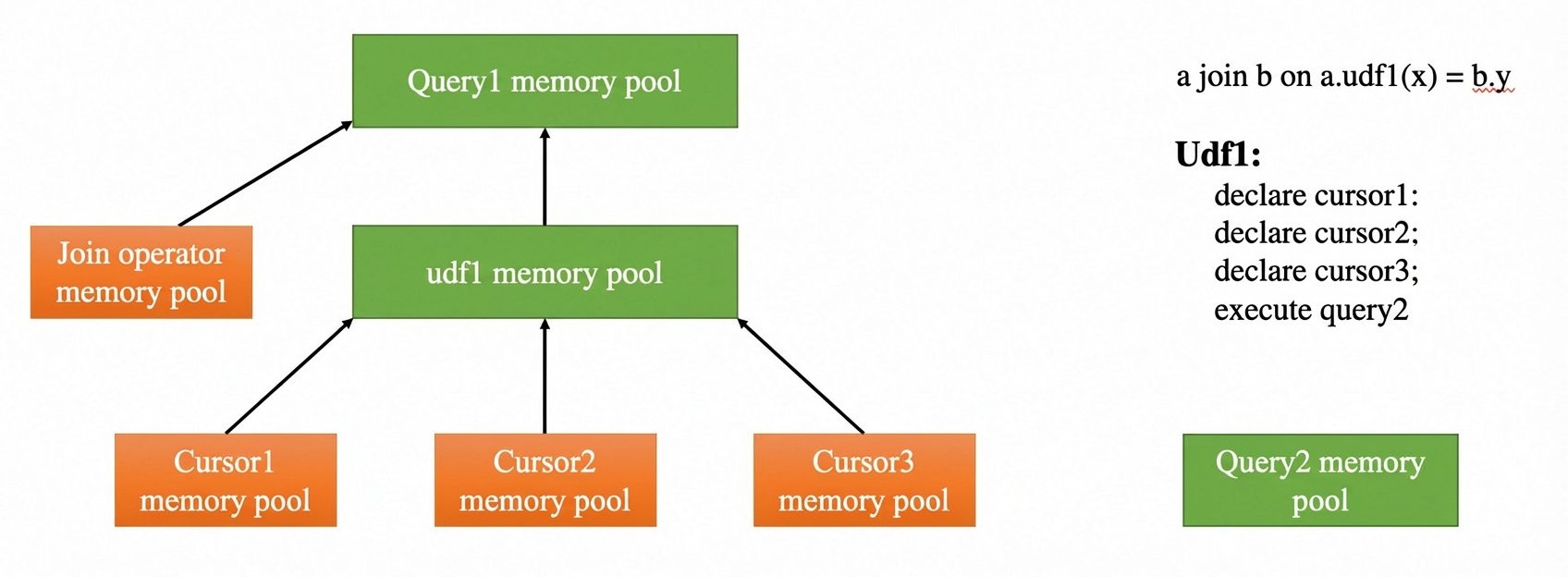
During UDF execution, memory is primarily used by cursors. Use the following parameters to set memory limits:
| Parameter | Description |
|---|---|
PL_CURSOR_MEMORY_LIMIT | Maximum memory for a single cursor. If exceeded, data spills to disk. Set to at least 128 KB (131072). |
PL_MEMORY_LIMIT | Maximum memory for a UDF. Must be greater than or equal to PL_CURSOR_MEMORY_LIMIT. |
Memory for the entire query that calls the UDF is also limited.
Call depth limit
Use the MAX_PL_DEPTH parameter to limit UDF call depth. Deep call stacks are difficult to debug and consume significant resources.