Quick start: PTS performance test
This topic describes the process of running a performance test with Alibaba Cloud Performance Test Service (PTS).
Procedure
Log in to the PTS console. In the left navigation bar, select Performance Testing > Create Scenario, and then click PTS Stress Test.
Orchestrate the scenario
To start a performance test, you must create a performance testing scenario. A performance testing scenario consists of one or more parallel business sessions, with each session containing one or more sequential requests (APIs).
Configure the following parameters:
scenario name: Enter a name for the scenario, such as
pts-test.API name: Enter a name for the API, such as
API-1.URL to be tested: Enter the URL to test, such as
http://www.example.com.NoteThe URL must be a complete URL starting with
http://orhttps://. It can include parameters, such ashttp://<DomainName>/<Path?key1=value1&key2=value2>.request method: Select
GET.Keep the default values for other settings.
Configure the stress settings
Because this is only a test, set the maximum number of virtual users to
10and the total test duration to1minute. Keep the default values for other settings. Running a performance test incurs fees. Select an appropriate stress level. For more information, see billing overview and stress configuration.Debug the scenario
To verify your configurations and prevent test failures, debug the scenario first. The following figure shows a successful request. If the response status is not
200, check if the API is accessible.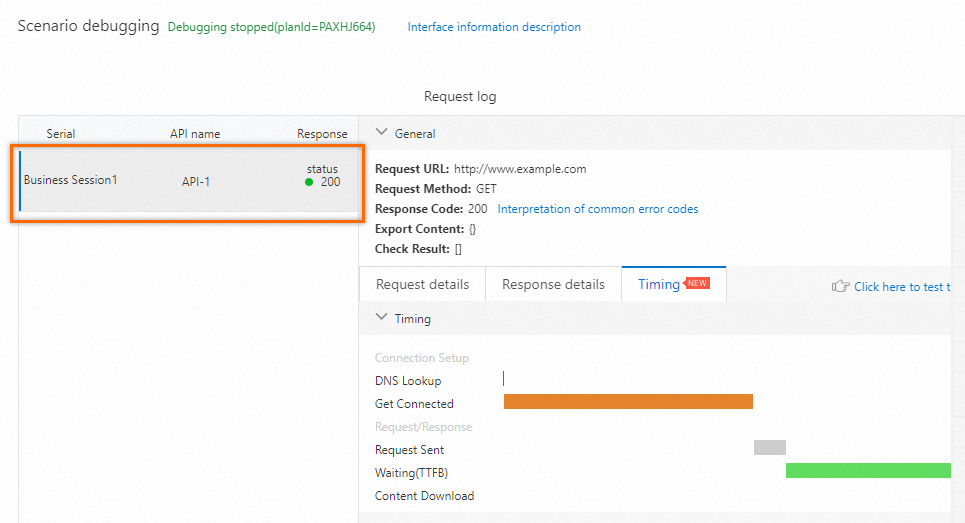
Click Save and Start Test. In the Reminder dialog box, select Run Now, select the Confirm that this performance test has been approved and complies with local laws checkbox, and then click Start Test.