Body
If you need to make special requests for your stress test, or if the request header is insufficient, you can define a request body. This topic explains how to define a request body and provides examples.
Procedure
Log in to the PTS console. In the left navigation bar, select Performance Testing > Create Scenario, and then click PTS Stress Test.
On the Scene Configuration tab, click the
 icon on the right side of the API chain module and configure the basic information in the expanded section. For more information, see Basic request information. Note
You can define a request body only when the API's request method is POST, PUT, or PATCH.
Click the Body Definition tab.
On the Body Definition tab, define the request body content based on the content type. Supported content types include x-www-form-urlencoded, raw, or custom.
Parameter
Description
x-www-form-urlencoded
Data is encoded as key-value pairs.
NoteIf you select the x-www-form-urlencoded content type and the request body is already encoded (for example, %25 is the encoded value of %), you must decode it before running the stress test. This prevents Performance Testing Service (PTS) from re-encoding the request, which can cause errors. To decode the body, click Decode the body in the upper-right corner of the editor and select UTF-8 or GBK as the decoding format.
raw
Text (text/plain): For content in a plain text format.
JSON (application/json): JSON string.
JavaScript (application/javascript): JavaScript string.
XML (application/xml): An XML string.
XML (text/xml): An XML string.
HTML (text/html): An HTML string.
Custom
The multipart, video, and image types are not supported.
Examples
For example, consider a new bookstore system accessible only with the initial account credentials (name=test and password=123456). To stress test this system, you must define a request body that specifies these credentials.
x-www-form-urlencoded
Enter the data as key-value pairs:
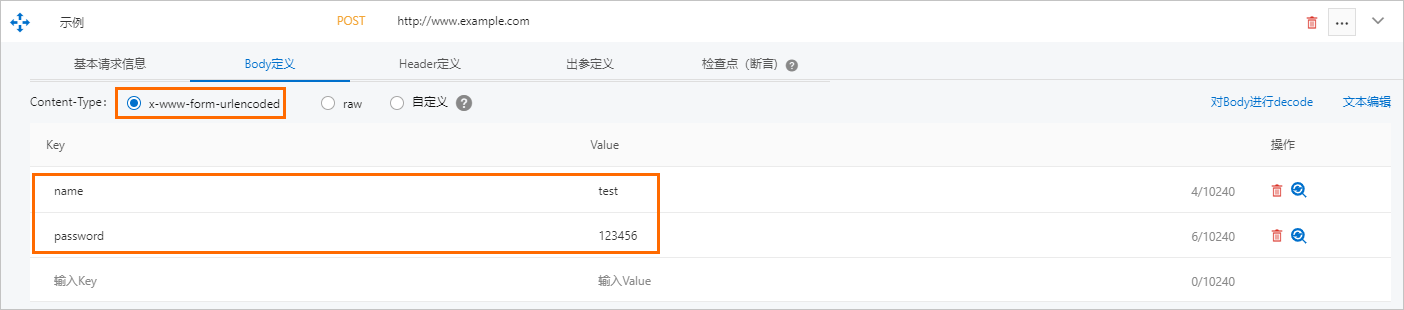
To switch to text mode, click Text Edit in the upper-right corner of the Body Definition tab. You can enter up to 65,535 characters. The format is as follows:
name=test&passwd=123456&itemid=2 JSON (application/json)
{"code":200,"data":{"items":[{"id":"123","name":"cosmetics"},{"id":"456","name":"clothing"}]},"requestId":"Cf2HJKEf-197B-JK47-79E9-FA*****4KA40","successResponse":false}
Text (text/plain)
<?xml version="1.0"?><resource><id>123</id><params><name><value>test</value></name></params></resource>