General settings
When you use PTS for stress testing, you can configure custom settings for all scenarios in the General settings section of Advanced Settings.
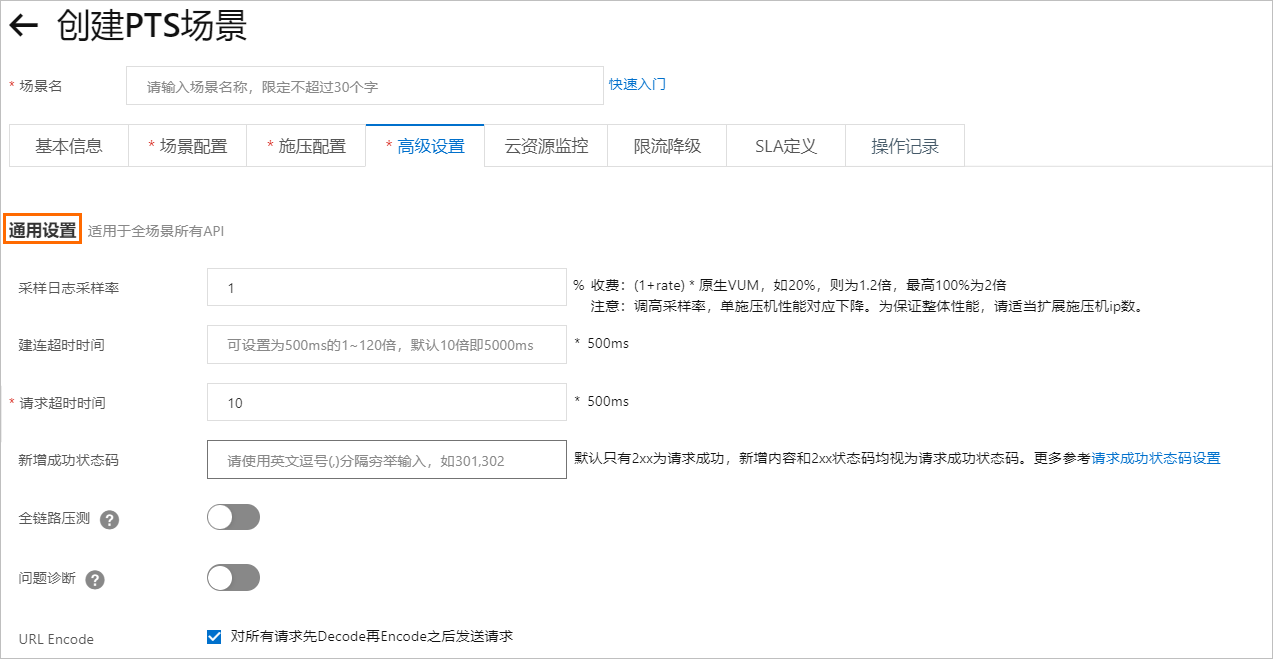
Log sampling rate
The default sample rate is 1%. You can configure the sample rate as needed. Valid values include the default of 1, or any multiple of 10 from 10 to 100, such as 10 or 20.
Increasing the sample rate incurs an additional fee. For example, a 20% sample rate adds a charge equal to 20% of the Virtual User Minute (VUM) cost.
Connection timeout
This setting controls the timeout for establishing an HTTP connection between the PTS engine and the server. The default is 5,000 ms (5 s).
The connection timeout is configured in multiples of 500 ms. You can enter an integer from 1 to 120, which corresponds to a timeout range of 500 ms to 60,000 ms. For example, to set a timeout of 5,000 ms, enter 10.
Request timeout
This setting specifies how long the engine waits for a server response, which is similar to the timeout setting in the basic request information. The default is 5,000 ms (5 s).
The request timeout is configured in multiples of 500 ms. You can enter an integer from 1 to 120, which corresponds to a timeout range of 500 ms to 60,000 ms. For example, to set a timeout of 5,000 ms, enter 10.
If you configure the request timeout in both this section and the Basic Request Information section of an HTTP node, the setting for the HTTP node overwrites the setting in Advanced Settings during stress testing. For more information about how to configure the request timeout in the Basic Request Information section, see Basic Request Information.
Additional success status codes
You can configure status codes other than 2xx to be treated as successful responses. To specify multiple codes, separate them with commas, such as 302,404. After you configure this, the specified codes and all 2xx codes are considered successful.
URL Encode
This option is selected by default. When selected, the system first decodes and then re-encodes the URL before sending the request.
This setting is useful when you copy an encoded URL from a browser's address bar to an HTTP node configuration in PTS. In most cases, you can ignore this setting. However, if your URL is not encoded and contains the + character, clear this check box. This prevents the decode operation from invalidating the URL.