The API center in Performance Testing Service (PTS) is the unified portal for managing HTTP APIs, where you can perform quick debugging and stress testing. Grouping related APIs into sets keeps your workspace organized and easier to navigate. For example, you can create sets by project, service, or environment.
PTS provides a Default Set for all new APIs. To build a more granular structure, create custom sets and nest child sets inside them. You can add APIs to both parent and child sets. For more information, see Create an API.
Create a set
Log on to the PTS console.
On the Test API page, click the Create Set icon (
 ) in the left-side navigation pane.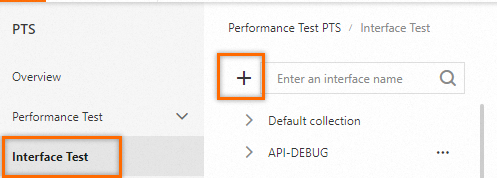
In the Create API Set dialog box, enter a Name and click OK.
The new set appears below Default Set in the left-side navigation pane.
Manage API sets
After you create a set, you can perform the following operations.
| Action | How |
|---|---|
| Expand a set | Click the Expand icon ( ) on the left of the set. ) on the left of the set. |
| Collapse a set | Click the Collapse icon ( ) on the left of the set. ) on the left of the set. |
| Create a child set | Click the Add Child Set icon ( ) on the right of the set. Use child sets to add another level of grouping, such as separating staging from production APIs within a project set. ) on the right of the set. Use child sets to add another level of grouping, such as separating staging from production APIs within a project set. |
| Rename a set | Click the Rename icon ( ) on the right of the set. ) on the right of the set. |
| Delete a set | Click the Delete icon ( ) on the right of the set. ) on the right of the set. |
If you delete a parent set, all child sets of the parent set are also deleted. At the same time, all APIs in the deleted parent and child sets are deleted. Proceed with caution.
Next steps
Create an API to add requests to your set.