Quick BI overview
This topic provides an overview of Quick BI, including its product positioning, highlights, business value, architecture, capabilities, and development history.
What is Quick BI?
Quick BI is the core business intelligence (BI) analytics platform of Alibaba Cloud. As the only enterprise product from China to be included in the Gartner® Magic Quadrant™ for Analytics and Business Intelligence Platforms for seven consecutive years, it leads the data analysis field.
As an intelligent analysis product for all-scenario data consumption in the era of foundation models, Quick BI supports connecting to enterprise data sources and creating datasets for real-time analysis and queries. By using features like workbooks or dashboards, you can create data visualizations through a drag-and-drop interface. It also supports using natural language for data analysis queries, quickly generating reports with narrative insights, and creating reports from local files and dashboards with a single click, which you can then manually edit and adjust. This elevates traditional manual data analysis to intelligent, data-driven decision-making, leading a new paradigm in data consumption.
With its intelligent analysis and visualization capabilities, Quick BI helps you build data analysis systems. You can use Quick BI to create polished dashboards, complex workbooks, immersive large screens, and analytical data portals. You can also integrate reports into your business processes and share them with a single click through email, DingTalk, or WeCom to ensure efficient data flow.
In addition, Quick BI deeply integrates traditional BI with AI analysis capabilities. Through AIPro, it provides an efficient and agile analysis experience for enterprises that already have data assets. As a new AI-native platform, AIPro enables you to complete the entire process of data queries, visual analysis, and report generation through natural language conversations. This covers the full analysis path from "Overview → Breakdown → Attribution → Diagnosis → Action," empowering everyone to become a super data analyst.
Product recognitions
The only Chinese product included in the Gartner® Magic Quadrant™ for Analytics and Business Intelligence (ABI) Platforms for seven consecutive years.
Winner of the 2025 iF Design Award, with a global selection rate of less than 10%.
Among the first products to pass the China Academy of Information and Communications Technology (CAICT) special evaluation for "foundation model-driven intelligent data analysis tools."
Quick BI customers
Quick BI serves tens of thousands of customers and has partnered with many Fortune 500 companies and industry leaders across sectors, including China Mobile, PetroChina, Vanke, Unilever, Mengniu, Yashili, Bosideng, Feihe, JALA, Haidilao, Heytea, Three Squirrels, Industrial Securities, DJI, FAW-Volkswagen, and Jaguar Land Rover.
Product highlights
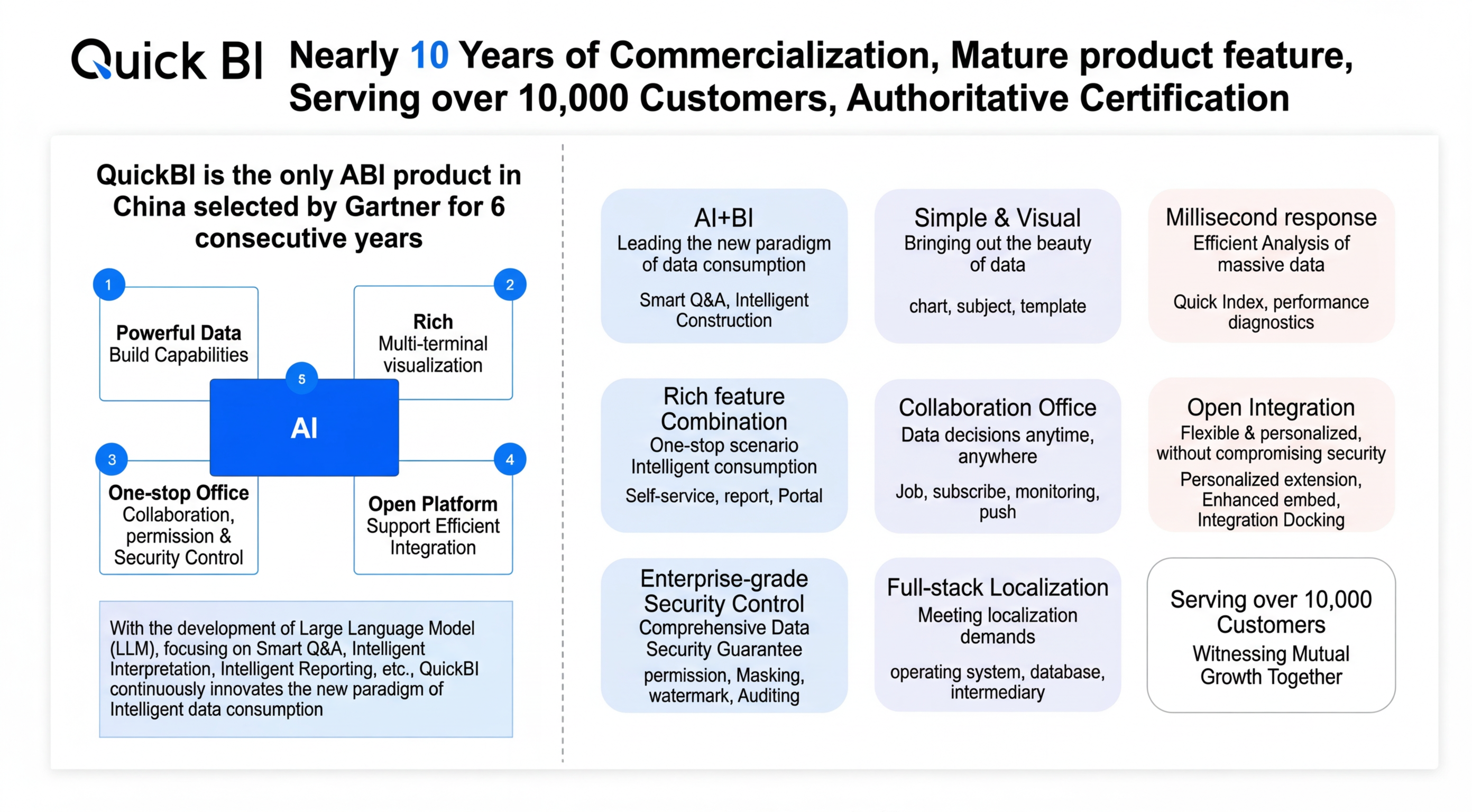
Intelligence: AIPro-driven, empowering everyone to become a super data analyst
High usability for diverse scenarios: With "conversation is analysis" as its core concept, Quick BI AIPro delivers zero-barrier interaction, AI-driven deep attribution, multi-modal outputs, enterprise-grade knowledge retention, and multi-device access. It works out of the box and adapts to a wide range of business scenarios.
High performance: Real-time, efficient analysis at scale
Millisecond-level query response: The built-in Quick acceleration engine delivers query feedback in milliseconds. Queries and calculations on 1 billion rows of data take only 0.3 seconds.
Extremely fast rendering: Experience lightning-fast rendering across multiple devices. Complex reports with over 200 charts render fully in just 3 to 4.5 seconds.
Intelligent diagnostics: A performance diagnostic tool monitors report performance risks in real time and provides intelligent optimization suggestions.
Low barrier to entry: Simple and convenient visual operations
Drag-and-drop report building: Visually configure dashboards, workbooks, and large screen displays through simple drag-and-drop operations to quickly create analytical outputs.
Convenient data preparation: A no-code ETL engine allows you to prepare data without barriers, making self-service data analysis accessible to everyone.
All-scenario: A one-stop solution for diverse enterprise data needs
Multi-device data presentation: Adapts to PCs, mobile devices, and large screens for cross-device, cross-scenario data analysis and presentation, allowing you to monitor business dynamics anytime, anywhere.
Seamless office collaboration: Integrates seamlessly with mainstream office IM applications such as DingTalk, WeCom, and Feishu. This incorporates data consumption into daily workflows, covering all enterprise data consumption scenarios. AIPro can also be accessed through channels in IM, allowing users to ask questions and receive analysis results directly within the application.
Strong qualifications: Enterprise-grade security and compatibility
Full-stack domestic ecosystem compatibility: Meets the compatibility requirements of China's domestic IT innovation ecosystem, with full support for domestic browsers, operating systems, chips, databases, and middleware.
Security certifications: Certified for MLPS Level 3 and ISO standards, providing a solid guarantee for enterprise data security.
Authoritative evaluation: Passed the 15th batch of Trusted Big Data Product Capability Evaluation by CAICT, demonstrating its recognized technical strength and service capabilities.
What value does Quick BI deliver?
Empower data-driven decisions with an AI-native, enterprise-grade intelligent analysis product:
Top-down decision analysis system: Quick BI AIPro offers powerful enterprise data construction capabilities and a wide range of analytical outputs to help enterprises build an end-to-end data analysis system. From macro-strategy to micro-operations, you can gain clear data insight to support informed, data-driven decision-making.
AI-powered autonomous insight: With AIPro's natural language interaction and intelligent analysis capabilities, Quick BI can proactively identify anomalies, trends, and potential opportunities in your data. This provides deep data insight, making the decision-making process more intelligent and forward-looking.
Connect data and business to achieve "zero distance between business and data":
Direct collaboration between business processes and data analysis: Quick BI seamlessly integrates into daily office systems like DingTalk and WeCom, delivering intelligent analysis results to frontline business teams in real time. This closes the loop from analysis to action and improves business responsiveness.
BI for everyone by lowering the barrier to data use: AIPro's natural language Q&A and AI-generated report capabilities make it easy for all employees, regardless of their technical background, to access, analyze, and interpret enterprise data. This greatly accelerates data adoption within the enterprise, making data empowerment a standard practice.
Improve data analysis efficiency across your organization and unlock productivity:
Intelligent and efficient analysis experience: With millisecond-level query responses, extremely fast rendering, and AI-driven report generation, Quick BI significantly reduces the time required for data analysis and information retrieval. Users can quickly obtain valuable data insight, allowing them to focus more on strategic thinking and business innovation.
Reduce data analysis costs: No-code data preparation and drag-and-drop report building significantly reduce the reliance on professional data analysts, enabling enterprises to achieve broader data application at a lower cost.
Drive cultural transformation by fostering a "data consumption and value insight" mindset:
Cultivate proactive data thinking: AIPro's intelligent interaction encourages employees to actively explore data and find answers from it, rather than waiting passively.
Turn data insight into action: Quick BI transforms data insight into actionable recommendations and initiatives. This helps build a decision-making culture grounded in data and driven by insight, which continuously enhances business value.
Products and capabilities

Table 1. Core capabilities
Feature | Description | |
AIPro | Use natural language conversations to complete data queries, attribution analysis, and report generation. AIPro supports multi-turn follow-up questions, canvas combinations, and one-click subscriptions. It delivers end-to-end intelligent analysis from question to insight, so business users can drive data-driven decisions with zero barriers. | |
AIPro supports generating a rich variety of outputs, including visual reports, document reports, HTML reports, data insights, data stories, and PowerPoint presentations. You can encapsulate analysis logic into reusable skills and schedule automated delivery, ensuring that analysis becomes actionable. | ||
Schedule analysis tasks to run automatically, push results to DingTalk, Feishu, WeCom, and email, and track and rerun execution records. This turns a one-time analysis into continuous data monitoring so key insights are delivered on time without repeated manual queries. | ||
Users can view enterprise data resources (including datasets, dashboards, data table combinations, files, and API data) and add them to My Data for use as needed. | ||
Business analysts can package data, knowledge, skills, and analysis rules by business domain, and create, manage, and publish them in a unified way. By constraining the topic context, you can reduce interference from irrelevant information and resolve cross-scenario definition conflicts, making table selection, metric understanding, and rule invocation more accurate. | ||
You can centrally manage metric definitions and field meanings, applying general and specialized knowledge in layers. This helps you train the AI with your enterprise's standard business language so analysis results are more consistent with your business context. | ||
Publish high-quality reports and dashboards from personal assets to a public gallery for other members of the organization to reuse. This breaks down data silos and simplifies sharing data-driven insights. | ||
You can install and use built-in and custom Skills immediately. Invoke them directly in conversations with the "/" command, helping you solidify analysis methods into reusable capabilities for all employees and ensuring that every analysis can be saved and reused. | ||
MCP connectors help you integrate data and tool capabilities from external systems into the AI analysis process. This allows analysis to extend beyond the platform's internal data to real-world business scenarios. | ||
When built-in charts do not meet business display needs, you can easily upload charts that are better suited to your requirements. These custom charts can be used directly in report generation and editing, breaking the limitations of built-in chart types and presenting data in richer, more context-aware ways. | ||
After integrating AIPro with IM platforms like DingTalk, Feishu, and WeCom, users can directly ask AIPro questions and receive analysis results within the IM. By binding IM accounts, Quick BI synchronizes conversations between the IM client and the web console, seamlessly embedding enterprise data capabilities into daily communication. | ||
You can integrate the data analysis capabilities of Quick BI AIPro into your own or third-party agent tools (such as Qwen, Claude, and Codex) through Skills and MCPs. After integration, users can complete data queries and analysis using natural language without switching their work interface. | ||
BI analysis | Build dashboards and reports with interactive analysis capabilities (such as linkage, drill down, marquee selection, and annotation) by using over 50 visualization components like tables and trend charts. This is the most commonly used data analysis feature. | |
Organize portal sites with an analytical flow using menus and navigation. The content can include dashboards, workbooks, data entry forms, self-service data retrieval, and external links. You can use a data portal to build complex reporting systems or data analysis applications for specific topics, such as user, product, or inventory analysis. | ||
Perform data analysis using online workbooks or create complex, China-style reports for regulatory submission and printing. Analysts and business users who are proficient with Excel can use workbooks to achieve the same operations and effects as in Excel. For example, you can use a workbook to summarize data from different sheets into a single table containing various business summary metrics. | ||
Create reports without technical barriers by dragging and dropping metrics. Business users can master it in minutes. You can freely select metrics, dimensions, and dimension values; merge and split any data rows and columns; and perform various calculations, sorting, and formatting directly within the table. When business structures change, you can quickly create new reports without modifying the underlying data. | ||
You can download millions of rows of data to a local machine or server for further processing or analysis. IT support staff can define metrics based on Quick BI datasets, and other business users can use the self-service data retrieval function to extract data via a drag-and-drop interface. This reduces the backend data extraction workload for IT staff and improves the efficiency of ad-hoc data retrieval. | ||
Complete data collection and submission online. It provides rich form components, batch upload capabilities, data management and approval, a flexible drag-and-drop layout, and a secure data permission control system. For example, in warehouse management, you can use data entry to record each transaction for inventory tracking and tracing historical records. | ||
The subscription feature sends report content as screenshots to users, helping you stay informed about data anomalies and fluctuations without having to open the report. You can push subscription tasks via email, DingTalk work notifications, and DingTalk groups. | ||
This feature monitors abnormal changes in metrics within a chart. You can customize the conditions for abnormalities and monitor them in real time across different time cycles (such as hourly, daily, and monthly). You can send alert notifications to yourself and others via email, SMS, and DingTalk. | ||
Development history
With over 10 years of development, Quick BI has achieved industry leadership and customer recognition:
Quick BI originates from the internal data construction practices of Alibaba Group and embodies the group's extensive experience in data-driven operations.
Across thousands of customer deployments, Quick BI has proven its feature completeness, superior performance, and service reliability.
In the AI era, Quick BI continues to enhance its AIPro intelligent capabilities, maintaining a leading position in intelligent analytics.
Trial and consultation
If you are interested in Quick BI, please fill out this form, and a specialist will contact you.