Custom SQL
In data analysis, you can use ad hoc queries to create datasets for complex logic or models. Ad hoc queries also support parameter passing for handling more complex and dynamic analytical scenarios.
Prerequisites
You have connected to a data source. For more information, see Connect to a data source.
Limitations
API data sources do not support ad hoc queries.
Enter SQL code
Follow these steps to add an ad hoc query.
-
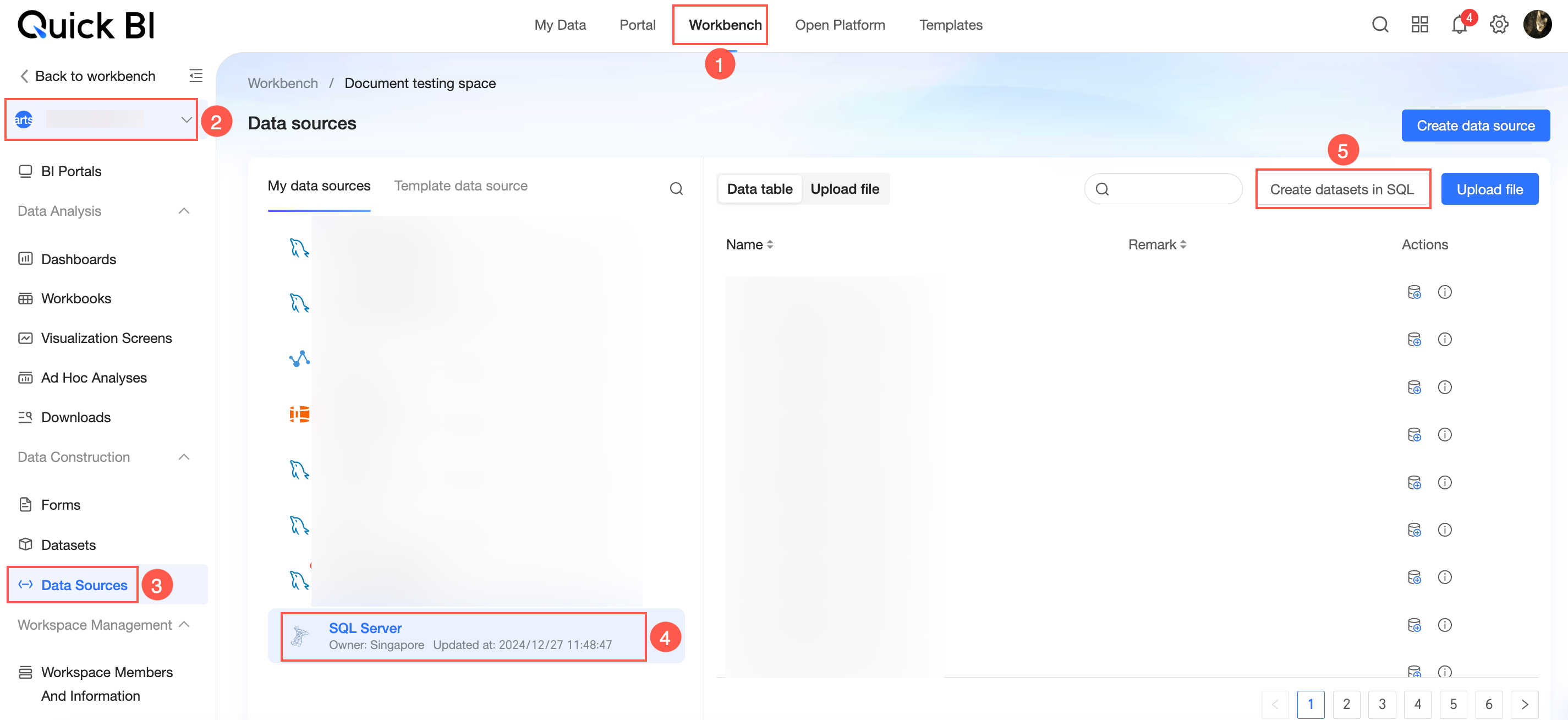
Go to the Ad Hoc Query page.
-
Method 1: On the Data Sources page, click Ad Hoc Query in the upper-right corner.
-
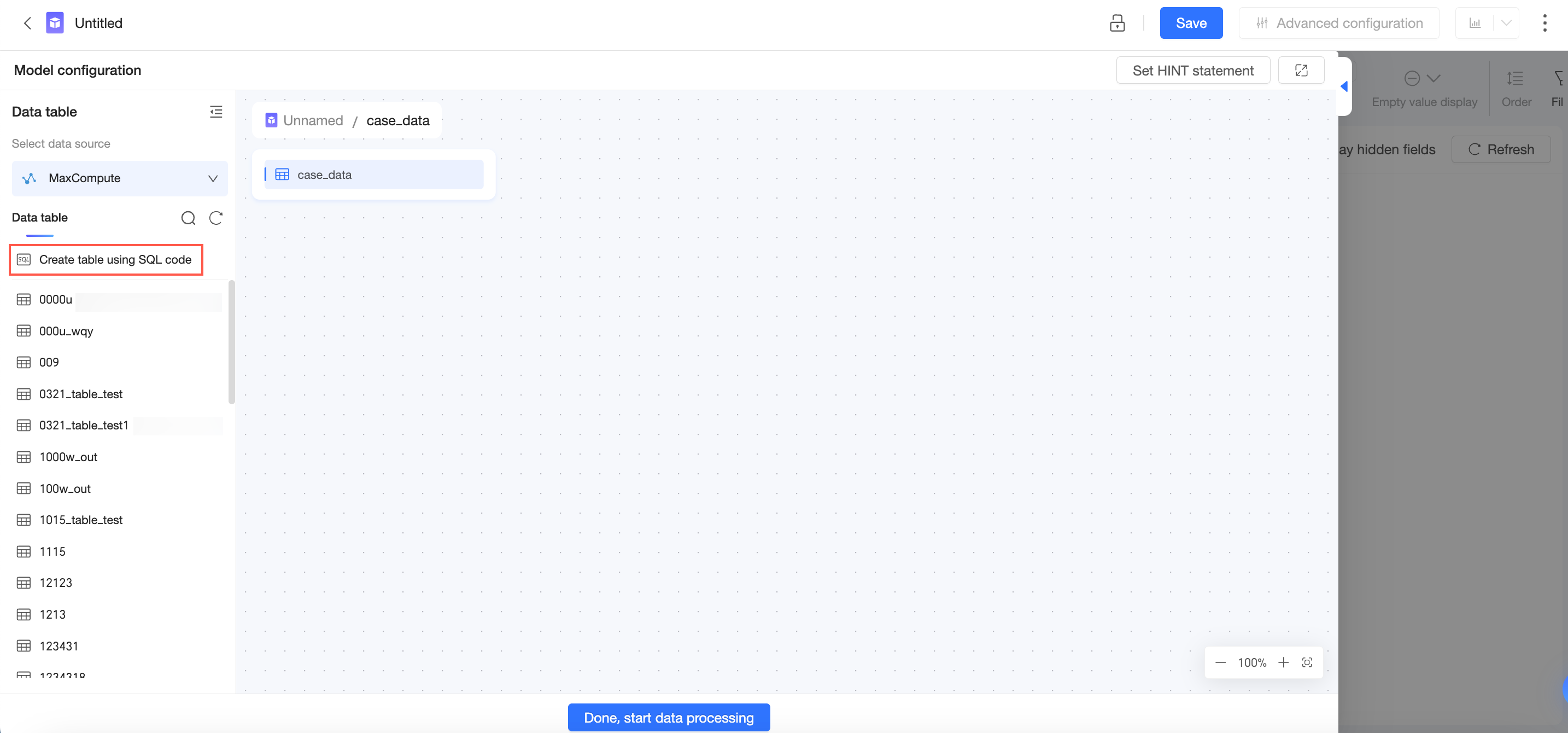
Method 2: On the relational model canvas of the dataset editing page, select a data source. If the canvas is empty, click Click to Create a Dataset Using SQL Code on the canvas or Create Table with SQL in the left-side panel.

-
Method 3: On the physical modeling canvas of the dataset editing page, click Create Table with SQL in the left-side panel.
-
-
Enter your SQL code and click run.
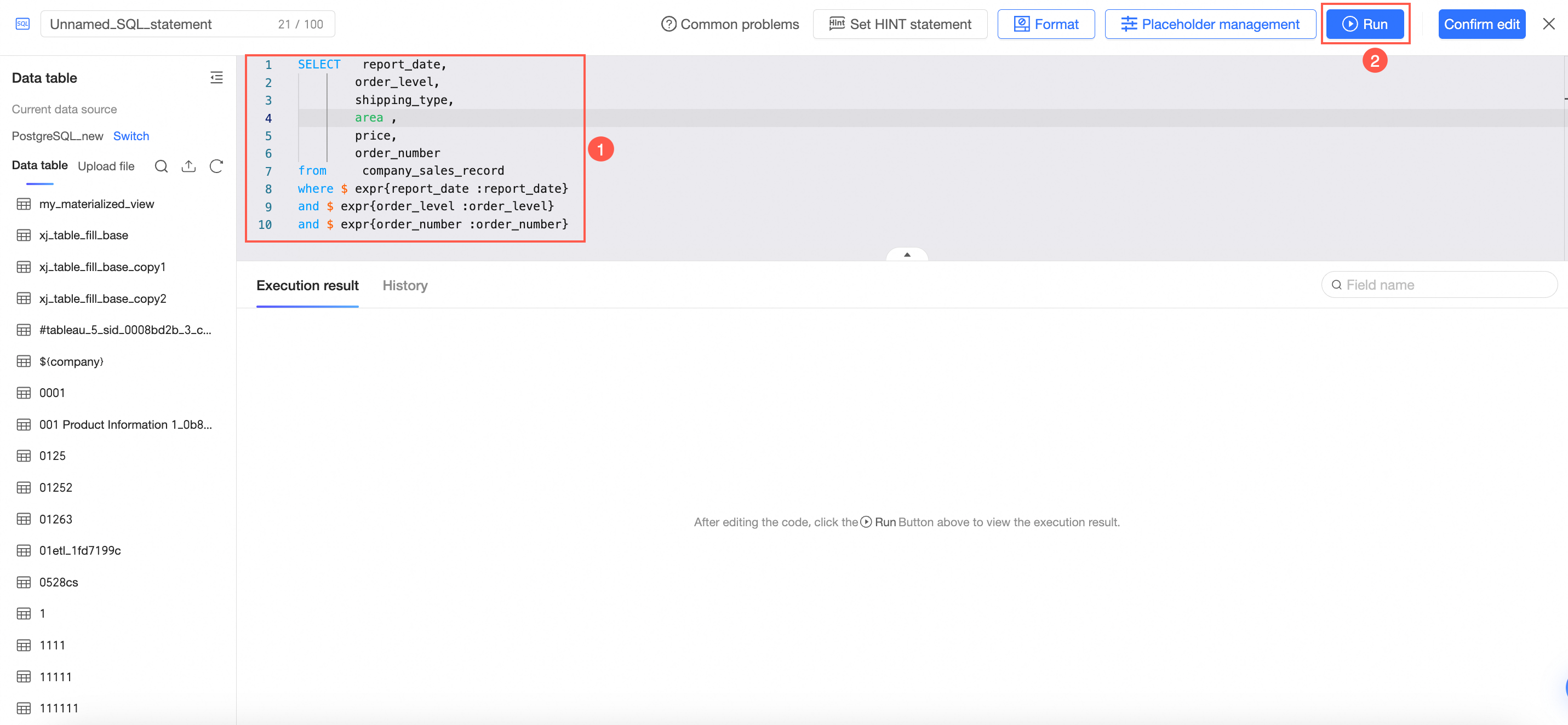
Sample SQL statement:
SELECT  report_date,
        order_level,
        shipping_type,
        area,
        price,
        order_number
from    company_sales_record
where   $expr{report_date :report_date}
and     $expr{order_level :order_level}
and     $expr{order_number :order_number}
After the query runs successfully, you can preview the results on the Result tab.

-
Click Create Dataset to save the dataset.


Edit SQL code
You can edit the SQL code in one of the following ways:
-
Click the
icon to the right of the target table. -
Click the target table on the canvas, and then click edit SQL in the Table Details section at the bottom.
-
Click the
icon to the right of the target table and select edit SQL.
 icon to the right of the target table.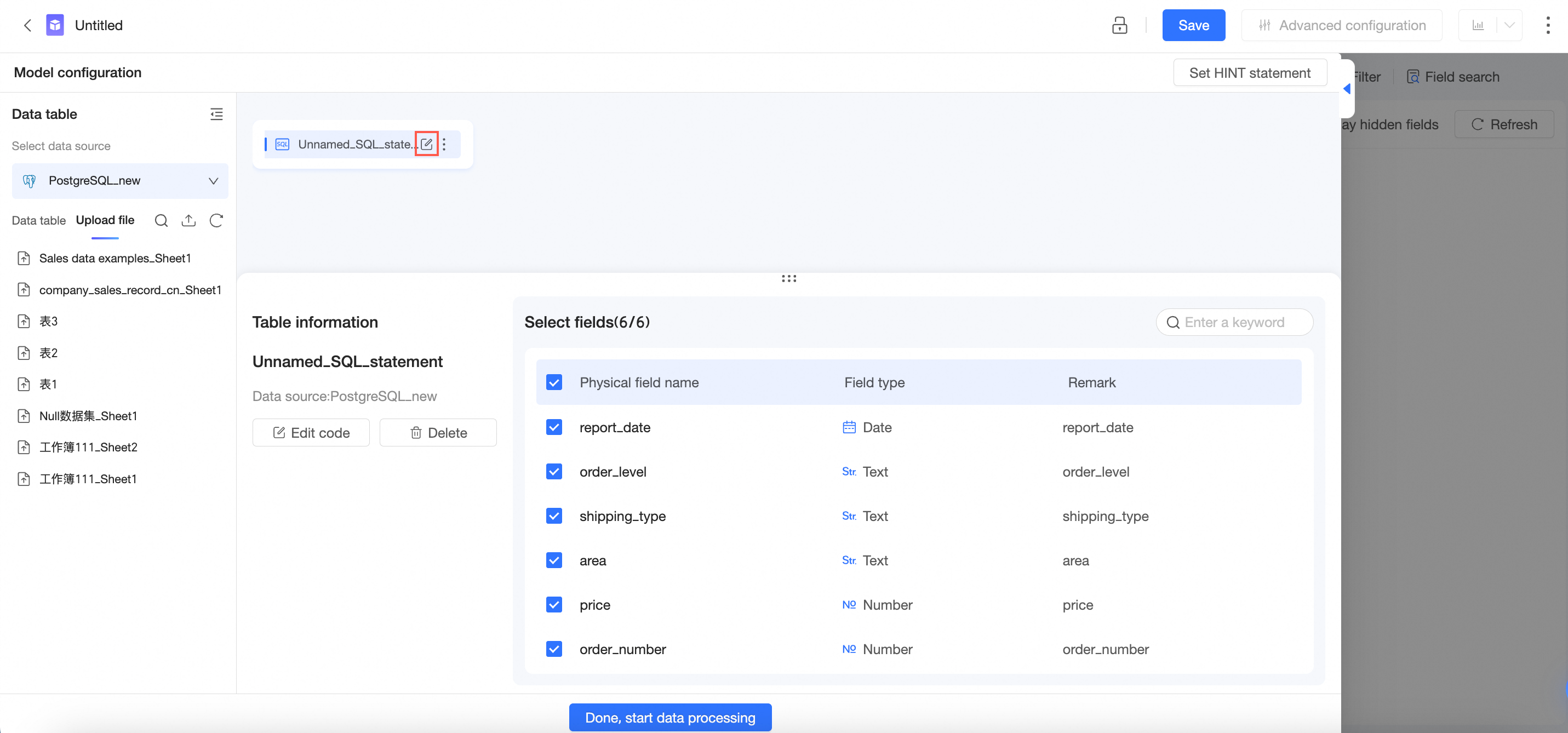

 icon to the right of the target table and select edit SQL.
SQL syntax
-
Ad hoc queries for datasets mainly support
SELECTstatements.INSERT,UPDATE, andDELETEstatements are not supported, and neither are stored procedures. -
The ad hoc query syntax must conform to that of the underlying data source. For example, if your data source is MySQL, the ad hoc query must be written in MySQL query syntax. Some database-specific syntax, such as
find()andfindOne()in MongoDB, is not supported in Quick BI. In such cases, you must use aSELECTstatement to query the data. -
To add comments in your ad hoc query, use the
--prefix followed by a space and the comment text.Sample SQL statement:
SELECT area, -- Area price -- Price from company_sales_record -
When you join multiple tables in an ad hoc query, use table and field aliases correctly. Note that the syntax for aliases can vary across different database engines.
-
An ad hoc query in a dataset has no row limit, but the query string is limited to 65,536 characters. If a query is too complex, you can split its logic or create and join multiple datasets for analysis.

-
Quick BI sends the dataset SQL to the database for execution and returns the results to Quick BI. The query timeout is 5 minutes. If no data is returned within this time, the query times out.
-
If a query takes less than 5 minutes but still returns a timeout error, a common cause is a shorter timeout configured on a network device on the user side, such as a load balancer, or a network filtering policy on a firewall that is blocking the query request.
Placeholders
Quick BI uses placeholders to pass parameters. When you view reports and analyze data, you can use query controls to pass placeholder values to the SQL for flexible data analysis. Quick BI supports value placeholders and expression placeholders.
|
Type |
Description |
Use cases |
Format |
|
Value placeholder |
Passes a single value or a set of values from a query control on a dashboard. Note
If the placeholder is a date, you must select a specific date format to control the format of the passed value. |
Suitable for most scenarios that require passing parameters. |
|
|
Expression placeholder |
Passes an entire condition, including the operator, from a query control on a dashboard. |
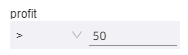
Use an expression placeholder when users need the flexibility to change the filter criteria dynamically on a dashboard. For example, if a user on a dashboard can set a filter to either |
|
Configuration
Write your SQL query and add placeholders.
-
On the SQL editing page, click placeholder management.
-
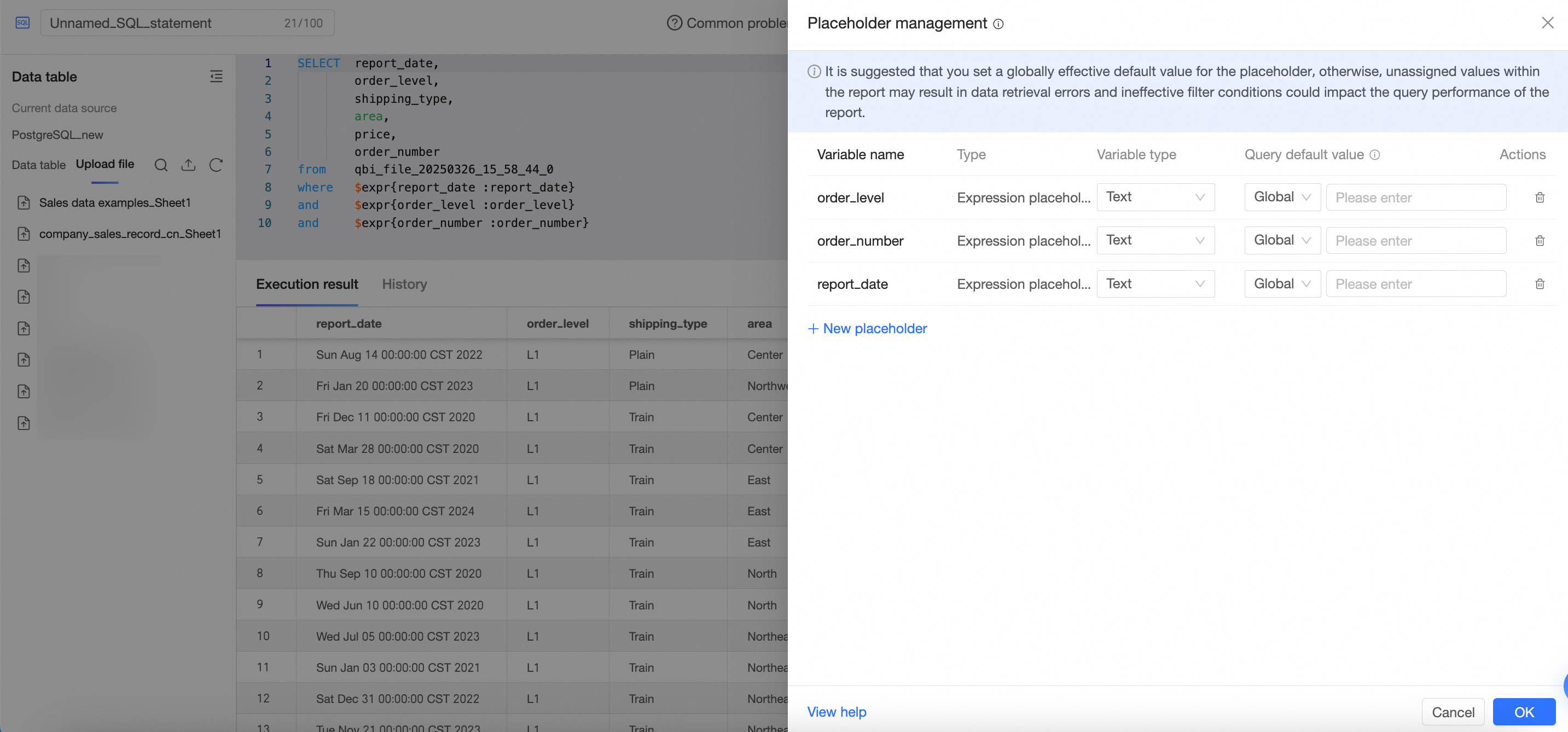
In the placeholder management panel, configure the placeholders and click OK.
For more information about the configuration items, see Create a dataset.
NoteIf a placeholder is used in a
SELECTclause, you must set a global default value for it.For example, if you add a placeholder named
profit_rangeto theSELECTclause when you create a dataset, the code is as follows:SELECT report_date, order_level, shipping_type,price,order_number,area, case when profit_amt< ${profit_range} then'Loss' when profit_amt> ${profit_range} then'Profit' else 'Break-even' end 'Order Level' from company_sales_record where $expr{report_date :report_date} and $expr{order_level :order_level} and $expr{order_number :order_number}Without a default value, the query fails to run.
You must set a default value for
profit_rangein the placeholder management panel.After the default value is set, the query runs successfully. The following figure shows the result.
-
Click Create Dataset to save the dataset.
-
In the top menu bar, click the
icon or click the icon and select Create Dashboard. -
On the dashboard editing page, add a query condition and bind it to a placeholder.
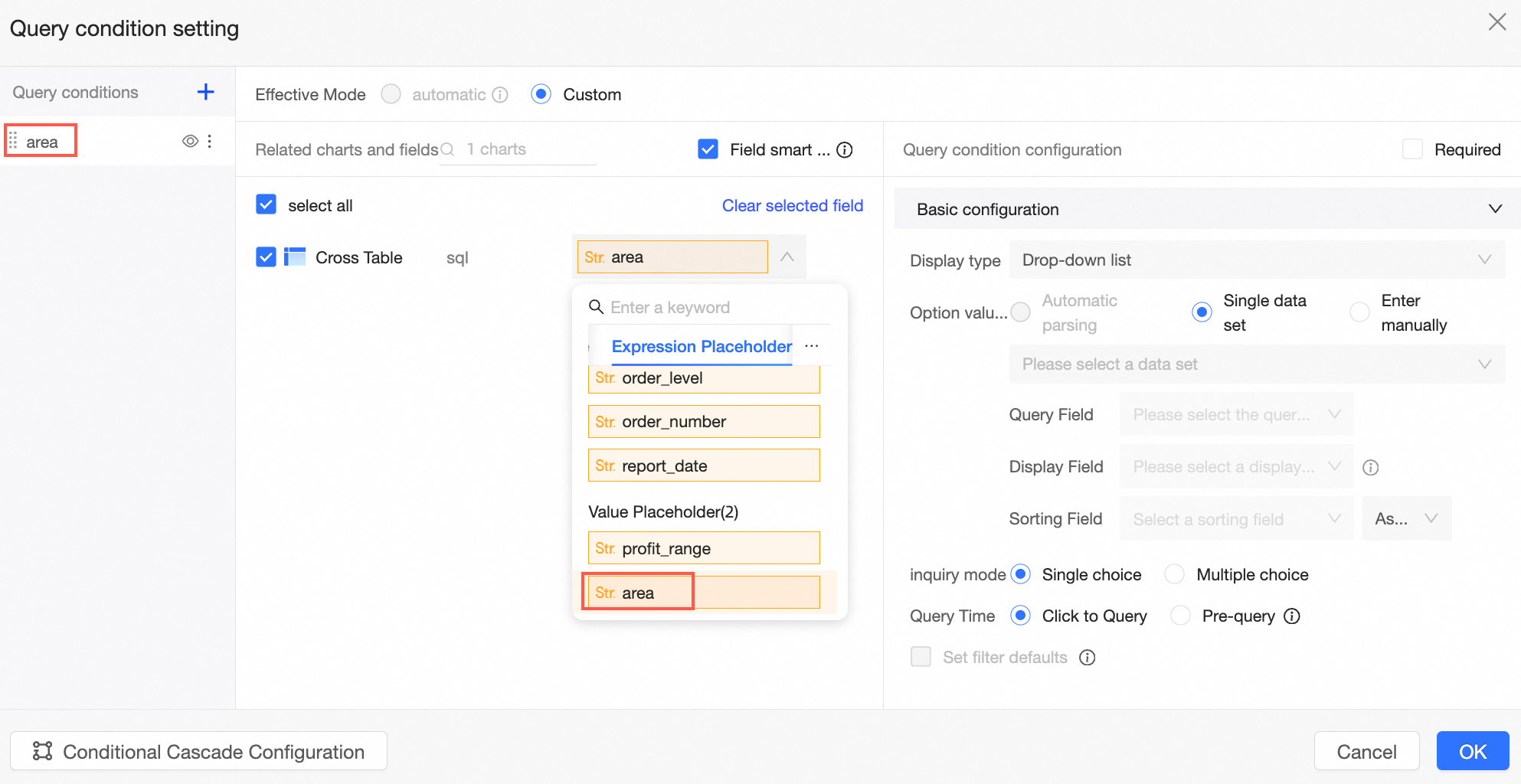
For example, when setting a query condition, use a single-select drop-down list to filter area and bind it to a value placeholder to pass a single value.
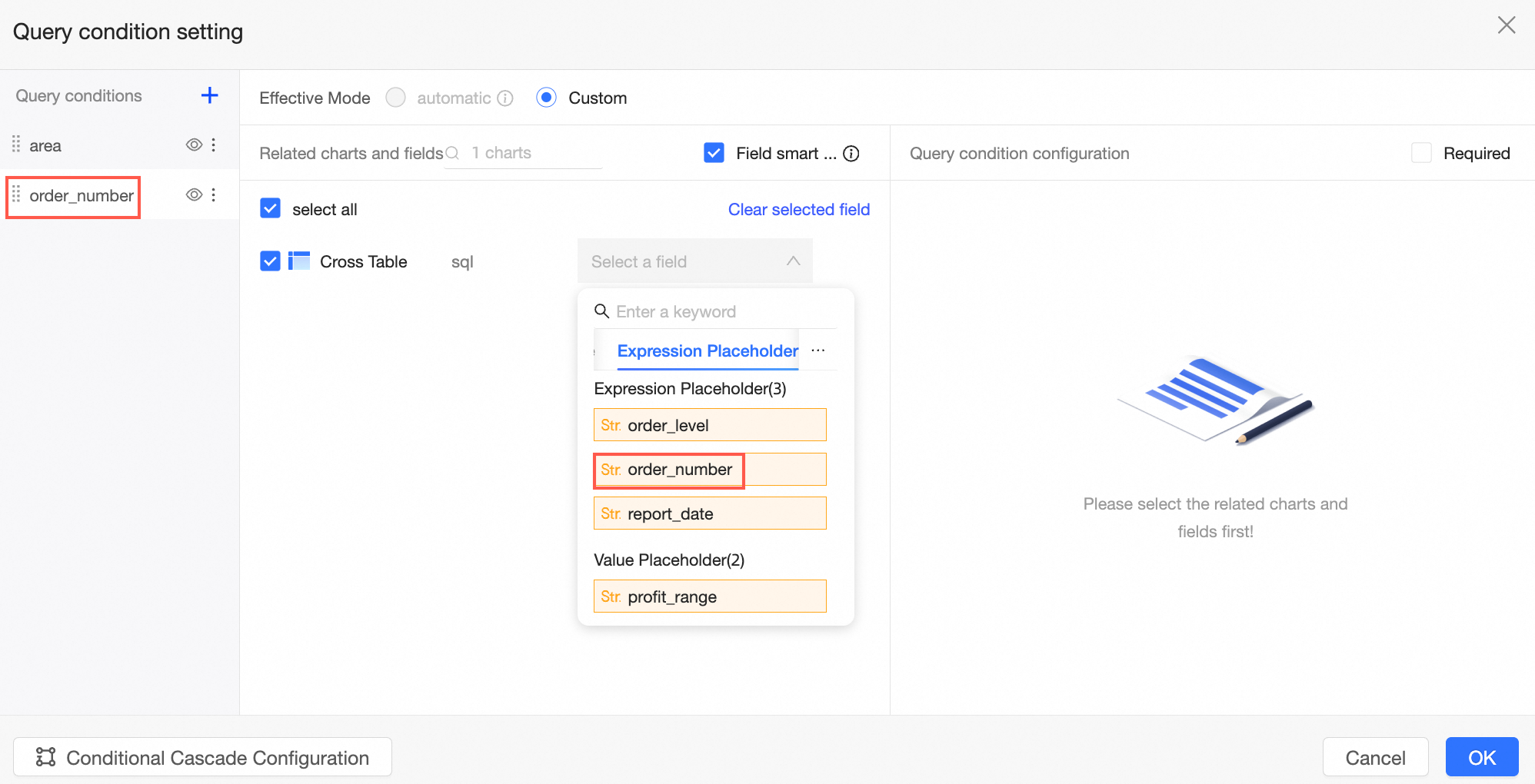
Use a text filter for order_number and bind it to an expression placeholder to pass a condition.
-
When users query the dashboard, the corresponding values and conditions are passed to the value and expression placeholders.
For example, assume the dashboard query conditions are set as shown in the following figure.
The resulting SQL is as follows:
SELECT * FROM company_sales_record
WHERE area = 'North China'
AND order_number > 100
The following code provides examples of placeholder usage:
SELECT * FROM tablename
WHERE area in ('$val{area_ph}') -- Text type, multiple selection
AND name = '$val{name_ph}' -- Text type, single selection
AND number = $val{number_ph}  -- Numeric type
AND report_date > '$val{report_date_ph.get(0)}' -- Date type, gets the start date of a date range control
AND report_date < '$val{report_date_ph.get(1)}' -- Date type, gets the end date of a date range control



 icon or click the
  icon and select Create Dashboard.

For more placeholder use cases, see Placeholders.
Backward-compatible syntax:
Legacy syntax for value placeholders (formerly known as placeholders): ${placeholder_name}
Legacy syntax for expression placeholders (formerly known as parameters): $expr{physical_field_name:parameter_name}