Obtain user information with OIDC
OpenID Connect (OIDC) is an identity layer on top of OAuth 2.0 that enables your application to obtain information about users who sign in to Alibaba Cloud.
Prerequisites
You have completed the following tasks: Create an application, Manage OAuth scopes, and Create a client secret.
Key concepts
|
Concept |
Description |
|
ID token |
OIDC issues an ID token that represents the signed-in user. The token contains user information such as name and login name, but cannot be used to access Alibaba Cloud services. |
|
OIDC discovery endpoint |
The OIDC discovery endpoint provides all OIDC configuration in one location, simplifying integration for developers. Note
The discovery endpoint returns a JSON document with provider metadata, including supported response types, the issuer value, the public key URL for ID token signature verification, and supported signature algorithms. Alibaba Cloud OIDC discovery endpoint: Example response from the discovery endpoint: |
How it works
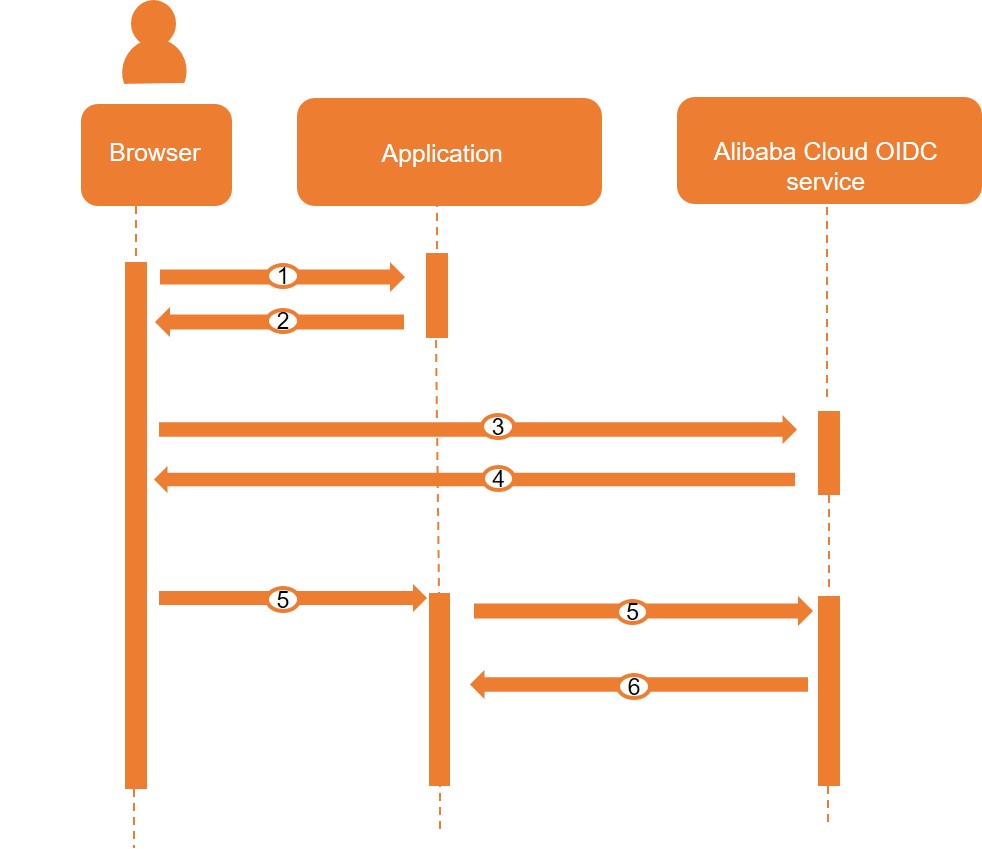
-
A user signs in to the application from a browser.
-
Your application redirects the user's browser to the Alibaba Cloud OIDC service.
NoteIf the user is not signed in, the request is further redirected to the Alibaba Cloud sign-in service.
-
The user signs in to Alibaba Cloud and authorizes your application.
-
The Alibaba Cloud OIDC service redirects the user's browser back to your application, providing an authorization code.
-
Your application exchanges the authorization code for an ID token from the Alibaba Cloud OIDC service.
-
The Alibaba Cloud OIDC service returns an ID token and an access token to the application. The application can then obtain user information by using either the ID token or the access token.
Common use cases:
-
Directly parse the ID token to obtain user information.
The application must verify the ID token signature: obtain the public keys (Example 1: Obtain the signature public key), verify the JWT signature (Example 2: Verify the JWT signature), and parse the user information (Example 3: Parse an ID token).
-
Use the ID token for communication between different modules.
The application must verify the ID token signature: obtain the public keys (Example 1: Obtain the signature public key) and verify the JWT signature (Example 2: Verify the JWT signature).
-
Use the access token to query user information multiple times.
After obtaining the access token, the application calls the UserInfo endpoint to retrieve user information (Example 4: Use the UserInfo endpoint).
-
Example 1: Obtain the signature public key
Request example:
private List getSignPublicKey() {
  HttpResponse response = HttpClientUtils.doGet("https://oauth.aliyun.com/v1/keys");
  List rsaKeyList = new ArrayList();
  if (response.getCode() == 200 && response.isSuccess()) {
    String keys = JSON.parseObject(response.getData()).getString("keys");
    try {
      JSONArray publicKeyList = JSON.parseArray(keys);
      for (Object object : publicKeyList) {
        RSAKey rsaKey = RSAKey.parse(JSONObject.toJSONString(object));
        rsaKeyList.add(rsaKey);
      }
      return rsaKeyList;
    } catch (Exception e) {
      LOG.info(e.getMessage());
    }
  }
  LOG.info("GetSignPublicKey failed:{}", response.getData());
  throw new AuthenticationException(response.getData());
}
Example 2: Verify the JWT signature
Alibaba Cloud ID tokens are signed JSON Web Tokens (JWTs). The signature algorithm is RS256, as defined by the JWS standard. Validate each ID token by checking:
-
Signature validation: Use the OAuth service public keys (Example 1) to verify the ID token's authenticity and integrity.
The OAuth service rotates its public keys regularly. When obtaining public keys:
-
Fetch public keys per request. Do not cache them long-term.
-
During key rotation, the service may return multiple valid keys. Try each key until one verifies the signature. Do not assume a fixed key count.
Request example:
public boolean verifySign(SignedJWT signedJWT) { List publicKeyList = getSignPublicKey(); RSAKey rsaKey = null; for (RSAKey key : publicKeyList) { if (signedJWT.getHeader().getKeyID().equals(key.getKeyID())) { rsaKey = key; } } if (rsaKey != null) { try { RSASSAVerifier verifier = new RSASSAVerifier(rsaKey.toRSAPublicKey()); if (signedJWT.verify(verifier)) { return true; } } catch (Exception e) { LOG.info("Verify exception:{}", e.getMessage()); } } throw new AuthenticationException("Can't verify signature for id token"); } -
-
Lifetime validation: Check that the token issue time and expiration time are valid.
-
Audience validation: Verify that the aud claim matches your application's client ID.
Example 3: Parse an ID token
-
Response parameters
-
Header claims
Parameter
Description
OAuth scope
alg
The signature algorithm.
openid
kid
The ID of the public key used to sign the token. Use this key to verify the signature and prevent tampering.
openid
-
Body claims
Parameter
Description
OAuth scope
exp
The timestamp indicating the token's expiration time.
openid
sub
A unique, stable identifier for the signed-in user. It does not include information such as the Alibaba Cloud UID or username.
NoteIf the signed-in user is a RAM role, the sub claim is generated from
<RoleId:RoleSessionName>. Each role session has its own sub value.openid
aud
The audience of the token, which is your application's client ID.
openid
iss
The issuer of the token. The value is https://oauth.aliyun.com.
openid
iat
The timestamp indicating when the token was issued.
openid
type
The type of the signed-in user. Valid values:
-
account: An Alibaba Cloud account (primary account).
-
user: A RAM user.
-
role: A RAM role.
profile
name
The display name of the signed-in user. Valid values:
-
For a RAM user: the display name of the RAM user.
-
For a RAM role:
<RoleName:RoleSessionName>.
NoteThis claim is returned only for a RAM user or a RAM role.
profile
upn
The login name of the RAM user.
NoteThis claim is returned only for a RAM user.
profile
login_name
The login name of the Alibaba Cloud account (primary account).
NoteThis claim is returned only for an Alibaba Cloud account (primary account).
profile
aid
The ID of the Alibaba Cloud account to which the user belongs.
aliuid
uid
The ID of the signed-in user. Valid values:
-
For an Alibaba Cloud account (primary account): the Alibaba Cloud account ID, which is the same as the aid value.
-
For a RAM user: the RAM user ID.
-
For a RAM role: the RAM role ID.
aliuid
-
-
-
Response examples
-
Header example
{ "alg": "RS256", "kid": "JC9wxzrhqJ0gtaCEt2QLUfevEUIwltFhui4O1bh****" } -
Body examples
These examples show decoded ID token payloads. The actual token is a single encoded JWT string that must be verified (Example 2: Verify the JWT signature).
-
Example payload for an Alibaba Cloud account
{ "exp": 1517539523, "sub": "123456789012****", "aud": "4567890123456****", "iss": "https://oauth.aliyun.com", "iat": 1517535923, "type": "account", "login_name":"alice@example.com", // The login name of the Alibaba Cloud account "aid": "123456789012****", // The ID of the Alibaba Cloud account "uid": "123456789012****" // The ID of the Alibaba Cloud account } -
Example payload for a RAM user
{ "exp": 1517539523, "sub": "123456789012****", "aud": "4567890123456****", "iss": "https://oauth.aliyun.com", "iat": 1517535923, "type": "user", "name": "alice", // The display name of the RAM user "upn": "alice@example.onaliyun.com", // The login name of the RAM user "aid": "123456789012****", // The ID of the Alibaba Cloud account to which the RAM user belongs "uid": "234567890123****" // The ID of the RAM user } -
Example payload for a RAM role
{
  "exp": 1517539523,
  "sub": "123456789012****",
  "aud": "4567890123456****",
  "iss": "https://oauth.aliyun.com",
  "iat": 1517535923,
  "type": "role",
  "name": "NetworkAdministrator:alice", // The display name of the RAM role
  "aid": "123456789012****", // The ID of the Alibaba Cloud account to which the RAM role belongs
  "uid": "300800165472****" // The ID of the RAM role
}
-
-
Example 4: Use the UserInfo endpoint
You can call the UserInfo endpoint with an access token to retrieve user information. The response is returned as plain JSON, not as an encoded token.
Even if you request only the openid, aliuid, and profile scopes, an access token is returned. This token is scoped only for the UserInfo endpoint.
The UserInfo endpoint URL is https://oauth.aliyun.com/v1/userinfo.
Request example:
GET v1/userinfo HTTP/1.1
Host: oauth.aliyun.com
Authorization: Bearer SlAV32hkKG
Response parameters:
|
Parameter |
Description |
OAuth scope |
|
sub |
A unique, stable identifier for the signed-in user. It does not include information such as the Alibaba Cloud UID or username. |
openid |
|
type |
The type of the signed-in user. |
profile |
|
name |
The display name of the signed-in user. Note
This parameter is returned only for a RAM user or a RAM role. |
profile |
|
upn |
The login name of the RAM user. Note
This parameter is returned only for a RAM user. |
profile |
|
login_name |
The login name of the Alibaba Cloud account (primary account). Note
This parameter is returned only for an Alibaba Cloud account (primary account). |
profile |
|
aid |
The ID of the Alibaba Cloud account to which the user belongs. |
aliuid |
|
uid |
The ID of the signed-in user. |
aliuid |
Response examples:
-
Example response for an Alibaba Cloud account
HTTP/1.1 200 OK Content-Type: application/json { "sub": "123456789012****", "type": "account", "login_name":"alice@example.com", // The login name of the Alibaba Cloud account "aid": "123456789012****", // The ID of the Alibaba Cloud account "uid": "123456789012****" // The ID of the Alibaba Cloud account } -
Example response for a RAM user
HTTP/1.1 200 OK Content-Type: application/json { "sub": "123456789012****", "type": "user", "name": "alice", // The display name of the RAM user "upn": "alice@example.onaliyun.com", // The login name of the RAM user "aid": "123456789012****", // The ID of the Alibaba Cloud account to which the RAM user belongs "uid": "234567890123****" // The ID of the RAM user } -
Example response for a RAM role
HTTP/1.1 200 OK
Content-Type: application/json
{
  "sub": "123456789012****",
  "type": "role",
  "name": "NetworkAdministrator:alice", // The display name of the RAM role
  "aid": "123456789012****", // The ID of the Alibaba Cloud account to which the RAM role belongs
  "uid": "300800165472****" // The ID of the RAM role
}